
1. Pengenalan
Terima kasih kerana membeliasing the Sanyo 20W Bluetooth Speaker. This portable speaker is designed to deliver high-quality audio with versatile connectivity options. Please read this manual carefully before using the product to ensure proper operation and to maximize its lifespan. Keep this manual for future reference.
Ciri-ciri utama termasuk:
- Bluetooth 5.3 for stable wireless connection.
- 20W audio output for clear and powerful sound.
- Multiple connectivity options: Bluetooth, AUX, USB.
- MP3 playback capability.
- Karaoke function.
2. Maklumat Keselamatan
Untuk memastikan operasi yang selamat dan mengelakkan kerosakan, sila patuhi langkah berjaga-jaga keselamatan berikut:
- Jangan dedahkan pembesar suara kepada air, kelembapan atau suhu yang melampau.
- Jangan cuba membuka atau mengubah suai pembesar suara. Ini akan membatalkan jaminan.
- Jauhkan pembesar suara daripada sumber haba, cahaya matahari langsung dan bahan mudah terbakar.
- Use only the specified charging cable and power adapter (if included) to charge the device.
- Bersihkan pembesar suara dengan kain lembut dan kering. Jangan gunakan pembersih atau pelarut yang melelas.
- Jauhkan daripada kanak-kanak.
3. Kandungan Pakej
Sila semak pakej untuk item berikut:
- Sanyo 20W Bluetooth Speaker Unit
- Kabel Pengecas USB
- Kabel Audio AUX
- Manual Pengguna
4. Produk Lebihview
Biasakan diri anda dengan komponen pembesar suara:
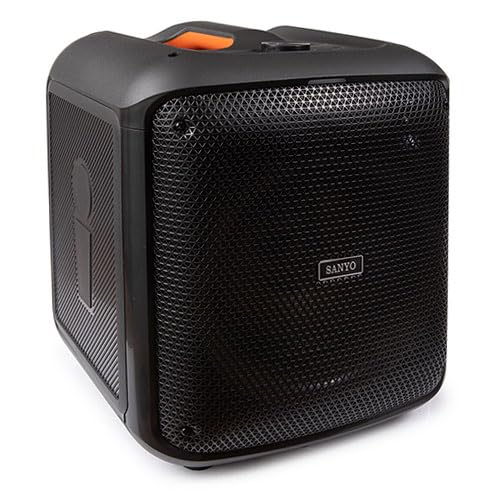
Imej yang menunjukkan bahagian hadapan view of the Sanyo 20W Bluetooth Speaker, highlighting its compact design and speaker grille. The speaker appears to have a handle on top for portability.
Note: Specific button layouts and port locations may vary slightly. Refer to the image for general reference.
- Butang Kuasa: Tekan dan tahan untuk menghidupkan/mematikan.
- Butang Mod: Switch between Bluetooth, AUX, and USB modes.
- Kawalan Kelantangan: Laraskan kelantangan naik/turun.
- Butang Main/Jeda: Kawal main balik audio.
- Butang Trek Sebelumnya/Seterusnya: Navigasi melalui trek.
- Port USB: For MP3 playback from a USB drive.
- Input AUX: Untuk menyambungkan peranti audio luaran melalui kabel audio 3.5mm.
- Port Pengecasan: Untuk menyambungkan kabel pengecas USB.
- Input Mikrofon: For karaoke function (if applicable).
5. Persediaan
5.1 Mengecas Speaker
- Sambungkan hujung kecil kabel pengecas USB ke port pengecasan pada pembesar suara.
- Sambungkan hujung besar kabel pengecas USB kepada penyesuai kuasa USB (tidak disertakan) atau port USB komputer.
- Lampu penunjuk pengecasan akan menyala (warna mungkin berbeza) untuk menunjukkan bahawa pembesar suara sedang dicas.
- Setelah dicas sepenuhnya, lampu penunjuk mungkin berubah warna atau padam. Putuskan sambungan kabel pengecas.
5.2 Menghidupkan/Mematikan
- Untuk Menghidupkan: Press and hold the Power button for approximately 3 seconds. You will hear an audible prompt.
- Untuk Mematikan: Press and hold the Power button for approximately 3 seconds. You will hear an audible prompt.
5.3 Berpasangan Bluetooth
- Ensure the speaker is powered on and in Bluetooth mode. If not, press the Mode button until you hear the Bluetooth pairing prompt. The Bluetooth indicator light will flash.
- Dayakan Bluetooth pada peranti mudah alih anda (telefon pintar, tablet, dll.).
- Cari untuk available Bluetooth devices. The speaker will appear as "Sanyo Speaker" or a similar name.
- Select the speaker from the list to pair. Once paired, you will hear a confirmation sound, and the Bluetooth indicator light will stop flashing and remain solid.
- Anda kini boleh memainkan audio daripada peranti anda melalui pembesar suara.
Note: The speaker will automatically attempt to reconnect to the last paired device when powered on, if that device's Bluetooth is active and within range.
5.4 Sambungan AUX
- Connect one end of the 3.5mm AUX audio cable to the AUX input port on the speaker.
- Connect the other end of the AUX audio cable to the headphone jack or audio output port of your external audio device (e.g., MP3 player, computer).
- Press the Mode button on the speaker to switch to AUX mode.
- Mainkan audio daripada peranti luaran anda.
5.5 Main Semula USB
- Masukkan pemacu kilat USB yang mengandungi audio MP3 files ke dalam port USB pada pembesar suara.
- Press the Mode button on the speaker to switch to USB mode.
- The speaker will automatically begin playing the MP3 files daripada pemacu USB.
6. Arahan Operasi
6.1 Kawalan Kelantangan
- Kelantangan: Tekan butang Kelantangan Naik.
- Perlahankan suara: Tekan butang Kurangkan Kelantangan.
6.2 Music Playback (Bluetooth/USB)
- Main/Jeda: Press the Play/Pause button to toggle playback.
- Lagu Seterusnya: Tekan butang Laluan Seterusnya.
- Trek Sebelumnya: Tekan butang Trek Sebelumnya.
6.3 Fungsi Karaoke
If your speaker model includes a microphone input:
- Connect a compatible microphone (not included) to the microphone input port.
- Ensure music is playing via Bluetooth, AUX, or USB.
- Adjust the microphone volume and echo effects (if available on your speaker) using the dedicated controls.
7. Penyelenggaraan
7.1 Pembersihan
- Lap bahagian luar pembesar suara dengan kain lembut, kering dan tidak berbulu.
- Jangan gunakan pembersih cecair, aerosol atau pelarut.
- Elakkan mendapatkan kelembapan ke dalam mana-mana bukaan.
7.2 Penyimpanan
- Simpan pembesar suara di tempat yang sejuk dan kering jauh dari cahaya matahari langsung dan suhu yang melampau.
- Jika menyimpan untuk tempoh yang lama, cas bateri secara berkala untuk mengekalkan kesihatannya.
7.3 Penjagaan Bateri
- Elakkan menyahcas sepenuhnya bateri dengan kerap.
- Do not leave the speaker connected to power for excessively long periods after it is fully charged.
8. Penyelesaian masalah
| Masalah | Kemungkinan Punca | Penyelesaian |
|---|---|---|
| Speaker tidak dihidupkan. | Bateri lemah. | Cas pembesar suara sepenuhnya. |
| Tiada bunyi. | Volume too low; incorrect mode; device not connected properly. | Increase volume; ensure correct mode (Bluetooth, AUX, USB); re-pair Bluetooth or re-connect cables. |
| Gandingan Bluetooth gagal. | Pembesar suara tidak dalam mod berpasangan; peranti Bluetooth dimatikan; terlalu jauh dari pembesar suara. | Ensure speaker is in pairing mode; enable Bluetooth on device; move device closer to speaker (within 10 meters). |
| Bunyi herot. | Volume too high; weak signal; audio source issue. | Reduce volume on speaker and device; move device closer; try a different audio source. |
9. Spesifikasi
| Ciri | Perincian |
|---|---|
| Jenama | Sanyo |
| Nombor Model | 8432068023011 |
| Output Kuasa | 20 Watt |
| Teknologi Ketersambungan | AUX, Bluetooth, USB |
| Versi Bluetooth | 5.3 |
| Dimensi (L x W x H) | 30.5 x 33 x 38 sm (lebih kurang 12 x 13 x 15 inci) |
| Berat Barang | 5.46 Kilograms (12.04 lbs approx.) |
| warna | Pelbagai warna |
| Bilangan Saluran | 2 |
| Ciri Khas | Karaoke, MP3 Playback |
10. Waranti dan Sokongan
Sanyo products are manufactured to the highest quality standards. This product is covered by a limited warranty from the date of purchase. Please refer to the warranty card included in your package for specific terms and conditions.
For technical support, warranty claims, or further assistance, please contact Sanyo customer service through their official webtapak atau maklumat hubungan yang diberikan bersama dokumentasi pembelian anda.
Sila simpan bukti pembelian anda untuk tujuan waranti.