
1. Pengenalan
This manual provides essential information for the safe and efficient use of your Amazon Basics 24 Inch FHD 100Hz Monitor. Please read these instructions carefully before operating the device and retain them for future reference.
The Amazon Basics 24 Inch Monitor features a 23.8-inch viewable IPS panel with Full HD (1080p) resolution and a maximum refresh rate of 100Hz. It includes built-in speakers and is VESA compatible for flexible mounting options. The monitor is designed for various uses, including office work, entertainment, and gaming.

Depan view of the Amazon Basics 24 Inch FHD 100Hz Monitor.
2. Kandungan Pakej
Sahkan bahawa semua item terdapat dalam pakej:
- Amazon Basics 24 Inch Monitor
- Pangkalan Berdiri
- Berdiri Leher
- Penyesuai Kuasa
- Kabel HDMI

Image showing the monitor's package contents: stand base, stand neck, power adapter, and HDMI cable.
3. Arahan Persediaan
3.1 Memasang Stand
- Insert the stand neck into the stand base until it clicks securely into place.
- Align the assembled stand with the mounting slot on the back of the monitor. Push the stand into the slot until it locks. Ensure it is firmly attached.
3.2 Menyambung Kabel
The monitor features multiple input ports for connectivity:
- DP 1.2: DisplayPort input for high-resolution video and audio.
- HDMI1.4: HDMI input for video and audio from compatible devices.
- VGA: VGA input for analog video signals.
- AUDIO DALAM: 3.5mm audio input for external audio sources.
- AUDIO KELUAR: 3.5mm audio output for headphones or external speakers.
- Connect the provided HDMI cable from your computer's video output port to the HDMI input port on the monitor. Alternatively, use a DisplayPort or VGA cable if your device supports those connections.
- Connect the power adapter to the monitor's power input port, then plug the power adapter into a wall outlet.
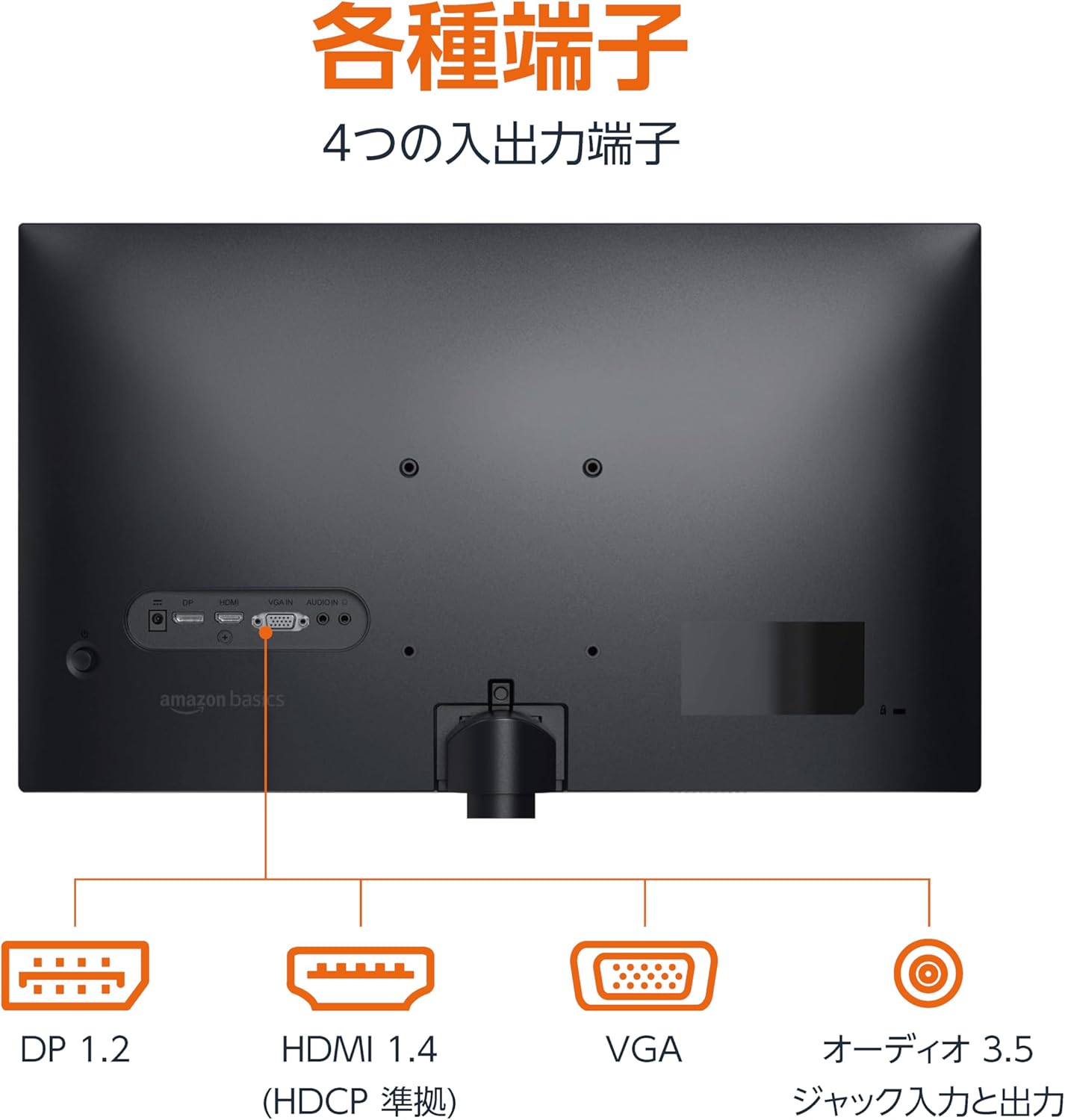
belakang view daripada monitor yang memaparkan pelbagai port input dan output.
3.3 Menghidupkan
Press the power button located on the back or bottom of the monitor to turn it on. The monitor will automatically detect the active input signal.
3.4 Pelarasan Kecondongan
The monitor allows for tilt adjustment to achieve an optimal viewing angle. Gently hold the top and bottom edges of the monitor and tilt it forward or backward. The tilt range is approximately -5° to 20°.

Monitor demonstrating its tilt adjustment capability.
3.5 Optional: VESA Mounting and Cable Lock
The monitor is VESA compatible, allowing it to be mounted on a wall or an adjustable arm (mounting hardware sold separately). Refer to the VESA mount's instructions for installation.
An optional cable lock slot is available on the rear of the monitor to secure it to a stable object, preventing theft.
3.6 Panduan Persediaan Video
For a visual guide on setting up your Amazon Basics monitor, please watch the video below:
This video demonstrates the assembly of the stand, connecting cables, and basic adjustments for the Amazon Basics monitor.
4. Arahan Operasi
4.1 Menu Paparan Pada Skrin (OSD).
The monitor features an On-Screen Display (OSD) menu for adjusting various settings. Use the buttons located on the back or bottom of the monitor to navigate the menu. Common settings include:
- Kecerahan/Kontras: Laraskan tahap pencahayaan dan kontras paparan.
- Tetapan Warna: Ubah suai suhu warna, rona dan ketepuan.
- Pilihan Input: Manually switch between DP, HDMI, and VGA inputs.
- Audio: Laraskan kelantangan untuk pembesar suara terbina dalam atau fon kepala yang disambungkan.
- Mod Gambar: Select from preset display modes (e.g., Standard, Game, Movie).
4.2 Using Built-in Speakers
The monitor includes integrated speakers. Audio will be played through these speakers when connected via HDMI or DisplayPort. If using a VGA connection, ensure an audio cable is connected to the 'AUDIO IN' port on the monitor and your computer's audio output.
5. Spesifikasi
| Ciri | Spesifikasi |
|---|---|
| Jenama | Asas Amazon |
| Nombor Model | 24M2020DJP |
| Saiz Skrin | 24 Inches (23.8 inch viewmampu) |
| Jenis Panel | IPS |
| Resolusi | FHD 1080p (1920 x 1080) |
| Kadar Segar Semula | Maks 100 Hz |
| Nisbah Aspek | 16:9 |
| Pembesar Suara Terbina dalam | ya |
| Keserasian VESA | ya |
| Port Input | 1x DisplayPort 1.2, 1x HDMI 1.4, 1x VGA, 1x Audio In (3.5mm) |
| Port Output | 1x Audio Out (3.5mm) |
| Berat Produk | 2.8 kg |
| Ketebalan Bezel | 1.44 mm (slim bezel) |
| Waranti | Waranti terhad 1 tahun |
5.1 Dimensi
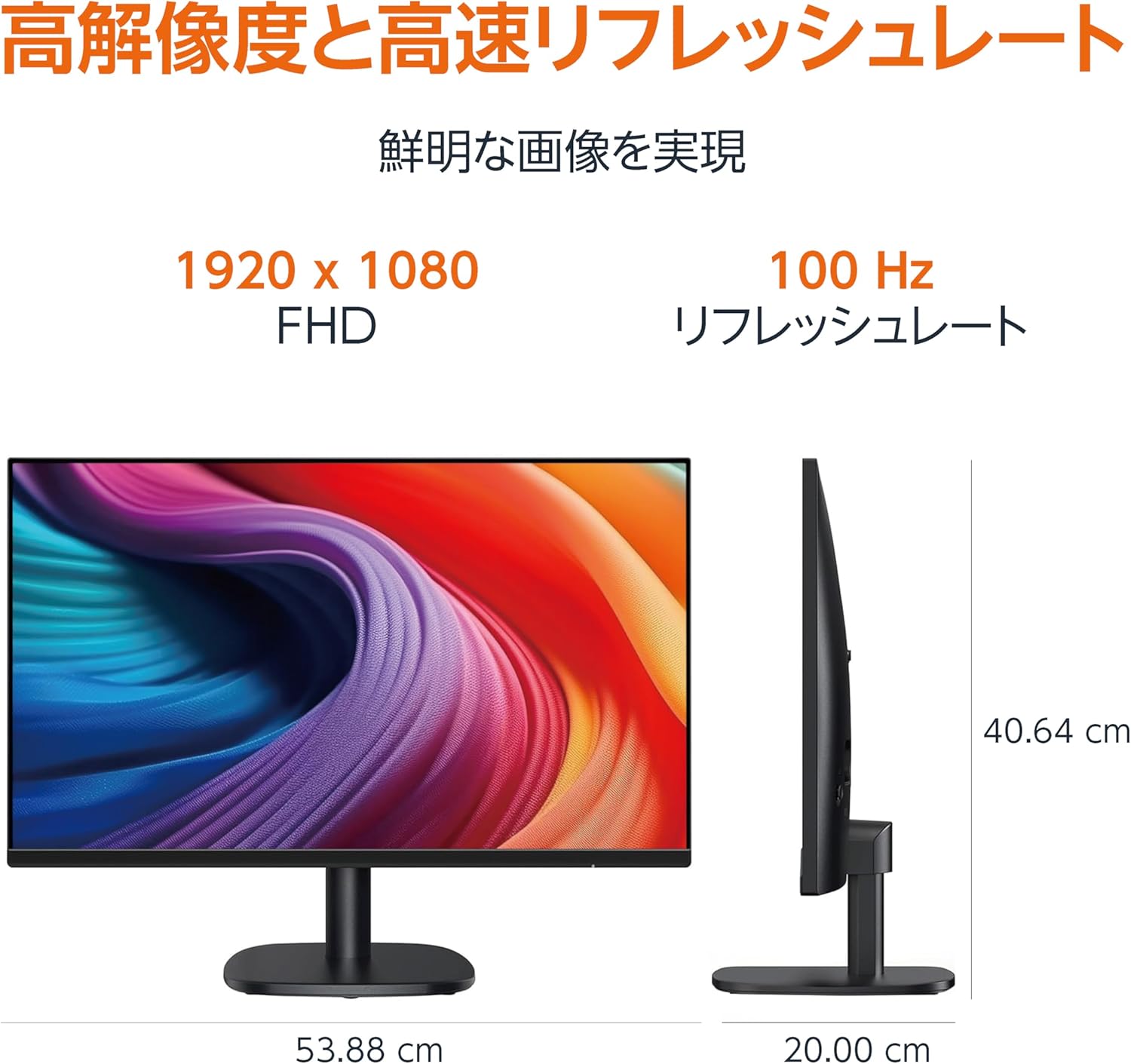
Diagram showing the monitor's dimensions (Width: 53.88 cm, Height: 40.64 cm, Depth: 20.00 cm).
5.2 Slim Bezel Design

Detail showing the monitor's slim bezel design, measuring 1.44 mm.
6. Penyelesaian masalah
Jika anda menghadapi masalah dengan monitor anda, rujuk kepada penyelesaian biasa berikut:
- Tiada Kuasa: Ensure the power cable is securely connected to both the monitor and a working power outlet. Check if the power adapter's indicator light is on.
- Tiada isyarat: Verify that the video cable (HDMI, DP, or VGA) is firmly connected to both the monitor and your computer. Ensure the correct input source is selected in the monitor's OSD menu. Try restarting your computer.
- Skrin berkelip: Check the video cable for damage or loose connections. Ensure your computer's graphics driver is up to date. Adjust the refresh rate in your computer's display settings.
- No Audio from Speakers: If using HDMI or DisplayPort, ensure the audio output is set to the monitor in your computer's sound settings. If using VGA, confirm the 3.5mm audio cable is connected. Check the volume level on both the monitor and your computer.
- Isu Kualiti Imej: Adjust brightness, contrast, and color settings via the OSD menu. Ensure the display resolution on your computer matches the monitor's native resolution (1920 x 1080).
If the problem persists after trying these steps, contact customer support.
7. Penyelenggaraan
Proper maintenance helps ensure the longevity and performance of your monitor:
- Membersihkan Skrin: Lap skrin perlahan-lahan dengan kain lembut yang tidak berbulu. Untuk tanda degil, ringankan dampLap kain dengan air atau pembersih skrin khusus. Elakkan menggunakan bahan kimia yang keras, alkohol atau bahan yang melelas.
- Membersihkan Casing: Gunakan kain lembut dan kering untuk mengelap casing.
- Pengudaraan: Pastikan bukaan pengudaraan monitor tidak disekat untuk mengelakkan terlalu panas.
- Matikan Apabila Tidak Digunakan: Matikan monitor apabila tidak digunakan untuk tempoh yang lama untuk menjimatkan tenaga dan memanjangkan jangka hayatnya.
8. Waranti dan Sokongan
This Amazon Basics monitor comes with a Waranti terhad 1 tahun dari tarikh pembelian. Waranti ini meliputi kecacatan pembuatan dan mutu kerja di bawah penggunaan biasa.
For warranty claims, technical support, or further assistance, please refer to the Amazon Basics support page or contact Amazon customer service directly. Keep your proof of purchase for warranty validation.