
FOREVER GSM169761
FOREVER Smartwatch SW-800 User Manual
Model: SW-800 (GSM169761)
pengenalan
This manual provides essential information for the proper use and maintenance of your FOREVER Smartwatch SW-800. Please read it thoroughly before operating the device to ensure optimal performance and longevity. The SW-800 features a 1.3-inch AMOLED display, Bluetooth connectivity, and various fitness tracking capabilities.

Image: The FOREVER Smartwatch SW-800, showcasing its versatile design with both metal and silicone strap options, and various digital watch faces.
Persediaan
1. Mengecas Jam Pintar
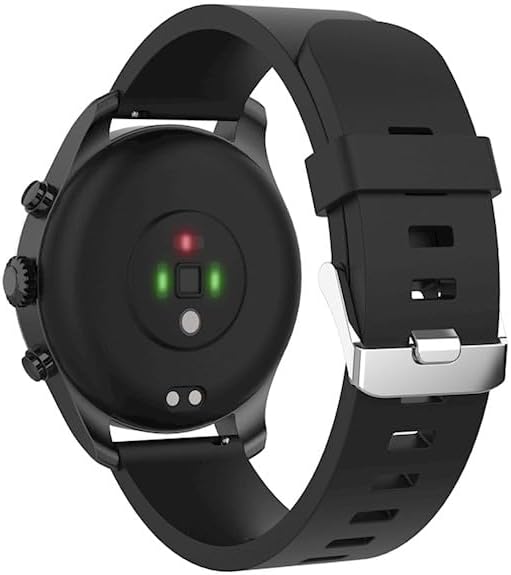
Before first use, fully charge your smartwatch. Connect the charging cable to the charging port on the back of the watch and plug the USB end into a power adapter (not included) or a computer's USB port. The watch display will indicate charging status.

Imej: Bahagian belakang view of the smartwatch, highlighting the magnetic charging pins and the optical heart rate sensors.
2. Menghidupkan/Mematikan
- To power on: Press and hold the side button until the FOREVER logo appears.
- To power off: Press and hold the side button, then select "Power Off" on the screen.
3. Berpasangan dengan Telefon Pintar Anda
- Download the companion application from the App Store (for iOS) or Google Play Store (for Android). Cari untuk "FOREVER Smartwatch" or refer to the QR code in the watch's settings.
- Pastikan Bluetooth didayakan pada telefon pintar anda.
- Open the application and follow the on-screen instructions to create an account or log in.
- Select "Add Device" or "Pair Device" within the app.
- Select "SW-800" from the list of available devices.
- Sahkan permintaan berpasangan pada telefon pintar anda dan jam tangan pintar.

Image: A smartphone displaying the FOREVER companion app interface, with the smartwatch screen prompting the user to "Connect APP" via Bluetooth.
Mengendalikan Smartwatch
1. Navigasi Asas
- Skrin sentuh: Swipe left, right, up, or down to navigate through menus and notifications. Tap to select an item.
- Butang Sisi: Press to return to the home screen or wake the display. Long press for power options.
2. Ciri-ciri Utama
- Pemantauan Denyut Jantung: The smartwatch continuously monitors your heart rate. Access the heart rate widget or app on the watch to view data masa nyata dan trend sejarah.
- Pedometer: Menjejaki langkah harian, jarak dan kalori yang dibakar.
- Mod Sukan: The SW-800 supports 14 different sports modes, including running, cycling, and walking. Select a mode before starting an activity to track specific metrics.
- Penjejakan Tidur: Memantau corak tidur anda, termasuk tidur nyenyak, tidur ringan dan waktu bangun.
- Pemantauan Oksigen Darah (SpO2): Ukur tahap ketepuan oksigen darah anda.
- Pemantauan Suhu: Provides body temperature readings.
- Kawalan Muzik: Control music playback on your connected smartphone directly from the watch.
- Pemberitahuan: Receive call, message, and app notifications from your smartphone.

Image: A collage of watch faces illustrating the various health and fitness tracking features, including heart rate, step count, calorie burn, sleep analysis, body temperature, and blood oxygen levels.

Image: The smartwatch displaying a graph of body temperature measurements over time, indicating current and historical readings.

Image: The smartwatch screen showing a blood oxygen saturation (SpO2) reading of 97%, along with a trend graph.

Image: The smartwatch worn by a runner, actively tracking fitness metrics during an outdoor exercise session.
Penyelenggaraan
1. Pembersihan
Regularly clean your smartwatch and strap to prevent skin irritation and maintain device functionality. Use a soft, lint-free cloth. If necessary, slightly dampen kain dengan air. Elakkan menggunakan bahan kimia yang keras atau bahan yang melelas.
2. Rintangan Air (IP68)
The SW-800 is rated IP68, meaning it is resistant to dust and can withstand immersion in water up to 1.5 meters for up to 30 minutes. It is suitable for daily use, such as hand washing or light rain. However, it is not recommended for swimming, diving, or high-pressure water activities.
3. Penjagaan Bateri
- Elakkan menyahcas sepenuhnya bateri dengan kerap.
- Jangan dedahkan peranti kepada suhu yang melampau.
- Gunakan hanya kabel pengecasan yang disediakan.
Menyelesaikan masalah
1. Jam Tangan Tidak Dihidupkan
- Pastikan jam tangan dicas sepenuhnya. Sambungkannya ke pengecas selama sekurang-kurangnya 30 minit.
- Try pressing and holding the side button for 10-15 seconds to force a restart.
2. Connectivity Issues (Bluetooth)
- Pastikan Bluetooth diaktifkan pada jam tangan pintar dan telefon pintar anda.
- Make sure the smartwatch is within the Bluetooth range of your phone.
- Restart both your smartwatch and smartphone.
- Unpair the device from your phone's Bluetooth settings and re-pair it through the companion app.
3. Bacaan Kesihatan yang Tidak Tepat
- Pastikan jam tangan dipakai dengan kemas pada pergelangan tangan anda, tetapi tidak terlalu ketat.
- Bersihkan penderia di belakang jam tangan.
- Elakkan pergerakan berlebihan semasa pengukuran.
- Note that these devices are not medical instruments and readings are for reference only.
4. App Not Syncing Data
- Periksa sambungan internet anda pada telefon pintar anda.
- Ensure the companion app has all necessary permissions enabled in your phone's settings.
- Close and reopen the app, or restart your phone.
Spesifikasi
| Nama Model | SW-800 (GSM169761) |
| Paparan | 1.3-inch AMOLED, 360 x 360 pixels |
| Ketersambungan | Bluetooth |
| Tahan Air | IP68 |
| Penderia | Heart Rate Monitor, Pedometer, SpO2, Temperature |
| Jenis Bateri | Litium Ion |
| Peranti Serasi | Telefon pintar |
| Input Antara Muka Manusia | Butang, Skrin Sentuh |
| Dimensi (Pakej) | 11.2 x 9.2 x 7.1 cm |
| Berat (Pakej) | 240 g |
Imej: A terperinci view of the smartwatch, emphasizing its 1.3-inch display with 360x360 pixel resolution, and the sleek design of the metal band.
Waranti dan Sokongan
Your FOREVER Smartwatch SW-800 comes with a standard manufacturer's warranty. Please refer to the warranty card included in your product packaging for specific terms and conditions, including the warranty period and coverage details.
For technical support, troubleshooting assistance, or warranty claims, please contact FOREVER customer service. Contact information can typically be found on the official FOREVER webtapak atau pada pembungkusan produk.
Ask a question about this manual
Ask about setup, troubleshooting, compatibility, parts, safety, or missing instructions. Manuals+ will review the question and use this page’s manual context to help answer it.