
1. Pengenalan
Thank you for choosing the ORDRO Z88 4K Video Camera. This manual provides essential information for setting up, operating, and maintaining your device. Please read it thoroughly before use to ensure proper functionality and to maximize your camera's potential. Keep this manual for future reference.
2. Maklumat Keselamatan
- Do not expose the camera to water or moisture. This device is not waterproof.
- Elakkan daripada menjatuhkan kamera atau mendedahkannya kepada hentaman yang kuat.
- Jauhkan kamera daripada medan magnet yang kuat.
- Jangan cuba membuka atau mengubah suai kamera. Pembaikan hanya boleh dilakukan oleh kakitangan servis yang dibenarkan.
- Gunakan hanya penyesuai kuasa dan aksesori yang dinyatakan.
- Simpan kamera di tempat yang sejuk dan kering apabila tidak digunakan.
3. Kandungan Pakej
Sahkan bahawa semua item yang disenaraikan di bawah disertakan dalam pakej anda:
- ORDRO Z88 4K Video Camera
- Kabel USB-C
- Mikro HDMI ke Kabel HDMI
- Penyesuai Kuasa/Pengecas
- Lithium-ion Batteries (2 included)
- Alat Kawalan Jauh
- Kad SD 32GB
- Penyesuai Kad SD
- Camera Bag/Pouch
- Tali Pergelangan Tangan

Image: The ORDRO Z88 4K camera displayed with its full set of accessories, including cables, batteries, remote, and storage card.
4. Produk Lebihview
The ORDRO Z88 is a compact 4K video camera designed for ease of use and high-quality recording. It features a 3.0-inch IPS touchscreen, 10x optical zoom, and various connectivity options.

Imej: Depan view of the ORDRO Z88 camera, highlighting its 4K resolution, 1/3" CMOS sensor, 28.0MP still image capability, 3.0" IPS touchscreen, and 10x optical zoom.
Komponen Kamera
- Kanta: 10x optical zoom lens.
- Skrin LCD: 3.0-inch IPS touchscreen, rotatable for various viewsudut-sudut.
- mikrofon: Mikrofon terbina dalam untuk rakaman audio.
- Penceramah: Untuk main balik audio.
- Butang Kawalan: Power, Record, Zoom lever, Menu, Playback, etc.
- Pelabuhan: USB-C, Mini HDMI, External Microphone input.
- Benang Tripod: Standard 1/4 inch thread for mounting on tripods.

Imej: Bahagian terperinci view of the ORDRO Z88 camera, illustrating the external microphone input, Mini HDMI port, and USB-C output.
5. Persediaan
5.1 Pemasangan Bateri
- Buka penutup petak bateri di bahagian bawah kamera.
- Insert the Lithium-ion battery, ensuring the correct polarity.
- Tutup penutup petak bateri dengan selamat.
5.2 Pemasangan Kad Memori
The camera supports SDHC flash memory cards up to 256GB. A 32GB SD card is included.
- Locate the SD card slot, usually on the side or bottom of the camera.
- Insert the SD card with the metal contacts facing the correct direction until it clicks into place.
- Untuk mengeluarkannya, tekan kad dengan lembut sehingga ia terkeluar.
5.3 Mengecas Bateri
Connect the camera to a power source using the provided USB-C cable and power adapter. The camera supports recording while charging.
5.4 Kuasa Awal Hidup
Press and hold the Power button to turn on the camera. The LCD screen will illuminate. You may need to set the date and time upon first use.
6. Arahan Operasi
6.1 Rakaman Video Asas dan Tangkapan Foto
- Hidupkan kuasa: Hidupkan kamera.
- Pilih Mod: Use the mode dial or touchscreen menu to select video recording or photo capture mode.
- Fokus: The camera features automatic focus. Ensure your subject is within the focus range.
- Record/Capture: Press the Record button to start/stop video recording. Press the Shutter button to take a photo.
6.2 Fungsi Zum
The ORDRO Z88 features a 10x optical zoom and a 120x intelligent (digital) zoom.
- Zum Optik: Use the zoom lever to adjust the optical zoom. This maintains image quality.
- Zum Digital: Beyond the 10x optical zoom, the camera can engage 120x digital zoom. Note that digital zoom may reduce image quality.

Image: A visual comparison demonstrating the clarity of 10x optical zoom versus the extended reach of 120x digital zoom, showing a distant tower.
6.3 Sambungan Wi-Fi
Connect your camera to a smartphone via Wi-Fi using the "D Video" application for remote control, preview, sharing, and downloading files. The effective range is up to 10 meters.
- Download and install the "D Video" app on your smartphone.
- Enable Wi-Fi on your camera through the menu settings.
- On your smartphone, connect to the camera's Wi-Fi network.
- Open the "D Video" app to establish the connection and control the camera.
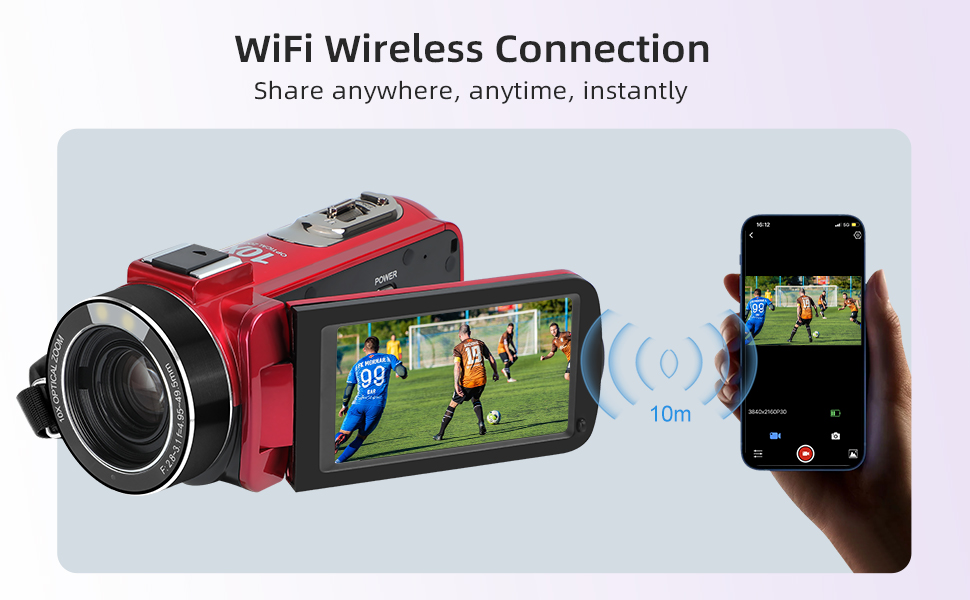
Image: The ORDRO Z88 camera wirelessly connected to a smartphone, demonstrating remote viewing and control capabilities via the "D Video" app.
6.4 WebMod cam
The camera can function as a high-definition webcam for live streaming.
- Connect the camera to your computer using the USB-C cable.
- On the camera's screen, select "PC Camera" mode when prompted.
- Your computer should recognize the camera as a webcam, allowing you to use it with video conferencing or streaming software.

Image: The ORDRO Z88 camera mounted on a mini tripod, connected to a laptop via USB-C, demonstrating its functionality as a webcam untuk panggilan video.
6.5 Playback and Connecting to TV
Review your recorded videos and photos directly on the camera's LCD screen or connect to a larger display.
- Pada Kamera: Tekan butang Main Semula untuk view media anda files. Use the touchscreen or navigation buttons to browse.
- Ke TV: Connect the camera to a 4K compatible television using the Mini HDMI to HDMI cable. This allows for high-resolution playback of your 4K content on a larger screen.
6.6 Ciri Istimewa
The ORDRO Z88 offers several advanced shooting modes:
- Masa berlalu: Capture a series of images over time and combine them into a video.
- Pergerakan Perlahan: Record videos at a higher frame rate for smooth slow-motion playback.
- Fungsi Jeda: Pause and resume recording within the same video file.
- Pengesanan Muka: Automatically detects and focuses on faces in the frame.
- Tembakan Bermasa: Set a timer for photo capture.
- Quick 3 Burst Shot: Tangkap berbilang foto secara berturut-turut.

Imej: Tayangan kolajcasing the camera's diverse shooting capabilities, including time-lapse, slow motion, pause function, and various event recordings like weddings and graduations.
7. Penyelenggaraan
7.1 Pembersihan
- Gunakan kain lembut dan kering untuk membersihkan badan kamera.
- For the lens, use a specialized lens cleaning cloth and solution.
- Jangan gunakan pembersih atau pelarut yang melelas.
7.2 Penyimpanan
- When not in use for extended periods, remove the battery.
- Store the camera in its protective bag in a cool, dry, dust-free environment.
8. Penyelesaian masalah
If you encounter issues with your ORDRO Z88 camera, refer to the following common solutions:
- Kamera tidak dihidupkan: Pastikan bateri dipasang dengan betul dan dicas sepenuhnya.
- Tidak boleh merakam: Check if the SD card is inserted correctly and has sufficient free space. Ensure the camera is in the correct mode.
- Kualiti imej yang lemah: Ensure the lens is clean. Check lighting conditions.
- Isu sambungan Wi-Fi: Ensure the "D Video" app is installed and updated. Verify Wi-Fi is enabled on the camera and your smartphone.
- Webcam mode not recognized: Ensure the USB-C cable is securely connected and "PC Camera" mode is selected on the camera. Try a different USB port on your computer.
Untuk bantuan lanjut, sila hubungi khidmat pelanggan.
9. Spesifikasi
| Ciri | Spesifikasi |
|---|---|
| Jenama | ORDRO |
| Nombor Model | HDR-Z88 |
| Teknologi Penderia Foto | CMOS |
| Resolusi Rakaman Video | 1080p, 4K (2880x2160@24fps) |
| Resolusi Imej Pegun | 5 MP (Interpolated to 28.0MP) |
| Zum Optik | 10x |
| Zum Digital | 120x |
| Saiz Skrin | 3.0 Inches (IPS Touchscreen) |
| Jenis Memori Denyar | SDHC (up to 256GB expansion) |
| Teknologi Ketersambungan | HDMI, USB-C, Wi-Fi (802.11ac) |
| Penstabilan Imej | Optical (Note: Product specs state 'No' for 'Posiada stabilizację obrazu' but 'Optyczny' for 'Stabilizacja obrazu'. Assuming optical stabilization is present as per feature bullets.) |
| Tahap Kalis Air | Bukan Kalis Air |
| Berat Barang | 300 Gram |
| Bateri Termasuk | Yes (2 Lithium-ion) |
| Penggunaan yang Disyorkan | Vlogging, daily video recording, beginner use |
10. Waranti dan Sokongan
The ORDRO Z88 4K Video Camera comes with a standard manufacturer's warranty. Please refer to the warranty card included in your package for specific terms and conditions. For technical support, troubleshooting, or warranty claims, please contact ORDRO customer service through the contact information provided with your purchase or on the official ORDRO webtapak.