pengenalan
Thank you for choosing MANKIW D06 Wireless Earbuds. This manual provides essential information for setting up, operating, and maintaining your earbuds to ensure optimal performance and longevity. Please read these instructions carefully before use.
Apa yang ada dalam Kotak

Image: Contents of the MANKIW D06 Wireless Earbuds package.
The MANKIW D06 Wireless Earbuds package includes the following items:
- Wireless Earbuds (1 pair)
- Sarung Pengecasan (1 unit)
- Kabel Pengecas Jenis-C (1 unit)
- Manual Pengguna (1 unit)
- Petua Telinga (3 pasang: Kecil, Sederhana, Besar)
Produk Selesaiview

Image: MANKIW D06 Wireless Earbuds and charging case.
The MANKIW D06 Wireless Earbuds are designed for a superior audio experience with convenience and durability. Key features include:
- Teknologi Bluetooth 5.3: Ensures faster speed and more stable connections up to 10 meters.
- LED Digital Power Display: Shows the battery level of both the charging case and individual earbuds.
- Bunyi Stereo Imersif: Delivers enhanced bass and crystal-clear audio.
- Kawalan Sentuhan Pintar: Intuitive touch sensors for managing music playback, calls, and voice assistants.
- Hayat Bateri yang Panjang: Up to 8 hours of continuous playback per charge, extending to 32 hours with the charging case.
- Rintangan Air IPX5: Protects against sweat and splashes, suitable for workouts and outdoor activities.
- Reka bentuk padat dan ringan: Easy to carry and comfortable for extended wear.
- Mikrofon terbina dalam: Untuk panggilan bebas tangan yang jelas.
Persediaan
1. Mengecas Fon Telinga dan Sarung
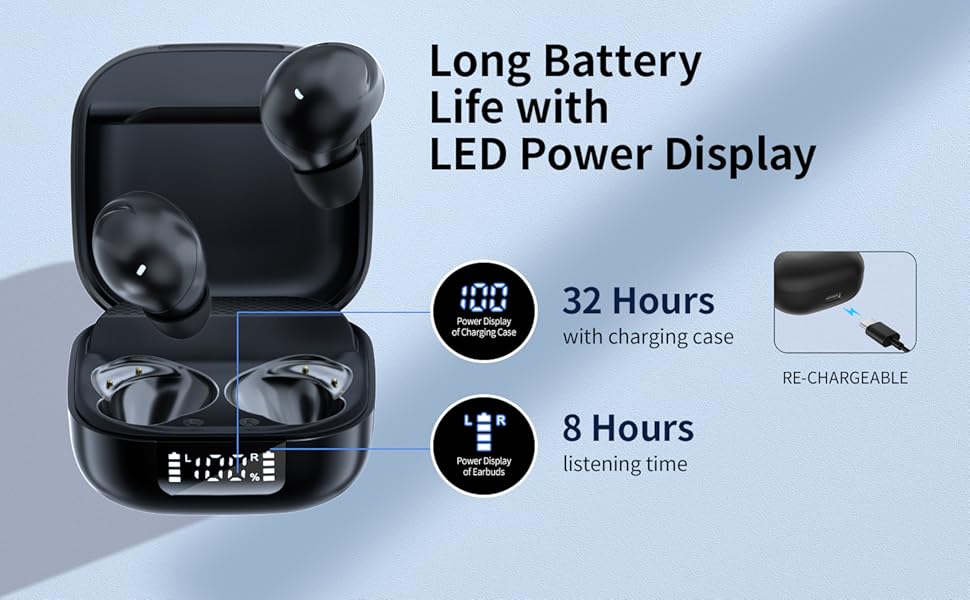
Image: Charging the earbuds and case.
- Sebelum penggunaan pertama, cas sepenuhnya fon telinga dan bekas pengecas.
- Letakkan fon telinga ke dalam bekas pengecasan. Pastikan mereka duduk dengan betul.
- Connect the provided Type-C charging cable to the charging port on the case and plug the other end into a USB power source (e.g., wall adapter, computer).
- The LED digital display on the case will show the current battery percentage pada bekas dan status pengecasan setiap fon telinga.
- Once fully charged, the display will show 100%.
2. Berpasangan dengan Peranti Anda (Berpasangan Satu Langkah)
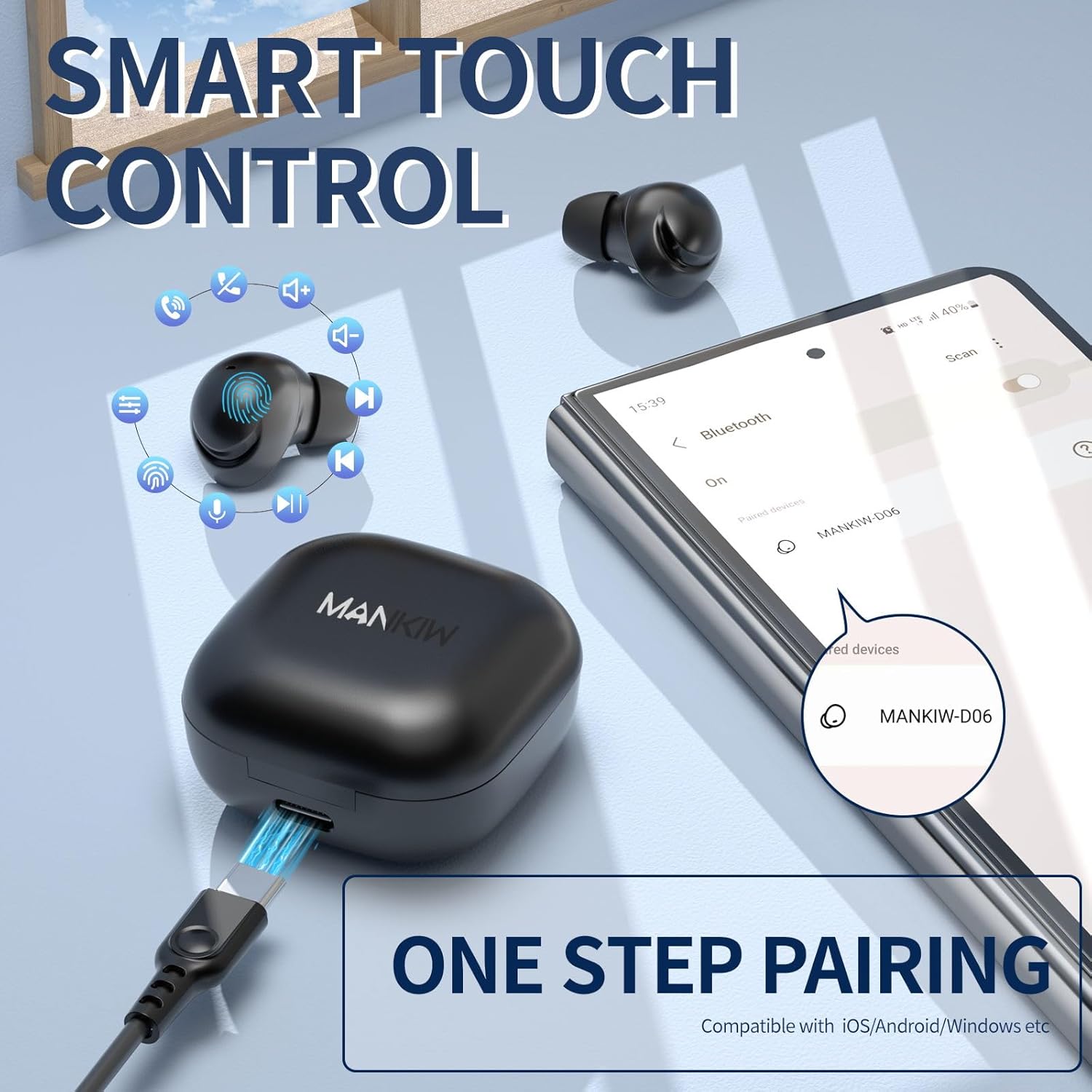
Image: One-step pairing process.
The MANKIW D06 earbuds feature one-step automatic pairing:
- Buka bekas pengecas. Fon telinga akan memasuki mod berpasangan secara automatik.
- On your device (smartphone, tablet, TV, computer), go to Bluetooth settings.
- Cari untuk available devices and select "MANKIW-D06" from the list.
- Setelah disambungkan, anda akan mendengar nada pengesahan dan fon telinga akan sedia untuk digunakan.
- The earbuds are compatible with iOS, Android, and Windows devices.
3. Memilih Petua Telinga yang Betul

Image: Selecting the correct ear tip size.
For optimal sound quality and comfort, choose the ear tips that best fit your ears. Three sizes (Small, Medium, Large) are provided. A snug fit helps with noise isolation and bass response.
Arahan Operasi
Kawalan Sentuh

Image: MANKIW D06 Earbuds touch control guide.
| Fungsi | Tindakan |
|---|---|
| Jilid + | Sentuh pada L (Left) earbud touch area twice in a row. |
| Isipadu - | Sentuh pada R (Right) earbud touch area twice in a row. |
| Main/Jeda | Sentuh pada L/R earbud touch area once. |
| Lagu Sebelumnya | Sentuh pada L (Left) earbud touch area three times in a row. |
| Trek Seterusnya | Sentuh pada R (Right) earbud touch area three times in a row. |
| Jawab Panggilan | Sentuh pada L (Left) earbud touch area twice in a row. |
| Panggilan Sambungan | Sentuh pada R (Right) earbud touch area twice in a row. |
| Call Siri / Voice Assistant | Tekan dan tahan butang L button for 3 seconds when not in music mode. |
Single and Dual Earbud Mode
You can use both earbuds together for stereo sound or use a single earbud independently for mono audio. Simply remove one earbud from the case to use it in single mode. The other earbud can remain in the case or be used later.
Penyelenggaraan
Pembersihan
- Bersihkan fon telinga dan bekas pengecas dengan kerap menggunakan kain yang lembut, kering dan tidak berbulu.
- Jangan gunakan bahan kimia yang keras, pelarut pembersih atau detergen yang kuat.
- Gently remove ear tips and clean them with water if necessary, ensuring they are completely dry before reattaching.
- Bersihkan sesentuh pengecasan pada kedua-dua fon telinga dan bekas dengan kapas kering untuk memastikan pengecasan yang betul.
Rintangan Air (IPX5)
The MANKIW D06 earbuds are IPX5 water-resistant, meaning they can withstand sweat and light splashes. They are not designed for swimming, showering, or submersion in water. Ensure the charging port is dry before charging.
Spesifikasi
| Ciri | Perincian |
|---|---|
| Nombor Model | D06 |
| Versi Bluetooth | 5.3 |
| Julat Bluetooth | Sehingga 10 meter (33 kaki) |
| Hayat Bateri (Earbud) | Up to 8 hours continuous playback |
| Jumlah Masa Main (dengan Kes) | Sehingga 32 jam |
| Port Pengecasan | USB Jenis-C |
| Penilaian Ketahanan Air | IPX5 (Kalis Peluh & Air) |
| Kaedah Kawalan | Kawalan Sentuh |
| Mikrofon Terbina dalam | ya |
| Peranti Serasi | Smartphones, Tablets, TVs, Computers (iOS, Android, Windows) |
| Berat Barang | 2.89 auns |
| Dimensi Pakej | 4.09 x 2.76 x 1.46 inci |
Menyelesaikan masalah
If you encounter any issues with your MANKIW D06 Wireless Earbuds, please refer to the following common solutions:
- Fon telinga tidak berpasangan atau bersambung:
- Pastikan kedua-dua fon telinga dicas.
- Matikan Bluetooth pada peranti anda, kemudian hidupkan semula.
- Delete "MANKIW-D06" from your device's Bluetooth list and attempt to re-pair.
- Place earbuds back in the charging case, close the lid, wait a few seconds, then open to re-initiate pairing mode.
- Hanya satu fon telinga berfungsi:
- Pastikan kedua-dua fon telinga dicas.
- Try placing both earbuds back into the charging case, closing the lid, and then taking them out again.
- Reset the earbuds (refer to the full user manual for specific reset instructions if available).
- Kelantangan rendah atau kualiti bunyi yang lemah:
- Laraskan kelantangan pada kedua-dua peranti anda dan fon telinga.
- Ensure the ear tips are clean and provide a snug fit in your ears.
- Bersihkan sebarang serpihan daripada pembesar suara fon telinga.
- Pastikan tiada halangan antara peranti anda dan fon telinga.
- Isu pengecasan:
- Periksa kabel pengecas dan penyesuai untuk kerosakan.
- Pastikan sesentuh pengecasan pada fon telinga dan bekas bersih dan bebas daripada serpihan.
- Cuba sumber kuasa USB yang lain.
Video Produk Rasmi
Video: MANKIW D06 Wireless Bluetooth Earbuds product overview. This video demonstrates the features and design of the earbuds.
Waranti dan Sokongan
MANKIW products are designed with quality and reliability in mind. For specific warranty information, please refer to the documentation included with your purchase or visit the official MANKIW website. If you require further assistance or have questions not covered in this manual, please contact MANKIW customer support.
Untuk maklumat lanjut, lawati MANKIW Store on Amazon.