
OSALO OS 82ES 2nd Edition
OSALO Scientific Calculator User Manual
Brand: OSALO
Model: OS 82ES 2nd Edition
pengenalan
Thank you for choosing the OSALO Scientific Calculator. This manual provides detailed instructions on how to set up, operate, and maintain your calculator. Designed for students and professionals, this calculator offers 252 functions to support a wide range of mathematical and scientific calculations.
Please read this manual carefully to ensure proper use and to maximize the functionality of your device.
Ciri-ciri Utama
- 252 Fungsi: Comprehensive functions including fractions, matrix calculations, statistics, calculus, complex numbers, equations, standard deviation, vector calculations, permutations, and combinations.
- 2-Line Written Display: Input expressions and view results in a natural, textbook-like format.
- Pelarasan Kecerahan: Optimize display visibility for various lighting conditions and reduce eye fatigue.
- Sumber Kuasa Dwi: Operates on both solar power and battery (LR44 included) for reliable, uninterruptible use.
- Multi-Replay Function: Easily recall and edit previously executed formulas.
- List-Based STAT-Data Editor: View and edit input data in list format for statistical analysis.
- Reka bentuk tahan lasak: Features ABS plastic keys with clear print and a curved edge for comfortable handling. Includes a slide-on hard case for protection.
- Ringan dan Mudah Alih: Reka bentuk padat untuk dibawa dengan mudah.

Imej: Selesaiview of the OSALO Scientific Calculator highlighting its 252 functions, including multi-replay, combination and permutation, statistics, fraction calculation, 9 variable memories, and the included slide-on hard case.
Persediaan
Pemasangan Bateri
Your OSALO Scientific Calculator comes with an LR44 battery pre-installed. The calculator also utilizes solar power for extended battery life and operation in well-lit environments.
- Ensure the calculator is turned OFF.
- Cari petak bateri di bahagian belakang kalkulator.
- Gunakan pemutar skru kecil untuk membuka penutup petak bateri.
- If replacing, remove the old LR44 battery.
- Masukkan bateri LR44 baharu dengan bahagian positif (+) menghadap ke atas.
- Gantikan penutup petak bateri dan kencangkannya dengan skru.
Note: The solar panel assists in powering the calculator in sufficient light, reducing reliance on the battery.
Arahan Operasi
Calculator Layout

Image: Detailed diagram of the OSALO Scientific Calculator showing the solar panel, extra large display, control keys, SHIFT key, MODE key, Power ON button, function keys, DEL (Delete) key, and ANS (Last Answer) key.
- ON Key: Press to turn the calculator on.
- Kunci MATI: Tekan SHIFT kemudian AC to turn the calculator off.
- Kunci AC: Clears all calculations and returns to the initial display.
- DEL Key: Deletes the last entered character.
- Kunci SHIFT: Activates the secondary functions (indicated in yellow above the keys).
- ALPHA Key: Activates the alpha functions (indicated in red above the keys).
- MODE/SETUP Key: Changes the calculator's mode (e.g., COMP, STAT, TABLE) or settings.
Operasi Asas
Enter numbers and operations as you would write them. Press = untuk mendapatkan hasilnya.
- Penambahan, Penolakan, Pendaraban, Pembahagian: Gunakan +, -, ×, ÷ kunci.
- Pecahan: Gunakan ab/c key to input fractions. For mixed numbers, input integer, then ab/c, then numerator, then ab/c, then denominator.
- Kuasa dan Akar: guna x² untuk segi empat sama, SHIFT x² for square root, x³ for cube, ANJAKAN x³ for cube root, and x■ for custom powers.
Written Display and Natural Input/Output
The calculator features a 2-line display that shows expressions as they are written in textbooks, making complex calculations easier to understand and verify.
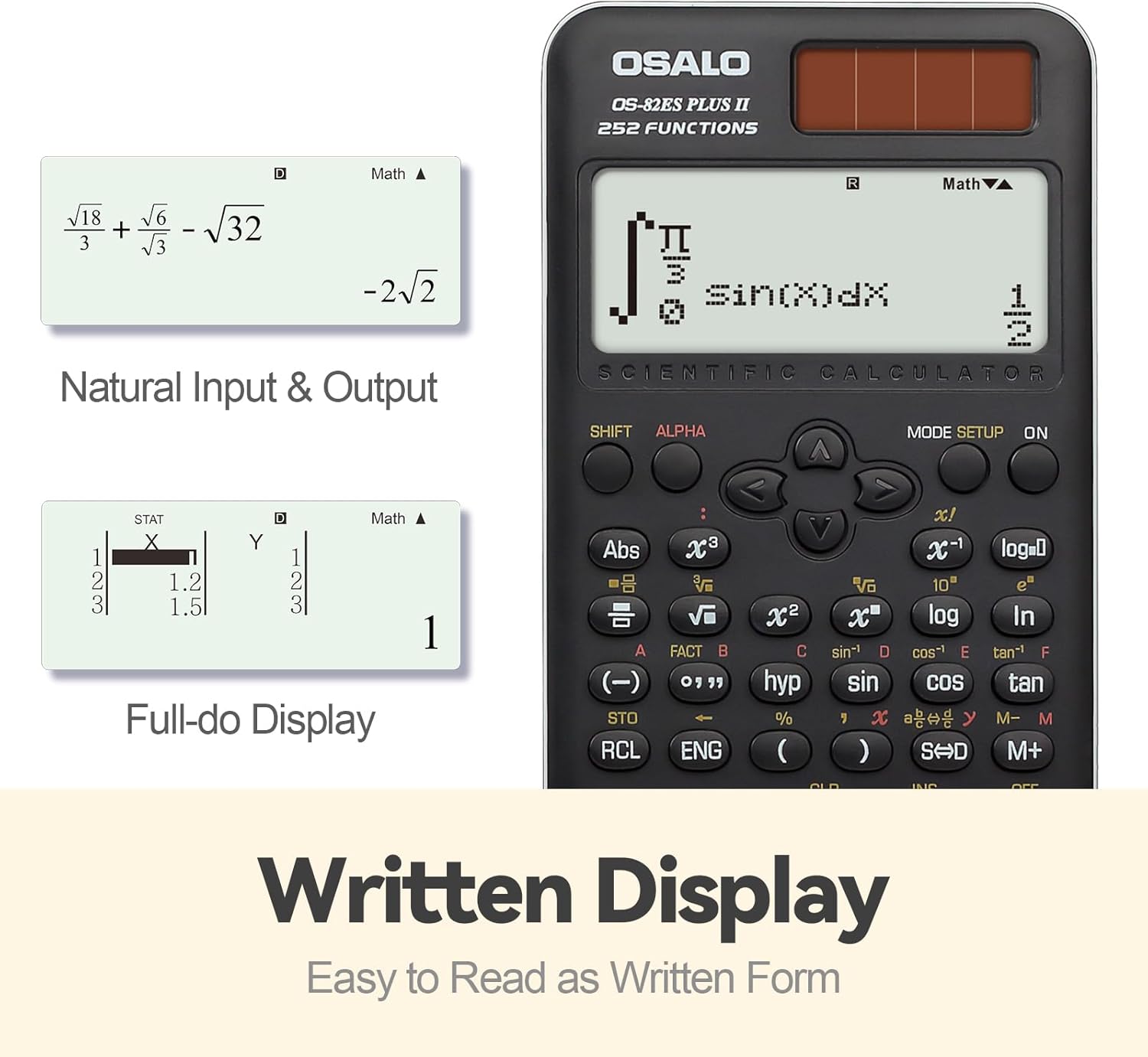
Image: Demonstrates the calculator's natural input and output display, showing complex expressions like integrals and square roots as they would appear in a textbook, along with a full-dot display for data entry.
Brightness Adjustment Function
You can adjust the screen brightness to suit your environment and reduce eye strain. Refer to the specific key combination for brightness adjustment, typically found in the SETUP menu or by pressing SHIFT followed by a specific key (e.g., MODE/SETUP and then navigating options).

Image: Comparison of the calculator display in dark (relieving visual fatigue) and bright (clear and intuitive) settings, illustrating the brightness adjustment function.
Advanced Functions (252 Functions)
The OSALO Scientific Calculator offers a wide array of advanced functions. To access these, you will often use the SHIFT key (for yellow functions) or the ALPHA key (for red functions) before pressing the desired function key.
- Fungsi trigonometri: dosa, cos, sawo matang dan fungsi songsangnya (SHIFT sin-1, dsb.).
- Fungsi Logaritma: log (asas 10) dan ln (logaritma asli).
- Pengiraan Statistik:
- Tekan MODE/SETUP and select STAT mode.
- Enter your data using the list-based editor.
- Perform calculations for mean, standard deviation, regression analysis, etc.
- Complex Number Calculations: Access this mode via MODE/SETUP.
- Equation Solving: Use the Equation mode to solve linear equations, quadratic equations, etc.
- Permutasi dan Gabungan: guna nPr dan nCr fungsi.
- Fungsi Memori: Store and recall values using STO dan RCL keys. The calculator supports 9 variable memories.
For detailed instructions on each specific function, please refer to the comprehensive user guide provided with your calculator, which covers all 252 functions in detail.
Penyelenggaraan
- Pembersihan: Wipe the calculator with a soft, dry cloth. For stubborn dirt, slightly dampLap kain dengan air. Jangan gunakan bahan kimia yang keras atau pembersih yang kasar.
- Storan: Store the calculator in its slide-on hard case when not in use to protect it from dust, scratches, and impacts. Avoid exposing the calculator to extreme temperatures, humidity, or direct sunlight for prolonged periods.
- Penjagaan Bateri: If the calculator will not be used for an extended period, it is recommended to remove the LR44 battery to prevent leakage.
Menyelesaikan masalah
| Masalah | Kemungkinan Punca | Penyelesaian |
|---|---|---|
| Kalkulator tidak boleh dihidupkan. | Low or dead battery; insufficient light for solar power. | Replace the LR44 battery. Ensure adequate lighting for solar operation. |
| Paparan malap atau tidak boleh dibaca. | Low battery; brightness setting too low. | Adjust display brightness using the brightness adjustment function. Replace battery if needed. |
| Keputusan pengiraan yang salah. | Incorrect mode setting; input error; syntax error. | Check the current mode (e.g., DEG/RAD, COMP/STAT). Review your input. Clear the calculation and re-enter. |
| Calculator freezes or becomes unresponsive. | Gangguan perisian sementara. | Tekan ke ON key. If unresponsive, remove the battery for a few seconds and reinsert it to perform a hard reset. Note that this may clear memory. |
If you encounter issues not listed here, please refer to the full user guide or contact customer support.
Spesifikasi
- model: OS 82ES 2nd Edition
- Fungsi: 252
- paparan: 2-Line Written Display, 10-digit mantissa / 2-digit exponential
- Sumber Kuasa: Solar and LR44 Battery (included)
- Bahan: Plastik ABS
- Dimensi: Kira-kira 164 x 80 x 20 mm (6.46 x 3.15 x 0.79 inci)
- Berat: Lebih kurang 141g (4.93 oz)
- Aksesori yang disertakan: Slide-on hard case, User Guide (Five Languages Version)

Image: Visual representation of the calculator's dimensions (0.79"/20mm thickness, 3.15"/80mm width, 6.46"/164mm length) and net weight (4.9oz/140g).
Waranti dan Sokongan
For warranty information and customer support, please refer to the specific terms outlined in the full user guide included with your product. You may also visit the official OSALO website or contact their customer service directly for assistance with product inquiries, troubleshooting, or warranty claims.
Amaran: Disassembly of the calculator should only be performed by qualified professionals.
Ask a question about this manual
Ask about setup, troubleshooting, compatibility, parts, safety, or missing instructions. Manuals+ will review the question and use this page’s manual context to help answer it.