
1. Pengenalan
This manual provides detailed instructions for the safe and efficient operation of your YITRANIC 2500W Pure Sine Wave Inverter. Please read this manual thoroughly before installation and use, and retain it for future reference.
The YITRANIC 2500W Pure Sine Wave Inverter converts 12V DC battery power to 110V AC household power, suitable for various applications including home backup, camping, and vehicle use. It features a pure sine wave output, ensuring compatibility with sensitive electronics, and includes both wireless and wired LCD remote control options.
2. Maklumat Keselamatan
AMARAN: Failure to follow these safety instructions may result in electric shock, fire, serious injury, or death. Always exercise caution when working with electrical equipment.
- Jangan buka penyongsang casing. Tiada bahagian yang boleh diservis pengguna di dalamnya.
- Pastikan pengudaraan yang betul di sekeliling penyongsang untuk mengelakkan terlalu panas.
- Connect the inverter only to a 12V DC power source. Do not connect to 24V or higher DC systems.
- Always connect the inverter to the battery terminals with correct polarity (positive to positive, negative to negative). Reverse polarity connection will damage the inverter.
- Jauhkan penyongsang daripada air, lembapan dan bahan mudah terbakar.
- Do not overload the inverter. The continuous output power is 2500W, with a peak surge power of 5000W.
- Putuskan sambungan inverter daripada bateri sebelum melakukan sebarang penyelenggaraan atau pembersihan.
3. Kandungan Pakej
Sahkan bahawa semua item terdapat dalam pakej:
- YITRANIC 2500W Pure Sine Wave Inverter Unit
- 2-in-1 Remote Controller (Wireless and Wired)
- DC Battery Cables (Red and Black)
- Backup Fuses
- USB Charging Cable (for remote controller)
- Manual Pengguna (dokumen ini)

Figure 3.1: Inverter unit with DC cables, remote controller, wireless receiver, USB cable, and fuses.
4. Produk Lebihview dan Ciri
4.1 Komponen Inverter

Figure 4.1: Front panel with AC outlets, USB ports, Type-C port, and remote connection. Side panel with DC input terminals and cooling fans.
- Cawangan AC: Four standard US 110V AC outlets for connecting appliances.
- Port USB: Dual 5V/3A QC3.0 USB fast charging ports.
- Pelabuhan Jenis-C: One PD30W Type-C port for compatible devices.
- Antara Muka Kawalan Jauh: Port for wired remote connection and wireless receiver.
- Terminal Input DC: Red (+) and Black (-) terminals for 12V DC battery connection.
- Kipas penyejuk: Dual temperature-controlled fans activate automatically when the internal temperature exceeds 45°C.
- Suis ON / OFF: Main power switch on the inverter unit.
4.2 Alat Kawalan Jauh
The inverter includes a versatile 2-in-1 remote controller, offering both wireless and wired operation for convenience.
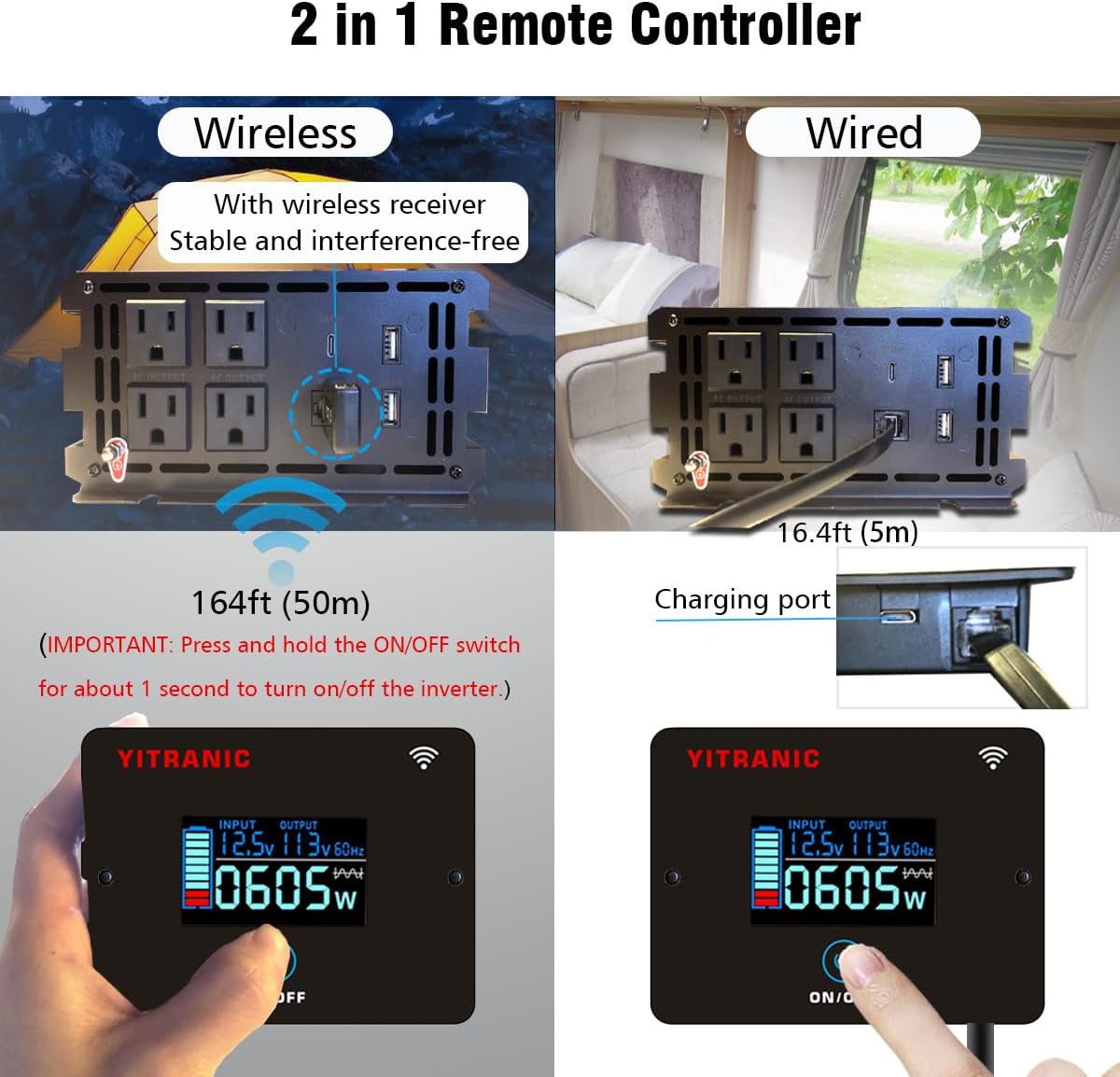
Figure 4.2: Remote controller showing wireless operation with receiver and wired connection via cable.
- Operasi Tanpa Wayar: Connect the wireless receiver to the inverter's remote port. The remote can operate up to 164 feet (50 meters) away.
- Operasi berwayar: Connect the remote directly to the inverter's remote port using the provided 16.4ft (5m) cable.
- Paparan LCD: Menunjukkan voltage, keluaran voltage, frequency, and power consumption.
- Butang HIDUP/MATI: Press and hold for approximately 1 second to turn the inverter on or off.
- Port Pengecasan: The remote controller has a built-in rechargeable Li-Ion battery, charged via a USB cable.
4.3 Output Gelombang Sinus Tulen
This inverter produces a pure sine wave output, which is identical to the AC power supplied by utility grids. This ensures compatibility and safe operation for all types of electronic devices, including sensitive equipment like laptops, medical devices, and appliances with motors.

Figure 4.3: Pure Sine Wave compatibility with various appliances compared to modified sine wave.
4.4 Ciri Perlindungan Pelbagai
The inverter is equipped with multiple safety features to protect both the device and connected equipment:

Figure 4.4: Visual representation of the inverter's built-in protection mechanisms.
- Perlindungan Lebihan: Shuts down if connected load exceeds rated power.
- Perlindungan Terlalu Panas: Mengaktifkan kipas penyejuk dan menutup jika suhu dalaman terlalu tinggi.
- Undervoltage Perlindungan: Ditutup jika input volum DCtage jatuh terlalu rendah.
- Overvoltage Perlindungan: Ditutup jika input volum DCtage melebihi had selamat.
- Perlindungan Sambungan Terbalik: Protects against incorrect battery polarity connection.
- Perlindungan Litar pintas: Protects against short circuits in the output.
5. Persediaan dan Pemasangan
5.1 Memilih Lokasi Pemasangan
- Install the inverter in a dry, well-ventilated area, away from direct sunlight and heat sources.
- Ensure there is sufficient space around the inverter for proper airflow, especially around the cooling fans.
- Mount the inverter securely on a flat, stable surface.
5.2 Connecting to a 12V DC Battery
PENTING: Before making any connections, ensure the inverter's main ON/OFF switch is in the OFF position.
- Identify the positive (+) and negative (-) terminals on your 12V DC battery.
- Sambungkan merah DC cable to the merah (+) terminal of the inverter.
- Sambungkan hujung yang satu lagi merah DC cable to the positif (+) terminal bateri.
- Sambungkan hitam DC cable to the hitam (-) terminal of the inverter.
- Sambungkan hujung yang satu lagi hitam DC cable to the negatif (-) terminal bateri.
- Pastikan semua sambungan adalah ketat dan selamat untuk mengelakkan sentuhan longgar dan lengkok.

Figure 5.1: DC input terminals for battery connection.
5.3 Persediaan Alat Kawalan Jauh
Choose between wired or wireless operation for the remote controller:
- Sambungan Berwayar: Plug the remote cable into the "REMOTE" port on the inverter and the corresponding port on the remote controller.
- Sambungan Wayarles: Plug the wireless receiver into the "REMOTE" port on the inverter. The remote controller will automatically pair with the receiver. Ensure the remote controller's battery is charged using the provided USB cable.
6. Operasi
6.1 Turning the Inverter On/Off
- After connecting the battery, press and hold the ON/OFF button on the inverter unit or the remote controller for approximately 1 second.
- The LCD display on the remote controller will illuminate, showing input voltage, keluaran voltage, and current power consumption.
- To turn off the inverter, press and hold the ON/OFF button again for approximately 1 second.
6.2 Menyambungkan Peralatan AC
- Pastikan jumlah wattage of all connected AC appliances does not exceed the inverter's continuous output power of 2500W.
- Plug your AC appliances into the 110V AC outlets on the inverter's front panel.
- For appliances with high starting currents (e.g., motors, refrigerators), ensure their surge wattage is within the inverter's 5000W surge capacity.
6.3 Using USB and Type-C Ports
- Connect your USB-powered devices to the QC3.0 USB ports for fast charging.
- Connect compatible devices to the PD30W Type-C port for power delivery charging.
6.4 Memahami Paparan LCD
The remote controller's LCD provides real-time operational status:

Figure 6.1: LCD display indicating input voltage, keluaran voltage, power, and potential error codes (OV, LV, OT, OL, SC).
- MASUKKAN: Displays the current DC input voltage daripada bateri.
- PENGELUARAN: Memaparkan volum output ACtage and frequency (e.g., 110V 60Hz).
- WATTAGE: Shows the real-time power consumption of connected devices in watts.
- Ikon Bateri: Indicates the approximate charge level of the remote controller's internal battery.
- Kod Ralat: The display may show codes like OV (Overvoltage), LV (Low Voltage), OT (Over Temperature), OL (Overload), SC (Short Circuit) if a protection mechanism is triggered. Refer to the Troubleshooting section for details.
7. Penyelenggaraan
- Pembersihan: Periodically clean the inverter's exterior with a dry, soft cloth. Ensure the cooling vents are free from dust and debris. Do not use liquid cleaners.
- Sambungan: Regularly check battery cable connections for tightness and corrosion. Clean any corrosion with a wire brush and baking soda solution.
- Storan: Jika menyimpan inverter untuk tempoh yang lama, cabutnya daripada bateri dan simpan di tempat yang sejuk dan kering.
- Penggantian fius: The inverter contains internal fuses. If a fuse blows, it indicates a significant issue. Contact customer support for assistance; do not attempt to replace internal fuses yourself.
8. Penyelesaian masalah
If the inverter is not functioning correctly, refer to the following table for common issues and solutions:
| Masalah | Kemungkinan Punca | Penyelesaian |
|---|---|---|
| No power output, inverter OFF. | Sambungan bateri longgar, volum bateri rendahtage, inverter switch OFF. | Check and tighten battery cables. Charge battery. Press and hold ON/OFF switch for 1 second. |
| Inverter shuts down with "OL" (Overload) on LCD. | Connected load exceeds 2500W continuous or 5000W surge. | Kurangkan jumlah wattage of connected appliances. Restart inverter. |
| Inverter shuts down with "LV" (Low Voltage) on LCD. | Bateri voltage terlalu rendah (di bawah 10.5V). | Cas semula atau gantikan bateri. |
| Inverter shuts down with "OV" (Overvoltage) on LCD. | Bateri voltage terlalu tinggi (melebihi 15.5V). | Disconnect from charging source. Check battery voltage. |
| Inverter shuts down with "OT" (Over Temperature) on LCD. | Inverter is overheating due to poor ventilation or excessive load. | Ensure adequate ventilation. Reduce load. Allow inverter to cool down. |
| No power from USB/Type-C ports. | Inverter is OFF, or device is incompatible. | Turn on the inverter. Check device compatibility. |
If the problem persists after attempting these solutions, please contact YITRANIC customer support.
9. Spesifikasi
| Ciri | Spesifikasi |
|---|---|
| Model | 2500W-12V |
| Kuasa Berterusan | 2500W |
| Kuasa Lonjakan | 5000W |
| Input DC Voltage | 12V |
| Keluaran AC Voltage | 110V |
| Kekerapan Output AC | 60Hz |
| Bentuk Gelombang Output | Gelombang Sinus Tulen |
| Output USB | Dual 5V/3A QC3.0 |
| Output Jenis-C | PD30W |
| Kecekapan | ≥ 90% |
| Dimensi Produk | 15.75 x 3.54 x 7.09 inci (40 x 9 x 18 cm) |
| Berat Barang | 10 paun (4.5 kg) |
| Pensijilan | FCC diperakui |
10. Waranti dan Sokongan Pelanggan
YITRANIC products are designed and manufactured to high-quality standards. For warranty information, technical support, or any questions regarding your inverter, please contact YITRANIC customer support through the retailer where the product was purchased or visit the official YITRANIC webtapak.
Please have your model number (2500W-12V) and purchase date available when contacting support.