
onamor NM009D
Manual Pengguna Penghapus Bau Penjana Ozon Digital ONAMOR
Model: NM009D | Brand: ONAMOR
1. Maklumat Keselamatan Penting
AMARAN: Ozone is a powerful oxidant and can be harmful if inhaled directly. Always ensure the area is unoccupied by humans, pets, and plants during operation. Ventilate the area thoroughly after treatment before re-entry.
- Use in Unoccupied Spaces Only: This device is designed for use in unoccupied spaces. Ensure no people, pets, or plants are present in the treatment area during operation.
- Pengudaraan: After treatment, allow sufficient time for ozone to dissipate (at least 30-60 minutes) and ventilate the area thoroughly by opening windows and doors before re-entry.
- Keselamatan Elektrik: Do not operate with wet hands. Do not immerse the unit in water. Ensure the power cord is not damaged.
- penempatan: Place the unit on a stable, flat surface. Ensure proper air circulation around the unit.
- Kanak-kanak dan Haiwan Kesayangan: Jauhkan daripada kanak-kanak dan haiwan peliharaan.
- Bahan mudah terbakar: Do not use near flammable liquids, gases, or materials.
For more detailed safety guidelines, please refer to the full user manual PDF available at Manual Pengguna (PDF).
2. Produk Lebihview
The ONAMOR Digital Ozone Generator Odor Eliminator is a high-capacity device designed to remove strong odors from various spaces up to 8,000 sq. ft. It features intuitive touch controls, flexible timer settings, and a robust aluminum alloy shell for durability.
Ciri-ciri Utama:
- High Ozone Output: 99,000 mg/h for effective odor elimination.
- Kawalan Sentuhan Intuitif: User-friendly display with six buttons for easy operation.
- Tetapan Pemasa Fleksibel: Adjustable from 0-24 hours in 5-minute increments, with a "Cycle" function for half-hour intervals and a "Hold" setting for continuous use.
- 5-Second Delay Start: Provides time to leave the room before ozone generation begins.
- Kipas Berkuasa: 2600 RPM fan for rapid ozone diffusion.
- Pembinaan Tahan Lama: Robust all-aluminum alloy shell with a metal handle for portability.
- Penyelenggaraan mudah: Upgraded independent ceramic ozone plate and three replaceable fuses for extended lifespan.
Kandungan Pakej:

The image shows the ONAMOR Ozone Generator along with its accessories: a user manual, an AC power cable, a "NO ENTRY" warning card, three glass fuses, a ceramic ozone plate (preinstalled), and a washable stainless mesh (preinstalled). This illustrates everything included in the product package.
- 1 x ONAMOR Ozone Generator
- 1 x Manual Pengguna
- 1 x AC Power Cable (1.5M)
- 1 x Warning Card ("NO ENTRY")
- 3 x Glass Fuse (Preinstalled)
- 1 x Ceramic Ozone Plate (Preinstalled)
- 1 x Washable Stainless Mesh (Preinstalled)
3. Persediaan
Before operating your ONAMOR Ozone Generator, ensure proper setup for safe and effective use.
- Buka bungkusan Unit: Carefully remove the ozone generator and all accessories from the packaging.
- Periksa Kerosakan: Check the unit and power cord for any signs of damage. Do not use if damaged.
- Pilih Lokasi: Place the ozone generator in the center of the room or area to be treated, ensuring it is on a stable, flat surface. Ensure there is adequate space around the unit for proper air circulation.
- Kosongkan Kawasan: Ensure the area is completely free of people, pets, and plants.
- Close Windows and Doors: For optimal effectiveness, close all windows and exterior doors in the treatment area.
- Sambungkan Kuasa: Plug the AC power cable into the unit's power inlet and then into a standard electrical outlet (AC110-120V).

This image displays the ONAMOR Ozone Generator positioned on a table, ready for operation. The blue unit has a black front panel with a digital display and touch controls. A warning label "CAUTION: USE IN UNOCCUPIED SPACE ONLY" is visible on the top left of the front panel, emphasizing the critical safety instruction for placement.
4. Arahan Operasi
The ONAMOR Ozone Generator features intuitive touch controls for easy operation.
Panel Kawalan Terlaluview:

Satu jarak dekat view of the ONAMOR Ozone Generator's control panel. It features a digital display showing "24:00" and six touch buttons: "OZONE", "TIME+", "TIME-", "CYCLE", "START", and "HOLD". This panel allows users to easily set the operation time and mode.
- OZONE Button: Short press to turn the ozone generation on/off.
- TIME+ Button: Increases the operation time in 5-minute increments.
- TIME- Button: Decreases the operation time in 5-minute increments.
- CYCLE Button: Activates the half-hour cycle setting.
- Butang MULA: Short press to pause/start the operation.
- Butang TAHAN: Sets the unit for 24-hour continuous operation.
Langkah-langkah operasi:
- Sediakan Kawasan: Clean up the primary odor source if possible. Ensure the area is unoccupied by people, pets, and plants.
- Tetapkan Pemasa: Use the "TIME+" and "TIME-" buttons to set the desired operation time. The timer can be set from 0 to 24 hours in 5-minute increments. For continuous operation, press the "HOLD" button. For half-hour cycles, press the "CYCLE" button.
- Mulakan Operasi: Press the "START" button. The unit will emit 5 buzzer sounds, indicating a 5-second delay before ozone generation begins. This allows you time to safely leave the treatment area.
- Unoccupied Space Only: Once the unit starts, immediately leave the room and ensure no one enters during the treatment. Place the "NO ENTRY" warning card on the door.
- Pengudaraan Selepas Rawatan: After the set time expires, the unit will stop ozone generation. If the operation time was over 30 minutes, the ozone will stop 5 minutes before the end, and the fan will continue to circulate to help dissipate residual ozone. Wait at least 30-60 minutes after the unit stops, then thoroughly air out the room by opening windows and doors before re-entry.

Visual guide for the four easy steps of operation.

Recommended operating times for various room sizes.
Recommended Operating Times:
| Area (Sq. Ft.) | Masa Disyorkan |
|---|---|
| 100 kaki persegi | 5 minit |
| 200 kaki persegi | 15 minit |
| 300 kaki persegi | 30 minit |
| 500 kaki persegi | 60 minit |
| 1000 kaki persegi | 90 minit |
| 1500 kaki persegi | 120 minit |
| 2000 kaki persegi | 150 minit |
| 3000 kaki persegi | 180 minit |
| 8000 kaki persegi | 24 hours (HOLD) |
Note: These are recommended times. Adjust based on odor severity and room conditions. Always ensure the space is unoccupied during treatment.
5. Penyelenggaraan
Regular maintenance ensures the longevity and optimal performance of your ONAMOR Ozone Generator.
Cleaning the Fan and Mesh Filter:

This diagram illustrates the easy disassembly of the fan and mesh filter components of the ONAMOR Ozone Generator for cleaning. It shows the fan being removed and washed, and the mesh filter blocking dirt, emphasizing the user-friendly design for maintenance.
- Matikan dan Cabut plag: Always ensure the unit is powered off and unplugged from the electrical outlet before performing any maintenance.
- Remove Fan Cover: Locate the fan cover on the side of the unit. Gently remove it.
- Clean Mesh Filter: The unit is equipped with a washable stainless mesh filter. Remove the filter and clean it with water. Allow it to dry completely before reinstallation.
- Bilah Kipas Bersih: If necessary, carefully clean the fan blades with a soft, dry cloth or a small brush to remove any dust or debris. The fan is designed for easy disassembly for effortless cleaning.
- Pasang semula: Once clean and dry, reattach the mesh filter and fan cover securely.
Mengganti Fius:
The unit comes with three replaceable fuses for added lifespan and dependability. Refer to the full user manual for detailed instructions on fuse replacement.
Ozone Plate Maintenance:
The unit features an upgraded independent ceramic ozone plate. While designed for long life (40,000+ hours), if you notice a significant decrease in ozone output over time, the ozone plate may need cleaning or replacement. Consult the full user manual or contact customer support for guidance.
6. Penyelesaian masalah
If you encounter issues with your ONAMOR Ozone Generator, refer to the following common problems and solutions:
| Masalah | Kemungkinan Punca | Penyelesaian |
|---|---|---|
| Unit tidak dihidupkan. | Tiada bekalan kuasa; Kord kuasa rosak; Fius putus. | Ensure the unit is properly plugged into a working outlet. Check the power cord for damage. Replace the fuse if blown (refer to Maintenance section). |
| No ozone smell or weak ozone output. | Ozone plate is dirty or worn out; Fan not working properly. | Clean the ozone plate and fan (refer to Maintenance section). If the issue persists, the ozone plate may need replacement. Contact customer support. |
| Unit stops unexpectedly during operation. | Timer expired; Overheating; Internal malfunction. | Check the timer setting. Ensure the unit is not obstructed and has proper ventilation. If the problem continues, unplug the unit, wait 10 minutes, and try again. Contact customer support if the issue persists. |
| Bunyi yang berlebihan semasa operasi. | Halangan kipas; Komponen longgar. | Check the fan for any obstructions and clean it. Ensure all components are securely in place. |
If these solutions do not resolve the issue, please contact ONAMOR customer service for further assistance.
7. Spesifikasi
| Spesifikasi | Perincian |
|---|---|
| Nombor Model | NM009D |
| Keluaran Ozon | 99,000 mg/h (Max) |
| Kawasan Liputan | Sehingga 8,000 Sq. Ft. |
| Bekalan Kuasa | AC110-120V |
| Kuasa Dinilai | 100 Watt |
| Isipadu Aliran Udara | Maks 106 CFM |
| Tahap Kebisingan | <45dB Maks |
| Tetapan Pemasa | 0-24 Hours (5-minute increments) |
| Dimensi Produk | 8.3"D x 6"W x 7.1"H |
| Berat badan | 3.2 paun |
| Pensijilan | FCC diperakui |
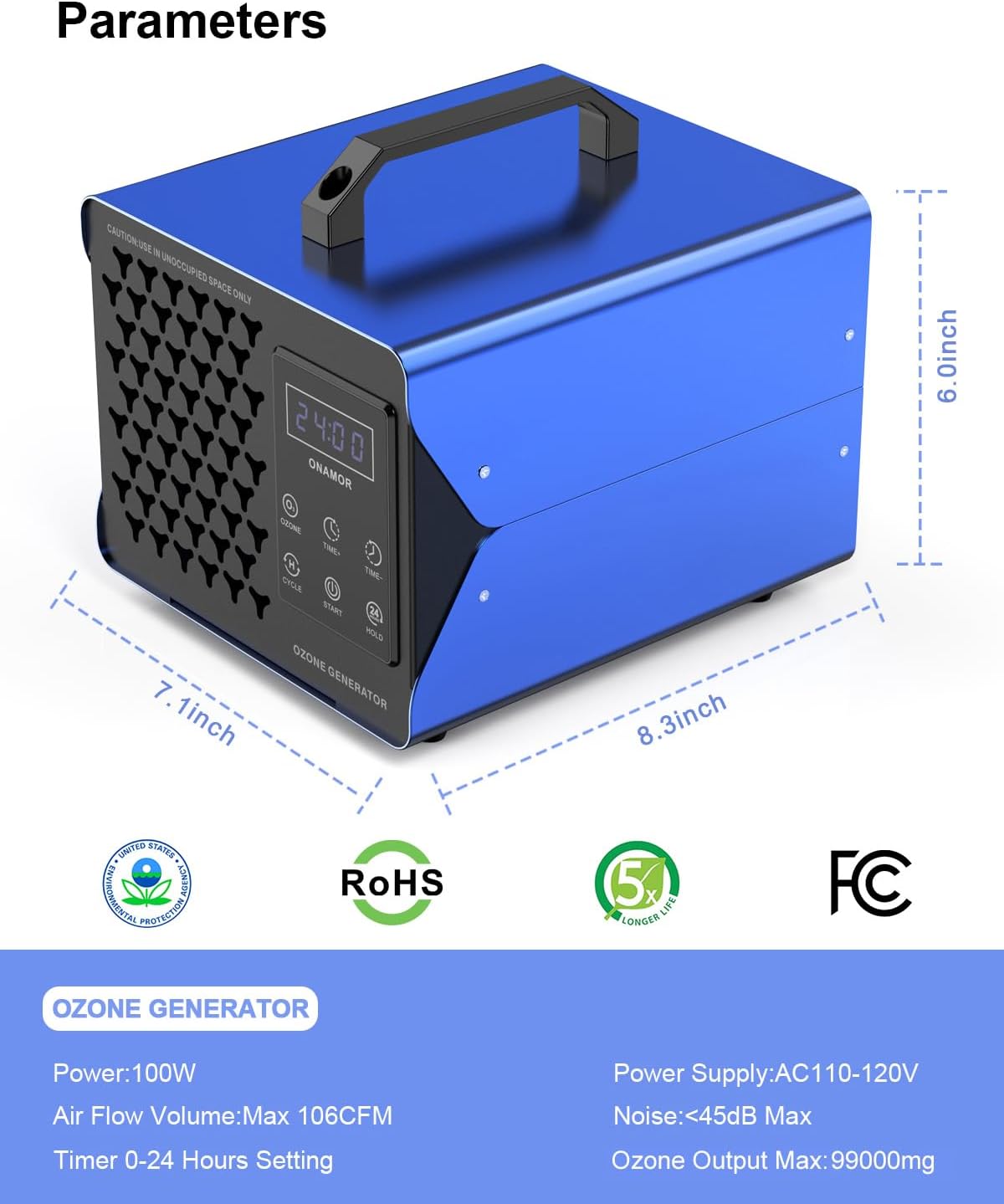
This image provides a visual representation of the ONAMOR Ozone Generator's dimensions (8.3 inches deep, 6.0 inches wide, 7.1 inches high) and highlights its certifications, including RoHS and FCC, indicating compliance with environmental and electronic standards.
8. Waranti dan Sokongan
ONAMOR is dedicated to providing high-quality products and excellent customer service.
- Waranti: The product includes a 12-Month Free Refund Service.
- Sokongan Pelanggan: If you have any questions or concerns about your ONAMOR Ozone Generator, please do not hesitate to reach out to us. We are committed to providing a satisfactory solution within 24 hours.
- Maklumat Hubungan: Please refer to the contact details provided in your physical user manual or on the official ONAMOR webtapak untuk mendapatkan maklumat sokongan yang paling terkini.
Note: Not for sale in California.
Ask a question about this manual
Ask about setup, troubleshooting, compatibility, parts, safety, or missing instructions. Manuals+ will review the question and use this page’s manual context to help answer it.