
1. Pengenalan
The AZIJYV F1 861 Smart Electronic Throttle Response Controller is designed to enhance your vehicle's driving experience by modifying the electronic throttle signal. This device aims to improve throttle response speed, reduce acceleration delay, and provide a more immediate power delivery. It offers various driving modes to suit different preferences and conditions.

Image: Visual representation of enhanced throttle response.
2. Maklumat Keselamatan
- Ensure the vehicle engine is turned off and the ignition is completely disengaged before installation or removal of the device.
- If you are unsure about any installation steps, it is recommended to seek professional assistance.
- Do not attempt to adjust the controller settings while driving, as this may cause distraction and lead to unsafe conditions.
- Verify that the controller is securely mounted and does not interfere with the accelerator pedal's operation or any other vehicle controls.
- This device is designed for specific vehicle models. Ensure compatibility before installation.
3. Kandungan Pakej
Sila sahkan bahawa semua item yang disenaraikan di bawah disertakan dalam pakej anda:
- 1 x Electronic Throttle Controller Display Screen
- 1 x Adapter Cable
- 1 x Kabel Penyambung
- 3 x Ikatan Kabel
- 1 x Manual Pengguna

Image: Complete package contents of the F1 861 controller.

Image: Close-up of individual components included in the kit.
4. Model Berkenaan
The AZIJYV F1 861 controller is compatible with a range of vehicles. Please refer to the table below to confirm your vehicle's compatibility. If your car's pedal connection matches the image, it is likely compatible.

Image: Compatibility chart for various vehicle makes and models.
Key Compatible Models:
- Ford: Raptor, F150, F350, E350, Focus (2012-), Forester, Renegade, Impala, Explorer, Taurus, Roadrunner, Mondeo (2013-), Expedition, F-150 Raptor, Mustang (2013+), F-350 Super Duty Trucks (2011+).
- Mazda: RWD (2009-2015), CX-7, Mazda5 (2012-), Mazda BT-50 (2011-), Mazda6 (2012-), Ranger (2012-).
- Landrover: 4th Generation Discovery Sport/Range Rover/Range Rover Sport/Land Rover Discovery (2015-), Land Rover Evoque (2016-).
- Lincoln: MKC (2014-), MKX (2015-).
- Jaguar: F-PACE 2.0T Renegade.
Nota: This electronic throttle controller is only applicable to models with an electronic throttle plug. Always compare your vehicle's accelerator pedal connector with the product's adapter for a precise match.
5. Produk Lebihview
The F1 861 controller features a compact design with an LED display and intuitive controls for easy operation.

Image: Explanation of display and button functions.
Paparan dan Kawalan:
- Three-digit Display: The first two digits indicate the selected driving mode (e.g., P1, P2, P3, EC, NOR). The last digit indicates the intensity level (1-9).
- Butang MOD: Press to cycle through the available driving modes.
- Butang Tolak (-): Decreases the intensity level within the current mode (1-9).
- Butang Tambah (+): Increases the intensity level within the current mode (1-9).
- iPhone Interface: The connection port for the controller.

Image: Physical dimensions of the controller.
6. Panduan Pemasangan
Follow these steps for proper installation of your electronic throttle response controller:

Image: Step-by-step installation process.
- Locate the Accelerator Pedal: Identify the electronic accelerator pedal in your vehicle.
- Unplug the Vehicle Accelerator Pedal Interface: Carefully disconnect the existing wiring harness from the accelerator pedal.
- Sambungkan Pengawal: Connect the provided adapter cable from the F1 861 controller to the vehicle's accelerator pedal interface. Ensure a secure connection.
- Pasang Pengawal: Use the provided cable ties to secure the controller and its wiring. Mount the display screen in a convenient location on your dashboard, ensuring it does not obstruct your view atau mengganggu kawalan pemanduan.
Penting: Ensure all connections are firm and the cables are routed safely away from moving parts or heat sources.
7. Operasi
Once installed, the controller is ready for use. The device will power on with the vehicle's ignition.
Menukar Mod:
- Tekan ke MODE button on the display unit to cycle through the available driving modes (P1, P2, P3, EC, NOR).
- The selected mode will be displayed on the screen.
Melaraskan Intensiti:
- Within P1, P2, P3, and EC modes, you can adjust the intensity level from 1 (weakest) to 9 (strongest).
- Gunakan Tambahan (+) button to increase the intensity.
- Gunakan Tolak (-) button to decrease the intensity.
- The NOR (Normal) mode does not have adjustable intensity levels as it replicates the original factory throttle response.
8. Mod Memandu
The F1 861 controller offers 5 distinct driving modes, each with 9 adjustable intensity levels (except NOR mode), allowing you to customize your vehicle's throttle response.

Imej: Selesaiview of the 9-DRIVE modes.
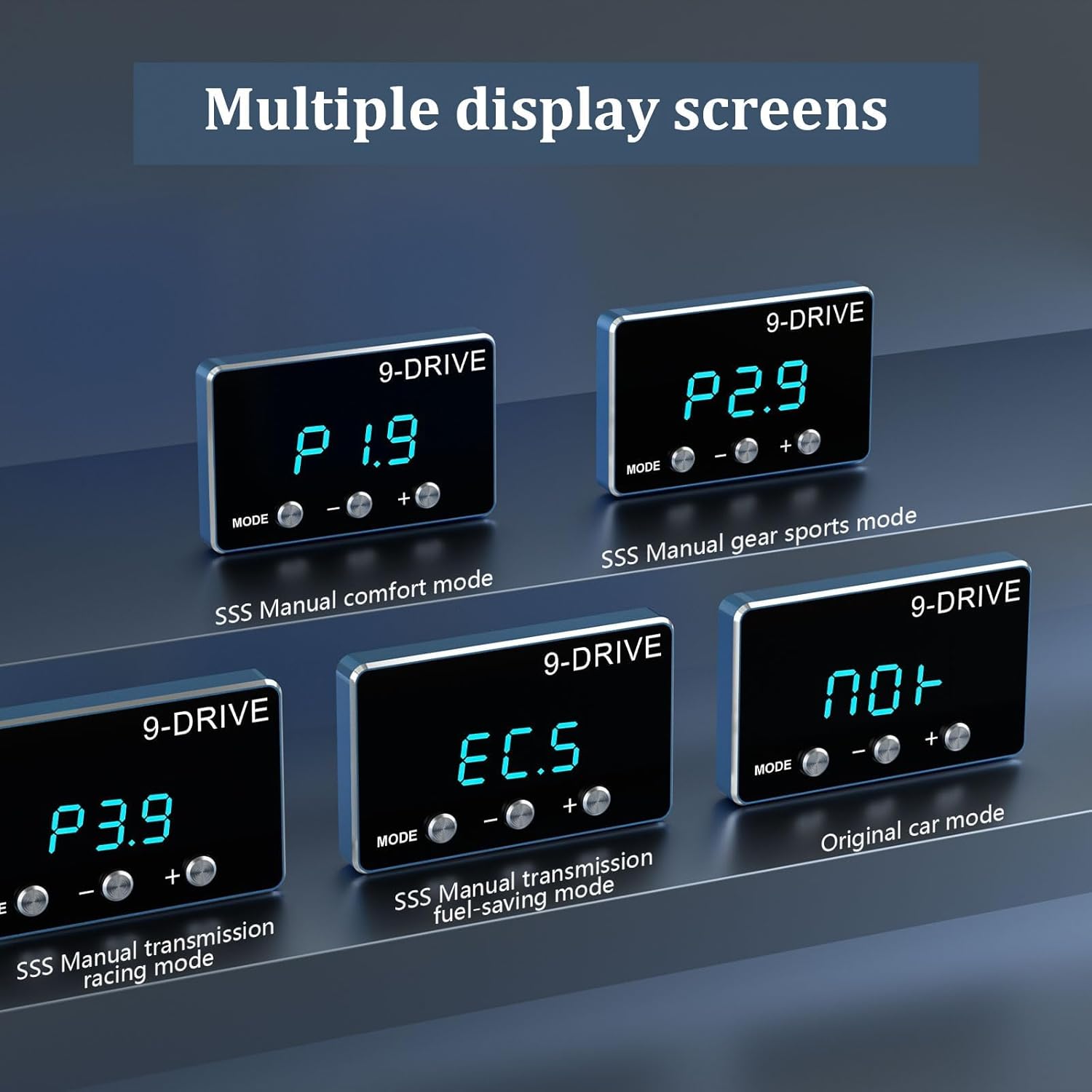
Imej: Cthamples of display screens for various modes.
- NOR (Normal) Mode: This is the original factory throttle response setting. It provides no modification to the vehicle's standard acceleration characteristics.
- P1 (Comfort) Mode: Designed for a smoother, more relaxed driving experience. It offers a gentle increase in throttle sensitivity compared to NOR mode, suitable for daily commuting or city driving. (Adjustable from P1.1 to P1.9)
- P2 (Sport) Mode: Provides a noticeable increase in throttle response, making the vehicle feel more agile and responsive. Ideal for spirited driving or when more immediate acceleration is desired. (Adjustable from P2.1 to P2.9)
- P3 (Racing) Mode: Delivers the most aggressive throttle response, minimizing lag for maximum acceleration. This mode is intended for track use or situations where peak performance is required. (Adjustable from P3.1 to P3.9)
- EC (Fuel Saving) Mode: Optimizes throttle input for improved fuel efficiency. This mode reduces throttle sensitivity, encouraging smoother acceleration and potentially lowering fuel consumption. (Adjustable from EC.1 to EC.9)
9. Penyelesaian masalah
If you encounter issues with your AZIJYV F1 861 controller, please refer to the following common solutions:
- Tiada Kuasa/Paparan Mati:
- Periksa semua sambungan kabel untuk memastikan ia dipasang dengan selamat.
- Sahkan bahawa penyalaan kenderaan dihidupkan.
- No Change in Throttle Response:
- Ensure the controller is not in NOR (Normal) mode. Switch to P1, P2, P3, or EC mode and adjust the intensity.
- Recheck all connections to the accelerator pedal. A loose connection can prevent the device from functioning.
- Check Engine Light / Limp Mode:
- Immediately turn off the vehicle and disconnect the throttle controller.
- Reconnect the original accelerator pedal wiring.
- Start the vehicle and check if the warning lights clear. If they persist, consult a qualified mechanic.
- Ensure the controller is compatible with your specific vehicle model and year. Incompatible devices can cause system errors.
- Butang Tidak Responsif:
- Restart the vehicle to reset the controller.
- Ensure the buttons are clean and free from debris.
Jika langkah ini tidak menyelesaikan isu ini, sila hubungi sokongan pelanggan untuk mendapatkan bantuan lanjut.
10. Spesifikasi
| Ciri | Perincian |
|---|---|
| Jenama | AZIJYV |
| Model | F1 861 |
| bahan | plastik |
| Jenis Paparan | LED |
| Berat Barang | 1 Gram (0.035 auns) |
| Dimensi Pakej | 5.59 x 3.5 x 2.13 inci |
| UPC | 743430908026 |
| warna | Biru |
11. Waranti dan Sokongan
For warranty information or technical support, please refer to the documentation provided with your purchase or contact AZIJYV customer service through the retailer where the product was purchased. Keep your proof of purchase for warranty claims.