1. Pengenalan
Thank you for choosing the Hiwill HW210 Soundbar with Subwoofer. This 2.1 channel surround sound system is designed to enhance your audio experience for televisions, PCs, gaming consoles, and other compatible devices. This manual provides detailed instructions for setup, operation, and maintenance to ensure optimal performance and longevity of your product. Please read this manual thoroughly before use and retain it for future reference.

Image 1.1: The Hiwill HW210 Soundbar and Subwoofer system, shown with a television for illustrative purposes.
2. Maklumat Keselamatan
Untuk mengurangkan risiko kejutan elektrik, kebakaran atau kerosakan pada unit, sila patuhi langkah keselamatan berikut:
- Jangan dedahkan perkakas ini kepada hujan atau lembapan.
- Jangan letakkan objek yang diisi dengan cecair, seperti pasu, pada perkakas.
- Pastikan pengudaraan yang betul. Jangan sekat sebarang bukaan pengudaraan.
- Jangan pasang berhampiran mana-mana sumber haba seperti radiator, daftar haba, dapur, atau radas lain (termasuk amppenghidup) yang menghasilkan haba.
- Lindungi kabel kuasa dari berjalan atau dicubit, terutama pada palam, wadah kemudahan, dan titik di mana mereka keluar dari perkakas.
- Hanya gunakan lampiran/aksesori yang ditentukan oleh pengilang.
- Cabut plag perkakas ini semasa ribut petir atau apabila tidak digunakan untuk jangka masa yang lama.
- Rujuk semua servis kepada kakitangan perkhidmatan yang berkelayakan. Servis diperlukan apabila radas telah rosak dalam apa jua cara, seperti kord bekalan kuasa atau palam rosak, cecair telah tertumpah atau objek jatuh ke dalam radas, radas telah terdedah kepada hujan atau lembapan, tidak beroperasi seperti biasa. , atau telah digugurkan.
3. Kandungan Pakej
Sila pastikan semua item ada dan dalam keadaan baik:
- Hiwill Soundbar
- Subwufer Berwayar
- Alat Kawalan Jauh
- Penyesuai Kuasa
- Optical Cable (may vary by region)
- AUX Cable (may vary by region)
- Kit Pemasangan Dinding (skru, sauh)
- Manual Pengguna (dokumen ini)
4. Produk Lebihview
4.1 Ciri-ciri Bar Bunyi
- Ultra-slim design (3.8 cm height)
- Integrated orbital aluminum diaphragm speakers
- Built-in HiFi and DSP technology for immersive 3D surround sound
- Maximum output power: 120 Watts
- Tahap tekanan bunyi: 106 dB
- Bluetooth 5.3 for wireless streaming
- Multiple input options: HDMI ARC, Optical, AUX, USB
- 3 adjustable EQ modes: Game, Movie, Music
- Adjustable bass and treble levels
4.2 Subwoofer Features
- 9-liter capacity for deep, resonant bass
- Wired connection to the soundbar for stable audio transmission
4.3 Kawalan dan Penunjuk
The soundbar features an integrated display and control buttons, typically located on the top or front panel. The remote control provides full functionality.
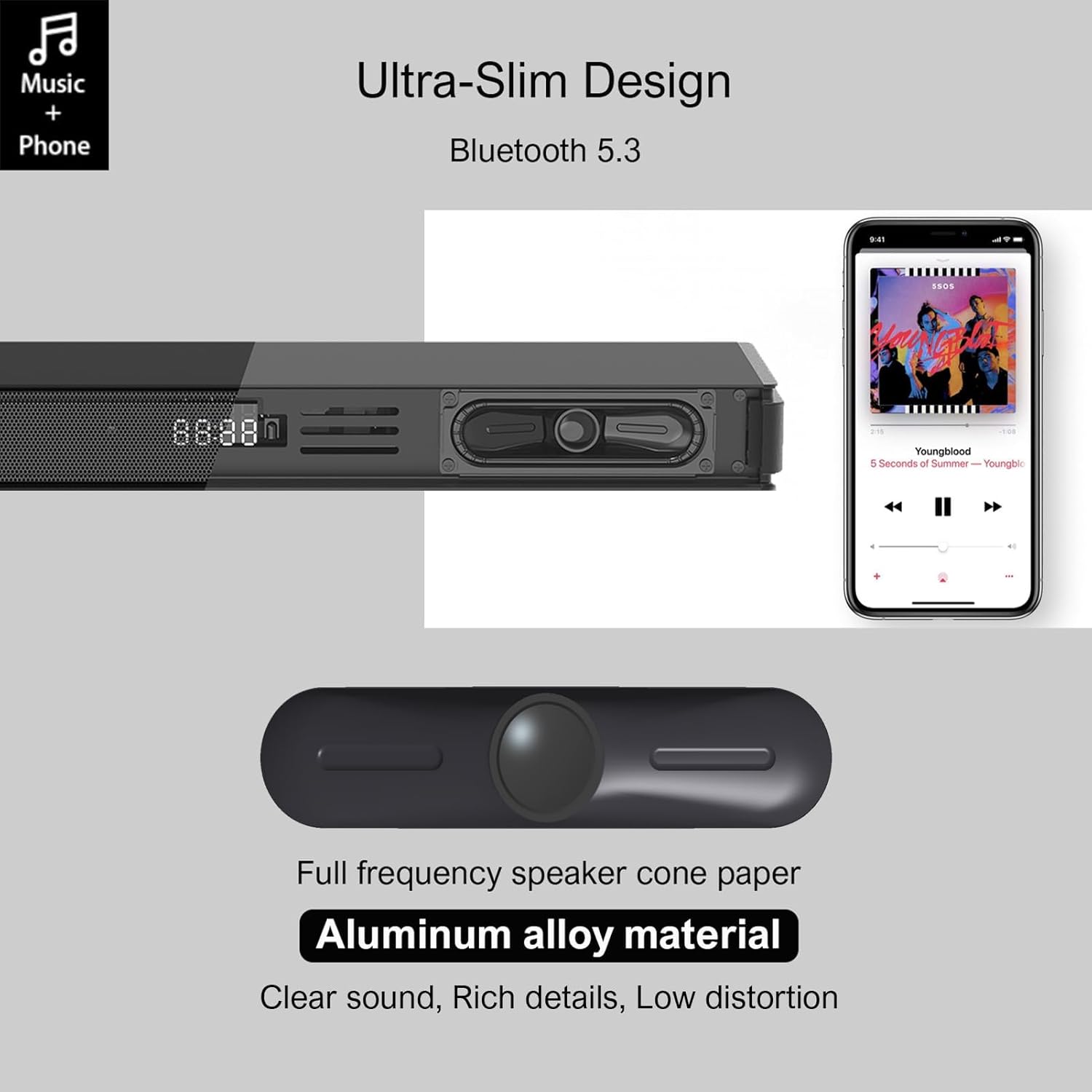
Image 4.1: Detail of the soundbar's ultra-slim design, showing the front display and integrated speakers.
4.4 Sambungan Panel Belakang
The rear panel of the soundbar provides various ports for connecting to your audio sources and power.

Imej 4.2: Belakang view of the soundbar showing input ports: AUX, HDMI ARC, USB, Optical, Subwoofer Out, and DC In.
- AUX (3.5mm): Untuk menyambungkan peranti dengan output audio 3.5mm.
- ARC (HDMI): For connecting to a TV's HDMI ARC port. Supports CEC for unified control.
- USB: Untuk memainkan audio files daripada pemacu USB.
- OPTIKAL: For connecting to a TV or other device with an optical audio output.
- SUB KELUAR: For connecting the wired subwoofer.
- DC DALAM: Untuk menyambungkan penyesuai kuasa.
5. Persediaan
5.1 Pilihan Penempatan
The Hiwill HW210 soundbar offers flexible placement options to suit your home entertainment setup.

Image 5.1: Illustrates placing the soundbar on a tabletop in front of the TV or mounting it on the wall below the TV.
- Peletakan Atas Meja: Place the soundbar on a stable, flat surface directly in front of your TV. Ensure it does not obstruct the TV's remote sensor.
- Pemasangan Dinding: The soundbar can be mounted on the wall below your TV. Use the provided wall mounting kit and follow these steps:
- Mark the desired mounting positions on the wall, ensuring the soundbar is centered with your TV.
- Gerudi lubang pandu pada kedudukan yang ditanda.
- Insert wall anchors (if necessary for your wall type).
- Secure the mounting brackets (if separate) or the soundbar directly using screws.
- Penempatan subwufer: Place the subwoofer on the floor near the soundbar. Experiment with placement to find the best bass response for your room.
5.2 Menyambung ke Kuasa
- Connect the power adapter to the DC IN port on the soundbar's rear panel.
- Palamkan hujung satu lagi penyesuai kuasa ke dalam salur keluar dinding.
- Connect the wired subwoofer cable to the SUB OUT port on the soundbar.
5.3 Menyambung kepada Sumber Audio
Choose one of the following connection methods based on your device:
- HDMI ARC (Disyorkan untuk TV):
- Connect one end of an HDMI cable (not included) to the ARC port on the soundbar.
- Sambungkan hujung yang satu lagi ke port HDMI ARC pada TV anda.
- Ensure HDMI CEC is enabled in your TV's settings for unified control.
- Optik:
- Connect the optical cable (included) to the OPTICAL port on the soundbar.
- Connect the other end to the optical audio output port on your TV or other device.
- Ensure your TV's audio output is set to "PCM" if you experience no sound.
- AUX (3.5mm):
- Connect the 3.5mm AUX cable (included) to the AUX port on the soundbar.
- Connect the other end to the headphone jack or AUX output of your device.
- USB:
- Masukkan pemacu kilat USB yang mengandungi audio files ke dalam port USB pada bar bunyi.
6. Arahan Operasi
6.1 Hidupkan/Mati Kuasa
- Tekan ke kuasa butang pada bar bunyi atau alat kawalan jauh untuk menghidupkan atau mematikan unit.
6.2 Memilih Sumber Input
- Tekan ke Input button on the remote control or the soundbar to cycle through available input sources (ARC, OPT, AUX, USB, BT). The selected input will be displayed on the soundbar's screen.
6.3 Berpasangan Bluetooth
- Turn on the soundbar and select the "BT" input source. The soundbar will enter pairing mode, indicated by a flashing "BT" on the display.
- Pada peranti mudah alih anda, dayakan Bluetooth dan cari peranti yang tersedia.
- Select "Hiwill HW210" (or similar name) from the list of devices.
- Once paired, the soundbar will emit a confirmation tone, and "BT" will stop flashing.
- To disconnect, turn off Bluetooth on your device or select a different input source on the soundbar.
6.4 Kawalan Kelantangan
- Gunakan Kelantangan Naik (+) dan Perlahankan suara (-) butang pada bar bunyi atau alat kawalan jauh untuk melaraskan kelantangan induk.
- Tekan ke bisu button on the remote control to mute or unmute the sound.
6.5 EQ Modes and Tone Adjustment
The soundbar features three preset equalizer modes and adjustable bass/treble settings.

Image 6.1: Visual representation of the three equalizer modes: Game, Movie, and Music, optimized for different audio content.
- Tekan ke EQ button on the remote control to cycle through the preset modes: Permainan, Filem, dan Muzik.
- Gunakan Bes +/- buttons on the remote control to adjust the bass level.
- Gunakan Tiga kali ganda +/- buttons on the remote control to adjust the treble level.
7. Penyelenggaraan
- Pembersihan: Use a soft, dry cloth to clean the surface of the soundbar and subwoofer. Do not use liquid cleaners or abrasive materials.
- Storan: Jika menyimpan unit untuk tempoh yang lama, cabut palamnya dari salur keluar kuasa dan simpan di tempat yang sejuk dan kering.
- Elakkan halangan: Ensure that the speaker grilles and ventilation openings are not blocked by dust or other objects.
8. Penyelesaian masalah
| Masalah | Kemungkinan Punca | Penyelesaian |
|---|---|---|
| Tiada kuasa | Kord kuasa tidak disambungkan; Salur keluar kuasa tidak aktif | Pastikan kord kuasa disambungkan dengan kukuh; Cuba salur kuasa yang lain. |
| Tiada bunyi | Incorrect input source selected; Volume too low; Cables not connected properly; TV audio output settings incorrect. | Select the correct input source; Increase volume; Check all audio cables are securely connected; For Optical/ARC, ensure TV audio output is set to PCM. |
| Penggandingan Bluetooth gagal | Bar bunyi tidak dalam mod berpasangan; Peranti terlalu jauh; Gangguan. | Ensure soundbar is in BT mode and flashing; Move device closer; Turn off other Bluetooth devices. |
| Alat kawalan jauh tidak berfungsi | Bateri berkurangan; Halangan antara alat kawalan jauh dan bar bunyi. | Replace remote control batteries; Ensure clear line of sight to the soundbar's sensor. |
| Kualiti bunyi yang lemah | Incorrect EQ mode; Source audio quality; Cable issues. | Adjust EQ modes and bass/treble settings; Try a different audio source; Check/replace audio cables. |
9. Spesifikasi
| Nama Model | Hiwill HW210 Soundbar |
| Jenis Pembesar Suara | Bar bunyi dengan Subwufer Berwayar |
| Konfigurasi Bunyi Sekeliling | 2.1 Saluran |
| Kuasa Output Pembesar Suara Maksimum | 120 Watt |
| Teknologi Ketersambungan | Bluetooth 5.3, HDMI ARC, AUX (3.5mm), USB, Optical |
| Mod Keluaran Audio | Keliling |
| Ciri Khas | High-resolution audio support, 3 EQ modes, Adjustable Bass/Treble, Wall-mountable |
| Penggunaan yang Disyorkan | TV, Gaming Consoles, Computers, Smartphones, Tablets, Music Players, DVD Players, Home Theater |
10. Waranti dan Sokongan
Hiwill products are designed and manufactured to the highest quality standards. For detailed warranty information, please refer to the warranty card included in your package or visit the official Hiwill website. If you encounter any issues or require technical assistance, please contact Hiwill customer support through the contact information provided on the product packaging or webtapak.
Please have your model number (HW210) and purchase date ready when contacting support.