
BOLOXA A17
Manual Pengguna Fon Telinga Wayarles BOLOXA A17
Model: A17 | Brand: BOLOXA
pengenalan
Thank you for choosing the BOLOXA A17 Wireless Earbuds. These Bluetooth headphones are designed for an exceptional audio experience, offering extended playback, robust water resistance, and a secure fit ideal for sports and active lifestyles. This manual provides detailed instructions to help you get the most out of your new earbuds.

The BOLOXA A17 Wireless Earbuds and their charging case.
Kandungan Pakej
Sila tandai kotak untuk item berikut:
- Wireless Earbud (Left & Right)
- Wireless Charging Case with Dual Digital Display
- Eartips (Sizes: Small, Medium, Large)
- Kabel Pengecas USB-C
- Manual Pengguna (dokumen ini)
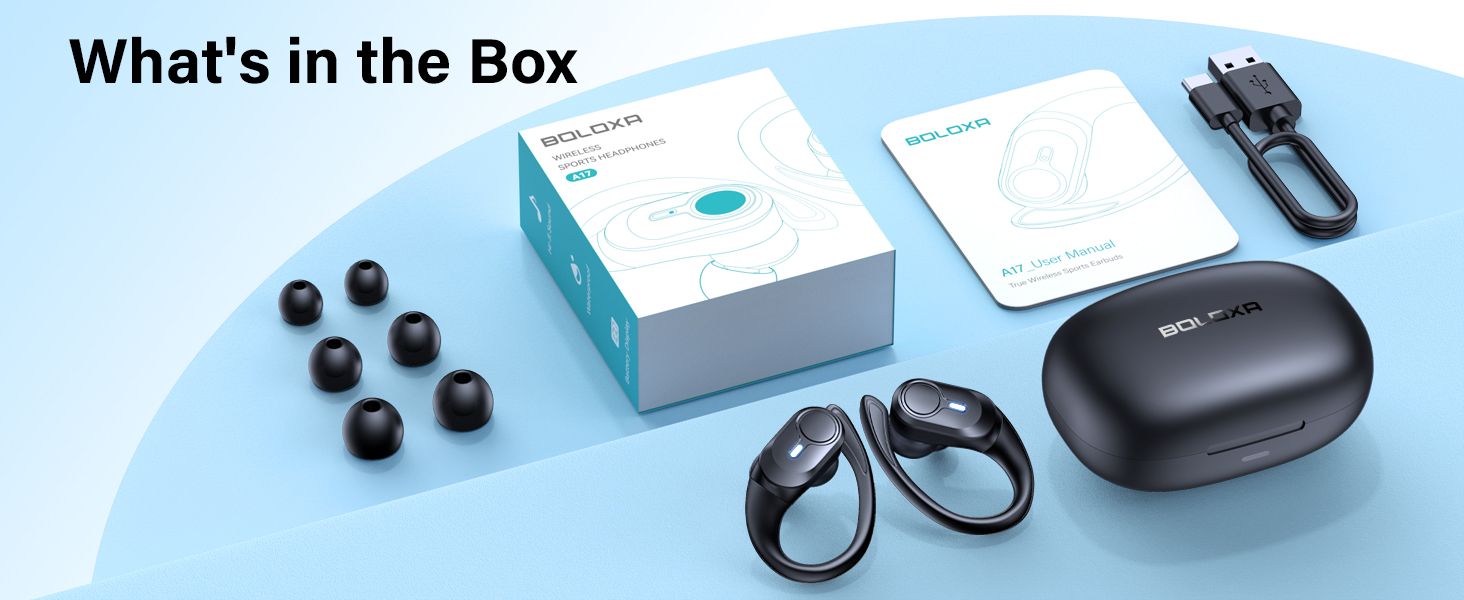
All components included in the BOLOXA A17 Wireless Earbuds package.
Ciri-ciri Utama
- Masa Main Dilanjutkan: Enjoy up to 9 hours of playback on a single charge, with the wireless charging case extending total usage to an impressive 70 hours. The dual LED display on the case will show real-time power levels for both the case and individual earbuds.

Visual representation of the extended battery life and charging case capacity.
- Padanan Selamat & Selesa: Designed with flexible ear hooks and three sizes of soft ear tips (S, M, L), these earbuds provide a secure and comfortable fit, making them ideal for vigorous workouts, daily commutes, and extended listening sessions without discomfort.

The ergonomic earhook design ensures a stable fit during physical activity.
- Rintangan Air IPX7: Built to withstand sweat and rain, the IPX7 waterproof rating ensures durability and reliability during intense workouts or outdoor activities.

The IPX7 rating protects your earbuds from moisture.
- Audio Jelas: Featuring 13mm chamber speaker driver units, the A17 earbuds deliver exceptional audio performance with deep bass and clear high notes. Built-in microphones ensure clear voice transmission for hassle-free calls.

The 13mm drivers provide rich, high-fidelity sound.
- Pilihan Pengecasan Dwi: The charging case supports both USB-C charging (cable included) and advanced wireless charging, offering convenience and flexibility. A quick 15-minute charge provides one hour of use.

Charge your earbuds conveniently with either USB-C or wireless charging.
- Bluetooth 5.3 & Auto Pairing: Utilizing Bluetooth 5.3, the earbuds offer a faster and more stable connection. They automatically pair with your device after the first successful connection simply by taking them out of the charging case.

Quick and seamless pairing with Bluetooth 5.3 technology.
Panduan Persediaan
1. Pengecasan Awal
Before first use, ensure your BOLOXA A17 earbuds and charging case are fully charged. Place the earbuds into the charging case. The LED display on the case will indicate the charging status.
- Pengecasan USB-C: Sambungkan kabel USB-C yang disediakan ke port pengecasan pada bekas dan ke sumber kuasa.
- Pengecasan Tanpa Wayar: Letakkan bekas pengecas pada pad pengecas tanpa wayar yang serasi (tidak disertakan).
A full charge for the earbuds provides approximately 9 hours of playback. The case provides multiple charges for a total of 70 hours.
2. Berpasangan Bluetooth
- Pastikan fon telinga anda dicas.
- Buka bekas pengecas. Fon telinga akan memasuki mod berpasangan secara automatik.
- Pada peranti anda (telefon pintar, tablet, komputer), pergi ke tetapan Bluetooth dan hidupkan Bluetooth.
- Cari untuk "A17" in the list of available devices and select it to connect.
- Setelah disambungkan, anda akan mendengar nada pengesahan dan fon telinga akan sedia untuk digunakan.
After the initial successful pairing, the earbuds will automatically connect to your last paired device when taken out of the case.
Arahan Operasi
The BOLOXA A17 earbuds feature a multi-functional button for easy control of various functions:
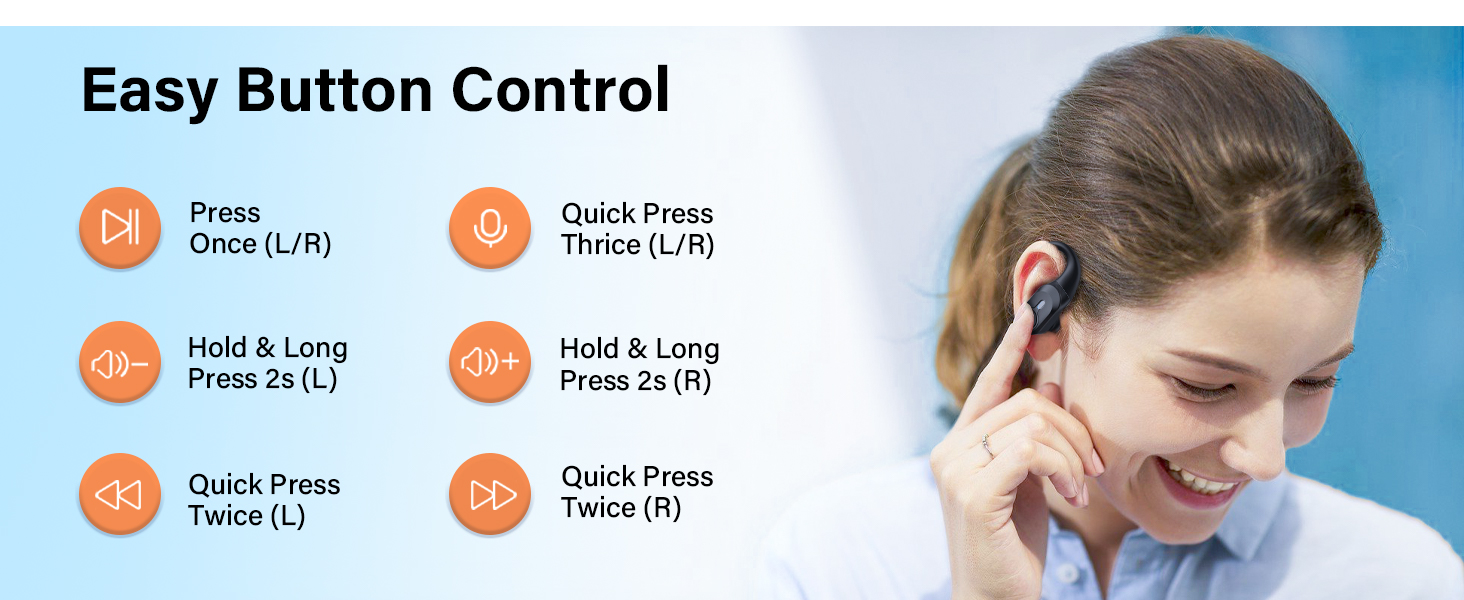
Berakhirview of the easy button controls on the earbuds.
| Tindakan | Fungsi |
|---|---|
| Press Once (L/R) | Main/Jeda Muzik, Jawab/Tamatkan Panggilan |
| Quick Press Thrice (L/R) | Aktifkan Pembantu Suara |
| Hold & Long Press 2s (Left Earbud) | Kelantangan Kurang |
| Hold & Long Press 2s (Right Earbud) | Kelantangan Naik |
| Quick Press Twice (Left Earbud) | Trek Sebelumnya |
| Quick Press Twice (Right Earbud) | Trek Seterusnya |
Using Mono Mode
The earbuds support both binaural (stereo) and mono modes. You can use either the left or right earbud independently for music or calls. Simply take one earbud out of the case, and it will automatically connect.
Penyelenggaraan dan Penjagaan
- Pembersihan: Regularly clean the earbuds and charging contacts with a soft, dry cloth. Avoid using harsh chemicals or abrasive materials.
- Tahan Air: While IPX7 rated for water resistance against sweat and rain, the earbuds are not designed for swimming or submersion. Ensure earbuds are dry before placing them back in the charging case to prevent damage to charging points.
- Storan: Simpan fon telinga dalam bekas pengecasnya apabila tidak digunakan untuk melindunginya dan memastikan ia dicas.
- Suhu: Avoid exposing the earbuds to extreme temperatures (hot or cold) or direct sunlight for prolonged periods.
Menyelesaikan masalah
- Fon telinga tidak berpasangan/bersambung:
- Pastikan kedua-dua fon telinga dicas.
- Matikan Bluetooth pada peranti anda, kemudian hidupkan semula.
- Forget "A17" from your device's Bluetooth list and try pairing again.
- Place both earbuds back into the charging case, close the lid for a few seconds, then open it to reset.
- Hanya satu fon telinga berfungsi:
- Pastikan kedua-dua fon telinga dicas.
- Letakkan kedua-dua fon telinga kembali ke dalam bekas pengecasan, tutup penutupnya, dan kemudian bukanya semula. Ini selalunya akan menyegerakkannya semula.
- Check if the earbuds are properly seated in the charging case and making contact with the charging pins.
- Kelantangan rendah atau kualiti bunyi yang lemah:
- Laraskan kelantangan pada kedua-dua peranti anda dan fon telinga.
- Ensure the ear tips are clean and free of debris.
- Cuba pelbagai saiz hujung telinga untuk memastikan saluran telinga anda tersumbat dengan betul.
- Isu pengecasan:
- Ensure the USB-C cable is securely connected or the wireless charging pad is properly aligned.
- Check the charging contacts on both the earbuds and the case for any dirt or obstruction.
- Cuba kabel pengecasan atau sumber kuasa lain.
Spesifikasi
| Ciri | Perincian |
|---|---|
| Nama Model | A17 |
| Jenama | BOLOXA |
| Teknologi Ketersambungan | Wayarles (Bluetooth 5.3) |
| Penempatan Telinga | Atas Telinga |
| Faktor Bentuk | Atas Telinga |
| Kawalan Bunyi | Pengasingan Bunyi |
| Hayat Bateri (Earbud) | Sehingga 9 Jam |
| Jumlah Masa Main dengan Kes | Sehingga 70 Jam |
| Tahap Ketahanan Air | Tahan Air IPX7 |
| Saiz Pemacu Audio | 13 Milimeter |
| Julat Kekerapan | 20 Hz - 20,000 Hz |
| Julat Bluetooth | 10 Meter |
| Jenis Kawalan | Volume Control, Button Control |
| bahan | plastik |
| Berat Barang | 163.3 Gram (5.8 auns) |
Waranti dan Sokongan
BOLOXA products are manufactured to the highest quality standards. For information regarding warranty coverage, technical support, or customer service, please refer to the contact information provided on the product packaging or visit the official BOLOXA webtapak.
For additional assistance, you may also contact the seller directly through the platform where the product was purchased.
Ask a question about this manual
Ask about setup, troubleshooting, compatibility, parts, safety, or missing instructions. Manuals+ will review the question and use this page’s manual context to help answer it.