1. Arahan Keselamatan
Sila baca semua arahan dengan teliti sebelum pemasangan dan penggunaan. Simpan manual ini untuk rujukan pada masa hadapan.
1.1 Keselamatan Elektrik
- Sentiasa putuskan sambungan kuasa pada pemutus litar sebelum pemasangan atau servis.
- Installation must be performed by a qualified electrician or a person with electrical experience.
- Pastikan semua sambungan pendawaian selamat dan mematuhi kod elektrik tempatan dan nasional.
- Jangan pasang kipas di lokasi yang bilahnya boleh terkena objek atau orang.
1.2 Keselamatan Am
- Use only Kviflon-approved replacement parts.
- Do not bend the fan blades during installation or cleaning.
- Pastikan struktur pelekap dapat menyokong berat kipas (kira-kira 9 paun).
- Jauhkan kanak-kanak daripada kipas semasa operasi.
2. Kandungan Pakej
Pastikan semua komponen ada sebelum memulakan pemasangan:
- Pemasangan Motor Kipas
- Kanopi
- Screw Bag (Mounting Hardware)
- Bilah Kipas (5 keping)
- Lampteduh
- Penerima
- Alat Kawalan Jauh (2 bateri AAA disertakan)
- Arahan Pemasangan (Manual ini)

3. Spesifikasi
| Ciri | Spesifikasi |
|---|---|
| Jenama | Kviflon |
| Nama Model | 8217-RGB |
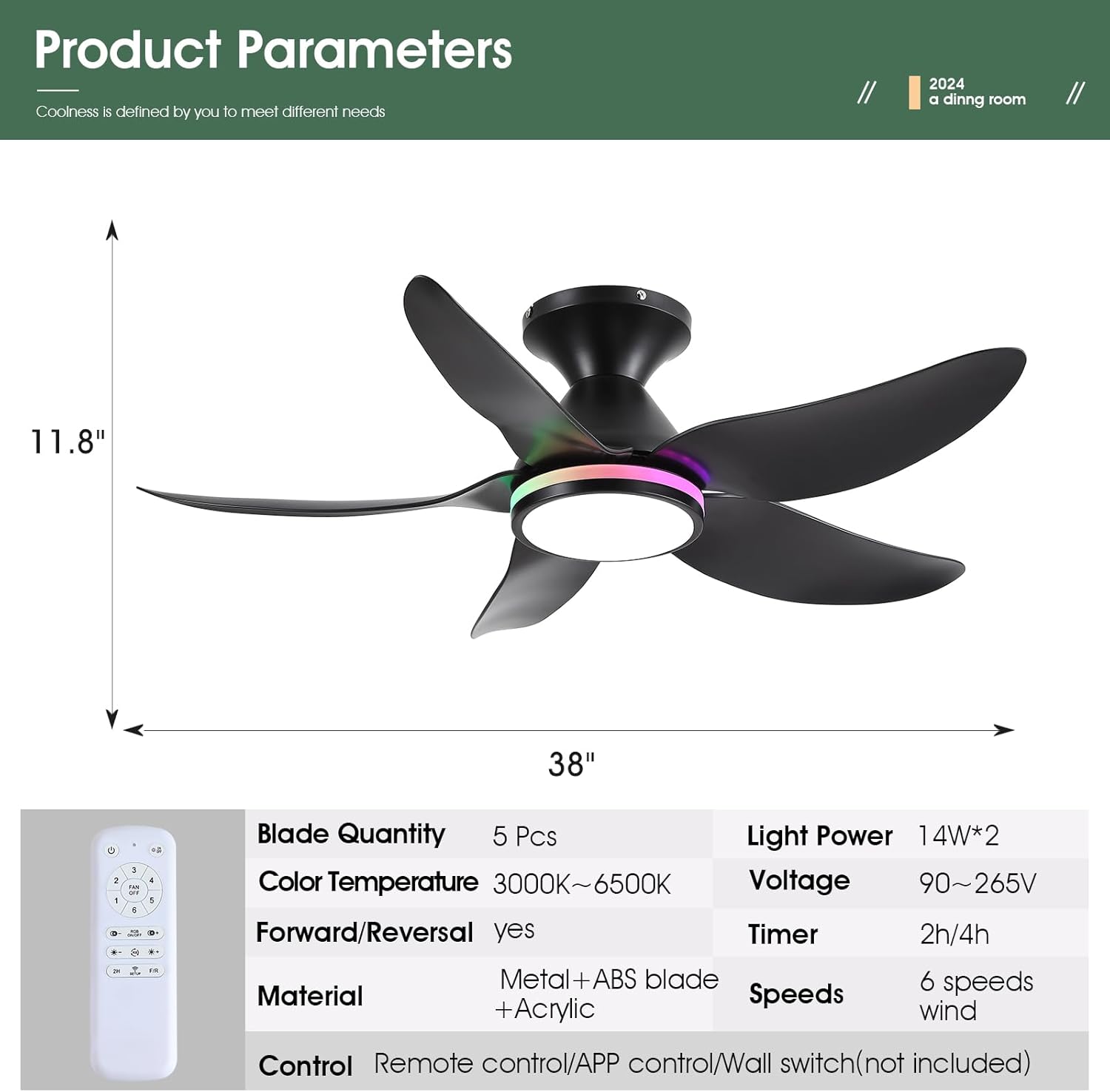
| Dimensi Produk | 38"D x 38"W x 11.8"H |
| Bilangan Bilah | 5 |
| Jenis Motor | Motor DC |
| Kelajuan Kipas | 6 |
| Pencahayaan | Dimmable White (3000K-6500K) + RGB Ring Light |
| Kaedah Kawalan | Remote Control, Mobile APP |
| Ciri Khas | Reversible, Timer (2/4 hours), Night Light Mode |
| Tahap Kebisingan | Kurang daripada 30 dB |
| Berat Barang | 9 paun |

4. Panduan Pemasangan
Follow these steps for a safe and successful installation. A safety hook is included for ease of installation by one person.
4.1 Pra-Pemasangan
- Matikan kuasa pada pemutus litar.
- Ensure the mounting location is structurally sound and can support the fan's weight.
4.2 Pemasangan Braket Pemasangan
- Pasang pendakap pelekap pada kotak simpang siling menggunakan skru yang disediakan. Pastikan ia diikat dengan selamat.
4.3 Pendawaian
- Connect the fan's wiring to the household wiring according to the wiring diagram in the manual. Match neutral (white), live (black), and ground wires.
- Connect the receiver module to the fan and household wiring as instructed.
4.4 Blade and Light Kit Assembly
- Attach the 5 fan blades to the motor assembly using the provided screws. Ensure they are firmly secured.
- Connect the LED light module to the fan's wiring.
- Selamatkan lampteduhan pada badan kipas.
4.5 Perhimpunan Akhir
- Carefully lift the fan assembly and hang it on the safety hook of the mounting bracket.
- Connect the remaining wires (if any) and tuck them neatly into the junction box.
- Secure the canopy to the mounting bracket with the screws.


5. Arahan Operasi
5.1 Fungsi Kawalan Jauh
The included remote control provides full functionality for the fan and lights:
- Semua Dimatikan: Turns off both fan and lights.
- Nyala / Mati: Toggles the main light.
- Kipas Mati: Mematikan kipas.
- Kawalan Kelajuan 6: Adjusts fan speed from 1 (low) to 6 (high).
- RGB Hidup/Mati: Toggles the RGB ring light.
- Suhu Warna +/-: Adjusts white light color temperature (3000K Warm, 4500K Natural, 6500K Cool).
- Kecerahan +/-: Dims or brightens the main white light.
- RGB Changing: Cycles through RGB colors.
- Pemasa 2H/4J: Menetapkan kipas supaya mati secara automatik selepas 2 atau 4 jam.
- F/R (Forward/Reverse): Changes fan blade direction for summer (downdraft) or winter (updraft) modes.
- Code Matching (Setup): Used for pairing the remote with the fan.


5.2 Persediaan Kawalan Apl
To control the fan via your smartphone, download the companion app:
- Scan the QR code provided in the manual or product images to download the 'FanLamp Pro' app.
- Buka apl dan ikut arahan pada skrin untuk menambah peranti baharu.
- Ensure the fan is powered on. Within 5 seconds of powering on, press the pairing button in the app to connect. The fan lights will flash to indicate successful connection.
5.3 Fan Speed and Direction
Kipas ini menawarkan 6 kelajuan untuk memenuhi pelbagai keperluan:
- Kelajuan 1-2: Gentle airflow, suitable for sleeping.
- Kelajuan 3-4: Natural wind, ideal for general comfort.
- Kelajuan 5-6: Strong wind, for maximum cooling.
Use the F/R button on the remote or the app to switch between summer (downdraft) and winter (updraft) modes.


5.4 Mod Pencahayaan
The fan features versatile lighting options:
- Dimmable White Lights: Adjust brightness from 0% to 100% and choose between 3 color temperatures (Cool White 6500K, Natural Light 4500K, Warm Light 3000K).
- Independent RGB Ring Lights: The side RGB aperture can be controlled independently, offering various colors and modes.
- Mod Cahaya Malam: Tetapan khusus untuk pencahayaan aras rendah.


6. Penyelenggaraan
Penyelenggaraan tetap memastikan prestasi optimum dan jangka hayat kipas siling anda.
- Pembersihan: Gunakan yang lembut, damp cloth to clean the fan blades and light cover. Do not use abrasive cleaners or solvents.
- Mengetatkan Skru: Periksa dan ketatkan semua skru pada bilah kipas dan perkakasan pelekap secara berkala untuk mengelakkan goyangan dan bunyi bising.
- Penyingkiran habuk: Dust the fan motor housing and blades regularly to prevent accumulation, which can affect performance and cause overheating.
7. Penyelesaian masalah
Jika anda menghadapi masalah, rujuk kepada masalah dan penyelesaian biasa berikut:
| Masalah | Kemungkinan Punca | Penyelesaian |
|---|---|---|
| Kipas tidak bermula | No power, loose wiring, remote not paired | Check circuit breaker, ensure connections are secure, re-pair remote/app. |
| Lampu tidak berfungsi | Loose wiring, LED module failure | Check light wiring connections, contact support if LED module is faulty. |
| Kipas bergoyang | Loose blades, uneven installation | Tighten all blade screws, ensure mounting bracket is level and secure. |
| Remote/App not responding | Low batteries, pairing issue, signal interference | Replace remote batteries, re-pair the remote/app, reduce interference sources. |
| Kipas membuat bising | Loose screws, motor issue | Check and tighten all screws, ensure blades are clean and balanced. |
8. Waranti dan Sokongan
Kviflon provides technical support for its products. If you encounter any problems not covered in this manual, please contact Kviflon customer service for assistance. Refer to your purchase documentation for specific warranty details.