
1. Pengenalan
This manual provides comprehensive instructions for the installation, operation, maintenance, and troubleshooting of the Frigoglass PJEZS0G100 Temperature Control unit. This device is designed for precise temperature management in various industrial and commercial applications, particularly within food service equipment.
Please read this manual thoroughly before attempting to install or operate the unit to ensure safe and efficient performance. Keep this manual for future reference.
2. Produk Lebihview
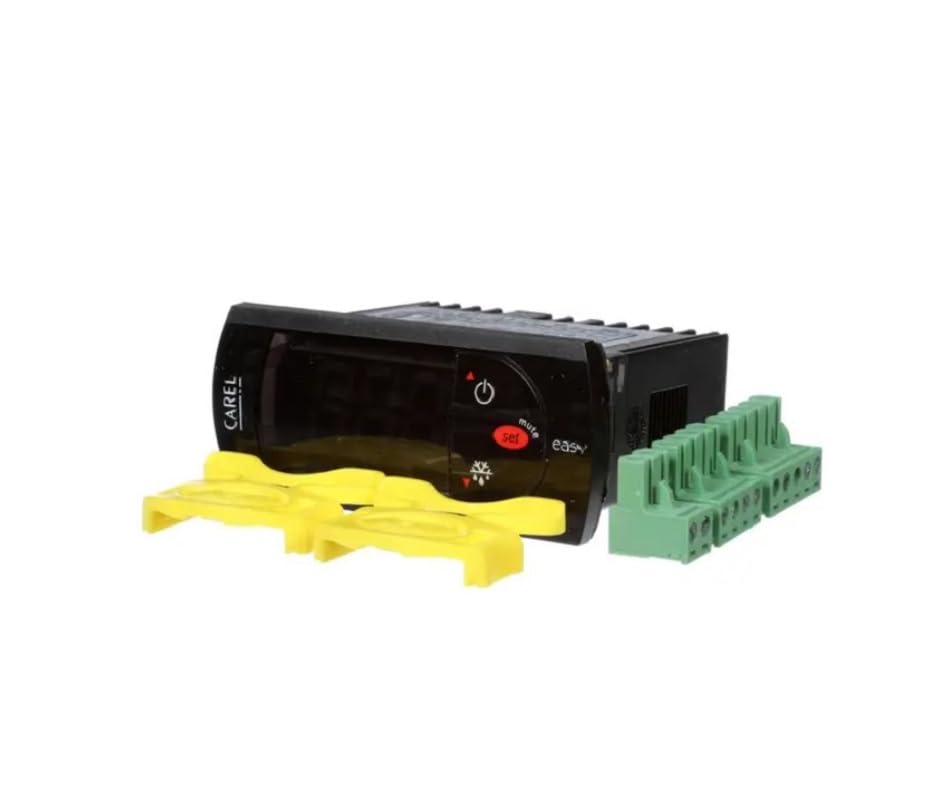
Rajah 2.1: Depan view of the Frigoglass PJEZS0G100 Temperature Control unit, showing the display, control buttons, and included mounting clips and terminal blocks.
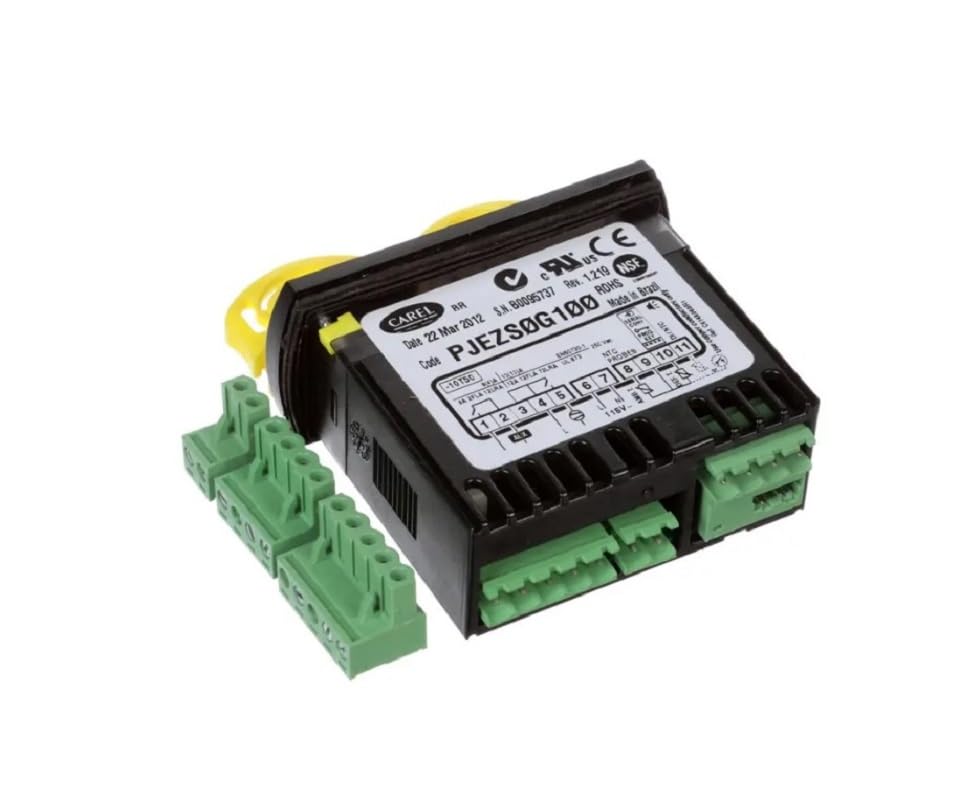
Rajah 2.2: belakang view of the Frigoglass PJEZS0G100 Temperature Control unit, highlighting the electrical connection terminals and the product specification label.
The Frigoglass PJEZS0G100 is a compact and robust temperature control device. It features a digital display for temperature readings and settings, along with intuitive buttons for configuration. The unit is supplied with detachable terminal blocks for easy wiring and mounting clips for secure installation.
3. Persediaan dan Pemasangan
3.1 Langkah Keselamatan
- Disconnect all power before installation or maintenance.
- Pemasangan hendaklah dilakukan oleh kakitangan yang berkelayakan sahaja.
- Pastikan bekalan kuasa sepadan dengan spesifikasi unit (115V).
- Protect the unit from water, dust, and extreme temperatures.
3.2 Pemasangan
- Identify a suitable mounting location, typically a panel cutout.
- Insert the PJEZS0G100 unit into the cutout from the front.
- Secure the unit using the provided yellow mounting clips. Ensure they are firmly engaged to prevent movement.
3.3 Sambungan Elektrik
Refer to the wiring diagram on the unit's label (Figure 2.2) for precise connections. The terminal blocks are detachable for easier wiring.
- Bekalan Kuasa: Sambungkan bekalan kuasa AC 115V ke terminal yang ditetapkan.
- Input Sensor: Connect the temperature sensor (NTC type) to the appropriate sensor input terminals.
- Load Outputs: Connect the controlled loads (e.g., compressor, fan, defrost heater) to their respective relay output terminals. Observe the current ratings (8/12A).
- Pastikan semua sambungan selamat dan terlindung dengan betul.
4. Arahan Operasi
4.1 Menghidupkan
Once all electrical connections are complete and verified, apply power to the unit. The display will illuminate, showing the current temperature reading.
4.2 Setting the Setpoint Temperature
- Tekan ke SET button once. The display will show the current setpoint value.
- Gunakan UP (▲) dan TURUN (▼) buttons to adjust the setpoint to the desired temperature.
- Tekan ke SET button again to confirm and save the new setpoint. The display will return to showing the current temperature.
4.3 Accessing Parameters (Advanced)
To access advanced configuration parameters (e.g., differential, defrost settings, sensor calibration), refer to the detailed programming manual provided by Frigoglass or Carel for the PJEZS0G100 series. This typically involves holding down specific button combinations for an extended period.
5. Penyelenggaraan
The Frigoglass PJEZS0G100 is designed for minimal maintenance. However, regular checks can ensure optimal performance and longevity.
- Pembersihan: Bersihkan panel hadapan secara berkala dengan kain lembutamp cloth. Do not use abrasive cleaners or solvents. Ensure no liquid enters the unit.
- Sambungan: Annually check all electrical connections for tightness and signs of corrosion. Loose connections can lead to intermittent operation or damage.
- Penderia: Verify the temperature sensor is clean and properly positioned for accurate readings.
- Pengudaraan: Ensure adequate airflow around the unit, especially if it is installed in an enclosed space, to prevent overheating.
6. Penyelesaian masalah
This section outlines common issues and their potential solutions. For problems not listed here, contact qualified service personnel.
| Masalah | Kemungkinan Punca | Penyelesaian |
|---|---|---|
| Unit tidak dihidupkan. | Tiada bekalan kuasa; pendawaian yang salah; fius yang ditiup. | Check power source; verify wiring connections; inspect and replace fuse if necessary. |
| Display shows "E1" or similar error code. | Sensor fault (open circuit, short circuit, out of range). | Check sensor wiring; replace sensor if faulty. Refer to the full programming manual for specific error code meanings. |
| Bacaan suhu tidak tepat. | Sensor not properly installed; sensor faulty; unit needs calibration. | Ensure sensor is correctly placed; test or replace sensor; consult advanced parameters for calibration. |
| Load (e.g., compressor) does not turn on/off. | Incorrect setpoint; relay fault; wiring issue to load. | Verify setpoint and differential settings; check load wiring; if relay is suspected faulty, professional service is required. |
7. Spesifikasi
| Parameter | Nilai |
|---|---|
| Model | PJEZS0G100 |
| Pengeluar | Frigoglass |
| Bekalan Kuasa | 115V AC |
| Penilaian Semasa | 8/12A |
| Jenis Sensor | NTC (typically) |
| ASIN | B0CLNYPSVM |
| Tarikh Mula-mula Tersedia | 24 Oktober 2023 |
8. Waranti dan Sokongan
For specific warranty terms and conditions, please refer to the documentation provided by your point of purchase or contact the manufacturer, Frigoglass, directly. Warranty coverage typically applies to defects in materials and workmanship under normal use.
For technical support, service, or to inquire about replacement parts, please contact the vendor from whom you purchased this product. Provide your product model number (PJEZS0G100) and ASIN (B0CLNYPSVM) when seeking assistance.