
LEMNOI SG7
LEMNOI SG7 Educational Day/Night Alarm Clock for Children - User Manual
Model: SG7
pengenalan
This manual provides detailed instructions for the setup, operation, and maintenance of your LEMNOI SG7 Educational Day/Night Alarm Clock. Please read it thoroughly to ensure proper use and to maximize the product's features.
Maklumat Keselamatan
- Jauhkan peranti daripada air dan kelembapan.
- Jangan dedahkan kepada suhu yang melampau.
- Gunakan hanya kabel USB-C yang disediakan untuk mengecas.
- Keep out of reach of small children to prevent choking hazards from small parts.
- Jangan cuba membuka atau membaiki peranti sendiri. Hubungi sokongan pelanggan jika timbul masalah.
Kandungan Pakej
Sila semak pakej untuk item berikut:
- LEMNOI SG7 Educational Day/Night Alarm Clock
- Kabel Pengecas USB-C
- Manual Pengguna
Produk Selesaiview
The LEMNOI SG7 is designed to assist children with sleep training and morning routines. It features:
- Day/Night Educational Icons: Green sun for wake-up, blue moon for sleep.
- Lampu Malam LED 5 Warna: Kecerahan boleh laras.
- 7 Musical Alarm Options: Gentle wake-up sounds.
- Dual Alarms & Snooze Function: Customizable for weekdays and weekends.
- Digital Display with Temperature Monitor: 12/24 hour format, F/C conversion.
- Touch/Sound Activated Screen: Skrin dimatikan selepas 20 saat tidak aktif.
- Bateri Litium 2000mAh terbina dalam: USB-C rechargeable.

Depan view of the LEMNOI SG7 alarm clock, displaying time, temperature, and day/night icons.
Persediaan
1. Pengecasan Awal
Before first use, fully charge the alarm clock. Connect the provided USB-C cable to the charging port on the back of the device and plug it into a compatible USB power adapter (not included).
- Lampu penunjuk pengecasan akan menyala semasa pengecasan.
- Pengecasan penuh biasanya mengambil masa lebih kurang 3 jam.
- The battery icon on the display will show charging status.
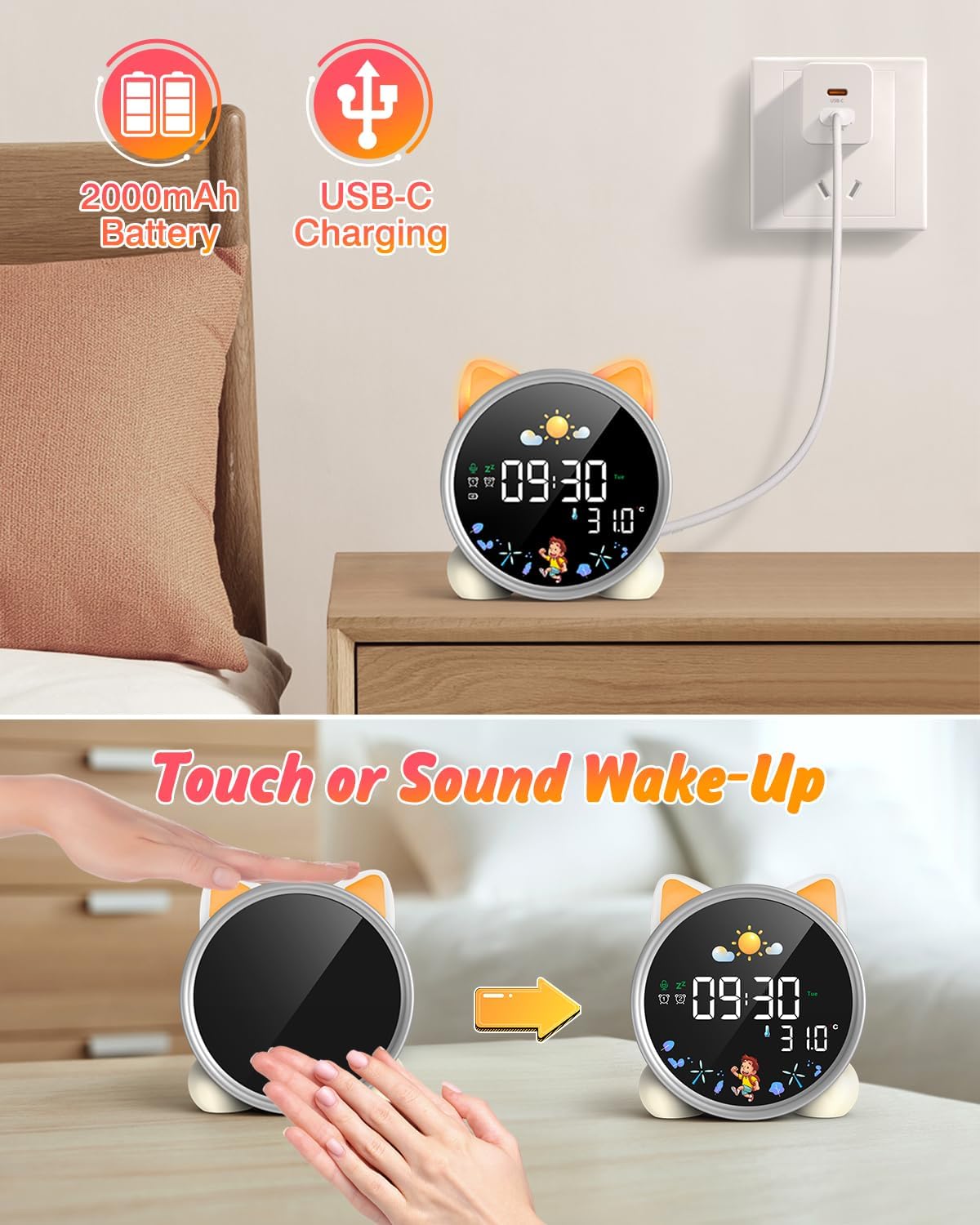
The alarm clock being charged via its USB-C port.
2. Hidupkan/Mati Kuasa
The device powers on automatically when connected to power. To manually power on/off or wake the screen:
- Skrin Bangun: Tap the device or make a sound near it. The screen will illuminate for 20 seconds.
- Hidupkan/Mati Kuasa: The device is designed to be always on for alarm functions.
Activating the screen by tapping the device.
Arahan Operasi
1. Menetapkan Masa dan Tarikh
The alarm clock supports 12/24 hour format and displays the day of the week. Specific buttons for setting are not detailed in the provided text, but typically involve a "Set" or "Mode" button.
- Refer to the physical manual for exact button functions (e.g., "SET" button).
- Tekan dan tahan butang "SET" untuk memasuki mod tetapan masa.
- Use "+" and "-" buttons to adjust hours, minutes, and other settings.
- Press "SET" again to confirm each setting and move to the next.
2. Day/Night Educational Mode
This feature uses color-changing lights and icons to signal wake-up and sleep times.
- Bangun: Green light and sun icon appear to indicate it's time to wake up.
- tidur: Blue light and moon icon appear to indicate it's time to sleep.

Day/Night mode with green sun for wake-up and blue moon for sleep.
3. Dual Alarms and Snooze Function
Set two independent alarms for different routines.
- Menetapkan Penggera: The dual alarms can be customized for any day from Monday to Sunday. Consult the full manual for specific steps to set Alarm 1 and Alarm 2.
- Tunda: When an alarm sounds, press the "SNOOZE" button on top for an additional 9 minutes of sleep. This can be repeated up to 3 times.

Illustration of the snooze function and dual alarm capability.
4. Night Light (5 Colors & Brightness Levels)
The alarm clock functions as a night light with 5 color options and adjustable brightness.
- Pilihan Warna: Yellow, Blue, Purple, White, and Gradient.
- Kecerahan: 3 levels of brightness (0%, 30%, 70%, 100%) for the screen display. The night light itself also has adjustable brightness.
- Refer to the physical manual for instructions on cycling through colors and adjusting brightness.

The 5 available night light colors and screen brightness options.
5. Music and Sound Machine
The alarm clock offers 7 musical options for a gentle wake-up or soothing sleep environment.
- 7 musical options are available.
- Refer to the physical manual for instructions on selecting and setting music.

The 7 sound options available for the alarm clock.
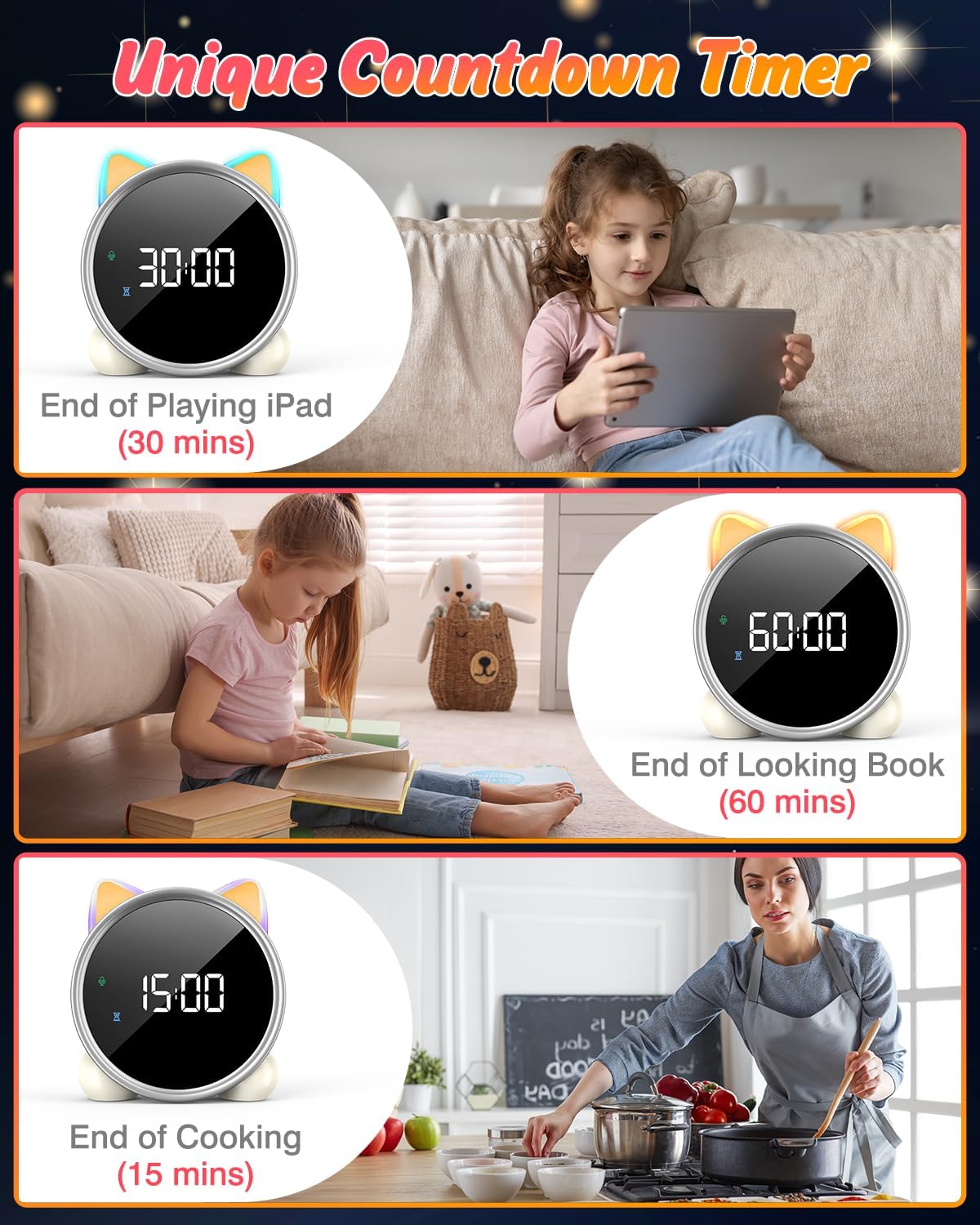
6. Pemasa Undur
A unique countdown timer feature can be used for various activities.
- Useful for managing screen time, reading sessions, or cooking.
- Refer to the physical manual for instructions on setting the countdown timer.
Examples of the countdown timer in use for various activities.
7. Paparan Suhu
The alarm clock displays the ambient temperature and supports both Celsius and Fahrenheit units.
- Supports F/C temperature conversion.
- Refer to the physical manual for instructions on switching between units.
8. Screen Activation (Touch/Sound)
The screen can be activated by touch or sound and will automatically turn off after a period of inactivity to save power.
- Tap the device or make a sound to wake the screen.
- The screen will turn off after 20 seconds of no interaction.
Penyelenggaraan
- Pembersihan: Lap peranti dengan kain lembut dan kering. Jangan gunakan pembersih atau pelarut yang melelas.
- Storan: Simpan di tempat yang sejuk dan kering apabila tidak digunakan untuk tempoh yang lama.
- Penjagaan Bateri: To prolong battery life, avoid fully discharging the battery frequently. Recharge when the low battery indicator appears.
Menyelesaikan masalah
| Masalah | Kemungkinan Punca | Penyelesaian |
|---|---|---|
| Screen does not turn on. | Bateri rendah atau peranti dimatikan. | Charge the device using the USB-C cable. Tap the device or make a sound to activate the screen. |
| Bateri cepat habis. | Night light mode consumes more power. | It is recommended to keep the device plugged in when using night light mode for extended periods. Ensure the screen brightness is not set too high if battery life is a concern. |
| Difficulty setting time/alarms. | Incorrect button sequence or unfamiliarity with controls. | Refer to the "Operating Instructions" section and the detailed physical manual for precise button functions and sequences. |
| Screen remains on constantly. | Possible setting error or malfunction. | Ensure the screen auto-off feature is enabled (if applicable, check manual). If the issue persists, try a soft reset (if available, check manual) or contact customer support. |
Spesifikasi
- Jenama: LEMNOI
- Nombor Model: SG7
- warna: Mawar
- Dimensi Produk (L x W x H): 13.1 x 3.81 x 14.5 cm
- Bahan: plastik
- ciri-ciri: Adjustable brightness, Snooze function
- Berat Barang: 265 gram
- Jenis Paparan: digital
- Sumber Kuasa: Battery Powered (Built-in 2000mAh Lithium Battery, USB-C charging)
- Jenis Bilik: Bilik tidur
- bentuk: Kucing
- Penggunaan Dalaman/Luar: Dalaman
Waranti dan Sokongan
For warranty information or technical support, please refer to the contact details provided with your purchase or visit the official LEMNOI webtapak. Simpan bukti pembelian anda untuk sebarang tuntutan waranti.
Ask a question about this manual
Ask about setup, troubleshooting, compatibility, parts, safety, or missing instructions. Manuals+ will review the question and use this page’s manual context to help answer it.