
NBD NBD-EU-S110-QT
NBD 4K 48MP Digital Vlogging Camera User Manual
Model: NBD-EU-S110-QT
1. Pengenalan
Terima kasih kerana membeliasing the NBD 4K 48MP Digital Vlogging Camera. This manual provides essential information for setting up, operating, and maintaining your camera. Please read it thoroughly before use to ensure optimal performance and longevity of your device.
2. Kandungan Pakej
Sahkan bahawa semua item yang disenaraikan di bawah disertakan dalam pakej anda:
- NBD 4K Camera x 1
- Mikrofon x 1
- Tripod x 1
- Wide-Angle Lens x 1
- Macro Lens x 1
- Kit Pembersihan x 1
- Additional Light x 1
- Kad SD 32GB x 1
- Pembaca Kad x 1
- Bateri x 2
- Pengecas x 1
- Beg Kamera x 1
- Lanyard x 1
- Alat kawalan jauh x 1
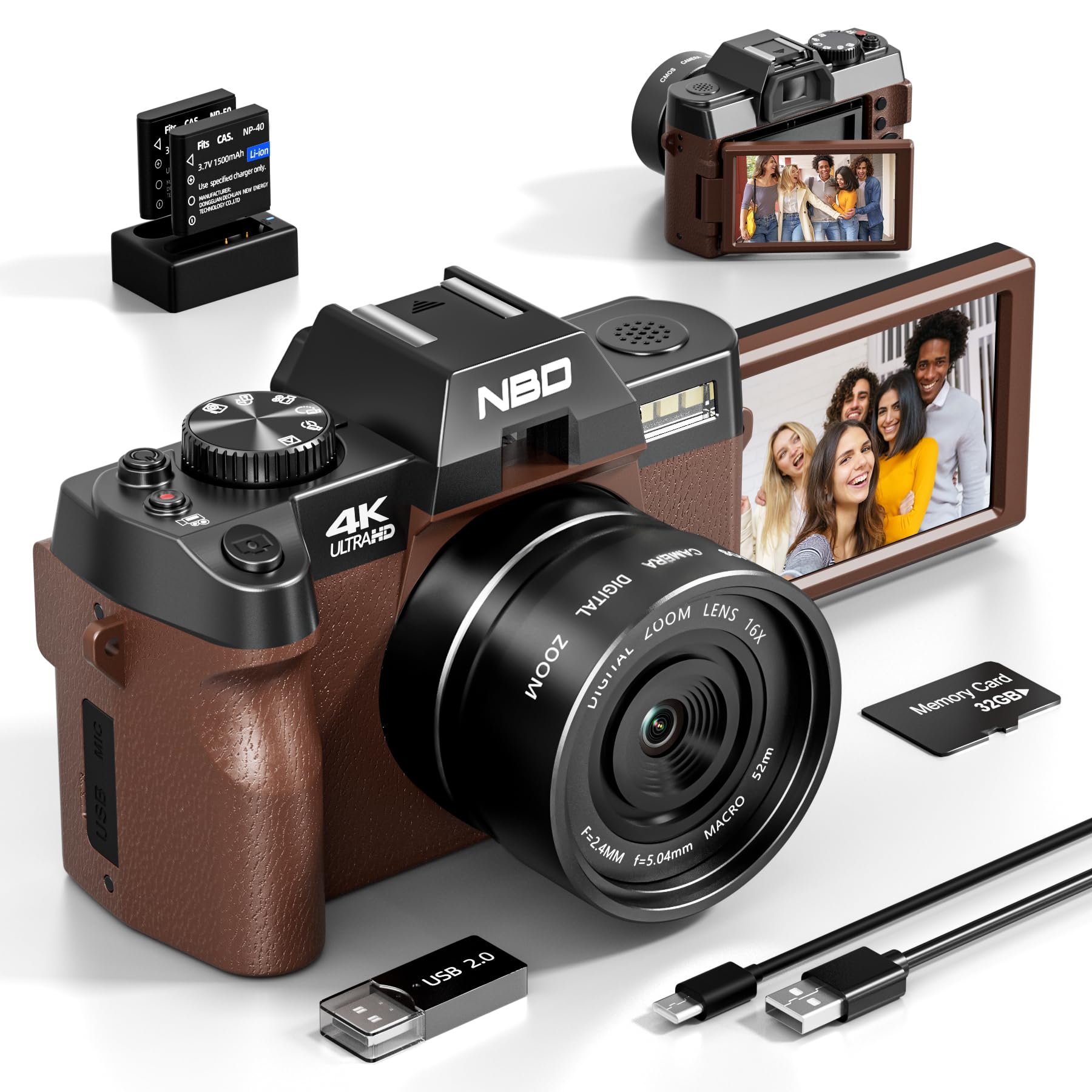
Image: NBD 4K Digital Camera with its complete set of accessories, including microphone, tripod, lenses, and other components.
3. Produk Lebihview
3.1 Komponen Kamera
Familiarize yourself with the main parts of your NBD camera.
- Kanta: Komponen optik utama untuk merakam imej.
- Skrin LCD: 3-inch OLED display for viewing and navigating.
- Butang Kuasa: Menghidupkan/mematikan kamera.
- Butang Pengatup: Menangkap foto atau memulakan/menghentikan rakaman video.
- Kawalan Zum: Adjusts digital zoom (up to 16x).
- Mode Dial/Buttons: Selects different shooting modes (photo, video, playback).
- Input Mikrofon: Untuk sambungan mikrofon luaran.
- Port USB: Untuk pemindahan data dan pengecasan.
- Slot Kad SD: Untuk memasukkan kad memori.
- Petak Bateri: Holds the rechargeable battery.
4. Persediaan
4.1 Mengecas Bateri
- Insert the provided battery into the charger.
- Sambungkan pengecas ke sumber kuasa.
- The indicator light on the charger will show charging status. Charge fully before first use.
4.2 Memasukkan Kad SD
- Cari slot kad SD pada kamera.
- Insert the 32GB SD card with the metal contacts facing the correct direction until it clicks into place.
- Untuk mengalih keluar, tolak kad masuk perlahan-lahan sehingga ia keluar.
4.3 Attaching Lenses and Accessories
- Kanta Sudut Lebar: Screw the wide-angle lens onto the front of the camera's main lens. This expands the field of view sebanyak 45%.
- Kanta Makro: The macro lens is typically integrated with the wide-angle lens or can be used separately for close-up shots. Refer to the lens markings for separation if applicable.
- mikrofon: Connect the external microphone to the camera's microphone input port.
- Tripod: Screw the camera onto the tripod mount for stable shooting.
5. Arahan Operasi
5.1 Menghidupkan/Mematikan
Tekan dan tahan butang Kuasa untuk menghidupkan atau mematikan kamera.
5.2 Mengambil Foto
- Hidupkan kamera.
- Select Photo mode using the mode dial or button.
- Bingkai tangkapan anda menggunakan skrin LCD.
- Press the Shutter button halfway to activate autofocus.
- Press the Shutter button fully to capture the photo.
5.3 Merakam Video
- Hidupkan kamera.
- Select Video mode.
- Press the Shutter button to start recording. A red indicator will usually appear on the screen.
- Tekan butang Shutter sekali lagi untuk menghentikan rakaman.
5.4 Fungsi Zum
Use the zoom controls (usually a rocker switch) to digitally zoom in or out. The camera supports up to 16x digital zoom.
5.5 Autofocus and Night Vision
- Fokus automatik: The camera features autofocus for sharper images. Half-press the shutter button to engage.
- Penglihatan Malam: Activate night vision mode for improved performance in low-light conditions. Refer to the camera's menu for this setting.
5.6 Pemasa Kendiri
The self-timer function allows for a delay before taking a photo. Access this setting through the camera's menu. Options include 2-second and 10-second delays.
5.7 Kesambungan Wi-Fi
The camera supports Wi-Fi connectivity for transferring photos and videos to compatible devices. Consult the camera's on-screen menu for Wi-Fi setup and connection instructions.
5.8 Menggunakan sebagai Webcam
Connect the camera to your computer via USB to use it as a webcam for vlogging, video calls, or live streaming. Select the webcam mode on the camera when prompted.
6. Penyelenggaraan
- Pembersihan: Use the provided cleaning kit to gently clean the lens and screen. Avoid abrasive materials.
- Storan: Store the camera in its bag in a cool, dry place when not in use. Remove the battery if storing for extended periods.
- Penjagaan Bateri: Do not expose batteries to extreme temperatures. Dispose of depleted batteries according to local regulations.
7. Penyelesaian masalah
| Masalah | Kemungkinan Punca | Penyelesaian |
|---|---|---|
| Kamera tidak dihidupkan. | Bateri habis atau salah dimasukkan. | Cas bateri sepenuhnya. Pastikan bateri dimasukkan dengan betul. |
| Tidak boleh mengambil gambar/merakam video. | Kad SD penuh, dikunci atau tidak dimasukkan. | Check SD card capacity. Unlock the SD card. Reinsert the SD card. |
| Imej adalah kabur. | Autofocus not engaged, lens dirty, or insufficient light. | Half-press shutter to focus. Clean the lens. Use additional light or night vision mode. |
| Isu sambungan Wi-Fi. | Kata laluan salah atau di luar julat. | Verify Wi-Fi password. Move closer to the Wi-Fi source. |
| Microphone not recording audio. | Microphone not properly connected or settings incorrect. | Ensure microphone is securely plugged in. Check camera audio settings. |
| Kamera membeku atau menjadi tidak bertindak balas. | Gangguan perisian sementara. | Tanggalkan dan masukkan semula bateri untuk menetapkan semula kamera. |
8. Spesifikasi
| Jenama: | NBD |
| Nama Model: | NBD-EU-S110-QT |
| Effective Photo Resolution: | 48 MP |
| Resolusi Tangkapan Video: | 4K |
| Zum Digital: | 16x |
| Saiz Skrin: | 3 Inci |
| Jenis Paparan: | OLED |
| Image Sensor Technology: | CMOS |
| Max Aperture: | F/1.8 |
| Teknologi Ketersambungan: | Wi-Fi |
| Penstabilan Imej: | ya |
| Fokus automatik: | ya |
| Penglihatan Malam: | ya |
| Pemasa Kendiri: | Yes (2s, 10s) |
| Jenis Bateri: | Litium-Ion |
| Included Memory Card Size: | 32GB (SD Card) |
9. Waranti dan Sokongan
For warranty information and technical support, please refer to the documentation provided with your purchase or visit the official NBD webtapak. Simpan bukti pembelian anda untuk tuntutan waranti.
Nota: Manual ini hanyalah untuk tujuan maklumat sahaja. Spesifikasi boleh berubah tanpa notis.
Ask a question about this manual
Ask about setup, troubleshooting, compatibility, parts, safety, or missing instructions. Manuals+ will review the question and use this page’s manual context to help answer it.