pengenalan
Thank you for choosing the UNIWEIGH Digital Kitchen Scale. This precision instrument is designed to provide accurate measurements for various items, including food, jewelry, and other small objects. Please read this manual thoroughly before use to ensure proper operation and to maximize the lifespan of your scale.
Maklumat Keselamatan
- Do not overload the scale beyond its maximum capacity of 3000 grams (6.61 lbs).
- Elakkan mendedahkan penimbang kepada suhu, kelembapan atau cahaya matahari langsung yang melampau.
- Jauhkan penimbang daripada medan elektromagnet yang kuat.
- Bersihkan penimbang dengan lembut, damp kain. Jangan rendamkannya di dalam air atau gunakan pembersih yang melelas.
- Kendalikan dengan berhati-hati untuk mengelakkan kerosakan akibat titisan atau hentaman.
Kandungan Pakej
- UNIWEIGH Digital Kitchen Scale
- Two weighing trays (different sizes)
- 2 bateri AAA (termasuk)
- Manual Arahan
Ciri-ciri Produk
- Ketepatan Tinggi: Weighs from 0.5g up to 3000g (6.61 lbs) with an accuracy of 0.1g.
- Unit Pengukuran Berbilang: Easily switch between grams (g), ounces (oz), grains (gn), carats (ct), pennyweights (dwt), and troy ounces (ozt).
- Fungsi Tare: Allows you to subtract the weight of a container for net weight measurement.
- Counting Function (PCS): Provides an accurate count for multiple small items.
- Clear Back-lit LCD Screen: Memastikan mudah dibaca dalam pelbagai keadaan pencahayaan.
- Fungsi Automatik: Dimatikan secara automatik selepas 180 saat tidak aktif untuk menjimatkan hayat bateri.
- Reka bentuk padat: Portable and easy to store with dimensions of 5" x 4.2" x 0.6".
- Bahan Tahan Lama: Constructed with a stainless steel platform and ABS plastic frame for easy cleaning and longevity.

Imej: Selesaiview of the UNIWEIGH Digital Kitchen Scale highlighting its key features including 3kg max capacity, 0.1g accuracy, low battery alarm, tare function, and overload alarm.
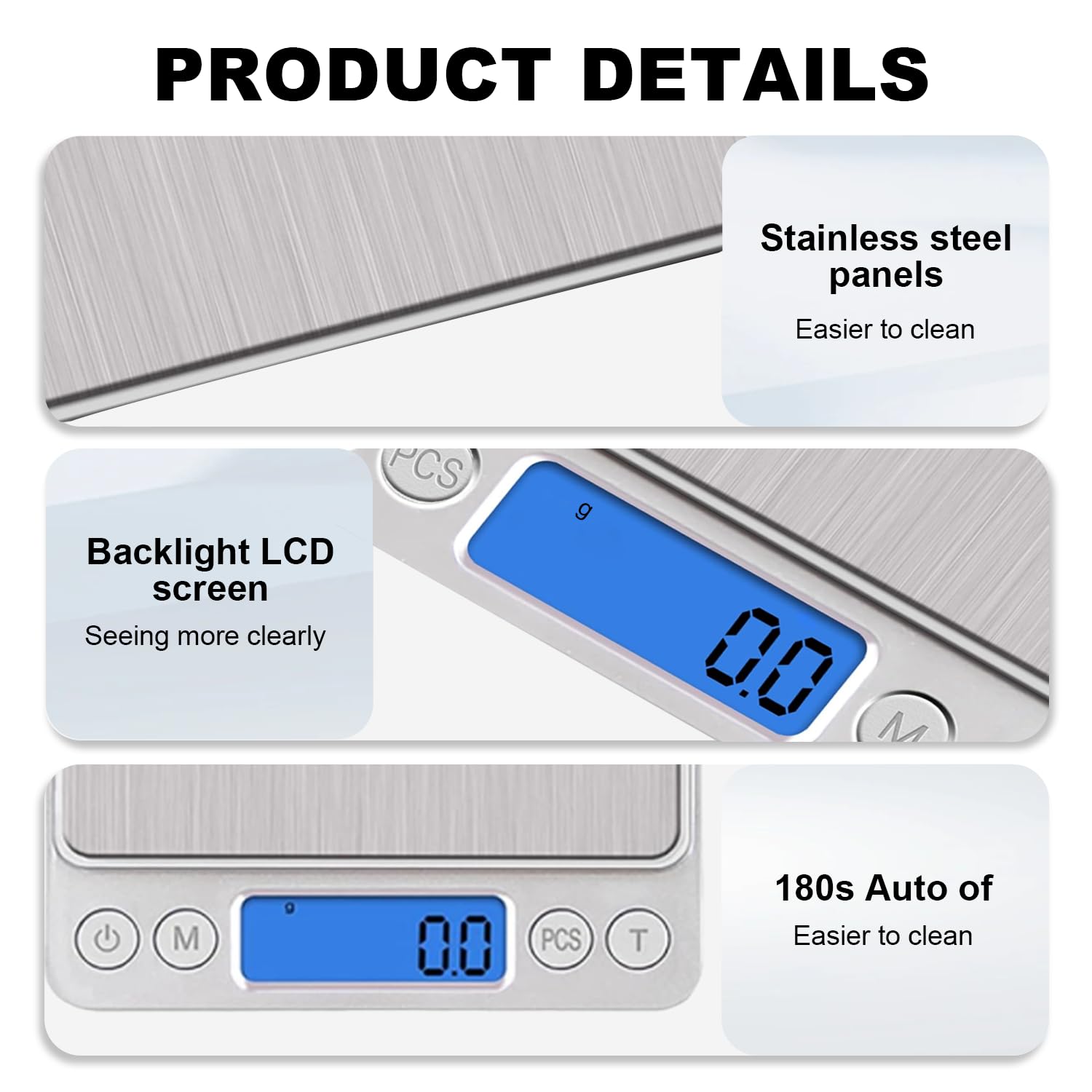
Imej: Terperinci view of the scale's stainless steel weighing surface, the clear blue backlit LCD display, and the 180-second auto-off feature for energy saving.
Persediaan
- Buka Pembungkusan Skala: Tanggalkan penimbang dan semua aksesori daripada pembungkusan dengan berhati-hati.
- Pasang Bateri: Open the battery compartment on the underside of the scale. Insert the two AAA batteries, ensuring correct polarity (+/-). Close the compartment securely.
- penempatan: Place the scale on a flat, stable, and level surface to ensure accurate readings. Avoid placing it on soft or uneven surfaces.
Arahan Operasi
- Hidupkan/Mati Kuasa: Tekan ke Butang kuasa (
 ) to turn the scale on. The LCD display will show '88888' then '0.0' or '0.00'. Press and hold the Power button to turn the scale off.
 - Penukaran Unit: Tekan ke Butang mod ('M') to cycle through the available weighing units: grams (g), ounces (oz), grains (gn), carats (ct), pennyweights (dwt), and troy ounces (ozt).
- Barangan Timbang: Place the item directly onto the center of the weighing platform. The weight will be displayed on the LCD screen.
- Fungsi Tare: To weigh items in a container, first place the empty container on the scale. Press the Butang tara ('T'). The display will reset to '0.0'. Now, add the items to the container, and the scale will display only the net weight of the items.
- Counting Function (PCS):
- With the scale on and showing '0.0', press and hold the butang PCS until a sample size (e.g., '25', '50', '75', '100') appears.
- Place the corresponding number of sample items on the scale.
- Press the PCS button again to confirm the sample size. The scale is now calibrated for counting.
- Add the items you wish to count, and the display will show the quantity.
Video: Demonstrates the boot display, weight measurement, unit switching, and tare function of the UNIWEIGH Digital Kitchen Scale.
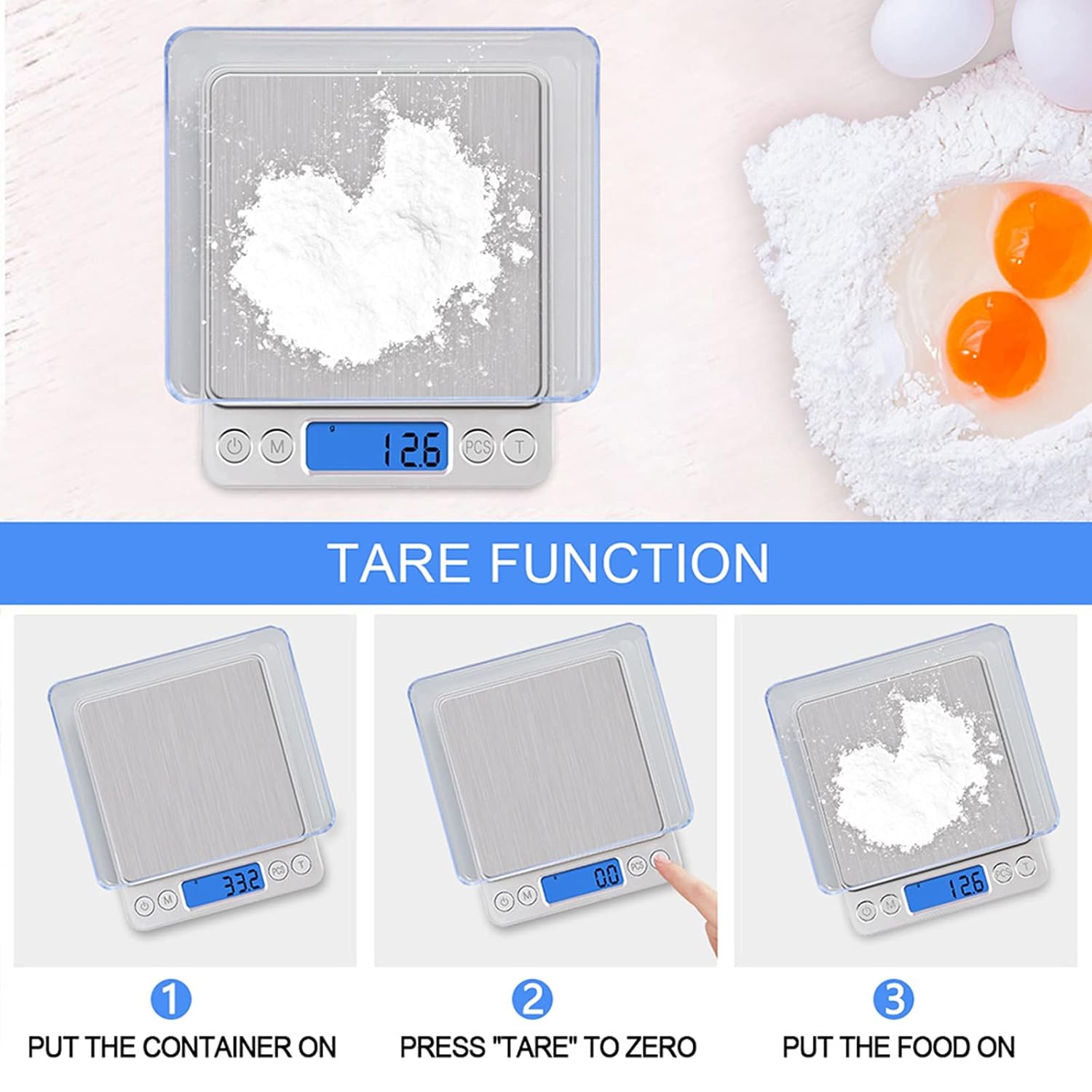
Image: Step-by-step guide on how to use the tare function to weigh ingredients accurately in a container.
Penyelenggaraan
- Pembersihan: Wipe the scale surface with a slightly damp cloth. For stubborn stains, use a mild detergent. Ensure no liquid enters the internal components.
- Storan: Store the scale in a cool, dry place. If not used for an extended period, remove the batteries to prevent leakage.
- Penentukuran: The scale is factory calibrated. If you suspect inaccuracies, refer to the troubleshooting section or contact customer support for calibration instructions.
Menyelesaikan masalah
| Masalah | Kemungkinan Punca | Penyelesaian |
|---|---|---|
| Paparan menunjukkan 'Lo' | Kuasa bateri rendah. | Gantikan bateri. |
| Display shows 'O-Ld' | Lebihan beban. | Remove the item immediately. Do not exceed 3000g. |
| Bacaan tidak tepat | Unstable surface, external interference, or needs calibration. | Place on a flat, stable surface. Avoid vibrations. Ensure no strong electromagnetic fields. If issues persist, contact customer support for calibration guidance. |
| Skala tidak dihidupkan | Bateri dipasang dengan salah atau kehabisan kuasa. | Periksa kekutuban bateri atau gantikan bateri. |
Spesifikasi
- Jenama: UNIWEIGH
- Nombor Model: 609378971129
- warna: Perak
- Had Berat: 3000g (6.61 lbs)
- Ketepatan Bacaan: 0.1g
- Jenis Paparan: LCD bercahaya belakang
- Unit: g, oz, gn, ct, ozt, dwt
- Bahan: Stainless Steel (platform), Acrylonitrile Butadiene Styrene (ABS) (frame)
- Dimensi Produk: 5 x 4.2 x 0.6 inci
- Berat Barang: 9.2 auns (0.26 Kilogram)
- Sumber Kuasa: 2 bateri AAA (termasuk)
- Ciri Khas: Auto Shut Off, Backlit Display, High Weight Capacity, Lightweight, Tare Function, Counting Function
Waranti dan Sokongan
UNIWEIGH products are rigorously tested and calibrated before shipment. For any questions, technical support, or warranty claims, please contact UNIWEIGH customer service through the retailer where the product was purchased. Please retain your proof of purchase for warranty validation.