
Produk Selesaiview
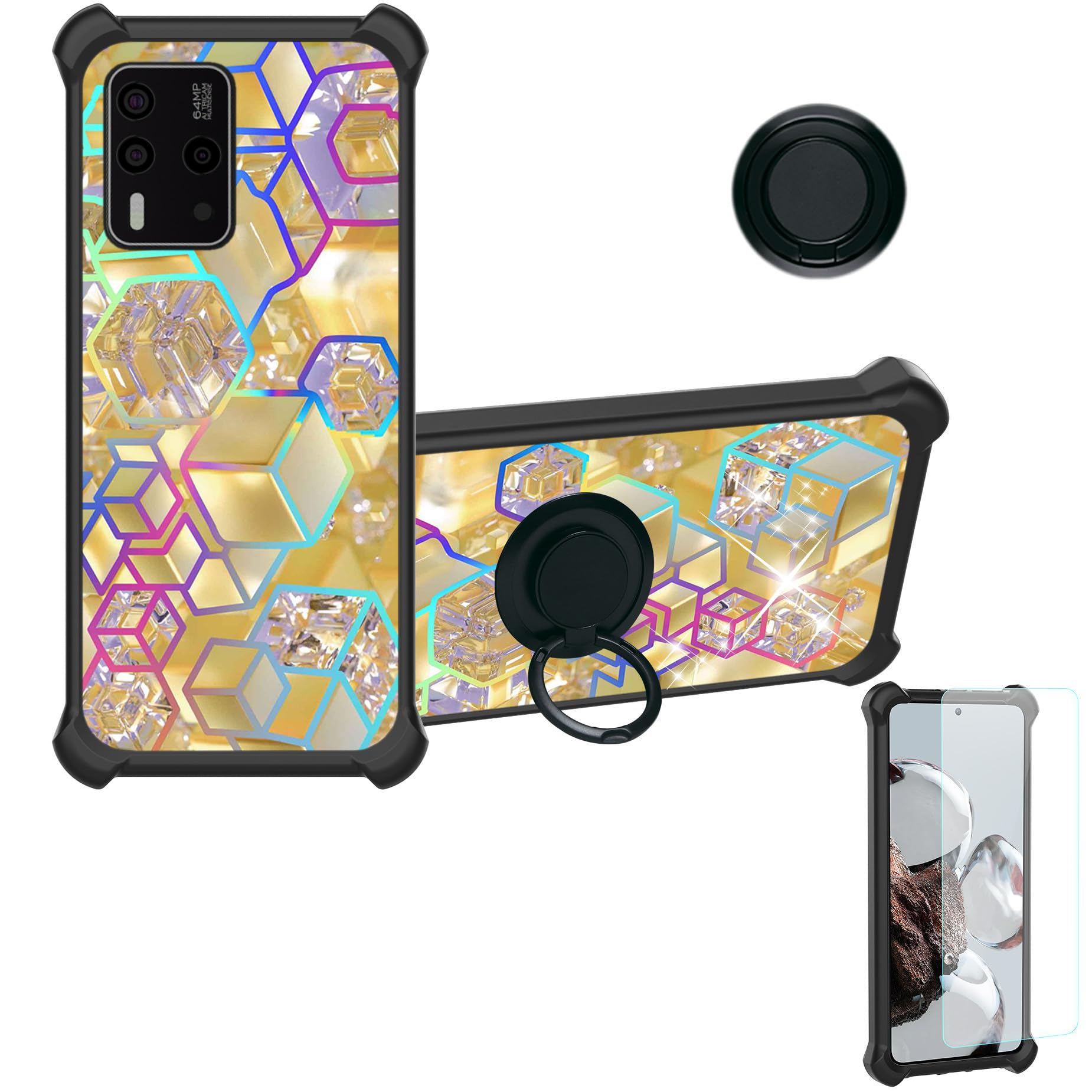
This product is a protective phone case designed for the LYOTECH LFI ONE, featuring a durable construction, an integrated ring stand, and a colorful reflective light design. It includes a tempered glass screen protector for comprehensive device protection.
Ciri-ciri Utama:
- Permukaan Berkabut: Provides a delicate feel and colorful light reflection.
- Integrated Ring Stand: A self-adhesive metal finger ring stand that can be attached to the case or used separately. It offers 360-degree rotation and magnetic suction for car mounts.
- Perlindungan Berbilang Lapisan: Constructed with a hard PC back panel, a soft silicone frame, and four-corner shock airbags for enhanced impact resistance.
- Advanced Back Panel Design: The back features a combination of four layers: solid PC, an ultra-high definition pattern layer, a special process layer, and a clear, scratch-resistant surface layer.
- Tepi Tertinggi: The case design ensures that it is higher than both the camera and the screen, providing superior flat surface protection.
Arahan Persediaan
1. Installing the Tempered Glass Screen Protector
- Bersihkan Skrin: Use the provided cleaning wipes (if included) to thoroughly clean your phone's screen. Ensure there is no dust, smudges, or fingerprints.
- Selaraskan Pelindung: Carefully peel off the protective film from the adhesive side of the tempered glass. Align the screen protector with your phone's screen, ensuring the cutouts for the camera and sensors match perfectly.
- memohon: Gently lower the screen protector onto the screen. It will adhere automatically. If bubbles appear, gently push them towards the edges using a soft cloth or squeegee.

2. Installing the Phone Case
- Masukkan Telefon: Hold your LYOTECH LFI ONE phone with the screen facing up.
- Align and Snap: Gently insert one side of your phone into the soft silicone frame of the case. Then, carefully press the other side of the phone into the case until it snaps securely into place. Ensure all buttons and ports are aligned with the case's cutouts.

3. Attaching the Finger Ring Stand
The metal finger ring stand is self-adhesive and can be attached to the back of the phone case or used separately.
- Permukaan Bersih: Ensure the back of the phone case (or your desired surface) is clean and dry.
- Pelekat Kupas: Remove the protective film from the adhesive side of the ring stand.
- Kedudukan dan Akhbar: Carefully position the ring stand in the desired location on the back of the case. Press firmly for at least 30 seconds to ensure strong adhesion. Allow a few hours for the adhesive to fully cure before heavy use.
Arahan Operasi
Using the Ring Stand
- Finger Grip: Insert your finger through the ring for a secure grip on your phone, reducing the risk of accidental drops.
- Kickstand Function: Rotate the ring 360 degrees to position your phone horizontally or vertically for hands-free viewing of videos, video calls, or browsing.
- Magnetic Car Mount: The metal plate on the ring stand is compatible with magnetic car mounts. Simply attach your phone to a magnetic car mount for navigation or hands-free operation while driving.

Penyelenggaraan
To ensure the longevity and appearance of your phone case and screen protector, follow these maintenance guidelines:
- Membersihkan Kes: Gunakan yang lembut, damp cloth with mild soap and water to clean the PC back panel and silicone frame. Avoid harsh chemicals or abrasive materials, as these can damage the finish.
- Cleaning the Screen Protector: Wipe the tempered glass screen protector with a microfiber cloth to remove fingerprints and smudges. For stubborn marks, a screen cleaner spray can be used.
- Elakkan Suhu Melampau: Do not expose the case to extreme heat or cold, as this may affect the material integrity.
- Check Ring Stand Adhesion: Periodically check that the ring stand is securely attached. If it loosens, re-apply pressure or consider using a new adhesive if necessary.
Menyelesaikan masalah
- Screen Protector Bubbles: If bubbles appear after installation, gently lift the nearest edge of the protector and re-apply, pushing the bubble out with a soft cloth. Small bubbles may disappear on their own within 24-48 hours.
- Ring Stand Not Sticking: Ensure the surface is clean and dry before application. Apply firm pressure for an extended period. If the adhesive wears out, a replacement adhesive pad may be needed.
- Isu Kesesuaian Kes: Double-check that your phone model is indeed LYOTECH LFI ONE. Ensure the phone is properly aligned and fully seated within the case.
Spesifikasi
| Ciri | Penerangan |
|---|---|
| Model Telefon yang Serasi | LYOTECH LFI ONE |
| bahan | PC hard back panel + soft silicone frame + metal finger ring stand |
| Warna/Corak | IMDH-HSJ (Colorful Reflective Light) |
| Ciri Khas | 360° Rotating Ring, Auto Magnetic Mounting, Finger Ring + Stand + Car Bracket Magnetic Suction |
| Komponen yang Disertakan | 1 x Phone Case, 1 x Tempered Glass Screen Protector |
| Dimensi Produk (L x W x H) | 10 x 10 x 10 millimeters (approximate) |
| Berat Barang | 70 grams (approximate) |
Waranti dan Sokongan
This product is manufactured by Generic. For any questions, technical support, or warranty inquiries, please contact the seller directly through your purchase platform. Please refer to your purchase receipt or order details for seller contact information.