
TecTake 404950
tectake® Foldable Exercise Bike User Manual
Brand: TecTake | Model: 404950
1. Maklumat Keselamatan
Please read this entire manual before assembling and using the exercise bike. Keep this manual for future reference.
- Rujuk doktor anda sebelum memulakan sebarang program senaman, terutamanya jika anda mempunyai masalah kesihatan yang sedia ada.
- This product is designed for home use only. Do not use it in a commercial or institutional setting.
- The maximum user weight capacity for this exercise bike is 100 kg (220 lbs). Jangan melebihi had ini.
- Keep children and pets away from the exercise bike during use.
- Place the exercise bike on a flat, stable surface. Ensure there is adequate clear space around the bike for safe operation.
- Pakai pakaian dan kasut senaman yang sesuai. Elakkan pakaian longgar yang boleh tersekat pada bahagian yang bergerak.
- Inspect the bike before each use for any loose or worn parts. Do not use if any damage is found.
- Berhenti bersenam serta-merta jika anda berasa pitam, pening, atau mengalami kesakitan.
2. Produk Lebihview
The tectake® Foldable Exercise Bike is a compact and efficient fitness solution designed for effective leg, waist, and glute training. Its robust steel tube construction ensures stability and durability, while its foldable design allows for space-saving storage.
Ciri-ciri Utama:
- Quiet operation with a foldable design.
- Robust X-shaped frame made of powder-coated steel.
- Flywheel with belt system and wear-resistant magnetic brake.
- Eight adjustable resistance levels via a rotary knob.
- Seven-position height-adjustable saddle.
- Padded handlebars with integrated pulse measurement.
- Non-slip pedal surface with adjustable foot straps.
- Rubber end caps for secure footing.
- Training computer with clear LCD display.

3. Persediaan dan Pemasangan
The tectake exercise bike is designed for quick and easy assembly. All necessary mounting materials are included.
3.1 Kandungan Pakej:
- Exercise Bike main frame and components
- Arahan Perhimpunan
- Mounting Material (screws, nuts, tools)
3.2 Langkah Pemasangan:
- Carefully unpack all components and verify against the parts list in the included assembly instructions.
- Attach the front and rear stabilizers to the main frame using the provided bolts and nuts.
- Secure the pedals to the crank arms. Note that the left pedal is reverse-threaded.
- Install the seat post and saddle, ensuring it is securely fastened.
- Attach the handlebars to the main frame, connecting any necessary sensor cables for the computer.
- Insert 2 x AA 1.5V batteries into the training computer (batteries not included).
- Connect the pulse sensor cables from the handlebars to the computer.
- Ensure all connections are tight and secure before first use.
4. Arahan Operasi
4.1 Adjusting Seat Height:
The saddle can be adjusted to seven different height positions to accommodate users up to 180 cm (5'11").
- Loosen the adjustment knob located on the seat post.
- Raise or lower the saddle to your desired height. Ensure your leg has a slight bend at the knee when the pedal is at its lowest point.
- Tighten the adjustment knob securely to lock the saddle in place.
4.2 Adjusting Resistance:
The bike features eight levels of magnetic resistance, allowing you to customize your workout intensity.

- Locate the rotary knob on the main frame, typically below the handlebars.
- Putar tombol mengikut arah jam untuk meningkatkan rintangan (nombor yang lebih tinggi untuk latihan yang lebih mencabar).
- Putar tombol lawan arah jam untuk mengurangkan rintangan (nombor yang lebih rendah untuk senaman yang lebih mudah).
4.3 Using the Training Computer:
The LCD training computer tracks important workout data.


- Fungsi Paparan: The computer typically displays Time, Speed, Distance, Calories, and Pulse (heart rate). Some models may have a 'Scan' mode that cycles through these metrics automatically.
- Pengukuran nadi: Grip the padded handlebars firmly with both hands. Ensure your palms are in contact with the metal sensors. Your pulse will be displayed on the screen after a few seconds.
- Butang Mod: Press the 'Mode' button to cycle through the different display functions or to select a specific function to view.
- Butang Tetapkan Semula: Press and hold the 'Reset' button to clear all current workout data.


5. Penyelenggaraan
5.1 Pembersihan:
- Lap basikal dengan iklanamp kain selepas setiap penggunaan untuk mengeluarkan peluh dan habuk.
- Jangan gunakan pembersih atau pelarut yang kasar, kerana ini boleh merosakkan kemasan atau komponen elektronik.
- Keep the LCD display clean and dry.
5.2 Storan:
Thanks to its practical foldable function, the exercise bike can be stored compactly when not in use.
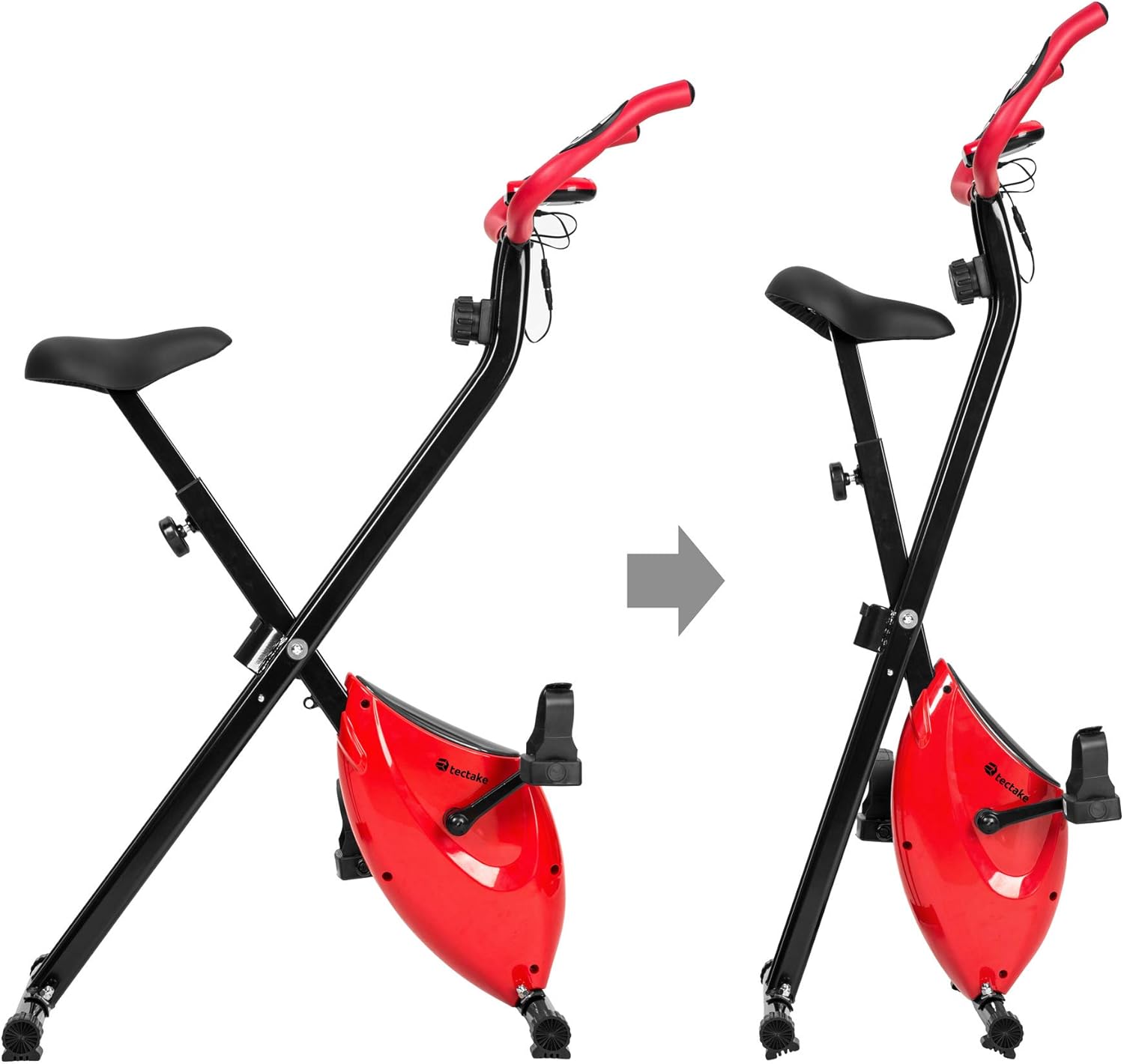
- To fold the bike, follow the instructions in the assembly manual or reverse the setup steps for folding.
- Simpan basikal di tempat yang kering dan sejuk, jauh dari cahaya matahari langsung dan suhu yang melampau.
- Ensure the bike is stable and secure in its folded position to prevent accidental tipping.
6. Penyelesaian masalah
If you encounter any issues with your tectake exercise bike, please refer to the following common troubleshooting tips:
- Computer Display Not Working:
- Check if the batteries (2 x AA 1.5V) are correctly installed and not depleted. Replace if necessary.
- Ensure all cable connections to the computer are secure.
- No Pulse Reading:
- Ensure your hands are firmly gripping both metal sensors on the handlebars.
- Make sure the pulse sensor cables are properly connected to the computer.
- Bunyi Luar Biasa Semasa Operasi:
- Check all bolts and nuts, especially on the frame and pedals, to ensure they are tight.
- Ensure the bike is on a flat and stable surface.
- Rintangan Tidak Berubah:
- Verify that the resistance knob is turning freely and engaging with the internal mechanism.
- Jika masalah berterusan, hubungi sokongan pelanggan.
For issues not covered here, please refer to the detailed assembly instructions or contact TecTake customer support.
7. Spesifikasi
| Ciri | Spesifikasi |
|---|---|
| Nombor Model | 404950 |
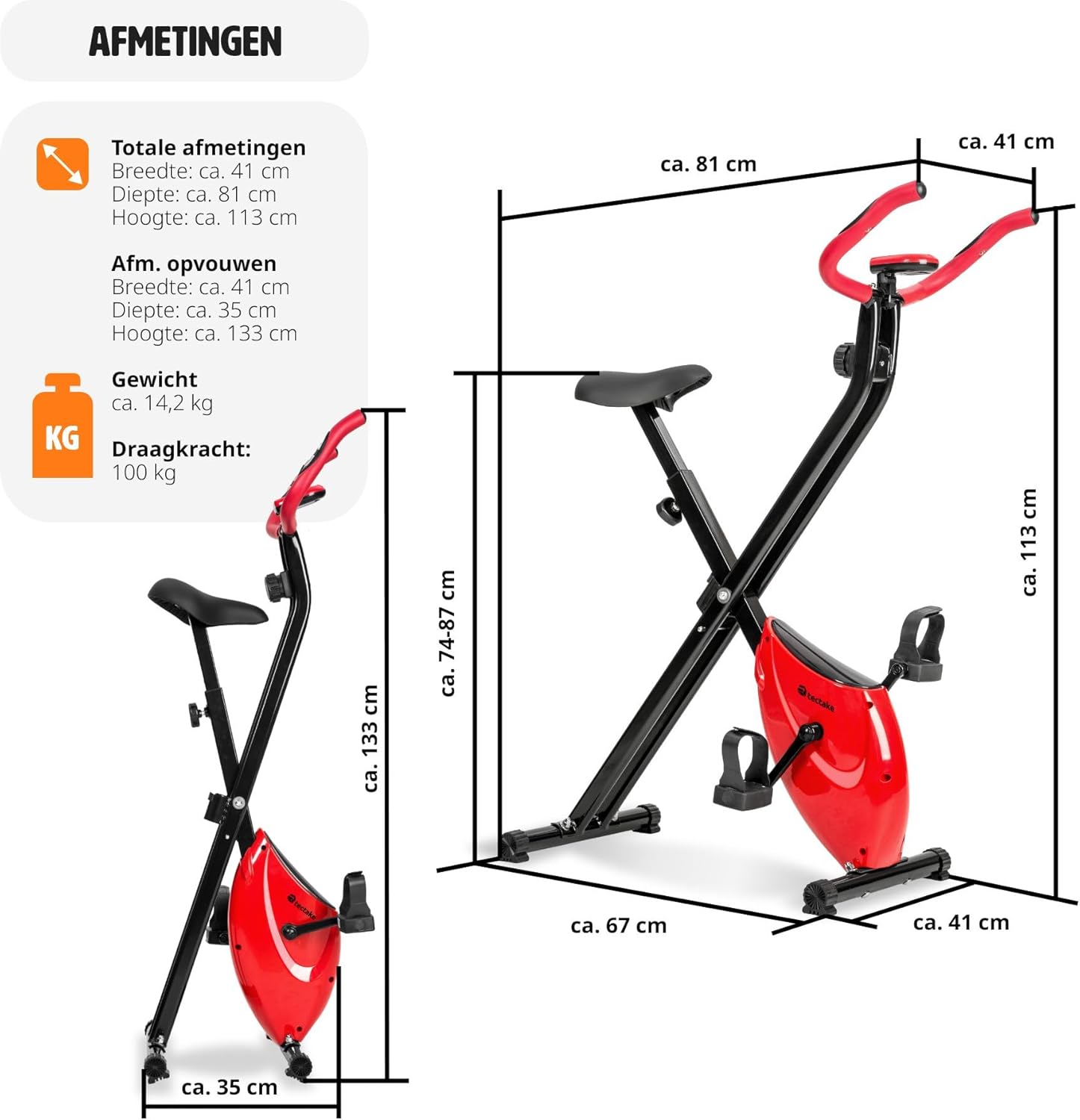
| Dimensi Keseluruhan (L x W x H) | Lebih kurang 81 x 41 x 113 cm (31.9 x 16.1 x 44.5 inci) |
| Dimensi Dilipat (L x W x H) | Lebih kurang 41 x 35 x 133 cm (16.1 x 13.8 x 52.4 inci) |
| Berat badan | lebih kurang 14.2 kg (31.3 paun) |
| Max User Weight Capacity | 100 kg (220 lbs) |
| Recommended Max User Height | Up to 180 cm (5'11") |
| Pelarasan Ketinggian Pelana | 7 positions (approx. 68-81 cm / 26.8-31.9 inches) |
| Sistem Rintangan | Magnetic, 8 levels |
| Training Computer Power | 2 x bateri AA 1.5V (tidak termasuk) |
| Bahan Utama | Powder-coated steel, ABS plastic, Polypropylene, NBR rubber, Polyurethane |
| warna | Merah / Hitam |
8. Waranti dan Sokongan
For warranty information, technical support, or to order replacement parts, please contact TecTake customer service. Refer to the contact details provided with your purchase documentation or visit the official TecTake webtapak.
Sila sediakan nombor model anda (404950) dan bukti pembelian semasa menghubungi sokongan.
Ask a question about this manual
Ask about setup, troubleshooting, compatibility, parts, safety, or missing instructions. Manuals+ will review the question and use this page’s manual context to help answer it.