
pengenalan
Terima kasih kerana membeliasing the Funistree Cell Phone Stand with Wireless Bluetooth Speaker. This device combines a versatile phone stand with a high-quality Bluetooth speaker and a white noise machine, designed to enhance your audio and viewing experience. Please read this manual carefully before use to ensure proper operation and to maximize the product's lifespan.
Produk Selesaiview
The Funistree H77 is a multi-functional device featuring a detachable phone stand and a wireless Bluetooth speaker. Its innovative design allows for independent use of the speaker and the stand, or combined for an integrated entertainment solution.
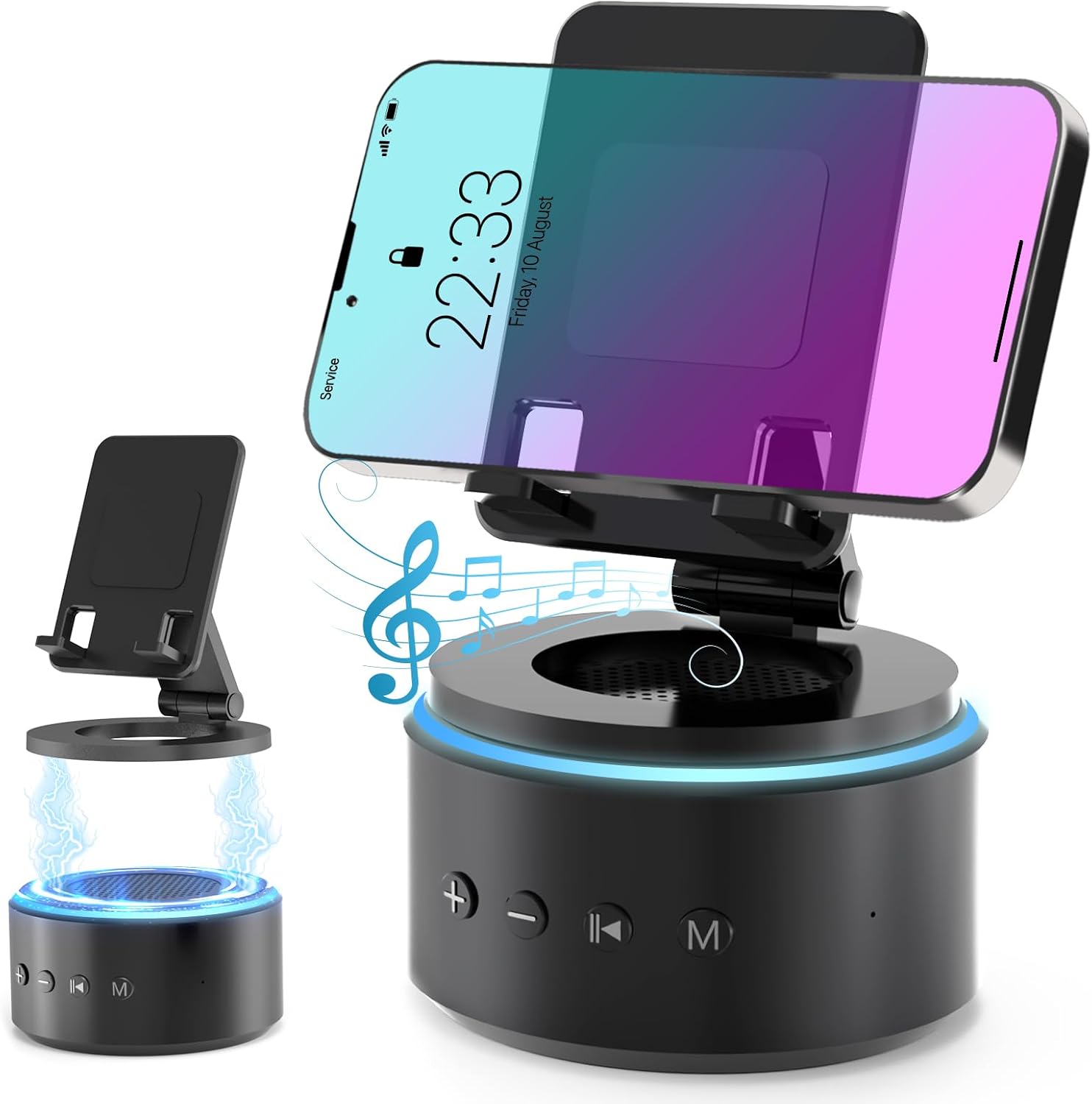
Image: The Funistree H77 device, illustrating its 2-in-1 design with the phone stand attached to the speaker base and also shown detached.
Ciri-ciri Utama:
- 2-in-1 Detachable Design: The phone stand magnetically connects to the Bluetooth speaker, allowing for combined or separate use.
- Adjustable & Portable Stand: Menawarkan berbilang viewing angles and includes a hanging design for easy portability.
- Bunyi Stereo HD: Equipped with a dual stereo system for enhanced bass, clear highs, and balanced midrange.
- Mesin Bunyi Putih: Features 10 soothing white noise sounds with an auto-off timer (15, 30, or 60 minutes).
- Pangkalan Stabil: Anti-slip silicone pads ensure device stability.
- Hayat Bateri yang Panjang: Optimized 1800 mAh battery for extended use.
Kandungan Pakej
Sila semak pakej untuk item berikut:
- Funistree Cell Phone Stand with Wireless Bluetooth Speaker (Model H77)
- Kabel Pengecas USB
- Manual Pengguna
Note: Contents may vary slightly. If any items are missing or damaged, please contact customer support.
Persediaan
Mengecas Peranti:
- Locate the charging port on the speaker base.
- Connect the provided USB charging cable to the speaker.
- Pasangkan hujung kabel USB yang satu lagi ke dalam penyesuai kuasa USB yang serasi (tidak disertakan) atau port USB komputer.
- Lampu penunjuk pengecasan akan menyala. Setelah dicas sepenuhnya, lampu mungkin bertukar warna atau mati.
Initial charge time is approximately 2-3 hours.
Assembling the Phone Stand and Speaker:
The phone stand and speaker connect magnetically.
- Align the magnetic base of the phone stand with the top surface of the speaker.
- The magnets will snap the two components together securely.
- To detach, simply pull the phone stand upwards from the speaker base.

Imej: Jarak dekat view demonstrating the magnetic connection between the phone stand and the speaker base.
Arahan Operasi
Hidupkan/Mati Kuasa:
- To power on, press and hold the Power button (usually marked with a power symbol) on the speaker base for a few seconds until you hear an audible prompt or see an indicator light.
- To power off, press and hold the Power button again for a few seconds.
Pairing Bluetooth:
- Ensure the speaker is powered on and in pairing mode (indicated by a flashing LED light, usually blue). If not, briefly press the Bluetooth button (if available) or power cycle the device.
- On your mobile device (smartphone, tablet, etc.), go to Bluetooth settings.
- Cari untuk available devices. The speaker will appear as "H77" or "Funistree H77".
- Select the speaker from the list to pair. Once paired, you will hear a confirmation sound, and the LED light will become solid.
- Anda kini boleh memainkan audio daripada peranti anda melalui pembesar suara.

Image: The Funistree H77 in use, with a smartphone mounted on the stand, playing music, and a laptop nearby, illustrating its versatile functionality.
Fungsi Bunyi Putih:
The speaker includes 10 built-in white noise sounds to aid relaxation or concentration.
- Press the 'M' (Mode) button to cycle through the white noise sounds.
- To set a timer for the white noise, press the Timer button (if available) or refer to the specific button layout on your device. The available timer settings are 15, 30, or 60 minutes. The device will automatically turn off after the selected duration.

Image: Visual representation of the 10 white noise options (Ocean, Wind, Rain, Bird, Heartbeat, Campfire, Thunderstorm, Brook, Fan, Piano) and timer settings, with a person sleeping, indicating the relaxation benefits.
Melaraskan Kelantangan dan Main Semula:
- Kelantangan: Tekan butang '+'.
- Perlahankan suara: Tekan butang '-'.
- Main/Jeda: Press the Play/Pause button (usually marked with a triangle/two vertical bars).
- Lagu Seterusnya: Press the '>>|' button.
- Trek Sebelumnya: Press the '|<<' button.
Menggunakan Pendirian Telefon:
The phone stand is adjustable to provide optimal viewsudut-sudut.
- Place your smartphone or tablet securely on the stand's cradle.
- Adjust the angle of the stand by gently pushing or pulling the articulated arm to your desired viewkedudukan.
- The stand features anti-slip silicone pads to prevent your device from sliding.

Imej: Terperinci view highlighting the adjustable angle mechanism and the anti-slip silicone pads on the phone stand and base for secure device placement.
mudah alih:
The speaker can be carried easily using its integrated hanging design.

Image: A woman outdoors, holding the Funistree speaker by its hanging rope, demonstrating its portability for outdoor activities.
Penyelenggaraan
- Pembersihan: Use a soft, dry cloth to wipe the surface of the device. Do not use abrasive cleaners, alcohol, or chemical solvents, as these may damage the finish.
- Storan: Apabila tidak digunakan untuk tempoh yang lama, simpan peranti di tempat yang sejuk dan kering jauh dari cahaya matahari langsung dan suhu yang melampau.
- Penjagaan Bateri: Untuk memanjangkan hayat bateri, elakkan daripada menyahcas sepenuhnya bateri dengan kerap. Cas peranti dengan kerap, walaupun tidak digunakan secara aktif.
- Elakkan Air: This device is not waterproof. Keep it away from water, moisture, and excessive humidity.
- Tangani dengan Berhati-hati: Elakkan daripada menjatuhkan atau meletakkan peranti kepada kesan yang kuat.
Menyelesaikan masalah
| Masalah | Kemungkinan Punca | Penyelesaian |
|---|---|---|
| Peranti tidak dihidupkan. | Bateri lemah. | Cas peranti sepenuhnya. |
| Tidak boleh berpasangan melalui Bluetooth. | Speaker not in pairing mode; Bluetooth disabled on source device; device too far. | Ensure speaker is in pairing mode. Enable Bluetooth on your device. Move devices closer (within 10 meters). Forget previous pairings and try again. |
| Tiada bunyi atau kelantangan rendah. | Volume too low on speaker or source device; device not properly paired. | Increase volume on both speaker and source device. Re-pair the device. |
| White noise function not working. | Mod salah dipilih. | Press the 'M' (Mode) button to cycle to the white noise function. |
| Phone stand is unstable. | Device not placed correctly; surface is uneven. | Ensure phone is centered on the cradle. Place the stand on a flat, stable surface. |
If the problem persists, please contact Funistree customer support.
Spesifikasi
| Nombor Model | H77 |
| Dimensi Produk | 4.53 x 4.13 x 4.37 inci |
| Berat Barang | 15.8 auns |
| Jenis Bateri | 1 bateri Lithium Ion (termasuk) |
| Kapasiti Bateri | 1800 mAh |
| Ketersambungan | Bluetooth |
| Bunyi White Noise | 10 types (Ocean, Wind, Rain, Bird, Heartbeat, Campfire, Thunderstorm, Brook, Fan, Piano) |
| Tetapan Pemasa | 15, 30, 60 minit |
| Peranti Serasi | Smartphones, Tablets (iPhone, Galaxy, LG, iPad, Samsung Tab, Sony, etc.) |
Maklumat Keselamatan
- Do not disassemble, repair, or modify the device. This may cause damage, electric shock, or fire.
- Keep the device away from heat sources, direct sunlight, and high temperatures.
- Jangan dedahkan peranti kepada air atau cecair lain.
- Do not use the device in environments with strong electromagnetic interference.
- Jauhkan daripada kanak-kanak dan haiwan peliharaan.
- Dispose of the device and its battery responsibly according to local regulations. Do not dispose of with household waste.
Waranti dan Sokongan
Funistree products are designed and manufactured to the highest quality standards. For warranty information and customer support, please refer to the warranty card included with your purchase or visit the official Funistree website. If you encounter any issues or have questions regarding your product, please contact our customer service team.
Untuk bantuan lanjut, sila layari: Funistree Official Store on Amazon