
1. Pengenalan
Welcome to the KRUPS Sensation C10 EA910A10 Superautomatic Coffee Machine user manual. This guide provides comprehensive instructions for the safe and efficient operation, maintenance, and troubleshooting of your new coffee machine. Please read this manual thoroughly before first use and keep it for future reference.
2. Arahan Keselamatan Penting
Untuk memastikan operasi yang selamat, sentiasa ikuti langkah berjaga-jaga keselamatan asas ini:
- Baca semua arahan sebelum menggunakan perkakas.
- Jangan rendam perkakas, kord kuasa, atau palamkan ke dalam air atau cecair lain.
- Perkakas ini bertujuan untuk kegunaan isi rumah sahaja.
- Pastikan voltage yang ditunjukkan pada perkakas sepadan dengan vol utama andatage.
- Sentiasa cabut plag perkakas dari salur keluar kuasa sebelum membersihkan atau apabila tidak digunakan.
- Jangan kendalikan sebarang perkakas dengan kord atau palam yang rosak, atau selepas perkakas tidak berfungsi atau rosak dalam apa jua cara.
- Jauhkan kanak-kanak daripada perkakas semasa operasi.
- Gunakan hanya aksesori yang disyorkan oleh pengilang.
- Avoid contact with hot surfaces, such as the coffee spouts or steam nozzle.
3. Komponen Produk
Familiarize yourself with the main components of your KRUPS Sensation C10 EA910A10 coffee machine:
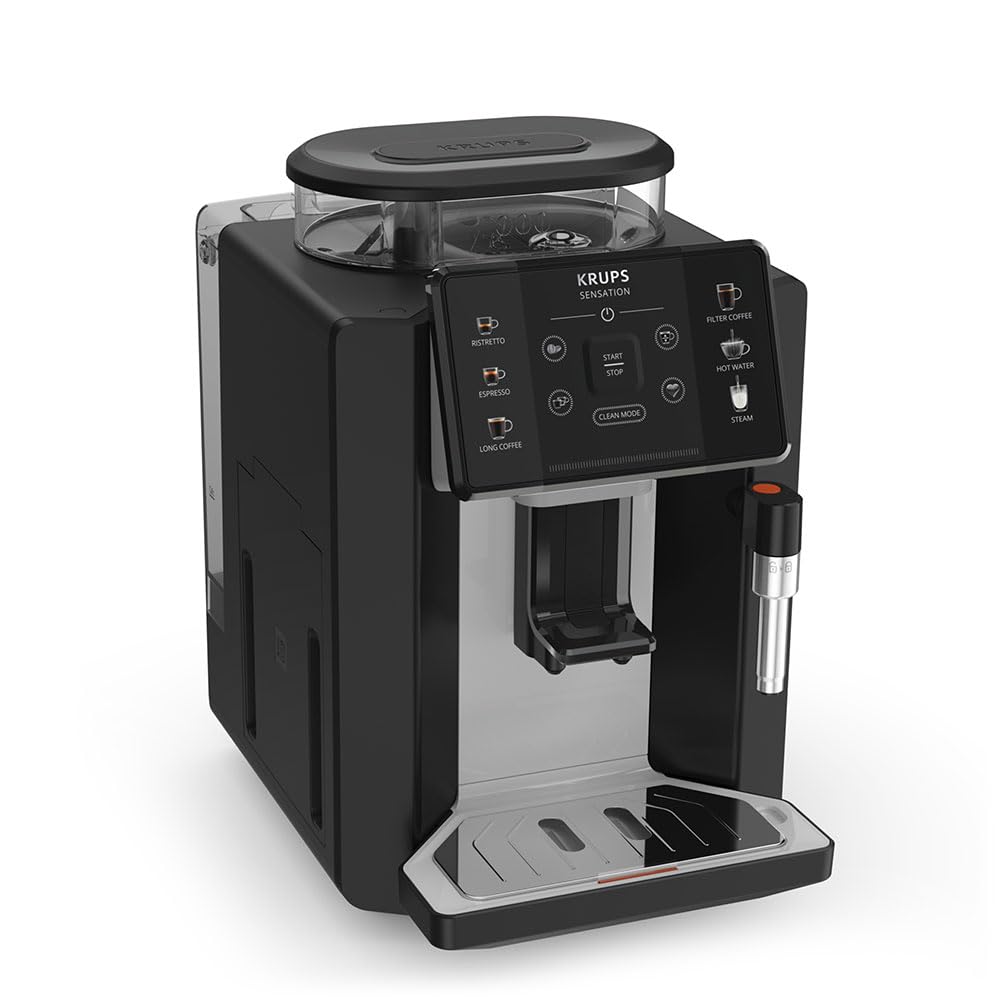
Imej: Depan-kanan view of the KRUPS Sensation C10 EA910A10 Superautomatic Coffee Machine, showing the bean hopper, control panel, coffee spouts, and drip tray. Two cups of coffee are being dispensed.
- Corong Kacang dengan Penutup
- Tangki Air
- Control Panel (Touchscreen)
- Coffee Spouts (Adjustable)
- Drip Tray with Grid
- Bekas Kopi
- Steam Nozzle / Hot Water Spout
- Sambungan Kord Kuasa
4. Persediaan Awal
4.1. Membongkar
- Keluarkan mesin kopi dari bungkusannya dengan berhati-hati.
- Keluarkan semua bahan pembungkusan, termasuk filem pelindung dan pelekat.
- Letakkan mesin di atas permukaan yang stabil, rata dan tahan haba, jauh daripada sumber air dan haba.
4.2. Penyediaan Penggunaan Pertama
- Rinse the Water Tank: Remove the water tank, rinse it thoroughly with fresh water, and fill it to the MAX level. Reinsert the tank securely.
- Isi Corong Kacang: Open the lid of the bean hopper and fill it with fresh coffee beans. Do not use ground coffee in the bean hopper.
- Sambungan Kuasa: Palamkan kord kuasa ke dalam mesin dan kemudian ke soket elektrik yang dibumikan.
- Kitaran Bilas Permulaan: The machine will prompt you to perform an initial rinse cycle. Follow the instructions on the touchscreen. This primes the system and cleans internal components.
5. Arahan Operasi
5.1. Panel Kawalan Selesaiview

Image: A hand interacting with the intuitive touchscreen control panel of the KRUPS Sensation C10 EA910A10, highlighting its ease of use.
The KRUPS Sensation C10 EA910A10 features an intuitive touchscreen control panel for easy operation. Key functions include:
- Ristretto: For a very short, concentrated espresso.
- Dinyatakan: For a classic espresso shot.
- Kopi Panjang: For a larger volume of coffee.
- Filter Coffee: For a milder, filter-style coffee.
- Air Panas: Untuk teh atau minuman panas yang lain.
- Stim: Untuk susu berbuih.
- Mula/Berhenti: To begin or end a brewing cycle.
- Mod Bersih: Initiates cleaning cycles.
- Coffee Strength/Volume Adjustment: Icons to customize your drink.
5.2. Membuat Kopi
To brew a coffee beverage:
- Pastikan tangki air diisi dan corong kacang mengandungi kacang yang mencukupi.
- Place a cup under the coffee spouts. Adjust the spout height if necessary.
- Select your desired coffee type (e.g., Espresso, Long Coffee) from the touchscreen.
- Adjust coffee strength and volume using the on-screen options if desired.
- Press the "Start" button to begin brewing.
- The machine will grind the beans, brew the coffee, and dispense it into your cup.
- The machine will automatically stop when the brewing is complete.

Image: A selection of coffee beverages, including espresso, long coffee, and a milk-based drink, demonstrating the versatility of the KRUPS Sensation C10 EA910A10.
5.3. Fungsi Air Panas
- Letakkan cawan di bawah muncung air panas.
- Select the "Hot Water" option on the touchscreen.
- Press "Start" to dispense hot water. Press "Stop" to cease dispensing.
5.4. Steam Function (for milk frothing)
- Isikan kendi dengan susu sejuk.
- Position the steam nozzle into the milk.
- Select the "Steam" option on the touchscreen.
- Press "Start" to activate the steam. Move the pitcher up and down to froth the milk.
- Press "Stop" when desired froth is achieved.
- Penting: Clean the steam nozzle immediately after use to prevent milk residue buildup.
6. Penyelenggaraan dan Pembersihan
Pembersihan dan penyelenggaraan yang kerap memastikan prestasi optimum dan jangka hayat mesin kopi anda.
6.1. Pembersihan Harian
- Dulang Titis dan Bekas Kopi: Empty and rinse the drip tray and coffee grounds container daily or when prompted by the machine.
- Muncung Kopi: Lap muncung kopi dengan iklanamp kain.
- Tangki Air: Bilas tangki air dengan air bersih setiap hari.
6.2. Penyahkelasan
The machine will indicate when descaling is required. Follow the on-screen instructions and use a KRUPS-approved descaling solution.

Image: A hand inserting a cleaning tablet into the designated slot of the KRUPS Sensation C10 EA910A10, illustrating the ease of the cleaning process.
6.3. Penggantian Penapis Air
If your machine uses a water filter, replace it every 2-3 months or as indicated by the machine to ensure optimal water quality and prevent limescale buildup.
7. Penyelesaian masalah
Rujuk jadual di bawah untuk isu biasa dan penyelesaiannya.
| Masalah | Kemungkinan Punca / Penyelesaian |
|---|---|
| Mesin tidak dihidupkan. | Check if the power cord is securely plugged into the machine and the electrical outlet. Ensure the outlet is functional. |
| Tiada kopi yang dikeluarkan. | Water tank empty: Fill the water tank. Bean hopper empty: Fill with coffee beans. Coffee grounds container full: Empty and clean. Descaling required: Perform descaling cycle. |
| Kopi terlalu lemah. | Adjust coffee strength settings on the control panel. Check if the bean hopper is sufficiently filled. Ensure fresh beans are used. |
| Air bocor dari mesin. | Check if the water tank is correctly inserted. Ensure the drip tray is properly positioned. If leakage persists, contact customer support. |
| "Clean Mode" alert persists. | Perform the indicated cleaning cycle (e.g., descaling, rinsing). Ensure all removable parts are clean and correctly reinserted. |
| Steam nozzle not frothing milk effectively. | Clean the steam nozzle thoroughly after each use to prevent blockages. Ensure cold milk is used. |
| Grinder is unusually loud or not grinding. | Check for foreign objects in the bean hopper. Ensure the bean hopper is not empty. Contact customer support if the issue persists. |
8. Spesifikasi Teknikal
| Ciri | Spesifikasi |
|---|---|
| Nombor Model | EA910A10 |
| Jenama | KRUPS |
| Voltage | 145 Volt |
| kuasa | 1450 Watt |
| bahan | Keluli |
| Berat Produk | 7.5 kg |
| Antara muka | Skrin sentuh |

Image: The KRUPS Sensation C10 EA910A10 coffee machine with indicated dimensions: 24 cm width, 34.6 cm depth, and 36.4 cm height.
9. Maklumat Waranti
Your KRUPS Sensation C10 EA910A10 Superautomatic Coffee Machine is covered by a manufacturer's warranty. Please refer to the warranty card included in your product packaging for specific terms, conditions, and duration. Keep your proof of purchase for warranty claims.
10. Sokongan Pelanggan
For further assistance, technical support, or spare parts, please contact KRUPS customer service. Contact details can typically be found on the KRUPS official website or in the warranty documentation provided with your appliance.