
1. Pengenalan
This manual provides instructions for the use and maintenance of your new replacement remote control for various Hitachi Smart TV models. This remote is designed to function as a direct replacement for your original remote, offering essential control over your television.
Please note that as a replacement unit, some advanced or specific functions present on your original remote might not be fully supported. It is recommended to verify compatibility with your specific TV model.
2. Produk Lebihview
The replacement remote control features a standard layout for easy navigation and control of your Hitachi Smart TV. It is typically supplied in either black or white color, chosen at random.
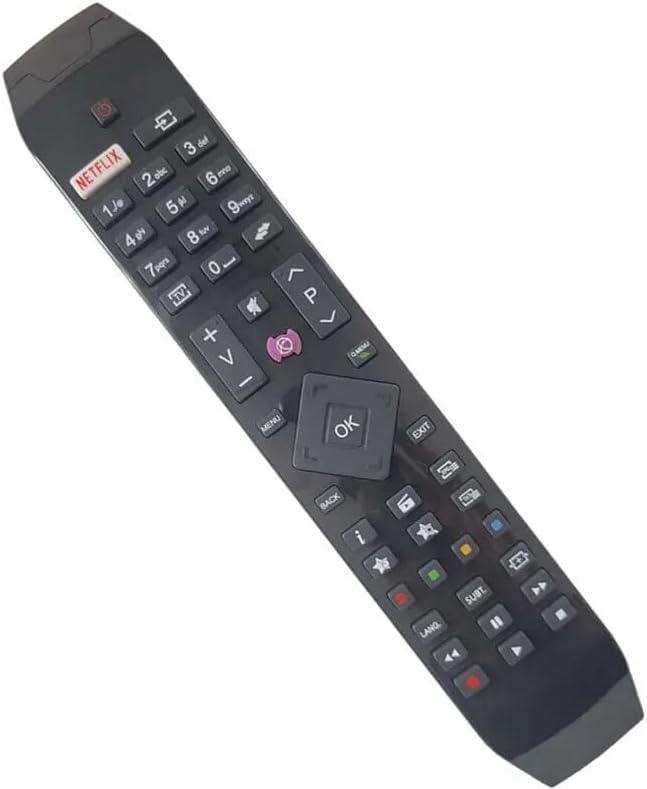
Rajah 2.1: Bersudut view of the replacement remote control, highlighting its ergonomic design and button layout.

Rajah 2.2: Bahagian hadapan view of the replacement remote control, detailing the arrangement of function buttons.
The remote includes dedicated buttons for common functions such as Power, Volume Up/Down, Channel Up/Down, Mute, and a central navigation pad with an OK button. It also features quick access buttons for streaming services like Netflix and other smart TV functionalities.
3. Persediaan
3.1 Pemasangan Bateri
- Cari petak bateri di belakang alat kawalan jauh.
- Luncurkan buka penutup bateri.
- Masukkan dua bateri AAA (tidak disertakan), pastikan terminal positif (+) dan negatif (-) sejajar dengan tanda di dalam petak.
- Tutup penutup bateri dengan selamat.
3.2 Penggunaan Awal
Once batteries are installed, the remote control is ready for use. Point the remote directly at your Hitachi Smart TV and press the Power button to turn on the television. No pairing or programming is typically required for this replacement remote.
4. Arahan Operasi
This remote control provides standard functionality for your Hitachi Smart TV. Below are common operations:
- Butang Kuasa: Menghidupkan atau mematikan TV.
- Butang Kelantangan (+/-): Menambah atau mengurangkan kelantangan TV.
- Channel Buttons (P+/-): Menukar saluran TV ke atas atau bawah.
- Butang Bisukan: Membisukan atau menyahredamkan audio TV.
- Pad Navigasi (Atas/Bawah/Kiri/Kanan/OK): Used to navigate menus and confirm selections on the TV screen.
- Butang Netflix: Direct access to the Netflix application (if supported by your TV model).
- Menu/Butang Laman Utama: Accesses the TV's main menu or smart home screen.
- Butang Kembali/Keluar: Kembali ke skrin sebelumnya atau keluar dari menu.
- Butang Nombor (0-9): For direct channel input or other numerical selections.
For specific advanced functions or smart TV features, refer to your Hitachi TV's original user manual.
5. Keserasian
This replacement remote control is compatible with various Hitachi Smart TV models. Known compatible models include, but are not limited to:
- 43HL15W69
- 43HL5W69
- 48HB6W62A
- 49HB5W62
- 49HB6W62H
- 32HB6T41A
- 43HB5T62
- 43HK4W64
- 43HK5W64
If your specific TV model is not listed, it is recommended to compare your original remote with the images provided or contact the seller for confirmation of compatibility.
6. Penyelenggaraan
6.1 Penggantian Bateri
Gantikan bateri apabila tindak balas alat kawalan jauh menjadi lembap atau berhenti berfungsi. Sentiasa gantikan kedua-dua bateri pada masa yang sama dengan yang baharu daripada jenis yang sama (AAA). Jangan campurkan bateri lama dan baharu, atau jenis bateri yang berlainan.
6.2 Pembersihan
Untuk membersihkan alat kawalan jauh, lap perlahan-lahan menggunakan kain lembut dan kering. Untuk kotoran degil, lap sedikitamp cloth can be used, but ensure no moisture enters the remote. Do not use abrasive cleaners or solvents.
6.3 Penyimpanan
Simpan alat kawalan jauh di tempat yang sejuk dan kering, jauh daripada cahaya matahari langsung dan suhu yang melampau. Jika alat kawalan jauh tidak akan digunakan untuk tempoh yang lama, adalah dinasihatkan untuk menanggalkan bateri bagi mengelakkan kebocoran.
7. Penyelesaian masalah
- Jauh tidak bertindak balas:
- Periksa sama ada bateri dimasukkan dengan betul dengan polariti yang betul.
- Gantikan bateri dengan yang baru.
- Pastikan tiada halangan antara alat kawalan jauh dan penderia inframerah TV.
- Halakan alat kawalan jauh terus ke TV.
- Beberapa fungsi tidak berfungsi:
- As a replacement remote, certain advanced or specific functions of your original TV remote may not be supported. This is normal.
- Verify that the function you are trying to use is standard for a TV remote.
- Kerja jarak jauh berfungsi secara berselang-seli:
- Bateri mungkin rendah; menggantikan mereka.
- Pastikan sesentuh bateri bersih dan bebas daripada kakisan.
If issues persist after following these steps, please contact the seller for further assistance.
8. Spesifikasi
| Jenama | Generik |
| Pengeluar | Generik |
| Peranti Serasi | Hitachi Smart TVs (e.g., 43HL15W69, 43HL5W69, 48HB6W62A, 49HB5W62, 49HB6W62H, 32HB6T41A, 43HB5T62, 43HK4W64, 43HK5W64) |
| Ciri Khas | Ergonomik |
| warna | Black/White (randomly sent) |
| Bilangan Maks Peranti yang Disokong | 5 (as a universal remote, though this is a replacement for specific TVs) |
| Sumber Kuasa | 2 x Bateri AAA (tidak termasuk) |
| bahan | plastik ABS |
9. Waranti dan Sokongan
Specific warranty information for this replacement remote control is not provided in the product details. For any warranty claims, technical support, or further inquiries, please contact the seller directly through your purchase platform.
It is recommended to retain your purchase receipt as proof of purchase for any support requests.