
TEYES CC3 2K
TEYES CC3 2K Car Radio Multimedia Video Player Navigation Stereo GPS Headunit User Manual
Model: CC3 2K
1. Pengenalan
This manual provides comprehensive instructions for the installation, operation, and maintenance of your TEYES CC3 2K Car Radio Multimedia Video Player Navigation Stereo GPS Headunit. Please read this manual thoroughly before using the product to ensure proper functionality and safety.

Imej: Depan view of the TEYES CC3 2K Headunit displaying its user interface.
2. Maklumat Keselamatan
Sentiasa patuhi langkah berjaga-jaga keselamatan berikut untuk mengelakkan kecederaan atau kerosakan pada peranti:
- Jangan cuba membuka atau mengubah suai unit. Ini boleh menyebabkan kerosakan dan membatalkan jaminan.
- Pastikan semua sambungan pendawaian selamat dan terlindung dengan betul untuk mengelakkan litar pintas.
- Elakkan mengendalikan peranti dalam suhu yang melampau atau kelembapan yang tinggi.
- Jangan sekat bukaan pengudaraan pada unit.
- Rujuk profesional untuk pemasangan jika anda tidak pasti tentang sebarang langkah.
3. Kandungan Pakej
Pastikan semua item yang disenaraikan di bawah terdapat di dalam pakej:
- 1x Head unit (TEYES CC3 2K)
- 1x Kabel kuasa
- 1x kabel USB
- 1x antena GPS
- 1x kabel AUX
- 1x 4G WiFi antenna
- 1x E-book (digital manual)
- 1x Frame (for BMW X5 E39 E53 1999-2006)
- 1x AHD 1080p rear camera
- 1x Membersihkan kain
- 1x Wiring diagram

Image: Visual representation of the TEYES CC3 2K Headunit and its included accessories.
4. Panduan Pemasangan
This section outlines the general steps for installing the TEYES CC3 2K head unit in compatible BMW X5 E39/E53 models (1999-2006). Professional installation is recommended.
4.1 Pemeriksaan Pra-Pemasangan
- Pastikan penyalaan kenderaan dimatikan dan bateri dicabut sebelum dihidupkan.
- Verify compatibility with your specific BMW X5 model and year.
- Familiarize yourself with the vehicle's existing dashboard layout and wiring.

Image: Comparison of a BMW X5 dashboard before and after installation of the TEYES CC3 2K head unit.
4.2 Removal of Existing Unit
- Carefully remove the trim pieces surrounding the factory radio.
- Unscrew and pull out the existing head unit.
- Putuskan sambungan semua abah-abah pendawaian dan kabel antena dari unit lama.
4.3 Head Unit Installation
- Attach the provided frame to the TEYES CC3 2K head unit.
- Connect the power cable, USB cables, GPS antenna, 4G WiFi antenna, and AUX cable to the corresponding ports on the new head unit. Refer to the included wiring diagram for detailed connections.
- Route the GPS and 4G WiFi antennas to an optimal location for signal reception, typically on the dashboard or under the windshield.
- If installing the rear camera, route its cable from the rear of the vehicle to the head unit and connect it to the designated input.
- Carefully slide the TEYES CC3 2K head unit with the frame into the dashboard opening.
- Secure the unit using the appropriate screws.
- Reattach the dashboard trim pieces.

Image: The OEM panel designed for integrating the TEYES CC3 2K head unit into the vehicle's dashboard.
4.4 Selepas Pemasangan
- Sambung semula bateri kenderaan.
- Hidupkan pencucuhan dan hidupkan unit kepala.
- Perform initial setup, including language, time, and network settings.
- Test all functions: radio, navigation, Bluetooth, USB, and rear camera.
5. Arahan Operasi
The TEYES CC3 2K operates on an Android system, offering a user-friendly interface. Navigate using the touchscreen and physical buttons (if applicable).
5.1 Operasi Asas
- Hidupkan/Mati Kuasa: Tekan dan tahan butang kuasa.
- Kawalan Kelantangan: Adjust using the on-screen controls or steering wheel buttons.
- Skrin Utama: Tap the home icon to return to the main interface.
- Laci Apl: Swipe up or tap the app icon to access all installed applications.

Image: Illustration of the head unit's compatibility with vehicle steering wheel controls for convenient operation.
5.2 Navigasi
- Access the pre-installed navigation application from the home screen or app drawer.
- Enter your destination using the on-screen keyboard or voice command.
- The system supports various map types, including North America.
5.3 Main Semula Multimedia
- Radio: Select the "Radio" application to tune into FM/AM stations. Supports RDS.
- Main balik USB: Connect USB devices to the available USB ports for audio and video playback. The unit features 3 USB outputs for data transfer.
- Audio Bluetooth: Pair your smartphone via Bluetooth to stream music.
- Main Balik Video: Menyokong pelbagai format video.

Image: Screenshot of the premium local radio interface on the TEYES CC3 2K head unit.
5.4 Ketersambungan
- Wi-Fi/Hotspot: Connect to a Wi-Fi network or use your phone's hotspot for internet access.
- Internet 4G: The unit supports 4G internet connectivity.
- Bluetooth: For hands-free calling and audio streaming, featuring an upgraded QCC3031QFN Qualcomm module.
- CarPlay Wayarles & Android Auto: Built-in support for seamless smartphone integration.

Image: Close-up of the three USB output ports provided for data transfer and device connectivity.
5.5 Ciri Lanjutan
- Mod Skrin Pisah: Utilize the "Freestyle Combination Split Screen Mode" to run two applications simultaneously.
- DSP Audio Processing: Features 2*DSP ADAU1701 + ROHM32107 for enhanced audio quality, including a 27-segment EQ, sound filtering, and optical/coaxial digital audio output.
- belakang View kamera: Masa nyata viewing of the vehicle's rear view and support for video recording with the included AHD 1080p rear camera.
- TEYES Vision & TEYES Yahu: Explore creative 3D software applications.

Image: The head unit displaying two applications simultaneously in split-screen mode.

Image: User interface for the DSP audio processing, highlighting the dual DSP chips.

Image: Display showing real-time rear view camera feed with video recording functionality.
6. Penyelenggaraan
Proper maintenance ensures the longevity and optimal performance of your TEYES CC3 2K head unit.
- Pembersihan: Use the provided cleaning cloth or a soft, dry cloth to wipe the screen and unit exterior. Avoid abrasive cleaners or solvents.
- Kemas Kini Perisian: Periodically check for and install software updates to ensure the latest features and bug fixes.
- Suhu: Avoid exposing the unit to direct sunlight for prolonged periods or extreme temperatures.
7. Penyelesaian masalah
Rujuk bahagian ini untuk isu biasa dan penyelesaiannya. Jika masalah berterusan, hubungi sokongan pelanggan.
| Masalah | Kemungkinan Punca | Penyelesaian |
|---|---|---|
| Unit tidak dihidupkan. | Loose power connection, blown fuse, vehicle battery disconnected. | Check power cable connections. Inspect vehicle fuses. Ensure battery is connected. |
| Tiada keluaran bunyi. | Volume too low, audio cables disconnected, incorrect audio source selected. | Increase volume. Verify speaker wire connections. Select correct audio source (e.g., Radio, USB, Bluetooth). |
| Isyarat GPS lemah atau hilang. | Antena GPS tidak diletakkan atau diputuskan dengan betul. | Ensure GPS antenna is securely connected and placed in an unobstructed location. |
| Isu sambungan Bluetooth. | Device not paired, Bluetooth off on phone/unit, interference. | Pastikan Bluetooth didayakan pada kedua-dua peranti. Pasang semula peranti. Bergerak lebih dekat dengan unit. |

Image: An icon representing the Frequently Asked Questions (FAQ) section, indicating support resources.
8. Spesifikasi
| Ciri | Perincian |
|---|---|
| Nombor Model | CC3 2K |
| Saiz Paparan | 9.5 Inci |
| Teknologi Paparan | 2K In-cell Display, Gamut Coverage 157% |
| Sistem Operasi | Android 10 |
| Pemproses | 8 cores 2.0GHz |
| RAM | 6GB |
| ROM | 128GB |
| Ketersambungan | Bluetooth (QCC3031QFN Qualcomm), USB, Wi-Fi, Hotspot, 4G Internet |
| Mod Keluaran Audio | Stereo |
| DSP | 2*DSP ADAU1701 + ROHM32107 |
| Output Audio | Optical and coaxial digital audio output |
| Ciri Khas | Touchscreen, Built-in wireless CARPLAY and ANDROID AUTO, RDS support, TEYES Vision & TEYES Yahu software, Real-time rear view with recording. |
| Included Rear Camera | AHD 1080p |
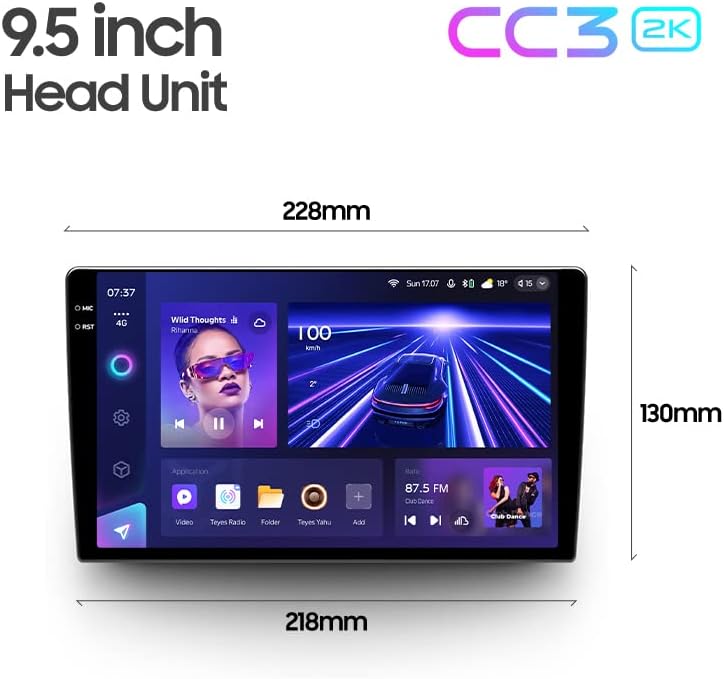
Image: Diagram showing the dimensions of the TEYES CC3 2K Headunit.
9. Waranti dan Sokongan
The TEYES CC3 2K Headunit comes with a Waranti 1 tahun dari tarikh pembelian.
For technical support, warranty claims, or further assistance, please contact TEYES customer service through their official webtapak atau peruncit tempat produk dibeli. Simpan bukti pembelian anda untuk pengesahan waranti.
Manufacturer: Shenzhen TEYES High tech Co., Ltd.
Ask a question about this manual
Ask about setup, troubleshooting, compatibility, parts, safety, or missing instructions. Manuals+ will review the question and use this page’s manual context to help answer it.