
WOOPKER AK55
Stereo WOOPKER AK55 AmpManual Pengguna yang lebih hidup
Model: AK55
pengenalan
The WOOPKER AK55 Home Audio Stereo Amplifier is designed to enhance your audio experience with powerful sound output and versatile connectivity options. Featuring Bluetooth 5.0, multiple input ports, and microphone capabilities, this amplifier is ideal for home entertainment, karaoke, and various audio setups. Its compact design allows for easy integration into any space.
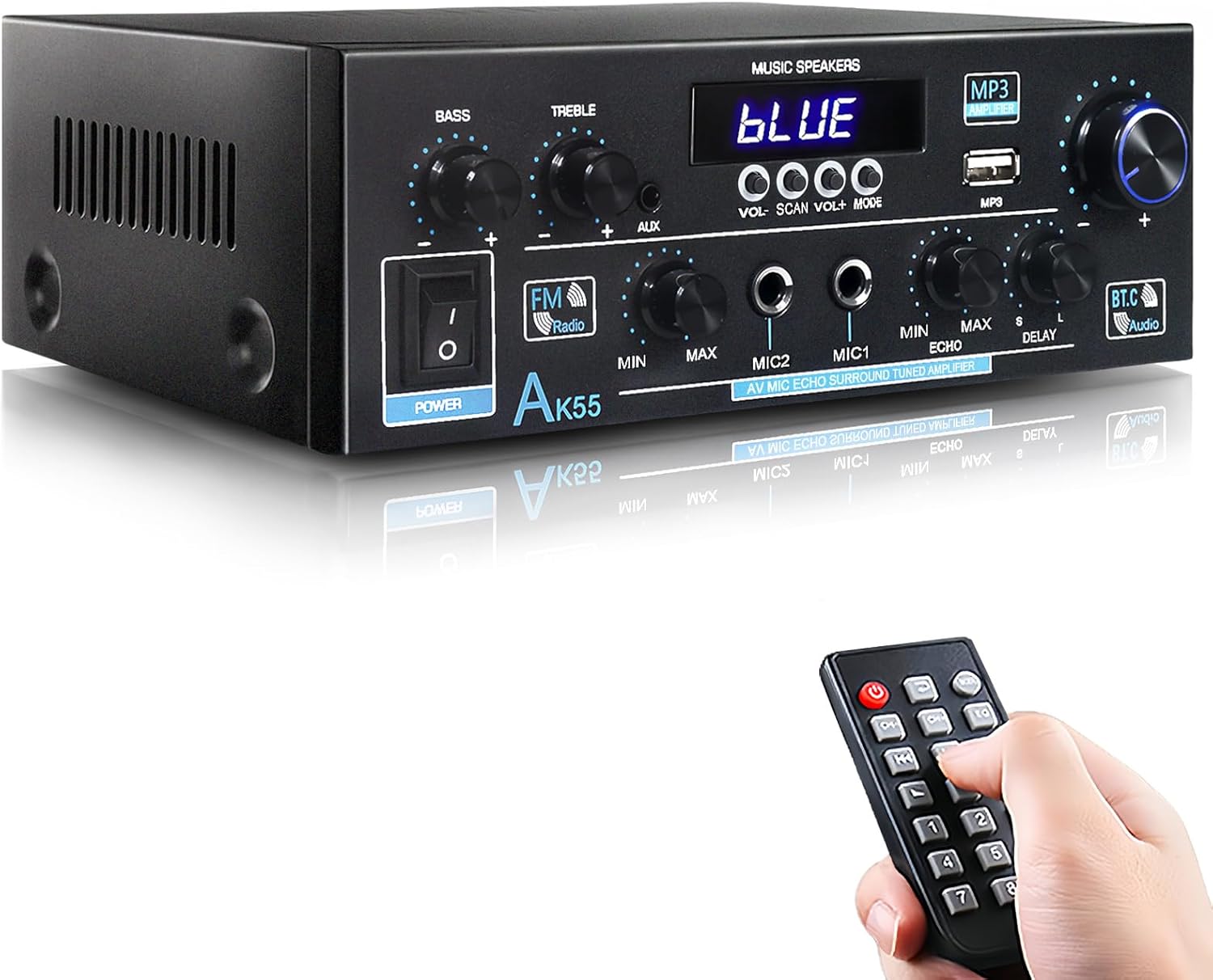
The AK55 Stereo Amplifier, shown with its remote control, offers a compact solution for home audio needs.
Kandungan Pakej
Selepas membuka bungkusan, pastikan semua item berikut ada:
- AK55 Power Amppenguat x 1
- Infrared Remote Control x 1
- Kabel Kuasa AC x 1
- FM Antenna Line x 1
- Manual Pengguna x 1
- Panduan Mula Pantas x 1

All items included in the AK55 amppakej penghidrat.
Ciri-ciri Produk
- Upgraded Power: Enhanced chip for 70W x2 output, supporting higher power devices.
- Powerful Sound & Compact Size: Delivers robust audio for 4-16 ohm speakers, ideal for various room sizes.
- Multiple Input & Multipurpose: Bluetooth, AUX, MIC, USB inputs for diverse audio sources like CD, DVD, TV, PC, phones, MP3 players.
- Bluetooth 5.0 & Remote Control: Easy wireless connection and convenient remote operation.
- MIC & USB Card Input: Two microphone jacks for karaoke and USB stick input for direct playback.
- Kawalan Bes & Treble: Fine-tune sound effects with dedicated knobs for microphone volume, bass, treble, and master volume.

Seamless wireless audio streaming with Bluetooth 5.0.

Experience high-quality audio for all your music.

Dual microphone inputs for karaoke and public speaking.
Persediaan
Panel Depan Terlaluview
Familiarize yourself with the controls and indicators on the front panel:

Terperinci view daripada AK55 amplifier's front panel controls.
- Suis kuasa: Menghidupkan atau mematikan unit.
- BASS/TREBLE Knobs: Adjust low and high frequencies.
- Input AUX: Bicu 3.5mm untuk peranti audio luaran.
- Port USB: Untuk memainkan MP3 files daripada batang USB.
- Tombol VOLUME: Kawalan kelantangan induk.
- MIC1/MIC2 Inputs: 6.35mm jacks for microphones.
- Tombol MIC VOL: Melaraskan kelantangan mikrofon.
- ECHO/DELAY Knobs: Control microphone echo and delay effects.
- FM Radio Button: Activates FM radio mode.
- Paparan Digital: Shows current mode, frequency, or track information.
Sambungan Panel Belakang
Connect your speakers and audio sources to the rear panel:

Rear panel connections for the AK55 amplebih hidup.
- AUDIO INPUT (AUX1/AUX2): RCA jacks for connecting external audio devices like CD/DVD players, TVs, or PCs.
- SPEAKER SYSTEM (4Ω-16Ω): Connect your passive speakers here. Ensure correct polarity (red for positive, black for negative).
- SEMUT FM: Connect the included FM antenna for radio reception.
- OPT/COAX INPUT: Digital audio inputs for compatible devices.
- POWER DC INPUT (12V/5A): For DC power supply (if applicable).
- AC POWER INPUT (110-240V): Connect the AC power cord to this port.
Panduan Sambungan Pembesar Suara
- Before connecting speakers, distinguish positive (red) and negative (black) terminals.
- Tekan pengapit di bahagian belakang AK55 amplifier and insert all bare wires into the speaker clasp corresponding to the positive and negative terminals.
- Elakkan memasang dan mencabut pemacu USB, kad SD, kabel audio RCA atau kabel pembesar suara semasa amppenyambung dihidupkan.
Panduan Persediaan Visual
This video provides a visual guide to setting up the AK55 Amplifier, including unboxing and connecting various components.
Arahan Operasi
Hidupkan/Mati Kuasa
Balikkan KUASA switch on the front panel to turn the amplifier on or off. The digital display will illuminate when powered on.
Pemilihan Mod
Tekan ke MODE button on the front panel or remote control to cycle through available input modes: Bluetooth, AUX1, AUX2, USB, OPT/COAX, and FM Radio. The digital display will indicate the current mode.
Volume and Tone Control
- Jumlah Induk: Putarkan yang besar JILID tombol untuk melaraskan kelantangan output keseluruhan.
- Bes/Trebel: Gunakan BASS dan TREBLE tombol untuk melaraskan frekuensi rendah dan tinggi audio anda.
Microphone Usage (Karaoke/Speaking)
- Sambungkan sehingga dua mikrofon ke MIC1 dan MIC2 bicu input.
- Laraskan kelantangan mikrofon menggunakan MIC VOL tombol.
- Apply echo and delay effects to the microphone audio using the ECHO dan KELEWATAN knobs for enhanced vocal performance.
Operasi Radio FM
- Tukar ke mod Radio FM menggunakan MODE butang.
- Gunakan IMBAS button to automatically search and save available FM stations.
- Gunakan VOL +/- buttons to manually tune to specific frequencies or navigate through saved stations.
Main Balik USB
Masukkan batang USB yang mengandungi audio MP3 files ke dalam USB port. The amplifier will automatically detect and begin playing the files. Menggunakan VOL +/- dan IMBAS (for track skip) buttons to control playback.
Penyelenggaraan
- Simpan amppenyangga di kawasan pengudaraan yang baik untuk mengelakkan terlalu panas.
- Bersihkan unit dengan kain lembut dan kering. Jangan gunakan pembersih cecair atau aerosol.
- Elakkan daripada mendedahkan amplifier to direct sunlight, high temperatures, humidity, or dust.
- Jangan menyekat bukaan pengudaraan.
Menyelesaikan masalah
| Masalah | Kemungkinan Punca | Penyelesaian |
|---|---|---|
| Tiada kuasa | Power cord not connected; Power switch off. | Ensure power cord is securely plugged in; Turn power switch ON. |
| Tiada keluaran bunyi | Volume too low; Incorrect input mode; Speakers not connected properly. | Increase volume; Select correct input mode; Check speaker connections and polarity. |
| Bluetooth tidak bersambung | Peranti tidak dalam mod berpasangan; Amplifier too far from device. | Ensure Bluetooth mode is selected on amplifier and device; Move devices closer. |
| Penerimaan FM yang lemah | FM antenna not connected or positioned incorrectly. | Connect FM antenna securely; Adjust antenna position for better signal. |
Spesifikasi
| Ciri | Perincian |
|---|---|
| Nombor Model | AK55 |
| Output Kuasa | 70W x 2 (Rated) |
| Impedans Pembesar Suara | 4-16 ohm |
| Versi Bluetooth | 5.0 |
| Input | Bluetooth, AUX (RCA), USB, MIC (x2), Optical, Coaxial |
| Dimensi (L x W x H) | 19.9cm x 18.8cm x 6.9cm (approx. 7.83 x 7.4 x 2.72 inches) |
| Berat Barang | 2.27 paun |
| Pengeluar | Jieyang Rongcheng District Baitong Electronics Factory |
| Negara Asal | China |
| Tarikh Mula-mula Tersedia | 27 Oktober 2023 |
Waranti dan Sokongan
WOOPKER is committed to providing high-quality products and customer satisfaction. For any inquiries or support needs, please refer to the following:
- Respons Pantas: Expect a response within 24 hours for your queries.
- Polisi Pemulangan: Return within 30 days for an exchange or refund.
- Sokongan Teknikal: Lifetime technical customer support is provided.
- For detailed warranty information and to contact support, please refer to the official WOOPKER webtapak atau maklumat hubungan yang diberikan dalam pembungkusan produk anda.
Ask a question about this manual
Ask about setup, troubleshooting, compatibility, parts, safety, or missing instructions. Manuals+ will review the question and use this page’s manual context to help answer it.