
1. Maklumat Keselamatan
Please read all instructions carefully before using the iZEEKER Projector. Keep this manual for future reference.
- Bekalan Kuasa: Gunakan hanya penyesuai kuasa yang ditentukan. Pastikan voltage serasi dengan wilayah anda.
- Pengudaraan: Do not block ventilation openings. Ensure adequate space around the projector for proper airflow to prevent overheating.
- Persekitaran: Avoid exposing the projector to rain, moisture, direct sunlight, or extreme temperatures. Do not place it near heat sources.
- Pembersihan: Cabut plag projektor sebelum membersihkan. Gunakan kain lembut dan kering. Jangan gunakan pembersih cecair atau aerosol.
- Perlindungan Mata: Jangan lihat terus ke dalam kanta projektor apabila lamp is on. The iZEEKER projector utilizes diffuse reflection technology to reduce blue light exposure and eye fatigue.
- Kanak-kanak: Keep the projector out of reach of small children. Supervise children when the projector is in use.
- Pembongkaran: Jangan cuba membuka atau membaiki projektor itu sendiri. Rujuk semua servis kepada kakitangan yang berkelayakan.

2. Kandungan Pakej
Sahkan bahawa semua item yang disenaraikan di bawah disertakan dalam pakej anda:
- iZEEKER Projector (Model: iPL320)
- Penyesuai Kuasa
- Alat Kawalan Jauh
- Kabel HDMI
- AV kabel
- Manual Pengguna
- Customized Tripod

3. Produk Lebihview
3.1 Ciri-ciri Utama
- Bluetooth 5.2: For enhanced audio experience with external Bluetooth speakers or headphones. Note: Bluetooth is for audio output only, not for screen mirroring.
- Kecerahan & Resolusi Tinggi: 12000 Lux brightness and native 1080P resolution with 100% NTSC color reproduction and 10000:1 contrast ratio for clear, realistic images.
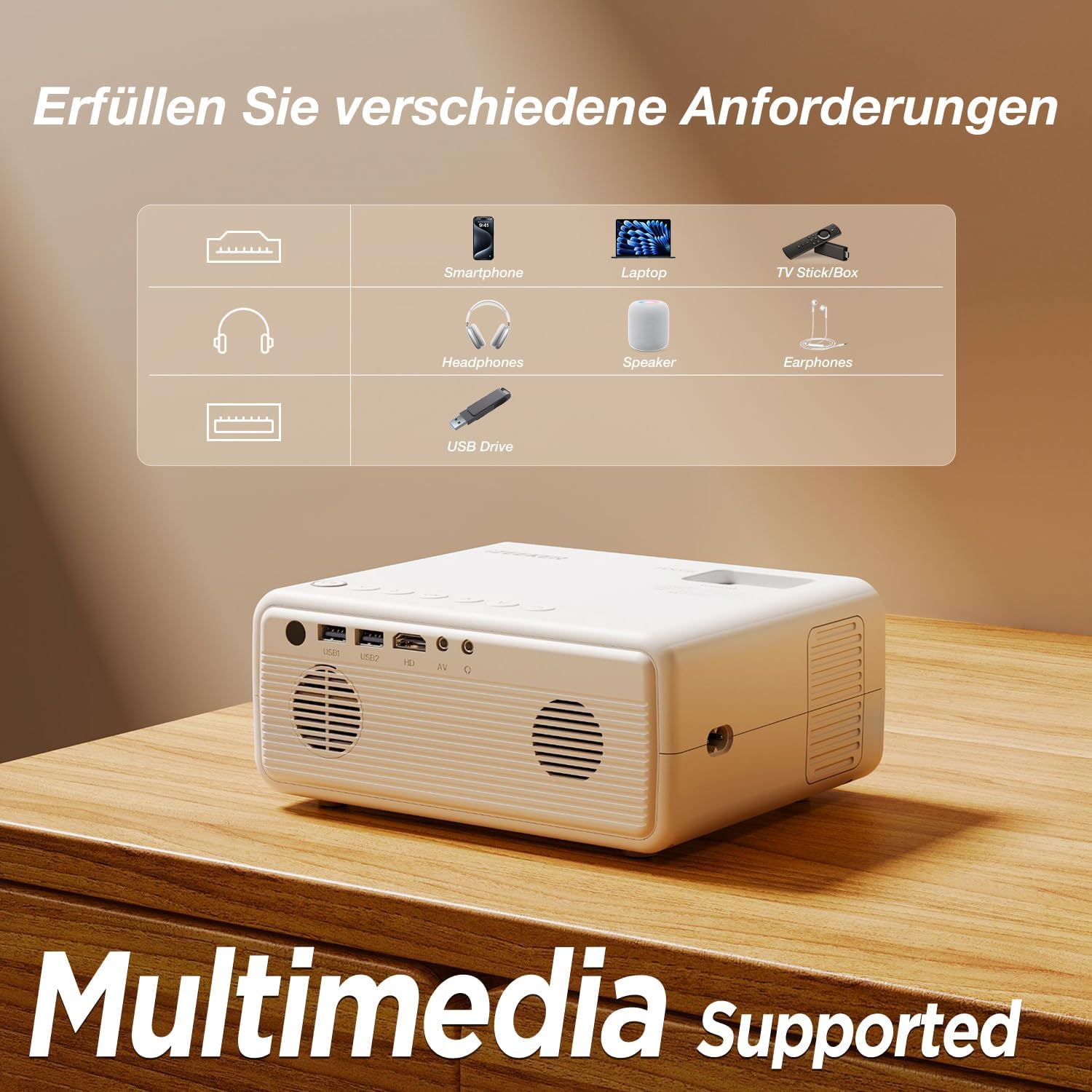
- Kesambungan Berbilang Peranti: Equipped with HDMI, AV, USB, and Aux ports for stable connections to smartphones, laptops, PS5, TV boxes, and DVD players.
- Tayangan Skrin Besar: Supports up to a 250-inch screen size with 75% zoom function for flexible screen adjustment without moving the projector.
- Perlindungan Mata: High-refraction lenses and diffuse reflection technology reduce blue light and eye fatigue.


4. Persediaan
4.1 Penempatan
Choose a flat, stable surface for the projector. The projection distance affects the screen size. For optimal viewing, ensure the projector is perpendicular to the projection surface.
- The projector can be placed on a table, mounted on the included tripod, or ceiling-mounted.
- Adjust the distance to achieve your desired screen size, up to 250 inches.

4.2 Sambungan Kuasa
Sambungkan penyesuai kuasa ke port input kuasa projektor, kemudian pasangkan penyesuai ke soket kuasa.
4.3 Pelarasan Fokus dan Keystone
After powering on, adjust the focus ring on the projector lens until the image is clear. Use the keystone correction dial to adjust the image shape if it appears trapezoidal.

4.4 Menyambung Peranti
The projector supports various wired connections for stable performance:
- HDMI: Connect laptops, gaming consoles (PS5), TV boxes, or DVD players using an HDMI cable.
- USB: Masukkan pemacu USB untuk memainkan media files secara langsung.
- DARI: Gunakan port AV untuk peranti lama.
- Smartphones (Wired):
- Peranti iOS: Requires an Apple Lightning to HDMI adapter cable (not included).
- Peranti Android: Requires a Micro USB/Type-C to HDMI cable (not included).


4.5 Sambungan Audio Bluetooth
Untuk menyambungkan pembesar suara atau fon kepala Bluetooth luaran:
- Pastikan peranti audio Bluetooth anda berada dalam mod berpasangan.
- Pada projektor, navigasi ke menu tetapan Bluetooth.
- Pilih peranti anda daripada senarai peranti yang tersedia untuk dipasangkan.
NOTA: The Bluetooth function is for audio output only and does not support screen mirroring from mobile devices.

5. Arahan Operasi
5.1 Hidupkan/Mati Kuasa
- Hidupkan kuasa: Tekan butang kuasa pada projektor atau alat kawalan jauh.
- Matikan: Tekan butang kuasa sekali lagi. Sahkan penutupan jika digesa.
5.2 Menu Navigasi
Use the navigation buttons on the projector or remote control to browse the on-screen menu. The "OK" button confirms selections, and the "Back" button returns to the previous screen.
5.3 Pemilihan Sumber Input
Press the "Source" button on the remote control or projector to select the desired input (e.g., HDMI1, USB, AV).
5.4 Fungsi Zum
The projector features a 75% zoom function. Access this setting in the projector's menu to adjust the screen size without physically moving the projector.


6. Penyelenggaraan
6.1 Membersihkan Lensa
Use a professional lens cleaning cloth or air blower to clean the projector lens. Do not touch the lens directly with your hands or use abrasive cleaners.
6.2 Membersihkan Badan Projektor
Wipe the projector's exterior with a soft, dry cloth. Do not use liquid, abrasive, or corrosive cleaners.
6.3 Penyimpanan
When not in use for extended periods, store the projector in a cool, dry, dust-free environment. Use the original packaging or a protective case to prevent damage.
7. Penyelesaian masalah
| Masalah | Kemungkinan Punca | Penyelesaian |
|---|---|---|
| No image/No signal | Incorrect input source selected; Cable not connected properly; Device not powered on. | Select the correct input source (HDMI, USB, AV). Check all cable connections. Ensure the connected device is powered on. |
| Imej kabur | Focus not adjusted; Projector too far/close; Lens dirty. | Adjust the focus ring. Adjust projection distance. Clean the projector lens. |
| Trapezoidal image | Projektor tidak berserenjang dengan skrin. | Adjust the keystone correction dial. Reposition the projector. |
| Tiada bunyi | Kelantangan terlalu rendah; Dibisukan; Peranti audio luaran tidak disambungkan/dipasangkan. | Increase volume. Unmute. Check Bluetooth connection for external speakers/headphones. |
| Cannot play Netflix/Prime Video | Sekatan hak cipta. | These services can only be played via a TV Stick (e.g., Amazon Fire Stick) connected to the projector's HDMI port. |
8. Spesifikasi
| Jenama | iZEEKER |
| Nombor Model | iPL320 |
| Jenis Produk | Projektor Mudah Alih |
| Kecerahan | 12000 Lux |
| Resolusi Paparan | 1920 x 1080 (1080P Native) |
| Resolusi Paparan Maksimum | 1920 x 1080 |
| Nisbah Kontras | Sehingga 10000:1 |
| Teknologi Ketersambungan | Bluetooth 5.2, HDMI, USB, AV, Aux |
| Screen Size (Max) | 250 Inci |
| Fungsi Zum | 75% |
| Dimensi Produk | 19L x 15.8W x 8.6H sentimeter |
| Jenis Pemasangan | Pemasangan Tripod |
| Penggunaan yang Disyorkan | Pawagam Rumah |
9. Waranti & Sokongan
iZEEKER is committed to providing excellent customer service.
- Waranti Pengilang: The iZEEKER Projector comes with a free 2-year after-sales warranty.
- Sokongan Teknikal: Professional lifetime technical support is available.
- Hubungi Kami: If you have any questions, issues, or require assistance, please do not hesitate to contact iZEEKER customer support. Refer to the contact information provided in your product packaging or on the official iZEEKER webtapak.