
Alat Kawalan Jauh Gantian (ASIN: B0CKWGC1KD)
Manual Pengguna Alat Kawalan Jauh Gantian
Model: Replacement Remote Control (ASIN: B0CKWGC1KD)
pengenalan
This manual provides instructions for the use and maintenance of your new replacement remote control. This remote is designed to function as a substitute for the original remote control of Chiq GCBLTV6EA-C4 L32H7N Smart LED TVs. Please note that as a replacement, some advanced or specific functions of your original remote may not be fully replicated.
Persediaan
Pemasangan Bateri
Alat kawalan jauh memerlukan dua bateri AAA (tidak disertakan). Ikuti langkah berikut untuk memasangnya:
- Cari penutup petak bateri di belakang alat kawalan jauh.
- Tekan ke bawah pada tab dan luncurkan penutup ke bawah untuk membuka petak.
- Masukkan dua bateri AAA, pastikan terminal positif (+) dan negatif (-) sejajar dengan tanda di dalam petak.
- Luncurkan penutup petak bateri kembali ke tempatnya sehingga ia berbunyi dengan selamat.
Once batteries are installed, the remote control is ready for use. No pairing or programming is typically required for this replacement remote.
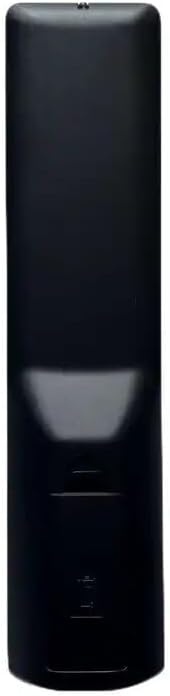
Imej: Belakang view of the remote control, illustrating the location of the battery compartment. The compartment is a rectangular indentation on the lower half of the remote's back, designed to hold two AAA batteries.
Arahan Operasi
This section outlines the general functions of the buttons on your replacement remote control. Button layouts may vary slightly depending on the specific model received (black or white version).

Imej: Depan view of the replacement remote control. It is black with various grey and colored buttons, including a power button, number pad, navigation arrows, volume and channel controls, and dedicated buttons for Netflix and YouTube.
- Butang kuasa (●): Menghidupkan atau mematikan TV.
- Pad Nombor (0-9): Terus memasukkan nombor saluran.
- Kelantangan Naik/Turun (+/-): Melaraskan kelantangan audio.
- Saluran Atas/Bawah (P+/P-): Menukar saluran TV.
- Bisu (bisu): Membisukan atau menyahredamkan audio TV.
- Anak Panah Navigasi (Atas, Bawah, Kiri, Kanan): Menavigasi melalui menu dan pilihan.
- Butang OK: Mengesahkan pilihan dalam menu.
- Kembali/Kembali: Kembali ke skrin atau menu sebelumnya.
- Sumber/Input: Changes the input source (HDMI, AV, etc.).
- Butang Netflix: Akses terus ke aplikasi Netflix.
- Butang YouTube: Akses terus ke aplikasi YouTube.
- Menu/Rumah: Opens the TV's main menu or smart TV home screen.
For specific functions not listed, refer to your television's original user manual, as this remote is designed to mimic common functions.
Penyelenggaraan
Membersihkan Alat Jauh
Untuk membersihkan alat kawalan jauh, gunakan kain lembut dan kering. Untuk kotoran degil, gunakan sedikit kainampen kain dengan air atau pembersih yang lembut dan tidak melelas. Jangan gunakan bahan kimia yang keras atau rendam alat kawalan jauh ke dalam air.
Penggantian Bateri
Gantikan bateri apabila tindak balas alat kawalan jauh berkurangan atau ia berhenti berfungsi. Sentiasa gantikan kedua-dua bateri pada masa yang sama dengan bateri AAA baharu. Jangan campurkan bateri lama dan baharu, atau jenis bateri yang berlainan.
Menyelesaikan masalah
| Masalah | Kemungkinan Punca | Penyelesaian |
|---|---|---|
| Jauh tidak berfungsi. | Bateri mati atau dipasang dengan salah. Halangan antara alat kawalan jauh dan TV. | Check battery polarity and replace batteries. Ensure clear line of sight to TV's IR receiver. |
| Some functions not working. | This is a replacement remote; some specific functions may not be supported. | Confirm if the function is standard. If not, it may be a limitation of the replacement remote. |
| Jauh tidak bertindak balas. | Low batteries. Remote sensor blocked. | Replace batteries. Clean the remote's IR emitter and TV's IR receiver. |
Spesifikasi
- Jenama: Generik
- model: Alat Kawalan Jauh Gantian (ASIN: B0CKWGC1KD)
- Peranti Serasi: Television, Stereo System, Set Top Box, DVD/Blu-ray Player, Home Theater
- Bilangan Maks Peranti yang Disokong: 5
- Ciri Khas: Ergonomik
- warna: Black/White (sent randomly)
- Bahan: plastik ABS
Waranti dan Sokongan
Specific warranty information for this generic replacement remote control is not provided in the product details. For any issues or support inquiries, please contact the seller directly through the platform where the purchase was made. It is recommended to provide your original remote part number or unit model to the seller for better assistance.
Ask a question about this manual
Ask about setup, troubleshooting, compatibility, parts, safety, or missing instructions. Manuals+ will review the question and use this page’s manual context to help answer it.