
1. Pengenalan
This manual provides comprehensive instructions for the safe and effective use of your Kongzee 4-in-1 TENS EMS Massage Muscle Stimulator, Model AS9026. This device is designed to offer Transcutaneous Electrical Nerve Stimulation (TENS) for pain relief, Electrical Muscle Stimulation (EMS) for muscle exercise, and various massage modes for muscle relaxation. Please read this manual thoroughly before initial use and retain it for future reference.

Image 1.1: Kongzee 4-in-1 TENS EMS Massage Muscle Stimulator with its packaging and electrode pads.
2. Maklumat Keselamatan Penting
Penafian Undang-undang:
Statements regarding dietary supplements have not been evaluated by the FDA and are not intended to diagnose, treat, cure, or prevent any disease or health condition. Consult with a healthcare professional before using this device, especially if you have pre-existing medical conditions, are pregnant, or have a pacemaker.
Do not use this device on broken skin, open wounds, or areas with swelling, redness, skin eruptions, or inflammation. Keep out of reach of children.
3. Kandungan Pakej
Your Kongzee 4-in-1 TENS EMS Massage Muscle Stimulator package includes the following items:
- 1 x Kongzee TENS EMS Massage Muscle Stimulator Unit
- 2 x Wayar Elektrod
- 12 x Electrode Pads (various sizes)
- 2 x Plastic Pad Holders
- 1 x Kabel Pengecasan USB-C
- 1 x Beg Penyimpanan
- 1 x Manual Pengguna
Imej 3.1: Selesaiview of the items included in the product package.
4. Produk Lebihview
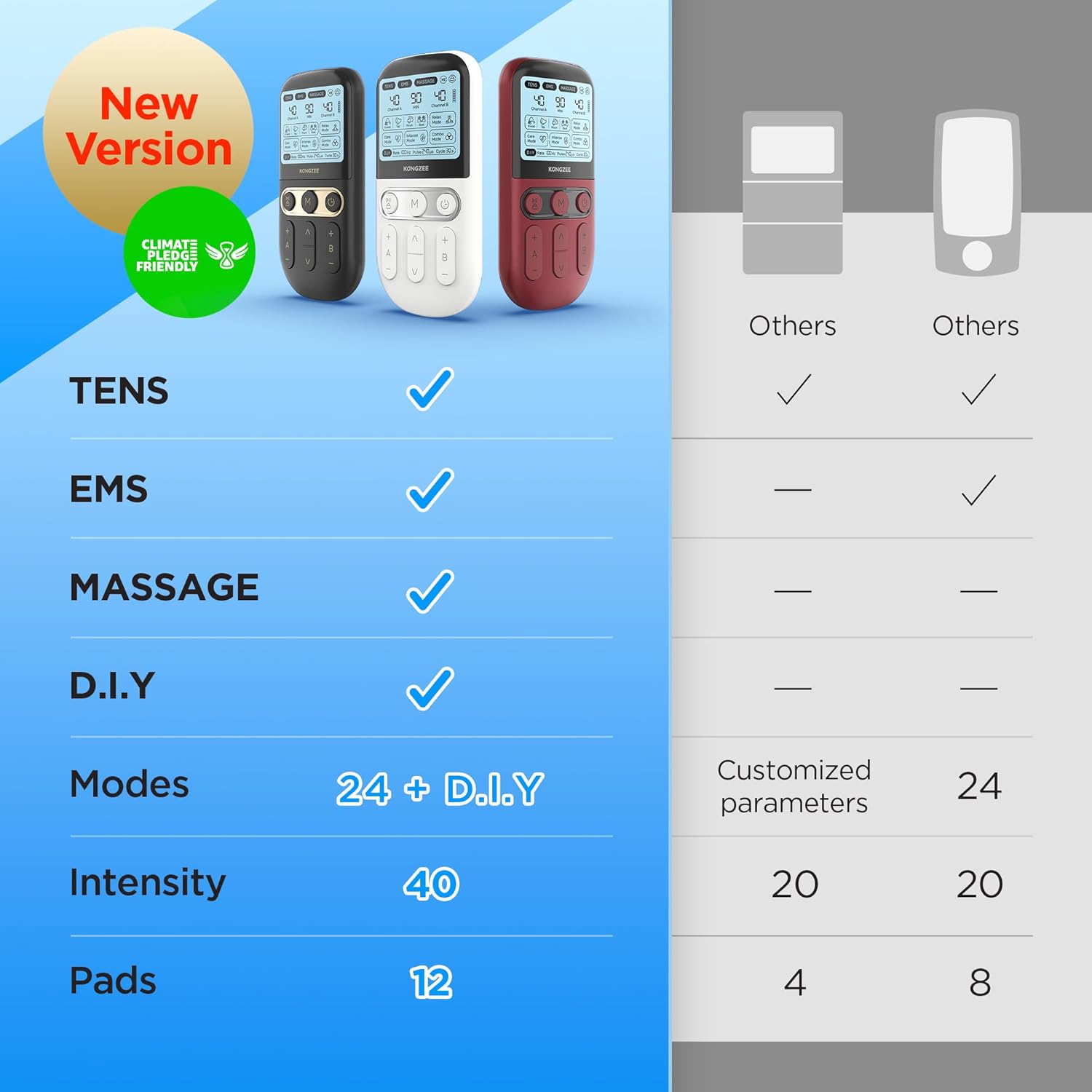
The Kongzee AS9026 is an advanced 4-in-1 device offering multiple therapy options:
- TENS (Stimulasi Saraf Elektrik Transkutaneus): For pain relief.
- EMS (Rangsangan Otot Elektrik): For muscle exercise and strengthening.
- Urut: For muscle relaxation and comfort.
- D.I.Y. Mode: Allows for customized settings to create unlimited personalized modes.
Key features include 24 pre-set modes plus D.I.Y. options, 40 intensity levels, dual-channel operation, a rechargeable battery with up to 90 minutes endurance time, USB-C charging, and a one-button protection feature to pause or lock the screen.

Imej 4.1: Terperinci view of the device's screen and control buttons, highlighting TENS, EMS, Massage, and D.I.Y. modes.

Image 4.2: The one-button protection feature allows users to pause or lock the screen to prevent accidental changes during use.
5. Persediaan
5.1 Mengecas Peranti
- Connect the provided USB-C charging cable to the charging port located at the bottom of the device.
- Palamkan hujung kabel USB-C yang satu lagi ke dalam penyesuai kuasa USB yang serasi (tidak disertakan) atau port USB komputer.
- The battery indicator on the screen will show charging status. A full charge provides up to 90 minutes of continuous use.
5.2 Memasang Pad Elektrod
- Ensure your skin is clean, dry, and free of oils or lotions before applying the pads.
- Carefully peel the electrode pads from their protective plastic plates. Retain the plastic plates for storage.
- Connect the electrode wires to the metal pins on the electrode pads.
- Plug the electrode wires into the Channel A and/or Channel B ports at the top of the stimulator unit.
- Firmly apply the electrode pads to the desired treatment area on your skin. Ensure good contact for effective stimulation.

Image 5.1: Illustration of connecting electrode pads and wires to the device, demonstrating dual-channel application.

Image 5.2: The device features a USB-C charging port for convenient power replenishment, offering up to 90 minutes of use per charge.
6. Arahan Operasi
6.1 Hidupkan/Mati Kuasa
Tekan dan tahan butang Butang kuasa ( ) untuk menghidupkan atau mematikan peranti.
6.2 Pemilihan Mod
Tekan ke Butang mod (M) to cycle through the available TENS, EMS, Massage, and D.I.Y. modes. The current mode will be displayed on the screen.
6.3 Pelarasan Intensiti
Gunakan '+' dan '-' buttons for Channel A and Channel B to increase or decrease the intensity of the stimulation. Start with the lowest intensity and gradually increase to a comfortable level. The device offers 40 intensity levels.

Image 6.1: The device provides 40 levels of output intensity for personalized therapy.
6.4 Penetapan Pemasa
While the device is on, short press the Butang kuasa to adjust the treatment timer. You can set the timer from 10 to 90 minutes.
6.5 Dual Channel Use
The device features dual channels (A and B), allowing you to use up to 4 pads simultaneously and adjust the intensity for each channel independently. This enables treatment of two different body areas or a larger area with varied intensity.
6.6 Electrode Pad Placement Guide
Refer to the diagram below for recommended electrode pad placements on various body parts. Ensure pads are placed on clean, dry skin for optimal adhesion and conductivity.

Image 6.2: Recommended electrode pad placements for various body areas.
7. Penyelenggaraan
7.1 Membersihkan Peranti
Lap peranti dengan lembut, damp kain. Jangan gunakan pembersih yang melelas atau rendam peranti di dalam air.
7.2 Cleaning and Storing Electrode Pads
After each use, gently wipe the adhesive side of the pads with a damp cloth to remove any debris. Allow them to air dry completely (adhesive side up) before reattaching them to their plastic plates. Store the pads in a sealed bag to prolong their lifespan. Replace pads when they lose their adhesiveness.
7.3 Penyimpanan
Store the device and all accessories in the provided storage pouch in a cool, dry place, away from direct sunlight and extreme temperatures.
8. Penyelesaian masalah
- No stimulation felt: Ensure the device is powered on, electrode pads are firmly attached to the skin, and wires are securely connected to both the pads and the device. Increase intensity gradually.
- Pads not sticking: Clean the pads and skin as per maintenance instructions. Replace pads if they have lost their adhesiveness.
- Peranti tidak dihidupkan: Pastikan peranti dicas sepenuhnya.
- Irregular or uncomfortable sensation: Reduce intensity. Re-position pads. If discomfort persists, discontinue use and consult a healthcare professional.
9. Spesifikasi
| Ciri | Spesifikasi |
|---|---|
| Nombor Model | AS9026 |
| Dimensi Produk | 5.31 x 2.05 x 6.5 inci |
| Berat Barang | 15.84 auns |
| Jenis Bateri | 1 bateri Polimer Litium (termasuk) |
| Port Pengecasan | USB-C |
| Tahap Intensiti | 40 |
| Mod | 24+ D.I.Y. |
| Saluran | Dual (A/B) |
| Pengeluar | KONGZEE |
10. Waranti dan Sokongan
For warranty information and customer support, please refer to the documentation included in your product packaging or visit the official Kongzee website. Contact information for support is typically provided within the warranty details.