
pengenalan
The Acoustic Research Portable Outdoor Wireless Speaker with LED Flickering Flame Light is designed to provide high-quality audio and ambient lighting for various indoor and outdoor settings. This rechargeable speaker features multiple light modes, including a realistic flickering flame, and is built with an IPX5 water-resistant rating, making it suitable for outdoor use. It also includes built-in nature sounds for relaxation and can be stereo-paired with another compatible AR speaker for an enhanced audio experience.
Kandungan Pakej
- Acoustic Research Portable Outdoor Wireless Speaker (Model: AWSF9R)
- Kabel Pengecas USB
- Manual Pengguna
Ciri-ciri Produk
- 7 Mod Cahaya: Soft White, Bright White, Flicker Flame, Soft Glow, Candlelight, Aurora. Separate controls for light and speaker.
- Masa Main Dilanjutkan: Sehingga 12 jam main balik audio dengan sekali cas.
- Tahan Air: IPX5 rated for protection against splashing water.
- Bunyi Alam: Includes Forest, Waves, Running Stream, and Rain.
- Reka Bentuk Mudah Alih: Attractive lantern style with a handle for easy carrying or hanging.
- Kesambungan Bluetooth: Penstriman audio tanpa wayar yang lancar daripada peranti yang serasi.
- Gandingan Stereo: Connect two AWSF9R speakers for true wireless stereo sound (second speaker sold separately).
Kawalan dan Penunjuk

Rajah 1: Speaker Control Panel. This image shows a close-up of the speaker's control buttons, including power, volume, track skip, light mode, and nature sound buttons, along with the DC charging port.
| Butang / Petunjuk | Fungsi |
|---|---|
| Butang Kuasa (⏻) | Press and hold to power the speaker ON or OFF. Press briefly to Play/Pause music. |
| Kelantangan Turun / Trek Sebelumnya (− / ⏮) | Tekan sebentar untuk mengurangkan kelantangan. Tekan dan tahan untuk pergi ke trek sebelumnya. |
| Jilid Naik / Laluan Seterusnya (+ / ⏭) | Tekan sebentar untuk meningkatkan kelantangan. Tekan dan tahan untuk pergi ke trek seterusnya. |
| Butang Mod Cahaya (💡) | Press to cycle through 7 light modes: Soft White, Bright White, Flicker Flame, Soft Glow, Candlelight, Aurora, and OFF. |
| Butang Bunyi Alam Semulajadi (♫) | Press to cycle through 4 nature sounds: Forest, Waves, Running Stream, Rain, and OFF. |
| Port Pengecasan DC | Connect the USB charging cable here to recharge the speaker's battery. |
| Penunjuk LED | Indicates charging status and Bluetooth pairing status. |
Persediaan
Mengecas Speaker
- Locate the DC charging port on the speaker's control panel.
- Connect the small end of the provided USB charging cable to the speaker's DC port.
- Sambungkan hujung kabel USB yang lebih besar ke penyesuai kuasa USB (tidak disertakan) atau port USB komputer.
- The LED indicator will illuminate to show charging status. Allow approximately 3-4 hours for a full charge. The indicator will change or turn off when charging is complete.
Nota: Fully charge the speaker before first use to maximize battery life.
Arahan Operasi
Menghidupkan/Mematikan
- To power ON, press and hold the ⏻ Power button for 2-3 seconds until you hear an audible prompt.
- To power OFF, press and hold the ⏻ Power button for 2-3 seconds until you hear an audible prompt.
Berpasangan Bluetooth
- Ensure the speaker is powered ON and within 10 meters (33 feet) of your Bluetooth device (smartphone, tablet, etc.).
- The speaker will automatically enter Bluetooth pairing mode when powered on for the first time or if no device is connected. The LED indicator will flash, indicating it's ready to pair.
- Pada peranti Bluetooth anda, pergi ke tetapan Bluetooth dan dayakan Bluetooth.
- Cari untuk available devices and select "AR Speaker" (or similar name) from the list.
- Once paired, the LED indicator will stop flashing and remain solid, and you will hear a confirmation sound.
- You can now play music from your device through the speaker.
Nota: Pembesar suara secara automatik akan cuba menyambung semula ke peranti pasangan terakhir apabila dihidupkan.
Controlling Light Modes
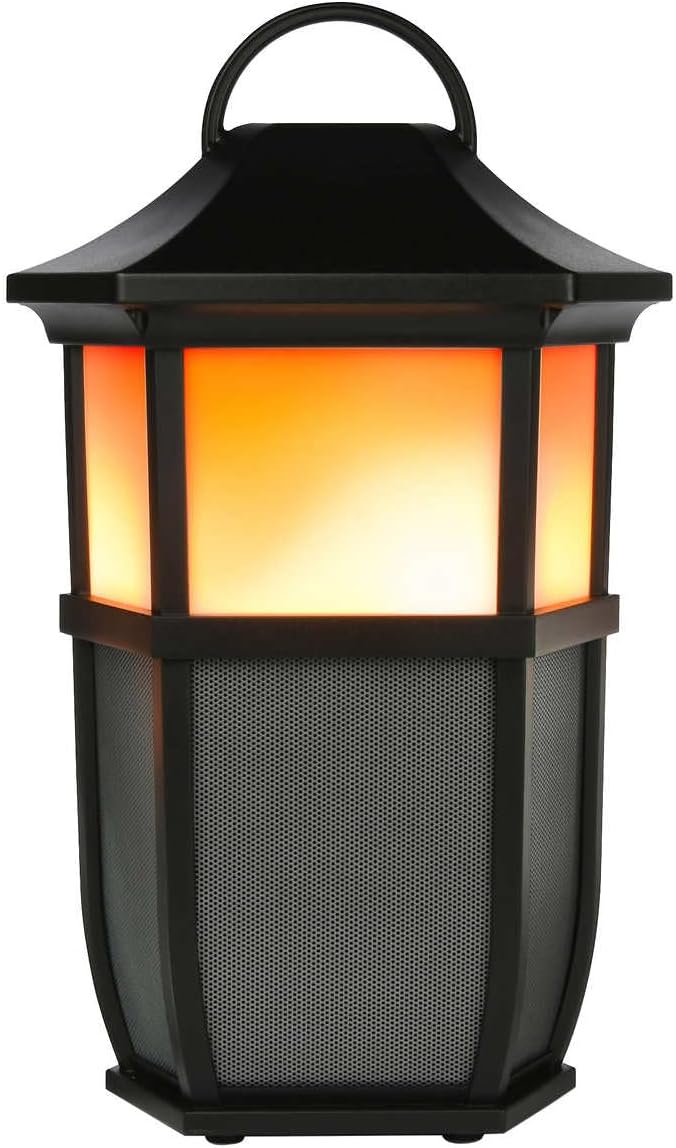

Rajah 2: Speaker Light Modes. The left image shows the speaker with a warm, flickering flame light, while the right image shows it with a bright white light, demonstrating two of the available light modes.
Tekan ke 💡 Light Mode button repeatedly to cycle through the 7 available light modes:
- Api Berkelip
- Putih Lembut
- Putih Cerah
- Cahaya Lembut
- Cahaya lilin
- Aurora
- Lampu MATI
Playing Nature Sounds
Tekan ke ♫ Nature Sound button repeatedly to cycle through the 4 built-in nature sounds:
- Hutan
- ombak
- Running Stream
- hujan
- Nature Sound OFF
True Wireless Stereo (TWS) Pairing (Optional)
To achieve a true stereo sound experience, you can pair two Acoustic Research AWSF9R speakers together. (Second speaker sold separately).
- Ensure both speakers are powered ON and not connected to any Bluetooth device.
- Pada satu pembesar suara (ini akan menjadi pembesar suara utama anda), tekan dan tahan ⏻ Power button for 5 seconds until you hear a distinct pairing tone.
- The primary speaker will now search for the second speaker.
- Once connected, you will hear a confirmation tone, and the LED indicators on both speakers will change to indicate a successful TWS connection.
- Now, connect your Bluetooth device to the primary speaker as described in the "Bluetooth Pairing" section. Audio will play in stereo through both speakers.
Nota: TWS pairing only works with two identical AWSF9R speakers.
Penyelenggaraan
- Pembersihan: Gunakan kain lembut dan kering untuk membersihkan bahagian luar pembesar suara. Jangan gunakan pembersih atau pelarut yang melelas.
- Pendedahan Air: While IPX5 water-resistant, do not submerge the speaker in water. Ensure the charging port cover is securely closed when exposed to water.
- Storan: Simpan pembesar suara di tempat yang sejuk dan kering jauh dari cahaya matahari langsung dan suhu yang melampau apabila tidak digunakan untuk tempoh yang lama.
- Penjagaan Bateri: To prolong battery life, fully charge the speaker at least once every three months, even if not in regular use.
Menyelesaikan masalah
| Masalah | Penyelesaian yang Mungkin |
|---|---|
| Speaker tidak dihidupkan. | Ensure the battery is charged. Connect the speaker to a power source using the USB cable and allow it to charge for at least 30 minutes before attempting to power on again. |
| Tidak boleh berpasangan dengan peranti Bluetooth. |
|
| Tiada bunyi atau kelantangan rendah. |
|
| Light modes are not working. | Press the Light Mode button repeatedly to cycle through all modes. Ensure the speaker has sufficient battery charge. |
| Nature sounds are not working. | Press the Nature Sound button repeatedly to cycle through all sounds. |
Spesifikasi

Rajah 3: Product Dimensions. This image illustrates the height (9.76 inches), width (7.2 inches), and depth (6.54 inches) of the speaker.
| Ciri | Perincian |
|---|---|
| Nama Model | AWSF9R |
| Jenama | Penyelidikan Akustik |
| Jenis Pembesar Suara | Luaran, Mudah Alih |
| Ketersambungan | Bluetooth (Wayarles) |
| Julat Bluetooth | Sehingga 10 meter (33 kaki) |
| Tahan Air | IPX5 (Tahan Air) |
| Output Kuasa | 30 Watt |
| Mod Keluaran Audio | Stereo (dengan gandingan TWS) |
| Hayat Bateri | Sehingga 12 Jam |
| Sumber Kuasa | Dikuasakan Bateri |
| Dimensi Produk (D x W x H) | 6.54" x 7.2" x 9.76" |
| Berat Barang | 5 paun |
| UPC | 044476151811 |
Waranti dan Sokongan
This Acoustic Research product comes with a Waranti Terhad. For detailed warranty information, technical support, or service inquiries, please refer to the warranty card included with your product or visit the official Acoustic Research webtapak. Sila simpan bukti pembelian anda untuk tuntutan waranti.
For further assistance, you may contact Acoustic Research customer support through their official channels.