
1. Pengenalan
Thank you for choosing the RadioShack TWS Bluetooth Wireless Earbuds, Model 100128651 (Snow). These earbuds are designed to provide a high-quality, wireless audio experience with convenience and comfort. This manual will guide you through the setup, operation, and maintenance of your new earbuds.
2. Kandungan Pakej
Sila pastikan semua item ada dalam pakej anda:
- RadioShack TWS Bluetooth Wireless Earbuds (Left and Right)
- Kes Pengecasan
- Kabel Pengecasan USB Jenis-C
- Pelbagai Saiz Petua Telinga

3. Produk Lebihview
Familiarize yourself with the components of your RadioShack TWS Bluetooth Wireless Earbuds.
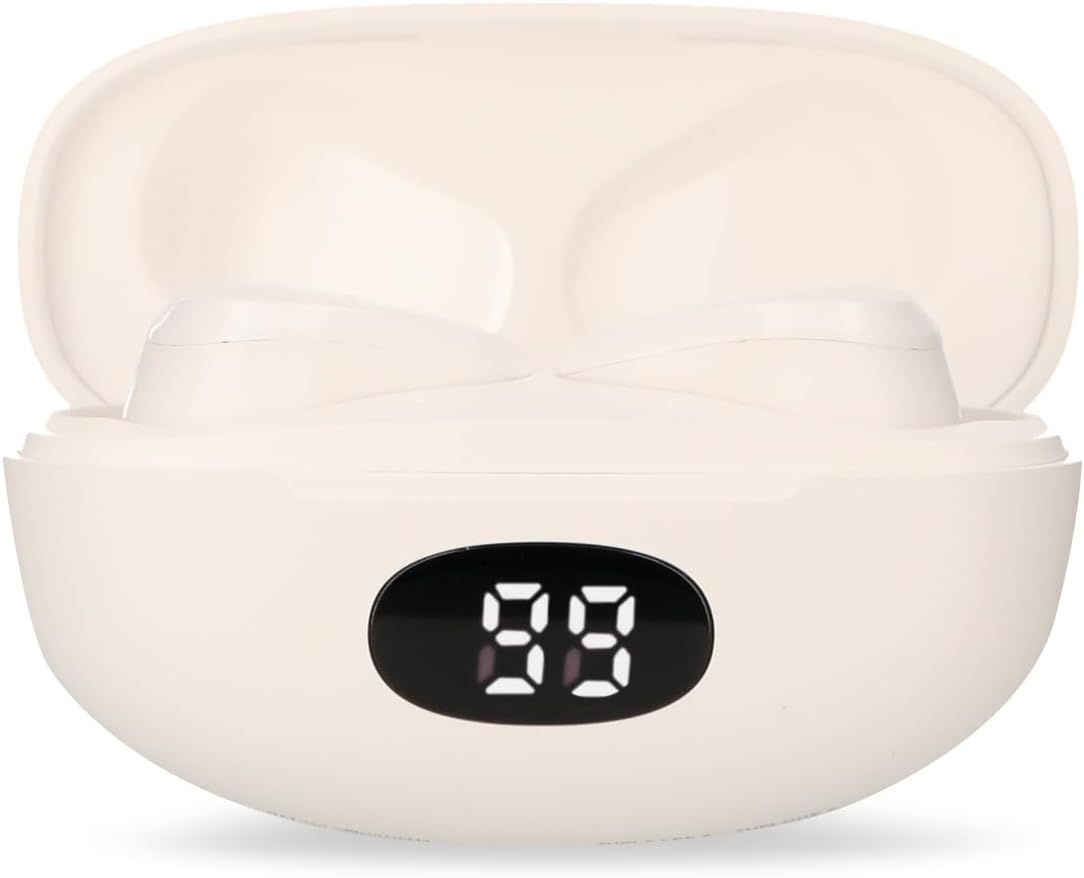


4. Persediaan
4.1 Mengecas Fon telinga dan Sarung
- Caj Permulaan: Sebelum penggunaan pertama, cas sepenuhnya fon telinga dan bekas pengecas.
- Mengecas Kes: Connect the provided USB Type-C cable to the charging port on the case and the other end to a USB power source (e.g., computer, wall adapter). The LED display on the case will indicate charging status.
- Mengecas fon telinga: Place the earbuds into the charging case. Ensure they are correctly seated; the earbuds will automatically begin charging. The LED display on the case will show the earbuds' charging status.
- Masa Pengecasan: A full charge for both the earbuds and case typically takes up to 1.5 hours.
4.2 Berpasangan Bluetooth
- Hidupkan kuasa: Open the charging case. The earbuds will automatically power on and enter pairing mode. You may hear an audible prompt.
- Aktifkan Bluetooth: On your mobile device (smartphone, tablet, etc.), go to the Bluetooth settings and ensure Bluetooth is enabled.
- Pilih Peranti: Cari untuk available Bluetooth devices. Select "RadioShack Snow" or a similar name from the list.
- Sambung: Once selected, your device should connect to the earbuds. A confirmation sound or message may indicate successful pairing.
- Sambung semula: After initial pairing, the earbuds will automatically connect to the last paired device when removed from the charging case and Bluetooth is active on your device.
5. Arahan Operasi
The RadioShack TWS Earbuds feature a multifunction touch button for easy control.
5.1 Hidupkan/Mati Kuasa
- Hidupkan kuasa: Open the charging case, and the earbuds will power on automatically. Alternatively, press and hold the touch area on both earbuds for approximately 3 seconds.
- Matikan: Place the earbuds back into the charging case and close the lid. They will power off automatically. Alternatively, press and hold the touch area on both earbuds for approximately 5 seconds.
5.2 Main balik Muzik
- Main/Jeda: Ketik kawasan sentuh pada mana-mana fon telinga sekali.
- Lagu Seterusnya: Ketik dua kali pada kawasan sentuh pada fon telinga kanan.
- Trek Sebelumnya: Ketik dua kali pada kawasan sentuh pada fon telinga kiri.
5.3 Pengurusan Panggilan
- Jawab/Tamatkan Panggilan: Ketik kawasan sentuh pada mana-mana fon telinga sekali.
- Tolak Panggilan: Press and hold the touch area on either earbud for approximately 2 seconds.
5.4 Kawalan Kelantangan
- Tingkatkan Kelantangan: Ketik tiga kali bahagian sentuh pada fon telinga kanan.
- Kurangkan Kelantangan: Ketik tiga kali bahagian sentuh pada fon telinga kiri.
5.5 Pembantu Suara
- Aktifkan Pembantu Suara: Press and hold the touch area on either earbud for approximately 2 seconds (when not on a call).
6. Penyelenggaraan
Untuk memastikan jangka hayat dan prestasi optimum fon telinga anda, ikut garis panduan penyelenggaraan ini:
- Pembersihan: Gunakan kain lembut, kering, bebas serabut untuk membersihkan fon telinga dan bekas pengecas. Jangan gunakan pembersih yang melelas, alkohol atau pelarut kimia.
- Petua Telinga: Tanggalkan dan bersihkan hujung telinga dengan kerapamp kain. Pastikan ia benar-benar kering sebelum dipasang semula.
- Mengecas Kenalan: Jika masalah pengecasan berlaku, bersihkan kanta pengecas pada kedua-dua fon telinga dan bahagian dalam bekas dengan lembut menggunakan kapas kering.
- Storan: Apabila tidak digunakan, simpan fon telinga di dalam bekas pengecas untuk melindunginya daripada habuk dan kerosakan. Simpan di tempat yang sejuk dan kering.
- Elakkan Air: These earbuds are not waterproof. Avoid exposure to water, moisture, or extreme temperatures.
7. Penyelesaian masalah
If you encounter any issues with your earbuds, refer to the following common problems and solutions:
| Masalah | Kemungkinan Punca | Penyelesaian |
|---|---|---|
| Fon telinga tidak berpasangan | Earbuds are not in pairing mode or Bluetooth is off on device. | Ensure earbuds are out of the case and Bluetooth is enabled on your device. Forget previous pairings and try again. |
| Tiada bunyi dari fon telinga | Volume too low, earbuds not connected, or media paused. | Increase volume on both earbuds and device. Check Bluetooth connection. Ensure media is playing. |
| Satu fon telinga tidak berfungsi | Low battery, connection issue, or earbud not properly seated in case. | Letakkan kedua-dua fon telinga kembali ke dalam bekas, tutup, kemudian buka semula. Pastikan kedua-duanya dikenakan bayaran. Pasang semula jika perlu. |
| Kes pengecas tidak dicas | Faulty cable, power source, or dirty charging port. | Try a different USB-C cable and power adapter. Clean the charging port. |
| Kualiti audio yang lemah | Distance from device, interference, or low battery. | Move closer to your device. Avoid environments with strong Wi-Fi or other Bluetooth signals. Charge earbuds. |
8. Spesifikasi
Detailed technical specifications for the RadioShack TWS Bluetooth Wireless Earbuds, Model 100128651 (Snow):
- Nama Model: salji
- Nombor Model: 100128651
- Ketersambungan: Tanpa Wayar, Bluetooth
- Versi Bluetooth: 5.1
- Julat Tanpa Wayar: Sehingga 10 meter (33 kaki)
- Bateri Earbud: 3.7V DC, 30 mAh (each)
- Mengecas Bateri Kes: 3.7V DC, 250 mAh
- Charging Input (Earbuds): 5V DC, 30 mA
- Charging Input (Case): 5V DC, 220 mA
- Port Pengecasan: USB Jenis-C
- Masa Pengecasan Penuh: Lebih kurang 1.5 jam
- Masa Main Balik Earbud: Sehingga 4 jam (berterusan)
- Total Playback Time (with case): Sehingga 12 jam
- Kaedah Kawalan: Sentuh
- mikrofon: Included (for hands-free calls)
- Ciri Khas: Voice Assistant support, Ergonomic Design, Passive Noise Cancellation
- Keserasian: Peranti iOS dan Android
- UPC: 7503038212252
- Dimensi Pakej: 17.7 x 8.5 x 4.7 cm
- Berat Pakej: 150 g
9. Waranti dan Sokongan
RadioShack products are manufactured with quality and reliability in mind. For warranty information, please refer to the documentation provided at the time of purchase or visit the official RadioShack webtapak untuk wilayah anda.
Untuk sokongan teknikal atau khidmat pelanggan, sila hubungi:
- Webtapak: www.radioshack.com.mx
- telefon: 55 2582 0999
Sila sediakan nombor model anda (100128651) dan bukti pembelian semasa menghubungi sokongan.