
FOREVER MATB-100
FOREVER MATB-100 Wireless Power Bank User Manual
Model: MATB-100
1. Pengenalan
Thank you for choosing the FOREVER MATB-100 Wireless Power Bank. This device is designed to provide convenient and efficient charging for your mobile devices, featuring both wired and wireless charging capabilities. Please read this manual carefully before using the product to ensure safe and optimal performance.
2. Ciri-ciri Utama
- Pengecasan Serbaguna: Supports simultaneous charging of three devices via wireless induction, USB-A, and USB-C ports.
- Penunjuk LED: A practical LED display accurately shows the current battery level of the power bank.
- Smart Magnetic Grip: Features a special magnetic grip to stabilize your phone with the power bank, allowing hands-free use during charging.
- Kapasiti Tinggi: Equipped with a 10,000 mAh battery, providing multiple recharges for your devices.
- Pengecasan Cepat: Supports Power Delivery (PD) and Quick Charge (QC) technologies for rapid charging.
- Kickstand Bersepadu: Allows the power bank to function as a stand for your phone while charging.
3. Produk Lebihview
Familiarize yourself with the components of your FOREVER MATB-100 Wireless Power Bank.

Imej 3.1: Depan dan belakang view of the FOREVER MATB-100 Wireless Power Bank, highlighting the wireless charging pad and the integrated kickstand.

Imej 3.2: sebelah view of the power bank, illustrating the USB-A output port, USB-C input/output port, and the LED battery level indicators.

Imej 3.3: The power bank magnetically attached to the back of a smartphone, demonstrating the secure magnetic grip feature.

Imej 3.4: Diagram showing the dimensions of the power bank: approximately 10.8 cm in length and 6.8 cm in width.
Komponen:
- Wireless Charging Pad (with magnetic alignment)
- Petunjuk Tahap Bateri LED
- Butang Kuasa
- Port Output USB-A
- Port Input/Output USB-C
- Kickstand Bersepadu
4. Persediaan dan Pengecasan Awal
4.1 Mengecas Power Bank
Before first use, fully charge your FOREVER MATB-100 Power Bank.
- Sambungkan kabel USB-C yang disediakan ke port USB-C pada power bank.
- Connect the other end of the USB-C cable to a compatible USB wall adapter (not included). For optimal charging speed, use a Power Delivery (PD) compatible adapter.
- The LED indicators will illuminate to show the charging progress. When all LEDs are solid, the power bank is fully charged.
Nota: The power bank can be charged using the USB-C port. It is recommended to fully charge the power bank every three months if not in regular use to maintain battery health.
5. Arahan Operasi
5.1 Menyemak Tahap Bateri
Press the power button once to check the remaining battery level. The LED indicators will light up, with each LED representing approximately 25% of the battery capacity.
5.2 Pengecasan Tanpa Wayar
The MATB-100 supports wireless charging for compatible devices, including MagSafe-enabled iPhones and other Qi-compatible smartphones.
- Pastikan bank kuasa dicas secukupnya.
- Place your wireless charging compatible device onto the wireless charging pad of the power bank. For MagSafe-enabled devices, the power bank will magnetically align.
- The device should begin charging automatically. If not, press the power button on the power bank to activate wireless charging.
- The LED indicators on the power bank may show charging status.
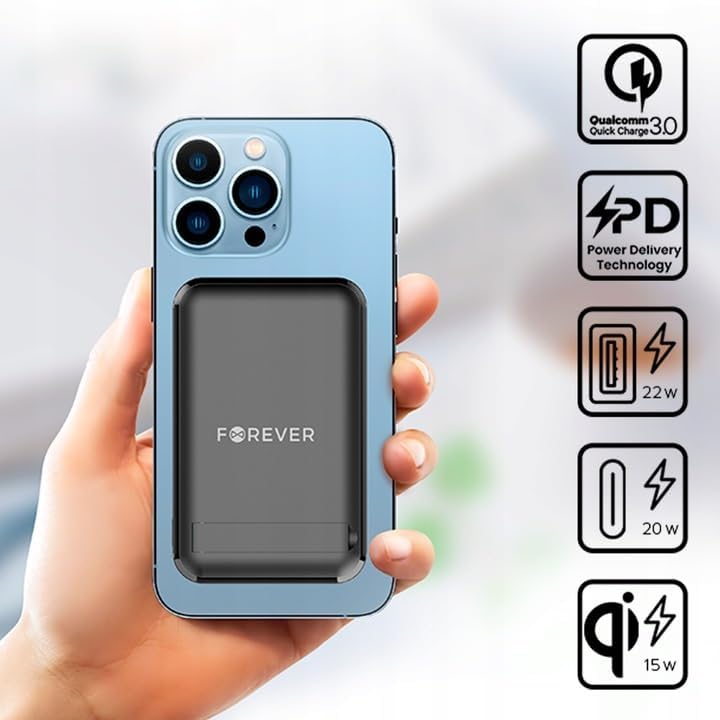
Imej 5.1: A smartphone attached to the power bank, illustrating wireless charging in progress and icons representing Quick Charge, Power Delivery, and various wattage output.
Petua: Use the integrated kickstand to prop up your phone while it charges wirelessly, allowing for comfortable viewing.
5.3 Wired Charging (USB-A and USB-C)
The power bank can charge devices via its USB-A and USB-C ports.
- Pastikan bank kuasa dicas secukupnya.
- Connect one end of a compatible charging cable to your device and the other end to either the USB-A or USB-C output port on the power bank.
- The device should begin charging automatically. If not, press the power button on the power bank.

Imej 5.2: A smartphone connected to the power bank via a USB-C cable, demonstrating wired charging.
Nota: The USB-C port functions as both an input for charging the power bank and an output for charging other devices. The USB-A port is an output only.
5.4 Pengecasan Serentak
The FOREVER MATB-100 can charge up to three devices simultaneously (one wirelessly, one via USB-A, and one via USB-C). The total output power will be distributed among the connected devices.
6. Penjagaan dan Penyelenggaraan
- Keep the power bank dry. Moisture can damage the internal circuitry.
- Jangan dedahkan kepada suhu yang melampau (panas atau sejuk).
- Elakkan daripada menjatuhkan atau meletakkan bank kuasa kepada kesan yang kuat.
- Bersihkan permukaan dengan kain lembut dan kering. Jangan gunakan bahan kimia yang keras atau pembersih yang kasar.
- Simpan di tempat yang sejuk dan kering jauh dari cahaya matahari langsung.
- If not used for extended periods, charge the power bank at least once every three months to prolong battery life.
7. Penyelesaian masalah
7.1 Power Bank Tidak Mengecas
- Ensure the USB-C cable is securely connected to both the power bank and the wall adapter.
- Sahkan bahawa penyesuai dinding berfungsi dengan betul dan dipasang ke soket kuasa hidup.
- Try using a different USB-C cable and/or wall adapter.
7.2 Peranti Tidak Mengecas daripada Power Bank
- Check the power bank's battery level. If it's low, recharge the power bank.
- Tekan butang kuasa pada bank kuasa untuk mengaktifkan pengecasan.
- For wired charging, ensure the cable is securely connected to both the power bank and your device. Try a different cable or port.
- For wireless charging, ensure your device is properly aligned on the charging pad and is wireless charging compatible. Remove any thick cases that might interfere.
- Ensure there are no metallic objects between the power bank and your device during wireless charging.
7.3 Pengecasan Lambat
- Pastikan anda menggunakan kabel pengecasan berkualiti tinggi dan serasi.
- For wired charging, ensure your device supports Quick Charge (QC) or Power Delivery (PD) if you expect fast charging speeds.
- For wireless charging, ensure your device supports fast wireless charging and is correctly aligned.
- Charging multiple devices simultaneously may reduce the charging speed for each individual device.
8. Spesifikasi
| Nama Model | MATB-100 |
| Jenama | SELAMANYA |
| Kapasiti Bateri | 10000 mAh (Milliampsebelum jam) |
| Komposisi Bateri | Litium-ion |
| Jenis Penyambung | USB Jenis A, USB Jenis C |
| Ciri Khas | Wireless Charging, Magnetic Grip, Integrated Kickstand |
| Voltage | 5 Volts (Output) |
| Bilangan Pelabuhan | 2 (USB-A, USB-C) + Wireless Charging |
| Peranti Serasi | Smartphones (including MagSafe compatible), Tablets, Headphones, Smartwatches |
| Dimensi (L x W x H) | 10.8 sm x 6.8 sm x 2 sm (anggaran) |
| Output Wayarles Maks | 15W |
| Max USB-A Output | 22.5W (Cas Pantas) |
| Max USB-C Output | 20W (Penghantaran Kuasa) |
9. Maklumat Keselamatan
- Jangan buka, buka atau carik pek bateri.
- Jangan dedahkan bank kuasa kepada haba atau api. Elakkan penyimpanan di bawah cahaya matahari langsung.
- Do not short-circuit the power bank. Do not store battery packs haphazardly in a box or drawer where they may short-circuit each other or be short-circuited by conductive materials.
- Jangan biarkan bank kuasa terkena kejutan mekanikal.
- Sekiranya berlaku kebocoran bateri, jangan biarkan cecair terkena kulit atau mata. Jika telah terkena, basuh kawasan yang terjejas dengan air yang banyak dan dapatkan nasihat perubatan.
- Jauhkan bank kuasa daripada kanak-kanak.
- Awasi kanak-kanak semasa menggunakan power bank.
- Jangan gunakan sebarang pengecas selain daripada yang disediakan khusus untuk digunakan dengan peralatan.
- Dispose of the power bank properly according to local regulations. Do not dispose of with household waste.
10. Waranti dan Sokongan
For warranty information and technical support, please refer to the documentation provided with your purchase or contact the FOREVER customer service department. Keep your proof of purchase for warranty claims.
For further assistance, you may visit the official FOREVER webtapak atau hubungi peruncit anda.
Ask a question about this manual
Ask about setup, troubleshooting, compatibility, parts, safety, or missing instructions. Manuals+ will review the question and use this page’s manual context to help answer it.