
1. Maklumat Keselamatan Penting
Sila baca semua arahan keselamatan dan pengendalian dengan teliti sebelum menggunakan televisyen anda. Simpan arahan ini untuk rujukan masa hadapan.
- Sumber Kuasa: Connect the TV only to the type of power source indicated on the marking label.
- Pengudaraan: Pastikan pengudaraan yang betul. Jangan sekat sebarang bukaan pengudaraan.
- Air dan Kelembapan: Do not expose the TV to rain or moisture. Do not use near water.
- Pembersihan: Cabut plag TV dari salur keluar dinding sebelum membersihkan. Gunakan kain lembut dan kering. Jangan gunakan cecair atau pembersih aerosol.
- penempatan: Letakkan TV pada permukaan yang stabil dan rata. Elakkan meletakkannya di bawah cahaya matahari langsung atau berhampiran sumber haba.
- kilat: Cabut palam TV semasa ribut petir atau apabila tidak digunakan untuk tempoh yang lama.
2. Kandungan Pakej
Verify that all items listed below are included in your TV package:
- coocaa ROKU 50R5G 50-inch UHD Smart LED TV
- Kawalan Jauh dengan Bateri
- Stand TV (2 keping)
- Skru Berdiri
- Kabel Kuasa
- Panduan Mula Pantas (manual ini)
3. Persediaan
3.1 Unpacking and Stand Installation
Carefully remove the TV from its packaging. It is recommended to have two people for this process. Place the TV face down on a soft, clean surface to prevent screen damage.
Untuk memasang pendirian TV:
- Jajarkan setiap bahagian dirian dengan slot yang sepadan di bahagian bawah TV.
- Selamatkan dirian menggunakan skru yang disediakan. Pastikan ia diketatkan dengan kuat.
Alternatively, for wall mounting, consult a professional installer and use a VESA-compatible wall mount (not included).

This image illustrates the coocaa Roku TV seamlessly integrated into a modern living room environment, mounted on a light blue wall. The TV is positioned above a minimalist wooden TV cabinet, demonstrating a typical installation scenario.
3.2 Kuasa Penyambungan dan Persediaan Awal
- Sambungkan kabel kuasa ke input kuasa TV dan kemudian ke saluran keluar dinding.
- Tekan butang kuasa pada alat kawalan jauh atau TV.
- Follow the on-screen instructions to complete the initial Roku OS setup, including language selection, country, and channel scanning for the triple tuner (satellite, cable, or antenna).
3.3 Sambungan Rangkaian
To access Smart TV features and streaming services, connect your TV to the internet:
- Wi-Fi: During initial setup or via the Settings menu, select 'Network' and then 'Wireless'. Choose your Wi-Fi network from the list and enter the password.
- LAN (Ethernet): Connect an Ethernet cable from your router to the LAN port on the back of the TV. The TV will automatically detect the wired connection.
4. Mengendalikan TV Anda
4.1 Roku OS Home Screen
The Roku OS home screen provides quick access to all your entertainment. It combines linear TV and streaming services into one intuitive interface.

This image shows the coocaa Roku TV from the front, powered on and displaying its intuitive home screen. The screen features icons for popular streaming services like Netflix, Disney+, Apple TV, and live TV options, alongside inputs for cable box and game console. A '2023 Heimkino Innovation Award' badge is visible on the bottom left bezel.
- Saluran penstriman: Access popular apps like Netflix, Disney+, and Apple TV.
- TV langsung: Watch broadcast television via the integrated triple tuner.
- Input: Easily switch between connected devices (e.g., game console, cable box).
- Cari: Use the cross-channel search to find content by title, actor, or genre.
4.2 Menggunakan Alat Kawalan Jauh
The user-friendly remote control provides all necessary functions:
- Pad Navigasi: Use the arrow buttons to navigate menus and select items.
- Butang OK: Sahkan pilihan.
- Butang rumah: Return to the Roku OS home screen.
- Butang Belakang: Kembali ke skrin sebelumnya.
- Main Semula Segera: Replay the last few seconds of video.
- Butang Akses Pantas: Butang khusus untuk perkhidmatan penstriman popular.
- Carian Suara: Use the voice search feature for hands-free control (if supported by remote model).
4.3 Sumber Input
Connect external devices to your TV using the available ports:
- HDMI: The TV features three HDMI inputs for connecting devices like Blu-ray players, game consoles, or set-top boxes.
- USB: One USB port is available for media playback or Timeshift functions.
- Audio Digital Keluar: Untuk menyambung ke sistem audio luaran.
4.4 Ciri TV Pintar
Your coocaa Roku TV offers a wide range of smart features:
- Perkhidmatan Penstriman: Access pre-installed apps like Netflix, Disney+, Apple TV, and more.
- Sokongan Pembantu Suara: Compatible with Apple AirPlay, Apple Home, Alexa, and Google Home for integrated smart home control.
- Apl Mudah Alih Roku: Control your TV, use voice search, and listen to audio via headphones using the free Roku app for iOS and Android devices.
4.5 Tetapan Audio dan Video
Optimumkan anda viewpengalaman:
- Mod Gambar: Select from various picture modes (e.g., Standard, Movie, Sport) or customize brightness, contrast, and color settings.
- Sokongan HDR: Enjoy enhanced contrast and color with HDR10 and HLG content.
- Mod Bunyi: Choose sound modes (e.g., Standard, Music, Speech) or adjust equalizer settings for optimal audio.
5. Penyelenggaraan
5.1 Membersihkan TV Anda
Untuk mengekalkan penampilan dan prestasi TV:
- Cabut plag TV sebelum membersihkan.
- Gunakan kain lembut, kering dan bebas serabut untuk mengelap skrin dan kabinet.
- Untuk tanda degil, ringankan dampen the cloth with water. Never spray cleaner directly onto the TV.
- Elakkan daripada menggunakan pembersih yang melelas, lilin atau pelarut.
5.2 Kemas Kini Perisian
Your Roku TV automatically checks for and installs software updates when connected to the internet. These updates provide new features, performance improvements, and bug fixes. Ensure your TV remains connected to the internet for timely updates.
6. Penyelesaian masalah
Jika anda menghadapi masalah dengan TV anda, rujuk kepada penyelesaian biasa berikut:
| Masalah | Penyelesaian yang Mungkin |
|---|---|
| Tiada Kuasa | Periksa sama ada kabel kuasa disambungkan dengan selamat ke TV dan alur keluar dinding. Cuba outlet lain. |
| Tiada Gambar, tetapi Bunyi Hadir | Pastikan sumber input yang betul dipilih. Semak sambungan kabel ke peranti luaran. |
| Tiada Bunyi, tetapi Gambar Hadir | Periksa tahap kelantangan dan status bisu. Pastikan sistem audio luaran disambungkan dan dihidupkan dengan betul. |
| Tidak Dapat Menyambung ke Wi-Fi | Verify your Wi-Fi password. Restart your router and modem. Move the TV closer to the router or use a wired connection. |
| Alat Kawalan Jauh Tidak Berfungsi | Gantikan bateri. Pastikan tiada halangan antara alat kawalan jauh dan TV. |
7. Spesifikasi
Detailed technical specifications for the coocaa ROKU 50R5G TV:

This image displays the official product data sheet (Produktdatenblatt) for the coocaa 50R5G television. It provides comprehensive technical specifications, including energy efficiency class, power consumption, screen resolution, panel technology, and guaranteed software/spare parts availability, as per EU regulations.
| Parameter | Nilai |
|---|---|
| Jenama | koko |
| Model Name / Item Model Number | 50R5G |
| Sistem Operasi | OS Roku |
| Saiz Skrin | 50 Inci (126 cm) |
| Teknologi Paparan | LCD LED |
| Resolusi | 3840 x 2160 piksel (4K UHD) |
| Nisbah Aspek | 16:9 |
| Refresh Rate (Standard) | 50 Hz |
| Ketersambungan | Wi-Fi, LAN (Ethernet), 3x HDMI, 1x USB |
| Ciri Khas | Integrated Speaker, HDR10, HLG, Triple Tuner |
| Perkhidmatan Internet yang Disokong | Netflix, Disney+, Apple TV, Prime Video, RTL+ |
| Dimensi Produk (W x H x D) | 110 cm x 65 cm x 9 cm (lebih kurang) |
| Kelas Kecekapan Tenaga (SDR) | G |
| Penggunaan Kuasa (SDR) | 70.0 W / 70 kWj/1000j |
| Kelas Kecekapan Tenaga (HDR) | G |
| Penggunaan Kuasa (HDR) | 103 W / 103 kWj/1000j |
| Guaranteed Software/Firmware Updates | 8 years (from end of market placement) |
| Guaranteed Spare Parts Availability | 7 years (from end of market placement) |
| Guaranteed Product Support | 7 tahun |
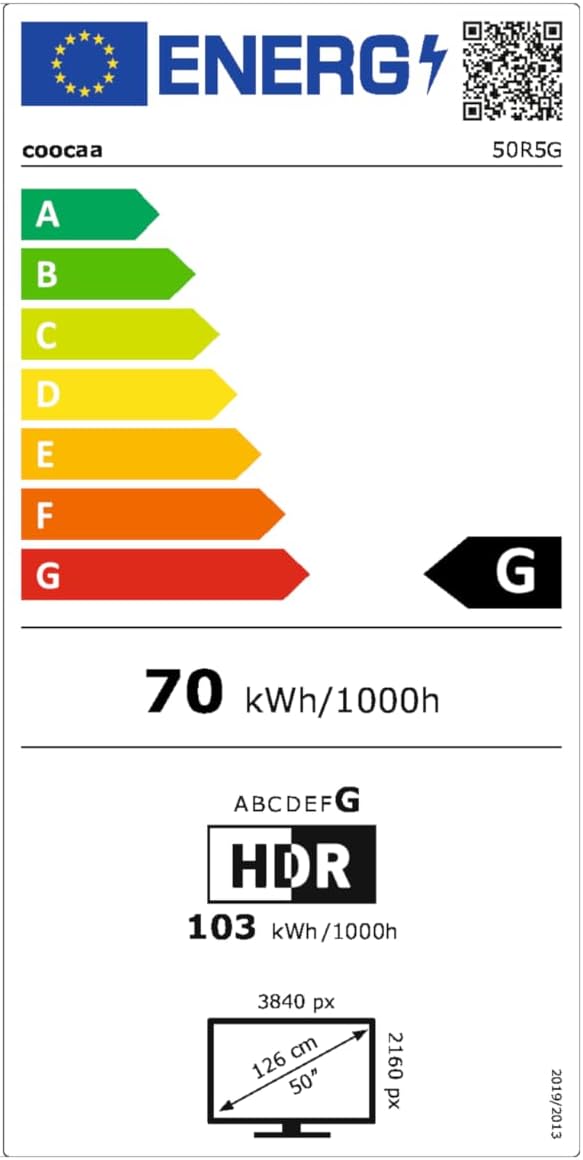
This image presents the EU Energy Label for the coocaa 50R5G TV. It indicates an energy efficiency class of 'G' for both Standard Dynamic Range (SDR) and High Dynamic Range (HDR) content, with power consumption values of 70 kWh/1000h for SDR and 103 kWh/1000h for HDR. The label also shows the screen size of 50 inches (126 cm) and resolution of 3840x2160 pixels. A QR code is included for accessing the EPREL database: Pautan Pangkalan Data EPREL
8. Waranti dan Sokongan
Your coocaa ROKU 50R5G TV comes with a manufacturer's warranty. Please refer to the official product documentation for specific terms and conditions.
- General Warranty Period: 2 tahun dari tarikh pembelian.
- Sokongan Produk: Guaranteed for 7 years.
- Alat Ganti: Guaranteed availability for 7 years after the product is no longer placed on the market.
- Kemas Kini Perisian: Guaranteed for 8 years after the product is no longer placed on the market.
For technical assistance or warranty claims, please contact coocaa customer support through their official webtapak atau peruncit tempat produk itu dibeli.