
pengenalan
This manual provides detailed instructions for the safe and efficient operation of your boAt Partypal 390 Bluetooth Speaker. Please read this manual thoroughly before using the product and retain it for future reference. The Partypal 390 is a powerful portable speaker designed for various audio needs, featuring 160W boAt Signature Sound, multiple connectivity options, and integrated LED lighting.
Maklumat Keselamatan
- Jangan dedahkan pembesar suara kepada suhu yang melampau, cahaya matahari langsung atau kelembapan yang tinggi.
- Elakkan daripada menjatuhkan atau menundukkan pembesar suara kepada impak yang kuat.
- Jangan cuba membuka, membaiki atau mengubah suai pembesar suara sendiri. Hubungi kakitangan servis yang berkelayakan untuk mendapatkan bantuan.
- Keep the speaker away from water and other liquids. Although it is waterproof, prolonged submersion or exposure to high-pressure water jets should be avoided.
- Gunakan hanya kabel pengecas yang disediakan atau kabel yang diperakui setarafnya.
- Pastikan pengudaraan yang betul semasa mengendalikan pembesar suara.
- Bersihkan pembesar suara dengan kain lembut dan kering. Jangan gunakan pembersih atau pelarut yang melelas.
Kandungan Pakej
Sahkan bahawa semua item yang disenaraikan di bawah terdapat dalam pakej anda:
- boAt Partypal 390 Speaker
- Kabel Pengecasan
- Manual Pengguna
- Kad Waranti
Produk Selesaiview
The boAt Partypal 390 is a versatile Bluetooth speaker featuring powerful audio output and dynamic LED lighting. Below are key visual references and descriptions of its components.
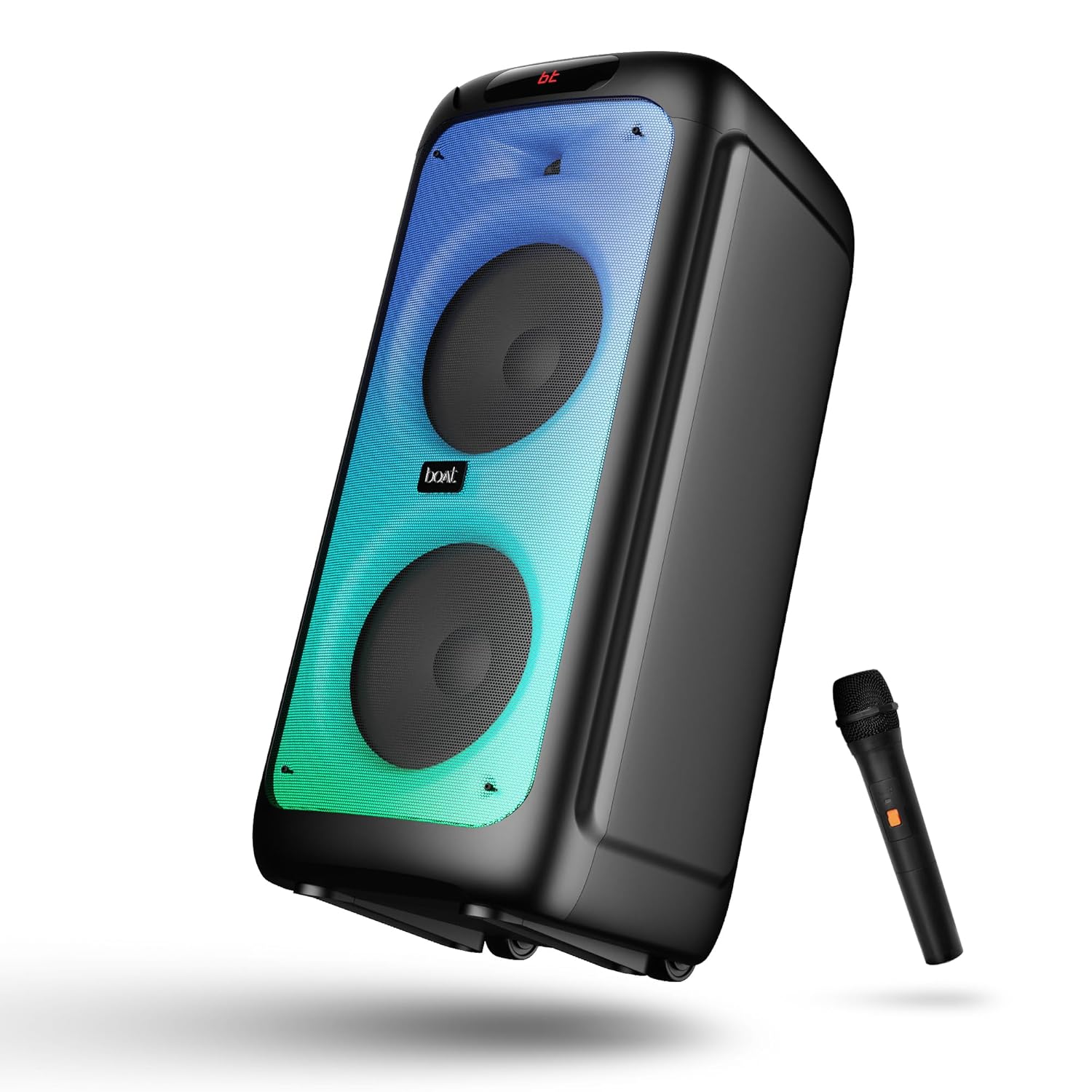
Rajah 1: Depan view of the boAt Partypal 390 speaker, showcasing its dual speaker design, integrated flame LEDs, and the included wired microphone.

Rajah 2: Top panel of the speaker displaying the control buttons and various input ports including USB, AUX, Guitar In, Mic 1, Mic 2, and the USB Type-C charging port. Also shown are dedicated controls for Bass/Treble, LED modes, and volume.
Ciri-ciri Utama:
- 160W boAt Signature Sound: Delivers powerful and clear audio.
- Flame LEDs: Dynamic lighting effects to enhance the listening experience.
- Kesambungan Berbilang: Bluetooth v5.3, AUX, USB, and TF card support.
- Fungsi Karaoke: Two microphone input ports for vocal performances.
- Input Gitar: Dedicated port for connecting a guitar.
- Mod EQ: Pre-set sound modes (Normal, Party, Pop, Rock, Jazz) for different audio preferences.
- Mod TWS: Allows wireless connection of two Partypal speakers for stereo sound.
- Kawalan Bes dan Treble: Adjustable audio settings for personalized sound.
- Long Playback: Hayat bateri sehingga 6 jam.
Persediaan
1. Mengisi Speaker
Before first use, fully charge the speaker. Connect the provided USB Type-C charging cable to the speaker's charging port and the other end to a compatible USB power adapter (not included). The charging indicator will show the charging status. A full charge provides up to 6 hours of playback.

Rajah 3: The speaker in an outdoor setting, illustrating its portability and battery life.
2. Hidupkan/Mati Kuasa
- To power on, press and hold the Power button located on the control panel until the display illuminates.
- To power off, press and hold the Power button again until the display turns off.
3. Pemasangan Bluetooth Awal
- Ensure the speaker is powered on and in Bluetooth mode. The display will show "bt" and the Bluetooth indicator will flash, indicating it's ready for pairing.
- Pada peranti mudah alih anda, dayakan Bluetooth dan cari peranti yang tersedia.
- Select "boAt Partypal 390" from the list of devices.
- Once paired, the speaker will emit a confirmation sound, and the Bluetooth indicator will stop flashing.
Arahan Operasi
1. Pemilihan Mod
Press the "Mode" button on the control panel to cycle through available input modes: Bluetooth, AUX, USB, and TF Card.
2. Mod Bluetooth
- Selepas pemasangan berjaya, audio daripada peranti anda yang disambungkan akan dimainkan melalui pembesar suara.
- Use the volume knob on the speaker or your connected device to adjust the volume.
- Use the Previous/Next buttons to skip tracks.
- Tekan butang Main/Jeda untuk mengawal main balik.
3. Mod AUX
- Connect an audio device to the AUX input port using a 3.5mm audio cable.
- Switch the speaker to AUX mode using the "Mode" button.
- Kawal main balik dan kelantangan daripada peranti anda yang disambungkan.
4. Mod Kad USB/TF
- Insert a USB flash drive into the USB port or a TF card into the TF card slot.
- Pembesar suara akan bertukar secara automatik ke mod USB atau kad TF dan mula memainkan audio files. If not, switch manually using the "Mode" button.
- Use the Previous/Next buttons to navigate tracks and Play/Pause for playback control.
5. Karaoke Function (Microphone Input)
- Connect up to two wired microphones to the "MIC 1" and "MIC 2" input ports.
- Adjust microphone volume using the dedicated MIC VOL knob.
- Adjust microphone echo effect using the ECHO knob.
6. Input Gitar
- Connect a guitar to the "GUITAR IN" port.
- Adjust guitar volume using the dedicated GUITAR VOL knob.
7. Mod EQ
The speaker offers several pre-set equalizer modes to optimize audio for different content types. Press the "EQ" button to cycle through:
- Biasalah
- parti
- Pop
- Rock
- Jazz

Rajah 4: Visual representation of the available EQ modes for sound customization.
8. Mod TWS (Stereo Wayarles Sejati).
To connect two Partypal 390 speakers for a stereo audio experience:
- Pastikan kedua-dua pembesar suara dihidupkan dan dalam mod Bluetooth, tetapi belum dipasangkan dengan mana-mana peranti.
- On one speaker (this will be the primary speaker), press and hold the TWS button. The speaker will emit a sound indicating it's searching for another speaker.
- Kedua-dua pembesar suara akan bersambung secara automatik antara satu sama lain. Bunyi pengesahan akan menunjukkan pasangan TWS yang berjaya.
- Now, pair your mobile device to the primary speaker via Bluetooth as described in the "Initial Bluetooth Pairing" section. Audio will play in stereo through both speakers.

Rajah 5: Two Partypal 390 speakers wirelessly connected, demonstrating the TWS feature.
9. Kawalan LED
Press the "LED Mode" button to cycle through different flame LED lighting effects or to turn them off.
10. Bass and Treble Controls
Use the dedicated Bass and Treble knobs on the control panel to adjust the low and high frequencies of the audio output according to your preference.
Penyelenggaraan
- Pembersihan: Gunakan kain lembut, kering dan tidak berbulu untuk membersihkan bahagian luar pembesar suara. Jangan gunakan pembersih cecair, aerosol atau pelarut.
- Storan: Apabila tidak digunakan untuk tempoh yang lama, simpan pembesar suara di tempat yang sejuk dan kering, jauh dari cahaya matahari langsung dan suhu yang melampau.
- Penjagaan Bateri: Untuk memanjangkan hayat bateri, elakkan daripada kerap mencas sepenuhnya pembesar suara. Caskannya secara berkala, walaupun tidak digunakan.
Menyelesaikan masalah
| Masalah | Kemungkinan Punca | Penyelesaian |
|---|---|---|
| Speaker tidak dihidupkan. | Bateri lemah; Butang kuasa tidak ditekan dengan betul. | Cas pembesar suara sepenuhnya. Tekan dan tahan butang Kuasa selama beberapa saat. |
| Tiada bunyi. | Kelantangan terlalu rendah; Mod input salah; Peranti tidak disambungkan. | Increase speaker and device volume. Ensure correct mode is selected (Bluetooth, AUX, USB, TF). Re-pair Bluetooth device or check cable connections. |
| Gandingan Bluetooth gagal. | Pembesar suara tidak dalam mod berpasangan; Peranti terlalu jauh; Gangguan. | Ensure speaker is in Bluetooth pairing mode (flashing "bt"). Move device closer to speaker. Turn off other Bluetooth devices. Forget "boAt Partypal 390" on your device and try pairing again. |
| Mikrofon tidak berfungsi. | Microphone not connected properly; MIC VOL too low. | Ensure microphone is securely plugged into MIC 1 or MIC 2 port. Increase the MIC VOL knob. |
| Sambungan TWS gagal. | Speakers already paired to a device; Speakers too far apart. | Ensure both speakers are not connected to any Bluetooth device. Place speakers within close proximity. Repeat TWS pairing steps. |
Spesifikasi
Below are the technical specifications for the boAt Partypal 390 speaker:
| Nama Model | Partypal 390 |
| Jenis Pembesar Suara | Multimedia, Floor Standing |
| Kuasa Output Audio | 160 Watt |
| Teknologi Ketersambungan | Bluetooth v5.3, AUX, USB, TF Card |
| Julat Bluetooth | Sehingga 10 meter |
| Hayat Bateri | Sehingga 6 Jam |
| Kapasiti Bateri | 7500 mAh (Lead Acid) |
| Dimensi Produk (D x W x H) | 70D x 32W x 32H Sentimeter |
| Berat Barang | 10.8 kg |
| Tahap Ketahanan Air | Kalis air |
| Komponen yang Disertakan | Speaker, Charging Cable, User Manual, Warranty Card |

Rajah 6: Diagram illustrating the physical dimensions of the Partypal 390 speaker.
Waranti dan Sokongan
Your boAt Partypal 390 speaker comes with a limited warranty. Please refer to the included Warranty Card for specific terms and conditions, including the warranty period and coverage details. For technical support, service, or warranty claims, please contact boAt customer service through their official webtapak atau maklumat hubungan yang diberikan pada kad jaminan anda.
For more information, visit the official boAt store: Kedai boAt di Amazon