
LAICOMEIN BR12
LAICOMEIN Bluetooth Receiver User Manual
Model: BR12
Brand: LAICOMEIN
pengenalan
Thank you for choosing the LAICOMEIN Bluetooth Receiver. This device is designed to transform your non-Bluetooth audio systems, such as car stereos, home speakers, or wired headphones, into wireless Bluetooth-enabled devices. Featuring Bluetooth 5.3 technology, an LED battery display, and ambient lighting, it provides a stable connection and enhanced user experience for audio streaming and hands-free calling.
Produk Selesaiview dan Isi Pakej

Penerangan Imej: Satu jarak dekat view of the LAICOMEIN Bluetooth Receiver. It features a circular main body with a digital LED display showing "100%" and a Bluetooth icon, indicating full charge and active Bluetooth. The device has a 3.5mm audio jack extending from one side, designed for direct plug-in. Around the display, there are illuminated ambient light rings and control icons for volume/track navigation and call management.
Kandungan Pakej:
- LAICOMEIN Bluetooth Receiver (Model: BR12)
- 3.5mm Audio Connector (integrated)
- 3.5mm Male-to-Male Audio Cable
- Kabel Pengecas USB-A ke Jenis-C
- Manual Pengguna (dokumen ini)
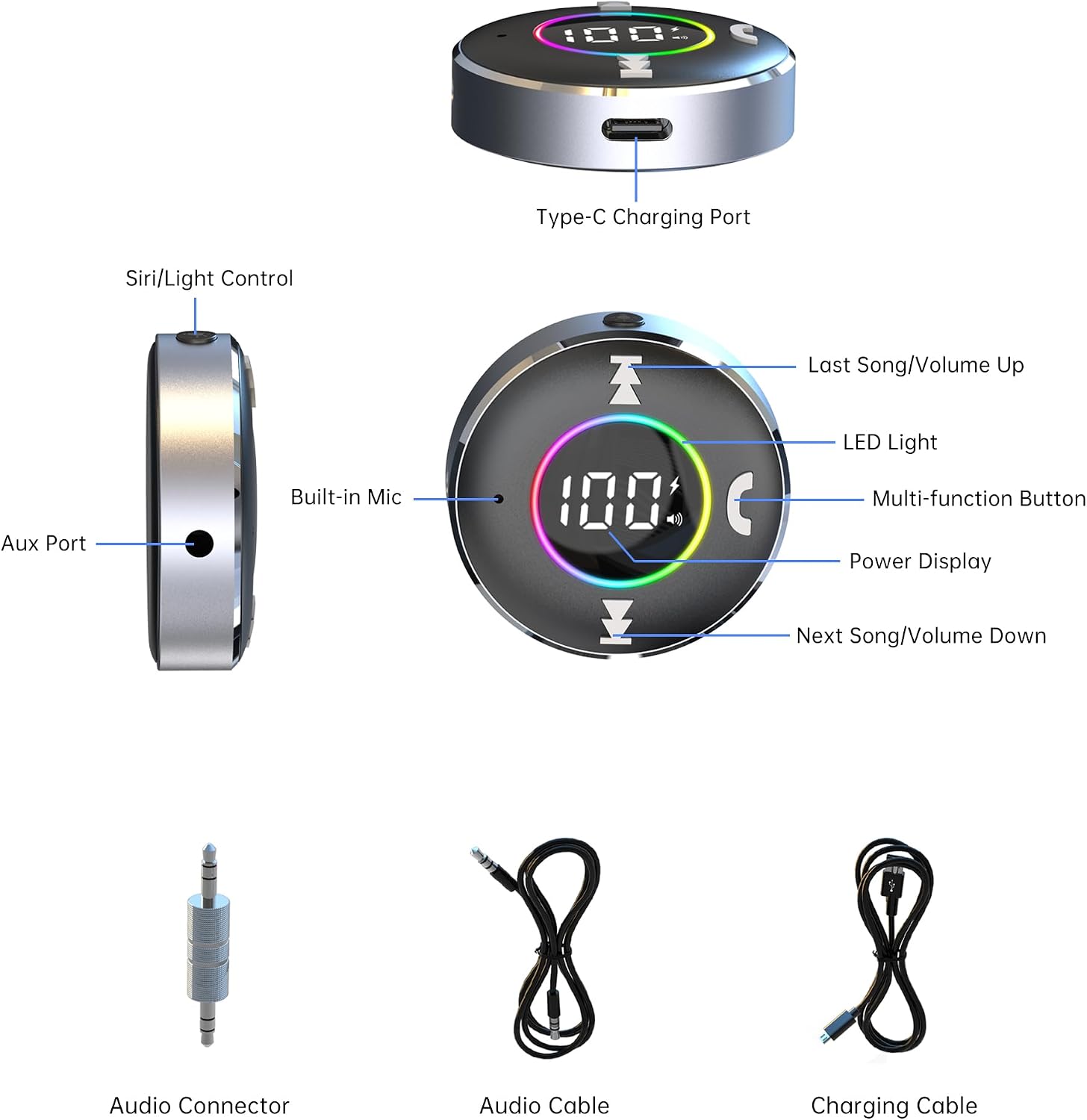
Penerangan Imej: This image displays the LAICOMEIN Bluetooth Receiver from multiple angles, highlighting its various components and the accessories included in the package. The top view shows the LED display, multi-function button, volume/track buttons, and LED light. A side view points out the Aux Port and Siri/Light Control. Another side view indicates the Type-C Charging Port and Built-in Mic. Below these, separate images show the Audio Connector (the integrated 3.5mm jack), an Audio Cable (3.5mm male-to-male), and a Charging Cable (USB-A to Type-C).
Kawalan dan Penunjuk
- Butang berbilang fungsi (MFB): Located at the center of the device. Used for Power On/Off, Play/Pause, Answer/End Calls, and activating voice assistant.
- Previous Track / Volume Down Button (<<): Located on the left side. Short press for previous track, long press for volume down.
- Next Track / Volume Up Button (>>): Located on the right side. Short press for next track, long press for volume up.
- Siri/Light Control Button: Small button on the side. Used to activate voice assistant (Siri/Google Assistant) and control ambient light.
- Paparan led: Menunjukkan percen bateritage and connection status.
- Cahaya Ambien: Circular LED light around the display, indicating device status and adding aesthetic appeal.
- Mikrofon terbina dalam: Untuk panggilan bebas tangan.
- Port Pengecasan Jenis-C: Untuk mengecas peranti.
- AUX Port (3.5mm Audio Jack): For connecting to non-Bluetooth audio devices.
Panduan Persediaan
1. Mengecas Peranti
Before first use, fully charge the Bluetooth receiver. Connect the provided USB-A to Type-C charging cable to the Type-C port on the receiver and the other end to a USB power source (e.g., car charger, wall adapter, computer USB port). The LED display will show the charging progress. A full charge typically takes about 30 minutes.
2. Menghidupkan/Mematikan
- Hidupkan kuasa: Long press the Multi-function Button (MFB) for 3 seconds until the LED display lights up and you hear a voice prompt "Power On".
- Matikan: Long press the Multi-function Button (MFB) for 3 seconds until the LED display turns off and you hear a voice prompt "Power Off".
3. Pairing with Your Bluetooth Device (e.g., Smartphone)
- Ensure the Bluetooth receiver is powered on and in pairing mode (the ambient light may flash, and the LED display might show a pairing indicator).
- Pada telefon pintar anda atau peranti berdaya Bluetooth lain, pergi ke tetapan Bluetooth.
- Cari untuk available devices. Select "BR12" from the list.
- Once connected, the LED display will show a stable Bluetooth icon, and you will hear a voice prompt "Connected".
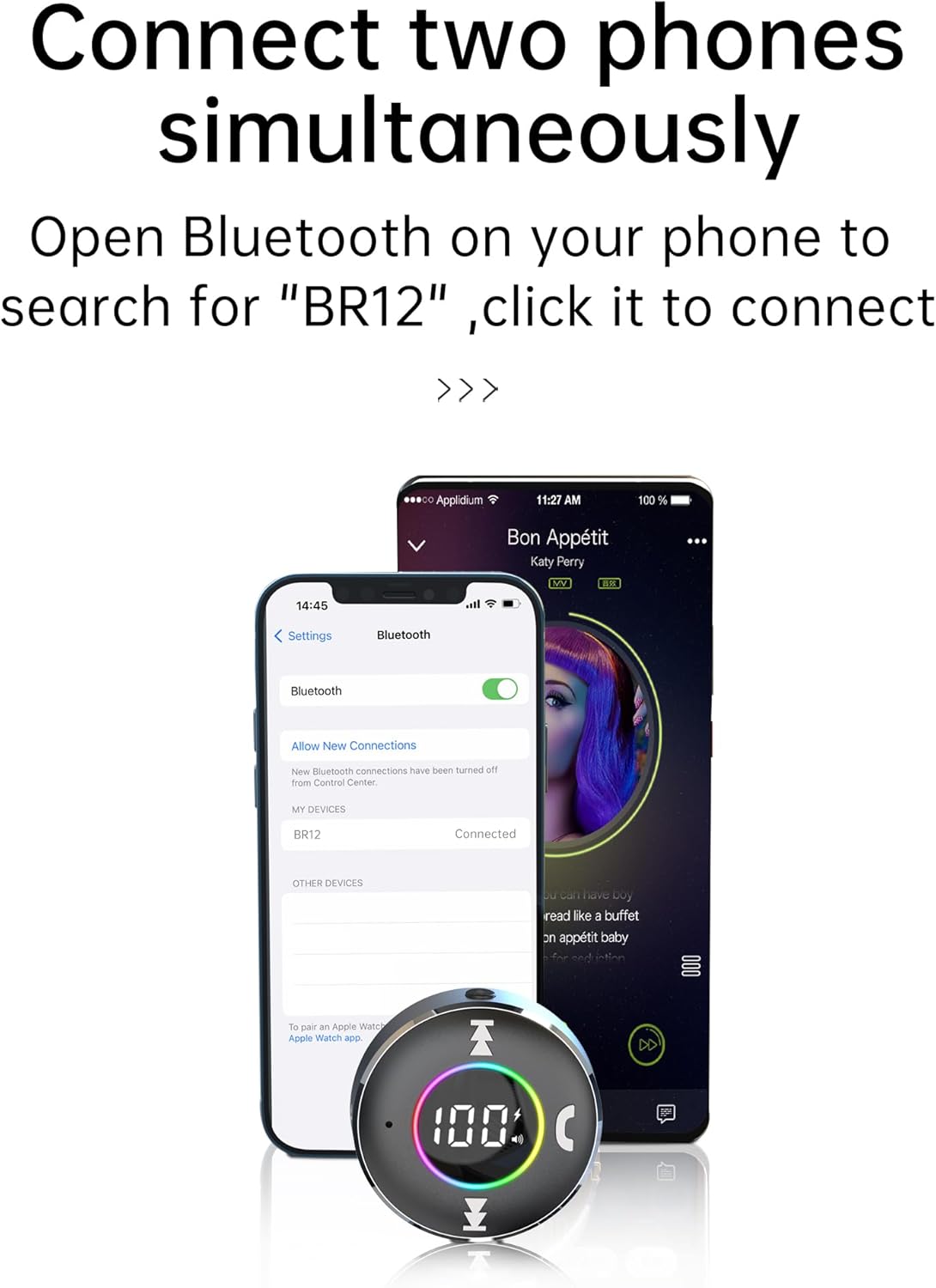
Penerangan Imej: This image illustrates the process of connecting the LAICOMEIN Bluetooth Receiver to a smartphone. A smartphone screen is visible, displaying its Bluetooth settings with "BR12" listed as a connected device. The Bluetooth receiver itself is placed in front of the phone, with its LED display showing "100%" and ambient lights active, signifying a successful connection.
4. Menyambung ke Sistem Audio
- For Car Audio System: Plug the 3.5mm audio jack of the receiver directly into your car's AUX input port. If your car's AUX port is recessed or requires an extension, use the provided 3.5mm male-to-male audio cable to connect the receiver to the AUX port. Set your car stereo to AUX mode.
- For Wired Headphones: Plug your wired headphones directly into the 3.5mm audio jack of the receiver.
- For Home Stereo/Speaker: Use the provided 3.5mm male-to-male audio cable to connect the receiver to the AUX input of your home stereo system or speaker.

Penerangan Imej: This image shows the LAICOMEIN Bluetooth Receiver in use within a car. The receiver is plugged into the car's AUX port, and a smartphone is placed nearby, displaying a music playback interface. This setup demonstrates how the device enables wireless audio streaming from a phone to a car's audio system.

Penerangan Imej: A woman is shown wearing wired headphones, which are plugged into the LAICOMEIN Bluetooth Receiver. This image illustrates the receiver's function of transforming traditional wired headphones into wireless Bluetooth headphones, allowing the user to enjoy audio wirelessly from a paired device.

Penerangan Imej: This diagram visually represents the wide compatibility of the LAICOMEIN Bluetooth Receiver. On the left, it shows non-Bluetooth devices that can receive audio, such as an amplifier, car audio system, speaker, and wired headphones, all connected via a 3.5mm jack. On the right, it shows Bluetooth-enabled source devices like a laptop, tablet, cell phone, and MP3 player, which can transmit audio wirelessly to the receiver. A central image of the receiver with a Bluetooth icon connects these two sides, demonstrating its role as a bridge.
Arahan Operasi
Main balik Muzik
- Main/Jeda: Tekan pendek Butang Pelbagai fungsi (MFB).
- Lagu Seterusnya: Short press the "Next Track / Volume Up" button.
- Trek Sebelumnya: Short press the "Previous Track / Volume Down" button.
- Kelantangan: Long press the "Next Track / Volume Up" button.
- Perlahankan suara: Long press the "Previous Track / Volume Down" button.
Panggilan Bebas Tangan
- Jawab/Tamatkan Panggilan: Short press the Multi-function Button (MFB) when a call comes in or during a call.
- Tolak Panggilan: Long press the Multi-function Button (MFB) for 2 seconds when a call comes in.
- Dail Semula Nombor Terakhir: Tekan dua kali Butang Pelbagai fungsi (MFB).
Pengaktifan Pembantu Suara
- Aktifkan Siri/Google Assistant: Short press the Siri/Light Control button.
Kawalan Cahaya Ambien
- Toggle Ambient Light: Long press the Siri/Light Control button to turn the ambient light on or off.
Menyambung Dua Telefon Serentak
The LAICOMEIN Bluetooth Receiver supports connecting to two Bluetooth devices at the same time. This allows for seamless switching between audio sources or managing calls from one phone while streaming music from another.
- Connect the first phone to the receiver as described in the "Pairing" section.
- Once the first phone is connected, disable Bluetooth on the first phone temporarily.
- Pair the second phone with the receiver ("BR12").
- Re-enable Bluetooth on the first phone. Both phones should now be connected to the receiver.
- The receiver will prioritize audio from the device that is actively playing or receiving a call.
Penyelenggaraan
- Pastikan peranti kering. Elakkan pendedahan kepada kelembapan atau cecair.
- Jangan dedahkan peranti kepada suhu yang melampau.
- Bersihkan peranti dengan kain lembut dan kering. Jangan gunakan bahan kimia yang keras atau pembersih yang kasar.
- Simpan peranti di tempat yang sejuk dan kering apabila tidak digunakan untuk tempoh yang lama.
Menyelesaikan masalah
| Masalah | Kemungkinan Punca | Penyelesaian |
|---|---|---|
| Peranti tidak dihidupkan. | Bateri lemah. | Cas peranti sepenuhnya menggunakan kabel Jenis-C yang disediakan. |
| Tidak boleh berpasangan dengan peranti Bluetooth. | Receiver not in pairing mode; Bluetooth on source device is off; too many paired devices. | Ensure receiver is powered on and in pairing mode. Turn Bluetooth on/off on your source device. Clear previous Bluetooth connections on your source device. |
| No sound after connecting. | Incorrect audio input selected on stereo/speaker; volume too low; cable not fully inserted. | Ensure your car stereo/home speaker is set to AUX input. Increase volume on both the receiver and the connected audio system. Check that the 3.5mm jack is fully inserted. |
| Kualiti audio yang teruk atau sambungan terputus-putus. | Interference; device too far from source; low battery. | Reduce distance between receiver and source device. Avoid obstacles. Charge the receiver. Avoid strong electromagnetic interference. |
| Kualiti panggilan kurang baik. | Halangan mikrofon; bunyi persekitaran. | Ensure the built-in microphone is not covered. Reduce background noise if possible. |
Spesifikasi
| Ciri | Perincian |
|---|---|
| Jenama | LAICOMEIN |
| Model | BR12 |
| Standard Komunikasi Tanpa Wayar | Bluetooth |
| Versi Bluetooth | 5.3 |
| Antara Muka Perkakasan | Bluetooth, Bluetooth 5 |
| Jenis Bateri | 1 Lithium-ion (included, rechargeable) |
| Port Pengecasan | Jenis-C |
| Alat Kawalan Jauh Termasuk | Tidak |
| Ciri-ciri | LED Battery Display, Ambient Light, Built-in Microphone, Multi-point Connection |

Penerangan Imej: Imej ini menyediakan dalaman view of the LAICOMEIN Bluetooth Receiver, highlighting its core component: the Bluetooth 5.3 chip. The image emphasizes the "New Upgraded Bluetooth 5.3" technology, suggesting improved low-power stable transmission, increased transmission distance, and clearer sound quality.
Waranti dan Sokongan
LAICOMEIN products are designed for reliability and performance. This product typically comes with a 1-year warranty from the date of purchase, covering manufacturing defects. Please retain your proof of purchase for warranty claims.
For technical support, warranty inquiries, or any questions regarding your LAICOMEIN Bluetooth Receiver, please contact our customer support team. Refer to the contact information provided on the product packaging or the official LAICOMEIN webtapak.