
pengenalan
This manual provides detailed instructions for the setup, operation, and maintenance of your infactory FWS-100 Radio-Controlled Weather Station. Please read this manual thoroughly before using the device to ensure proper function and longevity.
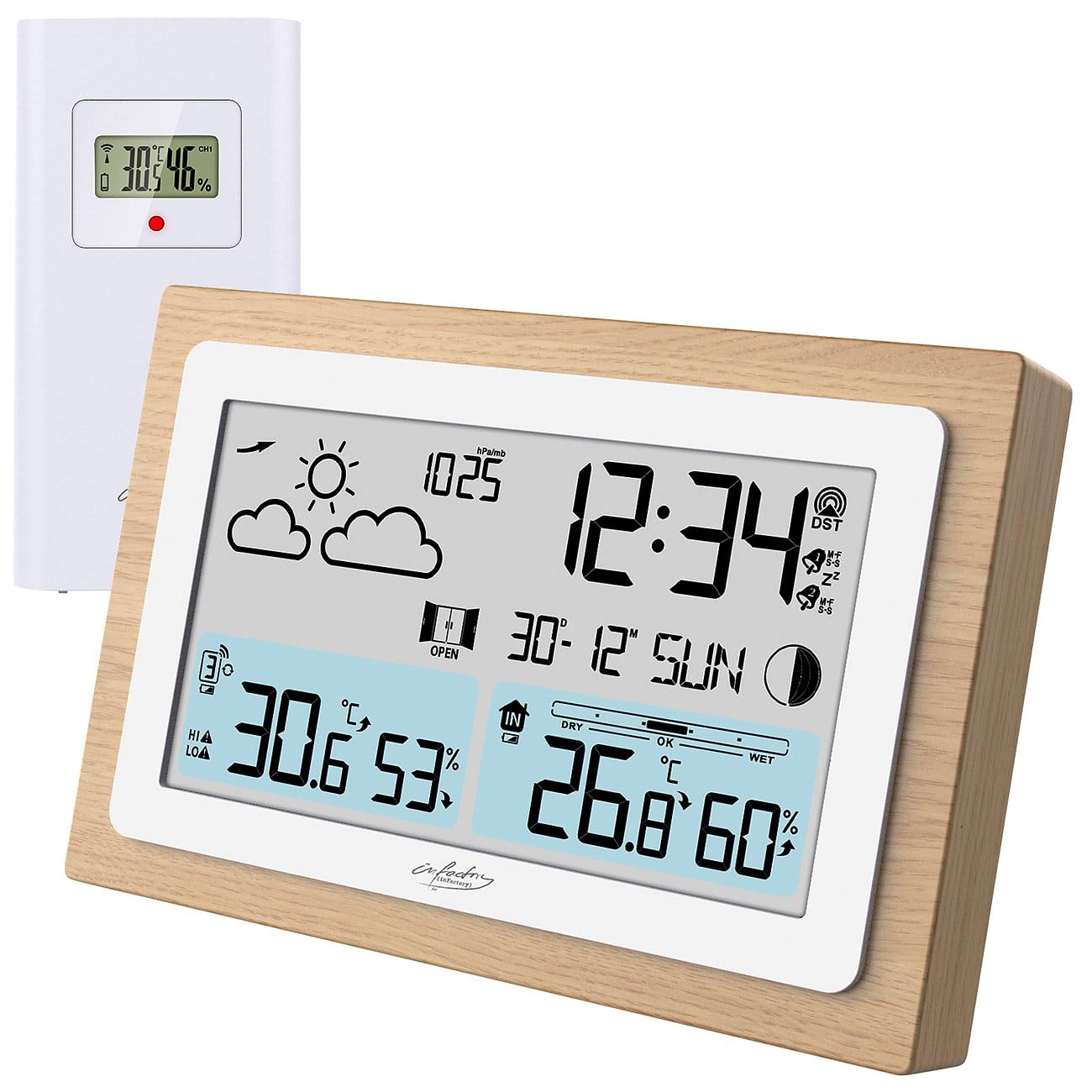
Image: The infactory FWS-100 weather station with its main unit featuring a wooden frame and a separate white outdoor sensor.
Kandungan Pakej
- 1x infactory FWS-100 Radio-Controlled Weather Station (main unit)
- 1x Wireless Outdoor Sensor (IP44 splash-proof)
- 1x User Manual (refer to this translated version for English)
Nota: Batteries (2x AAA for main unit, 2x AAA for outdoor sensor) and a DC power adapter are not included and must be purchased separately.
Ciri-ciri Utama
- LCD display (11.2 x 6.2 cm) with backlight
- Simultaneous display of indoor and outdoor temperature and humidity
- Weather trend forecast
- Radio-controlled time (DCF signal) with manual setting option
- 12/24 hour format selection
- Date and moon phase display
- Alarm clock with up to two adjustable alarms and snooze function
- Real wood frame design
- Wireless outdoor sensor with up to 60m transmission range (open area)
- Expandable with up to 2 additional outdoor sensors (sold separately)
- Temperature range: Indoor -9.9°C to 50°C; Outdoor -40°C to 70°C
- Power supply: 2x AAA batteries or DC power adapter (not included) for main unit; 2x AAA batteries (not included) for outdoor sensor.
Persediaan
1. Pemasangan Bateri
Unit Utama:
- Buka penutup petak bateri di belakang unit utama.
- Insert 2x AAA batteries, observing the correct polarity (+/-).
- Tutup penutup petak bateri.
- Alternatively, connect a DC 5V power adapter (not included) to the DC jack for continuous power and backlight.
Penderia Luaran:
- Buka penutup petak bateri di bahagian belakang sensor luar.
- Insert 2x AAA batteries, observing the correct polarity (+/-).
- Tutup penutup petak bateri.

Imej: Belakang view of the main weather station unit, showing the battery compartment and control buttons.
2. Peletakan Sensor
Place the outdoor sensor in a shaded, dry location, protected from direct sunlight and rain. Ensure it is within the 60-meter transmission range of the main unit. Avoid placing it near large metal objects or electronic devices that may interfere with the wireless signal. The sensor is splash-proof (IP44) but not fully waterproof.
3. Penyegerakan Awal
After inserting batteries into both units, the main unit will automatically attempt to connect with the outdoor sensor and receive the DCF radio signal for time synchronization. This process may take several minutes. Ensure both units are close to each other during initial setup.
Video: This video demonstrates the general features and setup of a wireless weather station, including sensor placement and display functions.
Arahan Operasi
1. Paparan Lebihview
Paparan LCD memaparkan pelbagai maklumat secara serentak:
- Atas Kiri: Weather forecast icons (sunny, cloudy, rainy, etc.)
- Atas Kanan: Time, DCF signal indicator, alarm indicators (Zz for snooze, bell for alarm)
- Tengah: Date and day of the week, moon phase
- Dibahagian bawah kiri: Outdoor temperature and humidity, signal strength for outdoor sensor
- Bawah Kanan: Indoor temperature and humidity, comfort level indicator (DRY, OK, WET)

Imej: A terperinci view of the weather station's LCD display, showing indoor/outdoor temperatures, humidity, time, date, and weather forecast icons.
2. Tetapan Masa dan Tarikh
The station automatically sets the time via the DCF radio signal. If the signal is not received or you wish to set it manually:
- Tekan dan tahan butang "SET" button (or similar, refer to button layout on back) to enter time setting mode.
- Gunakan "+" dan "-" butang untuk melaraskan nilai.
- Tekan "SET" again to confirm and move to the next setting (e.g., 12/24 hour format, hour, minute, year, month, day).
3. Fungsi Penggera
The station supports up to two alarms.
- Tekan ke "ALARM" button (or similar) to view masa penggera.
- Tekan dan tahan "ALARM" untuk memasuki mod tetapan penggera.
- guna "+" dan "-" untuk melaraskan masa penggera.
- Tekan "ALARM" to confirm and switch between Alarm 1 and Alarm 2 settings.
- Untuk mengaktifkan/menyahaktifkan penggera, tekan "ALARM" button repeatedly until the alarm icon appears/disappears.
- When an alarm sounds, press any button (except snooze) to stop it, or press the "SNOOZE" button for a temporary delay.
4. Pemilihan Unit Suhu
Untuk bertukar antara Celsius (°C) dan Fahrenheit (°F), tekan butang "C/F" button (or similar, often combined with another button). This usually affects both indoor and outdoor temperature displays.
5. Adding Additional Sensors
The weather station can connect to up to two additional outdoor sensors (not included). To add a new sensor:
- Install batteries in the new sensor.
- Pada unit utama, tekan butang "CH" (Channel) button to cycle through channels.
- Tekan dan tahan butang "CH" button to initiate a search for new sensors. The main unit will display the new sensor's data once connected.
Penyelenggaraan
- Pembersihan: Wipe the main unit and sensor with a soft, dry cloth. Do not use abrasive cleaners or solvents.
- Penggantian Bateri: Gantikan bateri di kedua-dua unit apabila penunjuk bateri rendah muncul pada paparan. Pastikan kekutuban yang betul.
- Storan: Jika menyimpan peranti untuk tempoh yang lama, keluarkan semua bateri untuk mengelakkan kebocoran.
Menyelesaikan masalah
| Masalah | Kemungkinan Punca | Penyelesaian |
|---|---|---|
| Tiada paparan pada unit utama | Dead batteries or incorrect polarity. No power adapter connected. | Replace batteries or check polarity. Connect DC power adapter. |
| Suhu/kelembapan luar tidak dipaparkan | Sensor out of range, dead sensor batteries, or interference. | Move sensor closer to main unit. Replace sensor batteries. Re-synchronize sensor (see Setup). Avoid interference sources. |
| Paparan masa yang salah | Weak DCF signal or manual setting required. | Move unit to a location with better signal reception. Manually set the time (see Operating Instructions). |
| Inaccurate outdoor temperature | Sensor yang terdedah kepada cahaya matahari langsung atau sumber haba. | Relocate the outdoor sensor to a shaded area, away from heat sources. |
Spesifikasi
- Jenama: infactory
- model: FWS-100 (ZX7450)
- Jenis Paparan: LCD
- Saiz Skrin LCD: 11.2 x 6.2 cm
- Julat Suhu Dalaman: -9.9°C hingga 50°C (14.2°F hingga 122°F)
- Julat Suhu Luaran: -40°C hingga 70°C (-40°F hingga 158°F)
- Ketepatan Suhu: ±0.1°C
- Julat Penghantaran Tanpa Wayar: Sehingga 60 meter (kawasan terbuka)
- Perlindungan Sensor Luar: IP44 (kalis percikan)
- Bekalan Kuasa (Unit Utama): 2x AAA batteries (not included) or DC 5V power adapter (not included)
- Bekalan Kuasa (Sensor Luar): 2x bateri AAA (tidak termasuk)
- Dimensi (Unit Utama): 14.8 x 9.8 x 2.6 cm
- Dimensions (Outdoor Sensor): 9.7 x 5 x 3.2 cm
- Berat (Unit Utama): 256 g
- Ketersambungan: Tanpa wayar
- Ciri Khas: Radio-controlled clock, dual alarms, snooze, moon phase, weather forecast, comfort indicator.
Waranti dan Sokongan
Warranty information is typically provided with your purchase. Please refer to the documentation included in your product packaging or contact your retailer for details regarding warranty coverage and customer support. For technical assistance, please contact infactory customer service.