
Anytek G66
Anytek G66 Dash Cam User Manual
Model: G66
pengenalan
Thank you for choosing the Anytek G66 Dash Cam. This device is designed to enhance your driving safety by recording your journeys with high-quality video. It features ultra-low light night vision, a 3.5-inch IPS HD touchscreen, dual camera recording, and intelligent motion detection. Please read this manual carefully before using the product to ensure proper operation and to maximize its performance.
Kandungan Pakej
Sila semak pakej untuk item berikut:
- 1 x Anytek G66 Dash Cam (Main Unit)
- 1 x Pendakap Cawan Sedutan
- 1 x Wired Rear Camera
- 1 x Pad Getah
- 2 x Skru
- 1 x Pengecas Kereta
- 1 x Kabel Data USB
- 1 x Manual Pengguna

Produk Selesaiview
Familiarize yourself with the main components of your Anytek G66 Dash Cam.
Unit Utama (Kamera Hadapan)
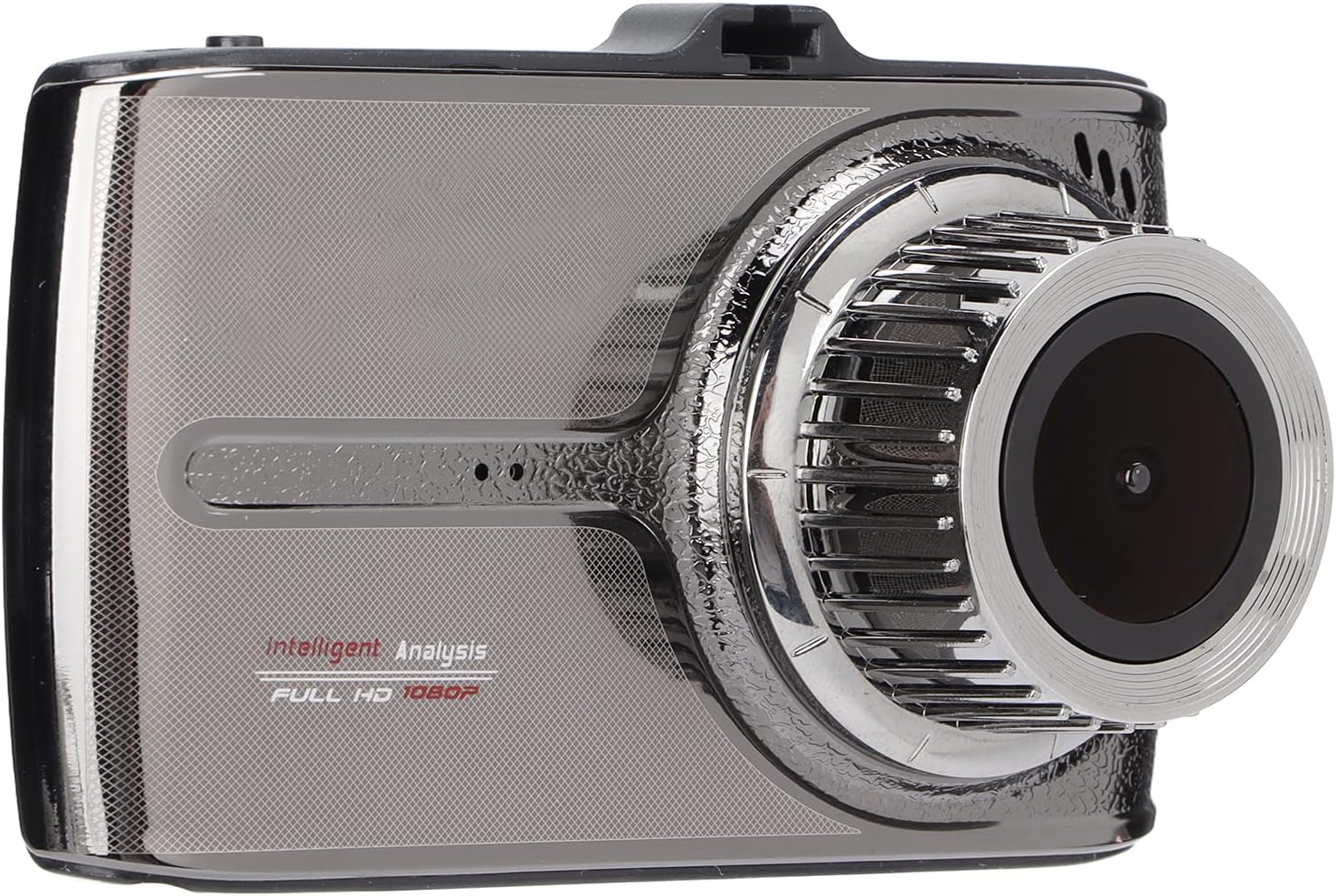
- Kanta Depan: 170-degree wide-angle lens for comprehensive road coverage.
- 3.5-inch IPS HD Touchscreen: For easy navigation and video playback.
- Mikrofon/Speaker: Built-in for audio recording and playback.
Pelabuhan dan Kawalan

- Port USB: Untuk bekalan kuasa dan pemindahan data.
- AV IN Port: Connects the wired rear camera.
- Butang Kuasa: Untuk menghidupkan/mematikan peranti.
- Slot Kad MicroSD: For inserting the memory card (not shown in this specific image, but typically on the side).
- Butang Tetapkan Semula: (Often a small pinhole, not explicitly visible in all images but common).
Kamera Belakang

The wired rear camera provides additional coverage, recording the view belakang kenderaan anda.
Persediaan
Follow these steps to install your Anytek G66 Dash Cam in your vehicle.
1. Prepare the MicroSD Card
- Insert a Class 10 or higher MicroSD card (up to 32GB, not included) into the dash cam's MicroSD card slot.
- It is recommended to format the MicroSD card within the dash cam's settings before first use and periodically thereafter.
2. Mount the Main Unit
- Bersihkan kawasan cermin depan tempat anda berhasrat untuk memasang sesondol pemuka.
- Attach the suction cup bracket to the main unit.
- Tekan cawan sedutan dengan kuat pada cermin depan, idealnya berhampiran bahagian belakangview mirror, and secure it using its locking mechanism.
- Laraskan sudut cam dash untuk memastikan jelas view jalan di hadapan.

3. Install the Rear Camera (Optional)
- Mount the wired rear camera on the rear windshield or near the license plate using the provided screws or adhesive.
- Route the rear camera cable to the main unit, ensuring it does not interfere with driving or vehicle functions.
- Connect the rear camera cable to the AV IN port on the main unit.
4. Sambungkan Kuasa
- Connect the car charger to the USB port on the dash cam.
- Palamkan hujung pengecas kereta yang satu lagi ke dalam soket pemetik api kenderaan anda.
- Kamera papan pemuka biasanya akan dihidupkan secara automatik apabila kenderaan dihidupkan dan dimatikan apabila enjin dimatikan.
Arahan Operasi
Hidupkan/Mati Kuasa
- automatik: The device powers on/off with the vehicle's ignition.
- Manual: Press and hold the Power Button to manually turn the device on or off.
Mod Rakaman
- Rakaman Gelung: The dash cam continuously records video in short segments (e.g., 1, 3, or 5 minutes). When the memory card is full, the oldest unlocked files ditimpa.
- G-Sensor (Rakaman Kecemasan): In the event of a sudden impact or collision, the built-in G-sensor will automatically detect the event and lock the current video file, menghalangnya daripada ditulis ganti.
- Pengesanan Pergerakan: When enabled, the dash cam will automatically start recording if motion is detected in front of the vehicle while parked. This feature requires a continuous power supply.
Menggunakan Skrin Sentuh
- Tap the 3.5-inch IPS HD touchscreen to access menus, change settings, and review dirakam footage.
- Swipe gestures may be supported for navigating through files atau tetapan.
Video Main semula
- Access the playback menu on the touchscreen.
- Pilih video yang dikehendaki file kepada view. Both front and rear camera footage boleh menjadi semulaviewed.
Penyelenggaraan
- Pembersihan: Use a soft, dry cloth to clean the dash cam lens and screen. Avoid abrasive materials or chemical cleaners.
- Kad MicroSD: Regularly format your MicroSD card (at least once a month) to ensure optimal performance and prevent data corruption. Back up important files sebelum memformat.
- Suhu: Elakkan mendedahkan kamera papan pemuka kepada suhu yang melampau untuk tempoh yang lama, kerana ini boleh menjejaskan hayat bateri dan prestasi peranti.
- Storan: If storing the dash cam for an extended period, ensure it is fully charged and stored in a cool, dry place.
Menyelesaikan masalah
Berikut ialah penyelesaian kepada isu biasa yang mungkin anda hadapi:
- Peranti tidak dihidupkan:
- Ensure the car charger is properly connected and the vehicle's cigarette lighter socket is receiving power.
- Check the USB cable for damage.
- The internal battery might be depleted; connect to power and try again.
- Rakaman berhenti atau terhenti:
- Formatkan kad MicroSD.
- Pastikan anda menggunakan kad MicroSD Kelas 10 atau lebih tinggi.
- The MicroSD card might be full; enable loop recording or delete old files.
- Screen not responding to touch:
- Restart the device by holding the power button or using the reset pinhole.
- Petua Penting: Do not press on the screen during assembly, as this can cause damage.
- Kualiti video yang teruk pada waktu malam:
- Ensure the windshield and lens are clean.
- Verify that the night vision setting is enabled in the menu.
Nota Penting: Repairing fees may be requested for man-made damages to the device.
Spesifikasi
| Jenis Item | Perakam Pandu |
| Jenama | Anytek |
| Model | G66 |
| bahan | logam |
| Lensa | 170-degree wide angle, 6GA+ multi-layer filter analysis lens, 3 million high-definition camera |
| Format Video | H.264 MOV |
| Mikrofon/Speaker | terbina dalam |
| Kapasiti Bateri | 200mAh Lithium battery (built-in) |
| Paparan | Skrin Sentuh IPS HD 3.5 inci |
| Supported MicroSD Card | Up to 32GB (Class 10 or higher, not included) |
| Bahasa | English, Russian, Simplified Chinese, Traditional Chinese, Japanese, Spanish, French, Korean |
| Vehicle Fixing Device | Pendakap Cawan Sedut |
| Berat Barang | 670 g |
Waranti dan Sokongan
For warranty information or technical support, please refer to the documentation provided with your purchase or contact the seller/manufacturer directly. Keep your proof of purchase for warranty claims.