
AOSHIDA AO300
SMSL AO300 User Manual
Model: AO300 | Brand: AOSHIDA
1. Produk Lebihview
The SMSL AO300 is a versatile audio device combining a Class D power amplifier, DAC (Digital-to-Analog Converter), and headphone amplifier. It is designed to deliver clear and accurate sound output for various audio setups.

Figure 1.1: SMSL AO300 Power Amppenguat dengan Alat Kawalan Jauh
Ciri-ciri utama termasuk:
- MA5332MS & CS43131 Chips: Utilizes MA5332MS power amplifier chip and CS43131 decoding headphone amplifier chip for clear and accurate sound.
- 2.1 Channel Audio System: Supports 165W x 165W output power and 2.1 channel active audio and subwoofer output for deep bass and rich sound.
- Berbilang Input dan Output: Provides USB, Optical, Coaxial, HDMI ARC, and Aux inputs, along with 4.4mm and 6.35mm headphone outputs.
- Personalized EQ and Filter Selection: Offers 8 EQ audio modes and 5 filters to adjust audio output based on listening preferences.
- HDMI (ARC) Audio Return: Enables audio and video synchronization by connecting to a TV via HDMI (ARC).
2. Nota Keselamatan
Please read the following safety notes carefully before operating the SMSL AO300 to ensure proper use and prevent damage or injury:
- Pasang unit ini di tempat yang berventilasi baik, sejuk, kering, bersih dari cahaya matahari langsung, sumber haba, getaran, habuk, lembapan atau sejuk.
- Gunakan voltage dinyatakan pada unit ini sahaja. Menggunakan unit ini dengan vol lebih tinggitage than specified is dangerous and may cause fire, damage to the unit, or personal injury. Our company will not be held responsible for any damage resulting from the use of this unit with a voltage selain daripada yang dinyatakan.
- Jangan cuba mengubah suai atau membetulkan unit ini sendiri. Hubungi jurujual atau perkhidmatan pelanggan apabila sebarang perkhidmatan diperlukan. Kabinet tidak boleh dibuka atas sebarang sebab.
- Apabila tidak merancang untuk menggunakan unit ini untuk jangka masa yang lama (iaitu semasa pergi bercuti), cabut kabel kuasa dari salur keluar dinding AC.
Nota penting: Spesifikasi produk dan maklumat yang dinyatakan dalam manual ini adalah untuk rujukan sahaja. Kandungan manual ini tertakluk kepada perubahan tanpa notis.
3. Ciri-ciri
The SMSL AO300 incorporates advanced technologies and design elements to provide a superior audio experience:
- Kuasa tinggi digital baharu amplifier chip from Infineon, Germany, with higher efficiency and low power consumption.
- Utilizes JRC's electronic volume control chip NJW1194 from Japan for precise volume control and ultra-low distortion.
- Supports MQA decoding and MQA-CD playback.
- New 3rd generation XMOS XU-316, supporting PCM up to 32bit/768kHz and DSD up to DSD256.
- New Bluetooth 5.0 reception for longer transmission distance and better sound quality.
- All Aluminum Alloy CNC precision processing shell, anodizing technology and chamfering process, exquisite workmanship and delicate touch.
- User-friendly operating system that is simple and easy to understand, equipped with full-featured remote control function.
- Sebilangan besar komponen audio Hi-Fi profesional digunakan untuk meningkatkan pengalaman bunyi.
- High-quality gold-plated input and output terminals.
- Litar perlindungan yang sempurna untuk terlalu panas, arus berlebihan, dll.
- Bekalan kuasa berkualiti tinggi terbina dalam, direka khas untuk audio.

Figure 3.1: Key Features of SMSL AO300
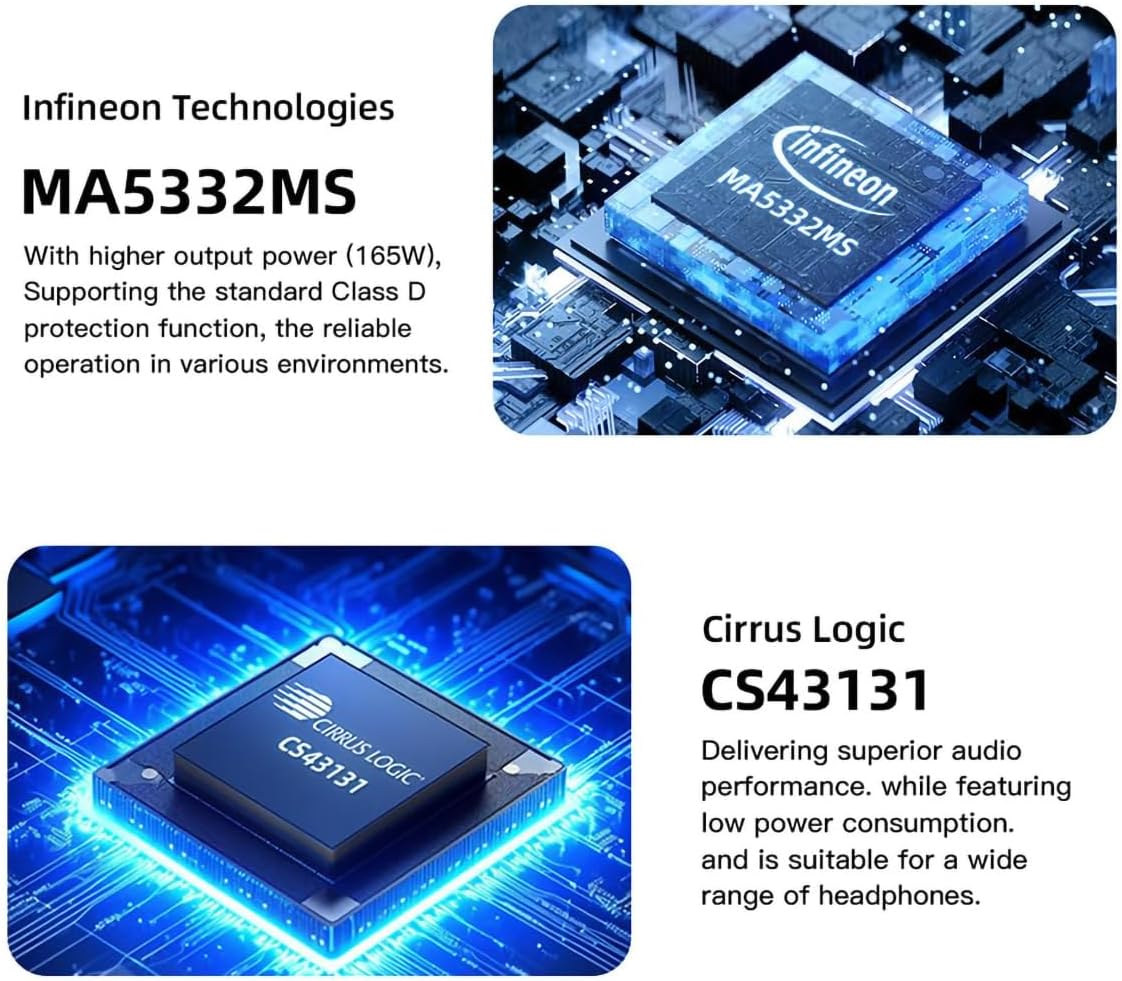
Figure 3.2: Infineon MA5332MS Ampcip penguat

Figure 3.3: Cirrus Logic CS43131 Decoder Chip
4. Spesifikasi
| Spesifikasi | Nilai |
|---|---|
| Input | HDMI(ARC)/RCA/BT/USB/Optical/Coaxial |
| THD+N | 0.003% |
| SNR | 107dB |
| Pemisahan saluran | 98dB |
| Kepekaan Input / Impedans Input | 280mV / 22kΩ |
| Output Power (Stereophonic) | 165W x 2 (4Ω) / 85W x 2 (8Ω) |
| Penghantaran USB | USB2.0 (Asynchronous Transfer) |
| Keserasian USB | Windows 7 / 8 / 8.1 / 10 / 11, Mac OSX, Linux |
| Penyahkod MQA | Optik / sepaksi |
| Penyahkod MQA-CD | Optik / sepaksi |
| Bit Depth (USB) | 1bit, 16-32bit |
| Bit Depth (Optical/Coaxial) | 1bit, 16-24bit |
| Sampling rate (USB PCM) | 44.1-768kHz |
| Sampling rate (USB DSD) | 2.8224-11.2896MHz |
| Sampling rate (Optical/Coaxial PCM) | 44.1-192kHz |
| Sampling rate (Optical/Coaxial DSD) | DSD64(DoP) |
| Penggunaan Kuasa | 40W (Normal Volume) |
| Saiz (WxHxD) | 219x42x185mm |
| Berat badan | 1.52kg / 3.35 paun |
5. Apa yang ada di dalam Kotak
Selepas membuka pakej, anda harus mencari item berikut:
- 1 x SMSL AO300 Unit
- 1 x Alat Kawalan Jauh
- 1 x Antena Bluetooth
- 1 x Kabel Kuasa AC
- 1 x Kabel USB
- 1 x Kabel HDMI
- 1 x SMSL Repair Card
- 1 x Manual Pengguna
Video 5.1: Unboxing and Included Accessories for SMSL AO300.
6. Persediaan dan Sambungan
Proper connection of your SMSL AO300 is crucial for optimal performance. Follow the instructions below to connect your devices.
6.1 Sambungan Input

Gambar 6.1: Lebihview of SMSL AO300 Input and Output Ports
- Input USB: Connect your PC or other USB audio source using the provided USB cable.
- Input Optik: Connect CD/DVD players, DACs, or TVs via an optical cable.
- Input sepaksi: Connect TV, CD/DVD players, or DACs via a coaxial cable.
- Input HDMI (ARC): Use a commercially available HDMI cable to connect to an ARC-compatible TV. Ensure the TV's HDMI IN port is labeled "ARC" or "eARC/ARC". The TV's audio output format must be set to PCM. This product supports digital signal input, not video input. The TV remote control cannot adjust the volume of this product via ARC, nor does it support synchronous power on/off.
- Aux (RCA) Input: Connect CD/DVD players or other analog audio sources using RCA cables.
- Input Bluetooth: Connect the Bluetooth antenna to the rear panel. Pair your mobile phone, tablet, or PC via Bluetooth.
Video 6.1: Demonstrating various input connections to the SMSL AO300.
Video 6.2: Important precautions and setup for HDMI ARC connection.
6.2 Sambungan Output
- Speakers Out (L/R): Connect your passive speakers to the red (Right) and black (Left) binding posts.
- Keluaran Subwoofer: Connect an active subwoofer to the SW OUT RCA port for a 2.1 channel system.
- Output Fon Kepala: The AO300 features both 4.4mm and 6.35mm headphone jacks on the front panel for direct headphone connection.
7. Arahan Operasi
7.1 Alat Kawalan Jauh
The SMSL AO300 comes with a full-featured remote control for convenient operation. This remote uses 2 x R03/AAA batteries.
- HIDUP/MATI Kuasa: Tekan butang kuasa untuk menghidupkan atau mematikan unit.
- Navigasi: Use the Up, Down, Left, Right arrows to navigate menus.
- MENU/OK: Press to enter menus or confirm selections.
- kembali: Kembali ke menu sebelumnya.
- Input Select (FN): Cycle through available input sources.
- Redam: Redamkan atau nyahredamkan output audio.
- Jilid +/-: Laraskan tahap kelantangan.
Video 7.1: Guide on how to use the remote control for SMSL AO300.
7.2 Navigasi Menu dan Tetapan
Access the setup menu to customize various settings:
- Input: Select the desired audio input source (USB, Optical, Coaxial, Bluetooth, ARC IN, AUX IN).
- Output: Konfigurasikan tetapan output.
- Tetapan EQ: Choose from 8 EQ audio modes (Direct, Tone, SDB, Bass, Super Bass, Rock, Soft, Clear) to adjust audio output.
- Pelarasan Treble: Adjust treble from -9dB to +9dB. When EQ mode is Direct or other EQ mode, adjusting Treble will automatically change to Tone mode.
- Pelarasan Bes: Adjust bass from -9dB to +9dB. When EQ mode is Direct or other EQ mode, adjusting Bass will automatically change to Tone mode.
- Penapis: Select from 5 filter options (Fast and Low-latency, Fast and Phase-compensated, Slow and Low-latency, Slow and Phase-compensated, Nonoversampling).
- Tetapan Warna: With 8 menu color settings, you can change the color of the display screen according to your own preferences.
- Bluetooth Clear: To clear the current Bluetooth paired device, press the Up and Down buttons on the remote or twist the knob.
Video 7.2: Exploring the 8 EQ audio modes and 5 filters available on the SMSL AO300.
8. Penyelesaian masalah
If you encounter issues with your SMSL AO300, refer to the following common troubleshooting steps:
- No Sound / Device Not Recognized (HDMI ARC):
- Ensure the ARC input of the product is connected to the HDMI ARC interface of the TV.
- Verify that the output mode of the TV is set to "ARC/ARC+TV speakers" or "PCM out only".
- If the TV does not support ARC, connect the TV's audio output port to the audio IN port (Optical, Coaxial, or AUX) of the AO300.
- Sound Not Loud Enough:
- Check the volume level on your source device and ensure it's set to the maximum.
- Check the volume on your AO300. If the sound is still not loud enough, you may need to use an amplifier with your DAC.
- DAC Not Working / Sounding as Expected:
- Ensure your DAC is properly connected and that your device's sound settings are correctly configured.
- Pastikan audio anda files are of high quality.
- Difficulty Adjusting DAC's Filter:
- Changes made by adjusting a DAC's filter can often be subtle and may not be easily noticeable, especially if you're not using high-quality audio equipment or listening to high-resolution audio files. Experiment with different settings to see which one you prefer.
Video 8.1: General tips for HiFi DAC setup and troubleshooting.
9. Waranti dan Sokongan
Syarat Waranti:
- Foshan Shuangmusanlin Technology Co., Ltd promises to offer good quality products. If the product is broken in 7 days after purchasing when you use it normally, you can choose to send it back for return, replacement or repairing (only the product does not affect the second sales can be returned).
- Repairing for free in one year if you use it normally.
- Tarikh pembelian adalah mengikut tarikh pada invois atau resit yang digunakan oleh penjual, dan jika anda membelinya dalam talian, anda boleh menunjukkan tangkapan skrin perdagangan.
- If an inappropriate usage causes the unit damaged, the warranty will be void. All damages by inappropriate use, including using it under non-normal working environment or without following the instructions, disassembling, refitting, repairing by user in private, causing damage by using some fittings instead of the designative or accredited ones, or inability to provide credible proof of purchase, are not covered.
- Hubungi penjual semula SMSL Audio anda untuk pemulangan atau penggantian.
For further assistance or inquiries, please contact AOSHIDA Audio customer support.
Video 9.1: Selesaiview of the SMSL AO300 User Manual, including safety and warranty information.
Ask a question about this manual
Ask about setup, troubleshooting, compatibility, parts, safety, or missing instructions. Manuals+ will review the question and use this page’s manual context to help answer it.