
Arahan Keselamatan Penting
Sila baca semua arahan dengan teliti sebelum memulakan pemasangan. Kegagalan mematuhi arahan ini boleh mengakibatkan renjatan elektrik, kebakaran atau kecederaan diri.
- AMARAN: Untuk mengurangkan risiko kejutan elektrik, pastikan elektrik telah dimatikan pada pemutus litar atau kotak fius sebelum bermula.
- Semua pendawaian mestilah mengikut kod elektrik nasional dan tempatan. Jika anda tidak biasa dengan pendawaian, rujuk juruelektrik yang bertauliah.
- Kipas mesti dipasang dengan jarak minimum 7 kaki (2.1 meter) dari lantai ke tepi belakang bilah.
- Ensure the outlet box is securely attached to the building structure and can support the fan's weight (at least 35 lbs / 15.9 kg).
- Jangan kendalikan kipas dengan bilah yang rosak. Gantikan semua bilah jika salah satu rosak.
- Jangan masukkan objek ke dalam laluan bilah kipas.
Kandungan Pakej
Buka bungkusan kipas anda dengan berhati-hati dan periksa kandungannya. Anda sepatutnya mempunyai item berikut:
- Perhimpunan Perumahan Bermotor
- Bilah Kipas (3)
- Kurungan Bilah
- Pemasangan Downrod
- Pendakap Pemasangan
- Pemasangan Kit Cahaya
- Kawalan Jauh dengan Pelekap di Dinding
- Pek Perkakasan (skru, pencuci, kacang dawai)
- Manual Arahan
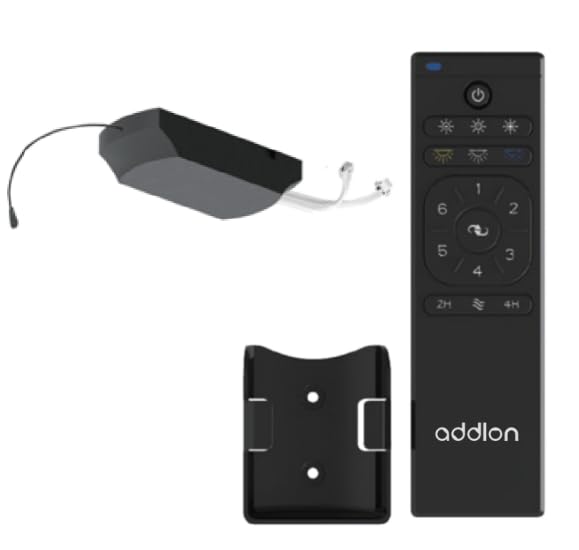
Figure 1: addlon 80-inch 3 Wood Blades Ceiling Fan with Light. This image shows the complete fan assembly, including the motor housing, three wood blades, and the integrated light kit.
Persediaan dan Pemasangan
Follow these steps to properly install your addlon ceiling fan. Ensure power is OFF at the circuit breaker before proceeding.
- Pemasangan Braket Pemasangan: Secure the mounting bracket to the ceiling outlet box using the screws provided. Ensure the bracket is firmly attached to a structural beam or a fan-rated outlet box.
- Perhimpunan Downrod: Insert the downrod through the canopy and coupling cover. Feed the motor wires through the downrod. Secure the downrod to the motor housing with the provided pin and screws.
- Menggantung Kipas: Carefully lift the fan assembly and place the downrod ball into the mounting bracket opening. Ensure the tab on the mounting bracket aligns with the slot on the downrod ball.
- Sambungan Elektrik: Connect the fan's electrical wires to the house wiring according to the wiring diagram in this manual (typically black to black, white to white, and green/bare copper to ground). Use the provided wire nuts and ensure all connections are secure.
- Lampiran Bilah: Pasangkan setiap bilah kipas pada pendakap bilahnya menggunakan skru yang disediakan. Kemudian, pasangkan pendakap bilah pada perumah motor. Pastikan semua skru diketatkan dengan kukuh.
- Pemasangan Kit Cahaya: Connect the light kit wires to the fan motor wires (usually blue to blue, white to white). Secure the light kit assembly to the bottom of the fan motor housing. Install the light cover.
- Berpasangan Alat Kawalan Jauh: Once installation is complete and power is restored, follow the remote control pairing instructions provided in the remote control section to synchronize the remote with your fan.
Arahan Operasi
Your addlon ceiling fan is operated by the included remote control. Ensure the remote has fresh batteries installed (2x AAA, not included).
- Kipas HIDUP/MATI: Tekan ke KIPAS HIDUP/MATI butang untuk menghidupkan atau mematikan kipas.
- Kawalan Kelajuan Kipas: Gunakan LAJU buttons (usually marked with fan icons or numbers) to cycle through different fan speeds (e.g., Low, Medium, High).
- Lampu HIDUP/MATI: Tekan ke LIGHT ON/OFF butang untuk menghidupkan atau mematikan lampu.
- Peredupan Cahaya: If your light kit supports dimming, press and hold the CAHAYA button to adjust the brightness. Release when the desired brightness is reached.
- Fungsi terbalik: Tekan ke TERBALIK button to change the direction of the fan blades. This is useful for seasonal comfort (downward airflow for cooling in summer, upward airflow for circulating warm air in winter). Allow the fan to stop completely before reversing direction.
- Fungsi Pemasa: Some models include a timer function. Press the PEMASA button (e.g., 1H, 2H, 4H) to set the fan to turn off automatically after a set period.
Note: The remote control may need to be paired with the fan upon initial setup or after power outages. Refer to the remote control's specific instructions for pairing procedures.
Penyelenggaraan
Regular maintenance ensures the longevity and optimal performance of your addlon ceiling fan. Always turn off power at the circuit breaker before performing any maintenance.
- Pembersihan: Gunakan yang lembut, damp kain untuk membersihkan bilah kipas dan perumah motor. Jangan gunakan pembersih atau pelarut yang kasar, kerana ini boleh merosakkan kemasan.
- Penjagaan Bilah: Periodically check the blade screws for tightness. Loose screws can cause wobbling and noise.
- Penggantian Mentol Lampu: If the light bulb needs replacement, ensure the power is off. Allow the bulb to cool before removing. Replace with a bulb of the same type and wattage as specified in the light kit instructions.
- Semakan Tahunan: Annually, check all connections and screws for tightness. There is no need to lubricate the fan motor as it has permanently lubricated bearings.
Menyelesaikan masalah
Before contacting customer support, try these troubleshooting steps for common issues:
| Masalah | Kemungkinan Punca | Penyelesaian |
|---|---|---|
| Kipas tidak bermula | Tiada kuasa kepada kipas; Sambungan wayar longgar; Alat kawalan jauh tidak berpasangan atau bateri mati. | Check circuit breaker; Verify all wire connections; Replace remote batteries and re-pair remote. |
| Cahaya tidak berfungsi | Loose wire connection; Faulty bulb; Remote control issue. | Check light kit wiring; Replace bulb; Check remote batteries and pairing. |
| Kipas bergoyang | Skru bilah longgar; Bilah yang tidak seimbang; Pendakap pelekap longgar. | Ketatkan semua skru bilah; Gunakan kit pengimbang (tidak disertakan) untuk mengimbang bilah; Pastikan pendakap pelekap kukuh. |
| Operasi bising | Skru longgar; Motor hum; Bilah mengenai halangan. | Check and tighten all screws; Ensure no wires are rubbing against the motor housing; Verify blades are clear of obstructions. |
Spesifikasi
| Ciri | Perincian |
|---|---|
| Jenama | addlon |
| Model | 80-inch 3 Wood Blades Ceiling Fan with Light |
| Gaya | moden |
| Jenis Bilik | Bilik tidur, ruang tamu |
| Jenis Pengawal | Alat Kawalan Jauh |
| bahan | Wood (Blades) |
| Bilangan Bilah | 3 |
| Kaedah Kawalan | Jauh |
| UPC | 850056663090 |
| ASIN | B0CHJKZ5GD |
Waranti dan Sokongan Pelanggan
addlon products are manufactured to the highest quality standards and are warranted against defects in materials and workmanship. Please refer to the warranty card included with your purchase for specific terms and conditions.
For technical assistance, replacement parts, or general inquiries, please contact addlon customer support:
- Webtapak: addlon Official Store on Amazon
- e-mel: support@addlon.com (placeholder email, as none provided)
- telefon: 1-800-XXX-XXXX (placeholder phone, as none provided)
Please have your model number (80-inch 3 Wood Blades Ceiling Fan with Light) and purchase date available when contacting support.