
1. Produk Lebihview
The AOPUTTRIVER AP-5000A is a professional digital light meter designed for accurate measurement of illumination in various environments. It supports measurement of fluorescent, incandescent, and LED lamps up to 400,000 Lux (40,000 FC). Key features include a 270-degree rotatable detector, data logging capabilities, and connectivity for real-time monitoring.

Figure 1: AOPUTTRIVER AP-5000A Digital Light Meter highlighting its main features.
2. Kandungan Pakej
Sahkan bahawa semua barang yang disenaraikan di bawah ada dan dalam keadaan baik semasa membuka bungkusan. Jika terdapat barang yang hilang atau rosak, sila hubungi khidmat pelanggan.
- AP-5000A Light Meter x 1
- Beg Pembawa x 1
- Bateri AAA x 2
- Pemutar skru x 1
- Manual Pengguna x 1

Figure 2: All items included in the AP-5000A package.
3. Komponen Produk
Familiarize yourself with the different parts of your AP-5000A Digital Light Meter:
- Pengesan foto: Sensor for light measurement.
- Paparan Kristal Cecair (LCD): Displays measurement readings and settings.
- Butang HIDUP/MATI: Menghidupkan atau mematikan peranti.
- Butang TAHAN: Membekukan ukuran arus pada paparan.
- Butang MEM: Accesses data logging memory.
- Butang LUX/FC: Toggles between Lux and Foot-Candle measurement units.
- Butang MAX/MIN: Memaparkan nilai maksimum atau minimum yang direkodkan.
- Backlight Switch Button: Activates or deactivates the LCD backlight.

Figure 3: Labeled components of the AP-5000A Digital Light Meter.
4. Persediaan
4.1 Pemasangan Bateri
- Cari petak bateri di bahagian belakang peranti.
- Gunakan pemutar skru yang disediakan untuk membuka penutup petak bateri.
- Masukkan dua bateri AAA, pastikan kekutuban (+/-) betul.
- Gantikan penutup petak bateri dan kencangkannya dengan skru.
4.2 Kuasa Awal Hidup
Tekan ke HIDUP/MATI button to power on the device. The LCD will illuminate and display the current light and temperature readings.
5. Arahan Operasi
5.1 Mengambil Ukuran
Remove the protective cap from the photodetector. Point the photodetector towards the light source you wish to measure. The current light intensity will be displayed on the LCD.
5.2 Pemilihan Unit (Lux/FC)
Tekan ke LUX/FC button to switch between Lux and Foot-Candle measurement units. The selected unit will be indicated on the LCD.
5.3 Pemilihan Unit Suhu (°C/°F)
The device also measures temperature. Refer to the manual for specific button combinations to switch between Celsius (°C) and Fahrenheit (°F) temperature units.
5.4 Pegangan Data
Tekan ke TAHAN button to freeze the current reading on the display. Press it again to release and resume live measurement.
5.5 Pengukuran MAKSIMUM/MINIT
Tekan ke MAX/MIN button to cycle through maximum, minimum, and real-time values recorded during a measurement session. This helps identify peak and lowest light levels.
5.6 Operasi Lampu Latar
Tekan ke Suis Lampu Belakang button to turn the LCD backlight on or off, improving readability in low-light conditions.
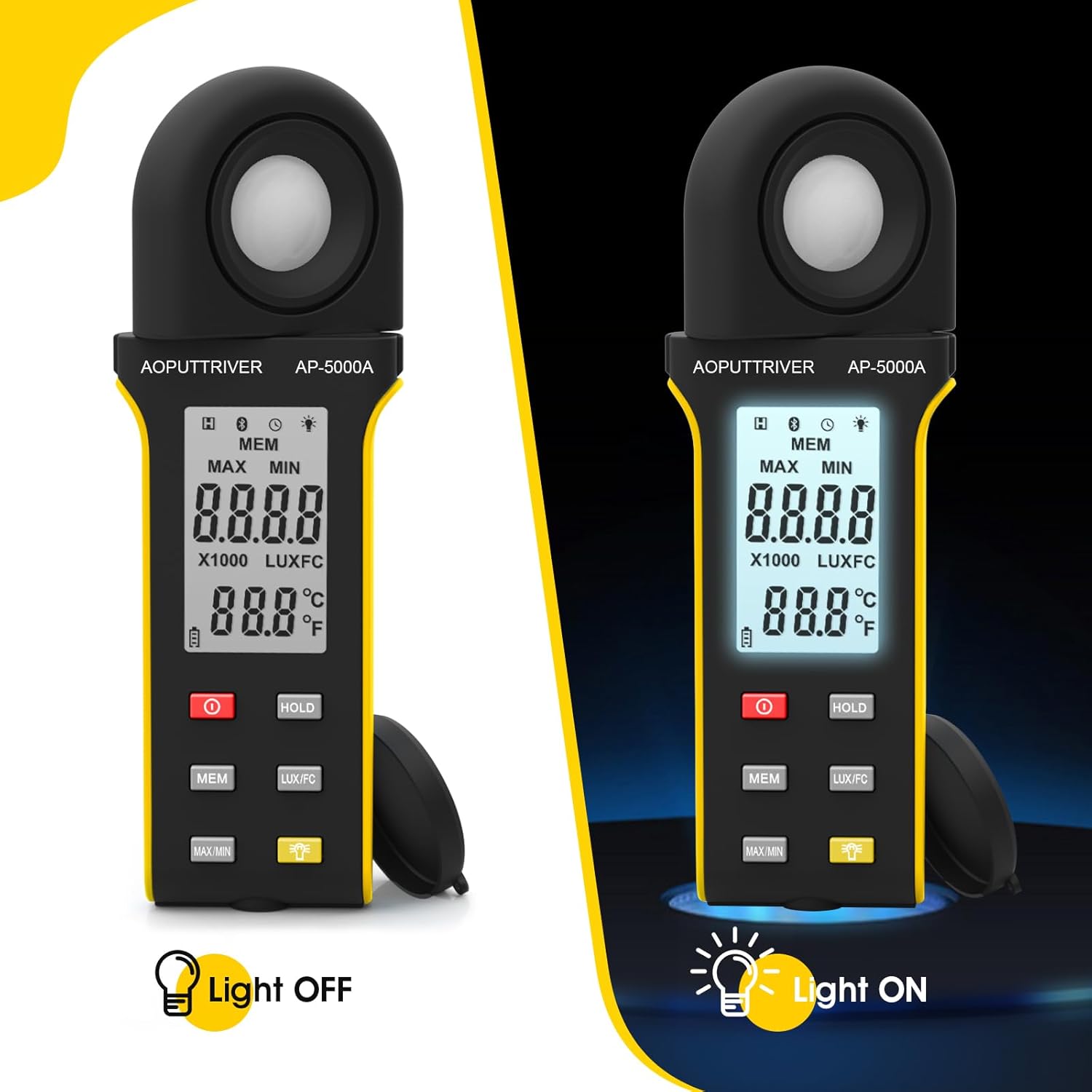
Figure 4: Comparison of the AP-5000A with backlight off and on.
6. Rotatable Detector
The AP-5000A features a 270-degree rotatable silicon filter diode sensor. This design allows you to measure photometric intensity from various angles without needing to reposition the entire meter. Simply rotate the sensor to face the light source while keeping the display visible for easy reading.
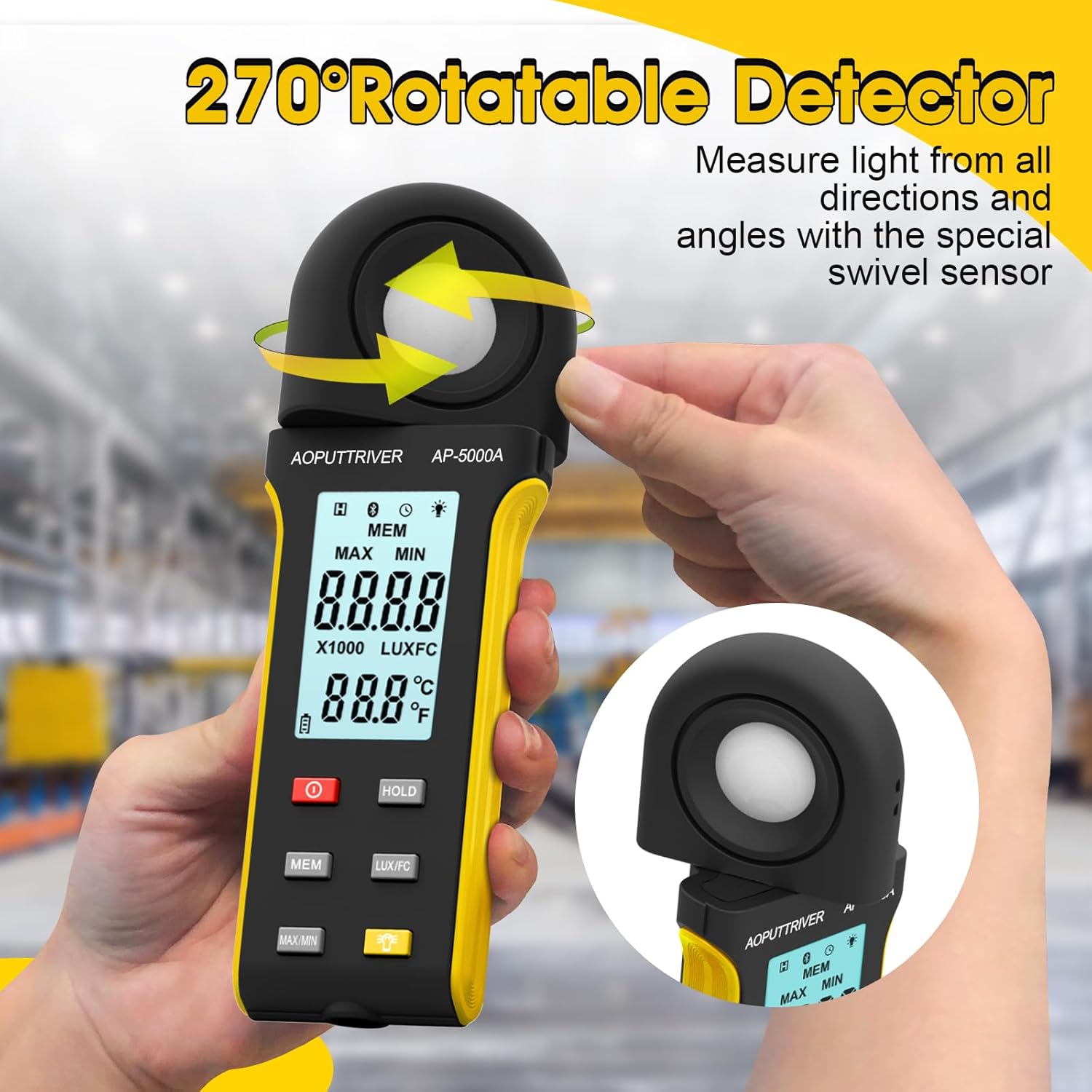
Figure 5: The 270-degree rotatable detector for flexible measurement.
7. Pengelogan Data
The meter supports data logging for up to 30 groups of measurements. This feature allows you to record and review light level data over time, which is useful for monitoring changes in lighting conditions for applications like plant growth or aquarium environments. Refer to the detailed instructions in the full user manual for specific steps on how to initiate, save, and recall data logs using the MEM butang.
8. Kesambungan Apl
The AP-5000A can connect to a smartphone application via Bluetooth. This allows for real-time tracking of data, remote control of certain functions, and advanced data analysis. Download the official AOPUTTRIVER app from your device's app store and follow the in-app instructions to pair your light meter.
9. Aplikasi
The AOPUTTRIVER AP-5000A is a versatile tool suitable for a wide range of applications requiring precise light measurement:
- Indoor Plant Growing: Optimizing light levels for various plant species.
- Akuarium: Ensuring appropriate lighting for aquatic life.
- Fotografi dan Videografi: Setting up ideal lighting conditions.
- Workplace and School Environments: Assessing illumination for comfort and productivity.
- Ruang Awam: Measuring light in libraries, stages, and street lighting.
- Tetapan Perindustrian: Monitoring lighting in factories and warehouses.

Figure 6: Diverse applications of the AP-5000A Light Meter.
10. Penyelenggaraan dan Penjagaan
- Pembersihan: Use a soft, dry cloth to clean the device. Do not use abrasive cleaners or solvents. Ensure the photodetector is kept clean and free of dust for accurate readings.
- Storan: When not in use, store the meter in its carrying bag with the protective cap on the photodetector. Store in a cool, dry place away from direct sunlight and extreme temperatures.
- Penggantian Bateri: Replace batteries when the low battery indicator appears on the LCD to ensure continuous accurate operation.
- Penutupan Auto: The device features an automatic shutdown function after 15 minutes of inactivity to conserve battery life.
11. Penyelesaian masalah
- Tiada Paparan/Kuasa Hidup: Periksa pemasangan bateri dan pastikan bateri tidak habis. Gantikan jika perlu.
- Bacaan Tidak Tepat: Ensure the photodetector is clean and unobstructed. Verify that the correct measurement unit (Lux/FC) is selected. Avoid measuring in rapidly changing light conditions.
- Isu Sambungan Apl: Ensure Bluetooth is enabled on your smartphone and the meter. Restart both the app and the meter. Check that the app is up to date.
- Paparan "OL": Indicates an overload, meaning the measured light intensity exceeds the meter's maximum range.
12. Spesifikasi
| Ciri | Spesifikasi |
|---|---|
| Nombor Model | AP-5000A |
| Julat Pengukuran | 0.1 ~ 400,000 Lux (0.1 ~ 40,000 FC) |
| Resolusi | 0.1 LUX/FC |
| Ketepatan | ≤10000Lux: +/-4% rgd+/-1.0% f.s. ≥10,000Lux: ±5% rgd+/-1.5% f.s ≥200,000Lux: +/-8% rdg+/-2.0%f.s |
| Detector Rotation | 270 darjah |
| Kapasiti Pengelogan Data | Sehingga 30 kumpulan |
| Penutupan Automatik | Selepas 15 minit tidak aktif |
| Paparan | HD Backlight LCD |
| Sumber Kuasa | 2 x Bateri AAA |
| Berat Barang | 7.8 auns |
| Dimensi Pakej | 7.99 x 3.43 x 1.93 inci |
13. Waranti dan Sokongan
AOPUTTRIVER products are manufactured to high-quality standards. For warranty information, technical support, or service inquiries, please refer to the contact details provided on the product packaging or visit the official AOPUTTRIVER webtapak. Simpan resit pembelian anda sebagai bukti pembelian untuk tuntutan waranti.