
1. Pengenalan
The SHX SHXA700 Infrared Heating Panel is designed to provide efficient and comfortable heating for your living spaces. Featuring a modern, frameless design with a white carbon crystal surface, it seamlessly integrates into any room. This 700W panel offers WiFi connectivity, remote control operation, and a programmable thermostat for optimal energy saving and comfort. This manual provides essential information for the safe and effective use of your heating panel.

Figure 1: SHX SHXA700 700W WiFi Infrared Heating Panel, front view. A clean, white rectangular infrared heating panel, showcasing reka bentuknya yang minimalis.
2. Arahan Keselamatan
Sila baca semua arahan keselamatan dengan teliti sebelum pemasangan dan penggunaan. Kegagalan mematuhi arahan ini boleh mengakibatkan renjatan elektrik, kebakaran atau kecederaan diri.
- Pastikan bekalan kuasa voltage sepadan dengan label penilaian pada perkakas.
- Do not operate the heater with a damaged cord or plug. If the cord is damaged, it must be replaced by the manufacturer, its service agent, or similarly qualified persons to avoid a hazard.
- Do not cover the heater. Covering the heater can cause overheating.
- Maintain a minimum distance of 100 cm from the front of the heater to any objects, and 20 cm from the sides and top to walls or other surfaces.
- This appliance is rated IP44, making it suitable for use in bathrooms. However, it must not be installed directly above a bath, shower, or swimming pool.
- Jangan masukkan sebarang objek ke dalam bukaan pemanas.
- The heater is equipped with overheating protection. If the heater overheats, it will automatically shut off. Unplug the heater and allow it to cool down before restarting.
- Jauhkan kanak-kanak dan haiwan peliharaan daripada pemanas semasa operasi.
- Always unplug the heater before cleaning or maintenance.
3. Kandungan Pakej
Buka bungkusan kotak dengan berhati-hati dan pastikan semua barang ada dan tidak rosak. Jika terdapat barang yang hilang atau rosak, hubungi peruncit anda.
- Panel Pemanasan Inframerah
- Manual Pengguna
- Alat Kawalan Jauh
- Screws and Dowels for wall mounting
- Optional Feet for freestanding placement
4. Ciri-ciri Produk
The SHX SHXA700 Infrared Heating Panel offers a range of features designed for convenience and efficiency:
- Output 700W berkuasa: Provides effective heating for rooms up to 14 m².
- Integrated WiFi Functionality: Control your heater remotely via a smartphone app.
- Kawalan Jauh: Convenient operation with the included remote.
- Pemasa 24 Jam: Program specific operating times for energy saving.
- Termostat Boleh Laras: Kekalkan suhu bilik yang diingini.
- Perlindungan Terlalu Panas: Enhanced safety feature.
- Penilaian IP44: Sesuai digunakan dalam damp persekitaran seperti bilik mandi.
- Reka Bentuk Moden: Frameless white carbon crystal surface for aesthetic integration.
- Paparan LCD: Clear display for settings and status.

Figure 2: SHX Infrared Heating Panel features. An infographic highlighting the main features of the SHX SHXA700 infrared heating panel, including WiFi connectivity, remote control, 24-hour timer, adjustable thermostat, and overheating protection. It also indicates suitability for up to 14m² rooms.
5. Persediaan dan Pemasangan
The SHX SHXA700 heating panel can be installed either wall-mounted or freestanding using the optional feet.
5.1 Pemasangan Dinding
- Choose a suitable location on a wall, ensuring sufficient clearance from other objects (refer to Safety Instructions).
- Mark the drilling points on the wall using the provided template or by measuring the panel's mounting holes.
- Drill holes and insert the provided dowels.
- Pasangkan kurungan pelekap pada dinding menggunakan skru yang disediakan.
- Carefully hang the heating panel onto the mounting brackets, ensuring it is securely seated.
- Palamkan kord kuasa ke salur keluar elektrik yang sesuai.
5.2 Penempatan Berdiri Bebas
- Attach the optional feet to the bottom of the heating panel using the provided screws.
- Place the panel on a stable, level surface, ensuring it is not easily tipped over.
- Ensure sufficient clearance from other objects (refer to Safety Instructions).
- Palamkan kord kuasa ke salur keluar elektrik yang sesuai.

Figure 3: SHX Infrared Heating Panel in various room settings. A collage of four images demonstrating the SHX infrared heating panel's versatile placement options in different rooms: a living room, a bedroom, a bathroom, and an office, illustrating its modern design integration.

Figure 4: SHX SHXA700 Infrared Heating Panel dimensions. A diagram illustrating the physical dimensions of the SHX SHXA700 infrared heating panel, showing its width (1200mm), height (500mm), and depth (45mm), along with its weight (2.9 kg).
6. Arahan Operasi
The heating panel can be operated using the integrated control panel on the back or the included remote control.
6.1 Panel Kawalan Selesaiview
The control panel is located on the back of the unit and includes buttons for power, WiFi, temperature adjustment, timer, and an LCD display.
6.2 Operasi Asas
- Hidupkan/Mati Kuasa: Press the power button on the control panel or remote control to turn the heater on or off.
- Pelarasan Suhu: Use the '+' and '-' buttons to set your desired temperature. The LCD display will show the current and target temperatures.
- Fungsi Pemasa: Press the timer button to activate and set the 24-hour timer. Follow the on-screen prompts to program the desired operating duration.

Figure 5: SHX Infrared Heating Panel control panel and remote control. A close-up view of the heating panel's integrated control unit on the side, featuring power, WiFi, LCD display, 24-hour timer, and indicator light buttons, alongside the included remote control for easy operation.
7. WiFi Connectivity & App Control
The SHX SHXA700 heating panel features integrated WiFi, allowing for smart control via your smartphone.
- Muat turun Apl: Download the "Tuya Smart" app from your smartphone's app store (available for iOS and Android).
- Daftar/Log Masuk: Cipta akaun atau log masuk ke akaun Tuya Smart anda yang sedia ada.
- Tambah Peranti: Follow the in-app instructions to add your SHX heating panel. This typically involves putting the heater into pairing mode (refer to the app's guide for specific steps, usually by holding the WiFi button on the control panel).
- Sambung ke WiFi: Select your home WiFi network and enter the password.
- Kawalan: Once connected, you can control the heater's power, temperature, timer, and other settings directly from the app.
- Integrasi Rumah Pintar: The Tuya Smart app supports integration with voice assistants like Amazon Alexa and Google Home, allowing for voice control of your heating panel.

Figure 6: SHX Infrared Heating Panel WiFi and integrated timer features. An image showing the heating panel's WiFi symbol and a smartphone displaying the "Tuya Smart" app interface, along with logos for Alexa and Google Home, indicating smart home compatibility and a 24-hour timer function.
8. Penyelenggaraan
Regular cleaning and maintenance will ensure the longevity and optimal performance of your heating panel.
- Pembersihan: Always unplug the heater and allow it to cool completely before cleaning. Wipe the surface with a soft, damp kain. Jangan gunakan pembersih yang kasar, pelarut atau bahan kimia yang keras, kerana ini boleh merosakkan permukaan.
- Storan: Jika menyimpan pemanas untuk tempoh yang lama, pastikan ia bersih dan kering. Simpan di tempat yang sejuk dan kering, sebaik-baiknya dalam bungkusan asalnya.
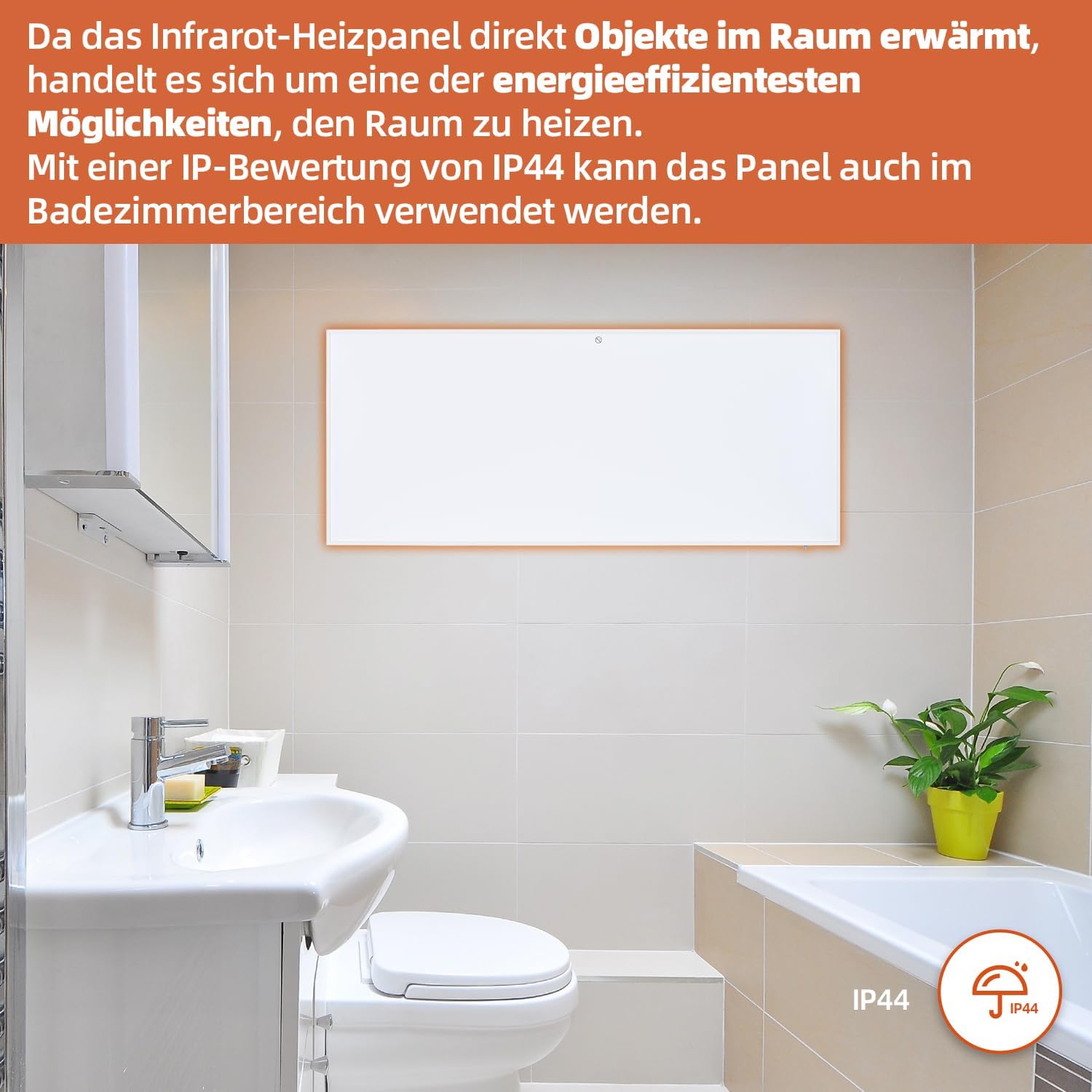
Figure 7: SHX Infrared Heating Panel with IP44 rating. The infrared heating panel mounted in a modern bathroom setting, emphasizing its IP44 water resistance rating, making it safe for use in damp persekitaran.
9. Penyelesaian masalah
If you encounter any issues with your SHX heating panel, refer to the following common problems and solutions:
| Masalah | Kemungkinan Punca | Penyelesaian |
|---|---|---|
| Pemanas tidak dihidupkan. | No power supply. Overheating protection activated. | Check if the power cord is securely plugged in and the outlet is functional. Unplug the heater, allow it to cool for 30 minutes, then plug it back in. |
| Sambungan WiFi gagal. | Incorrect WiFi password. Heater not in pairing mode. Router issues. | Ensure correct WiFi password. Put the heater into WiFi pairing mode (refer to app instructions). Restart your WiFi router. Ensure the heater is within WiFi range. |
| Alat kawalan jauh tidak berfungsi. | Batteries are dead or incorrectly inserted. Obstruction between remote and heater. | Replace the batteries in the remote control (requires 2 AAA batteries). Ensure there is a clear line of sight between the remote and the heater's receiver. |
| Pemanas tidak memanas dengan berkesan. | Temperature setting too low. Room size exceeds heater capacity. Drafts. | Increase the target temperature. Ensure the room size is within the recommended range (up to 14 m²). Seal any drafts in the room. |
10. Spesifikasi
| Spesifikasi | Nilai |
|---|---|
| Jenama | SHX |
| Nombor Model | SHXA700-WiFi |
| warna | putih |
| Dimensi Produk (L x W x H) | 120 x 50 x 4.5 cm |
| Berat badan | 2.9 Kilogram |
| kuasa | 700 Watt |
| Voltage | 220 Volt (AC) |
| Kelas Kecekapan Tenaga | A hingga G |
| Tahap Kebisingan | 1 Desibel |
| Ciri Khas | WiFi Compatible, Overheating Protection, Programmable Thermostat, Remote Control, Energy Efficient |
| Sumber Kuasa | Elektrik Bertali |
| Kaedah Pemanasan | Berseri-seri |
| Penggunaan yang Disyorkan | Dalaman, Rumah |
| Jenis Pemasangan | Wall Mount, Floor Mount (with optional feet) |
| Bateri Diperlukan untuk Jauh | 2 bateri AAA |
| Negara Asal | China |
11. Waranti dan Sokongan
The SHX SHXA700 Infrared Heating Panel comes with a Waranti 2 tahun dari tarikh pembelian. Sila simpan bukti pembelian anda untuk tuntutan waranti.
For technical support, warranty claims, or any questions regarding your product, please contact your retailer or the manufacturer's customer service. Contact information can typically be found on the product packaging or the manufacturer's official webtapak.