
pengenalan
Terima kasih kerana membeliasing the OBEST EN8829-B Wireless Weather Station. This device provides accurate indoor and outdoor temperature and humidity readings, a 6-level weather forecast, time, date, and an alarm function. Please read this manual carefully to ensure proper setup and operation.
Kandungan Pakej
- OBEST EN8829-B Weather Station (Main Unit)
- Sensor Luaran Tanpa Wayar
- Kabel Kuasa USB
- Manual Pengguna
Produk Selesaiview
The OBEST EN8829-B features a 6-inch color LCD display and a wireless outdoor sensor for comprehensive environmental monitoring.

Image: The main display unit of the OBEST EN8829-B weather station, showing indoor and outdoor temperature and humidity, weather forecast, date, moon phase, and time.
Ciri Unit Utama:
- 6-inch HTN color LCD display
- 6 touch buttons: [SET], [MODE], [ALERTS], [UP], [SNOOZE/LIGHT], [DOWN]
- 12H/24H time selection
- Alarm with snooze function (5-60 minutes)
- Perpetual calendar with M/D or D/M display
- Week display in 5 languages (German, English, French, Italian, Spanish)
- Temperature display in °C / °F
- Barometric pressure indication (last 12 hours) in hPa/mb or inHg
- 6-level weather forecast (sunny, cloudy, overcast, rainy, heavy rain, snow)
- 8 types of moon phase indication
- Memory function for highest/lowest indoor/outdoor temperature and humidity
- Indoor temperature alarm (upper and lower limits)
- Port pengecasan USB
- Adjustable backlight (4 levels with DC power, 10 seconds with battery)
Outdoor Sensor Features:
- Penarafan kalis air IP54
- Supports up to 3 sensors (one included)
- RF 433.92 MHz detection frequency
- Wireless transmission distance up to 60m / 100ft
- Petunjuk kuasa rendah
Persediaan
1. Menghidupkan Unit Utama
The main unit can be powered by either DC power or batteries.
- DC Power (Recommended): Connect the provided USB power cable to the main unit and a suitable USB power adapter (not included). This allows the backlight to remain on continuously with adjustable brightness.
- Kuasa Bateri: Insert 3 AAA batteries (not included) into the battery compartment. When powered by batteries, the backlight will illuminate for 10 seconds after a button press to conserve power.
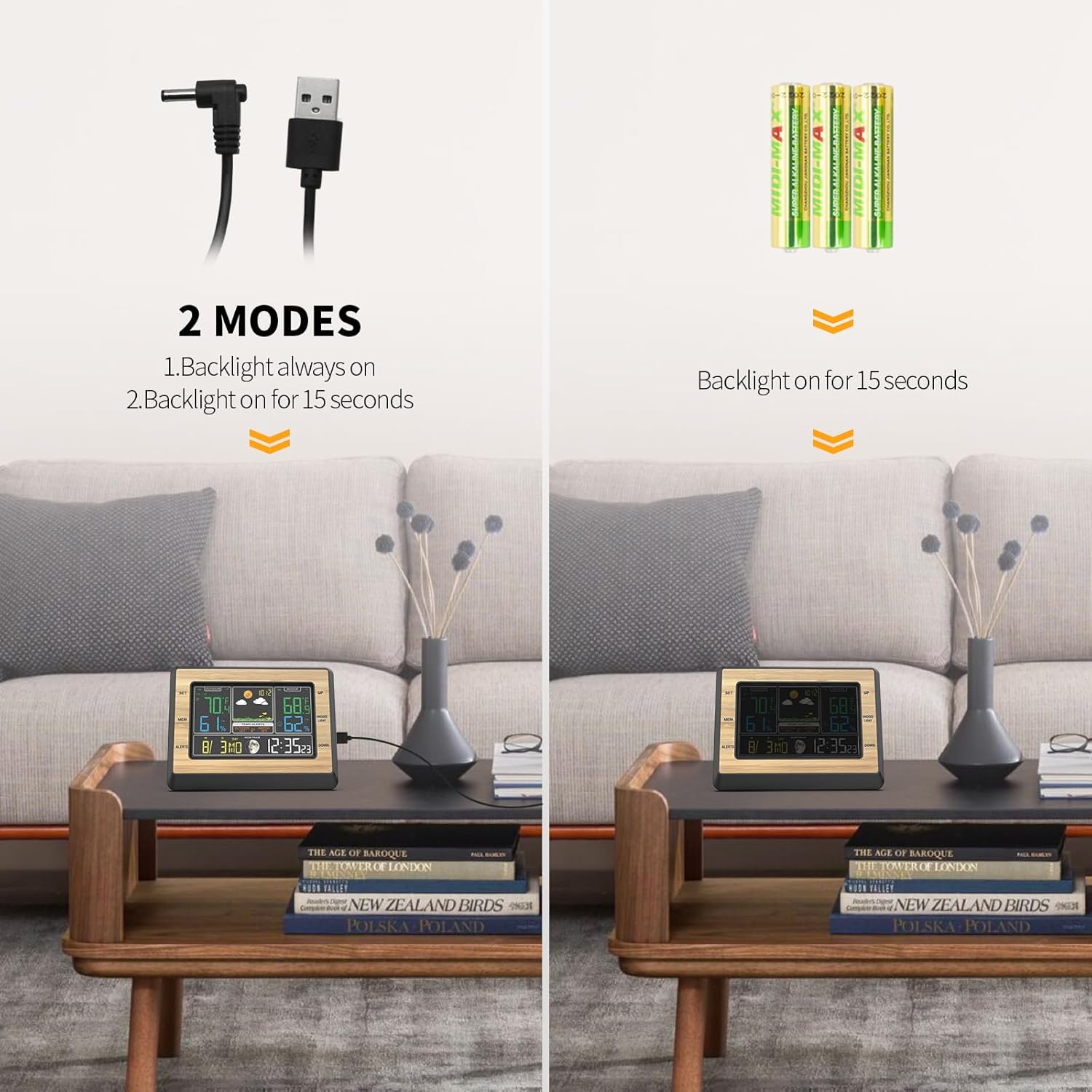
Image: Illustration of the two power modes for the weather station: DC power for continuous backlight and battery power for 15-second backlight.
2. Installing and Pairing the Outdoor Sensor
- Insert 2 AAA batteries (not included) into the outdoor sensor.
- Place the outdoor sensor in a shaded, dry location away from direct sunlight and rain, but where it can still transmit data to the main unit. The sensor is IP54 waterproof, but protection from extreme elements is recommended for longevity.
- The main unit will automatically search for and connect to the outdoor sensor. This may take a few minutes. Ensure both units are within the 60m / 100ft transmission range.
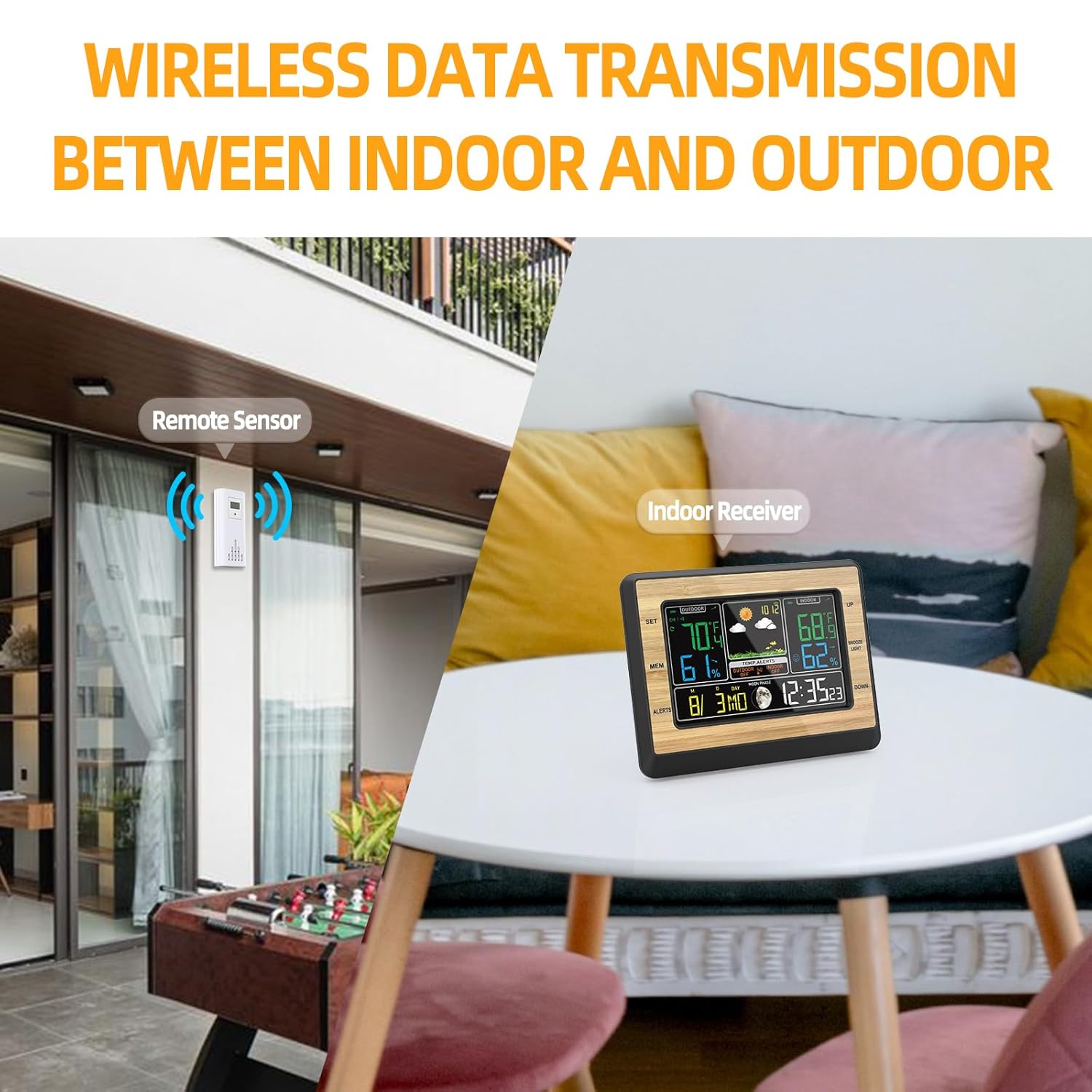
Image: Depicts the wireless data transmission between the remote outdoor sensor and the indoor receiver unit.
3. Tetapan Awal
After powering on, you may need to set the time, date, and other preferences.
- Tekan dan tahan butang [SET] butang untuk memasuki mod tetapan masa.
- Gunakan [KE ATAS] dan [TURUN] butang untuk melaraskan nilai.
- Tekan [SET] again to confirm and move to the next setting (e.g., 12/24H format, hour, minute, year, month, day, date format M/D or D/M, language for day of week).
- Tekan ke [MOD] button to exit settings at any time.
- To change temperature units (°C/°F), press the [KE ATAS] button in normal display mode.
Arahan Operasi
1. Paparan Maklumat
The main display shows various information:
- Suhu & Kelembapan Luaran: Terletak di sebelah kiri paparan.
- Suhu & Kelembapan Dalaman: Terletak di sebelah kanan paparan.
- Ramalan cuaca: Icons indicating sunny, cloudy, rainy, etc., in the upper middle section.
- Masa & Tarikh: At the bottom right.
- Fasa Bulan: Icon next to the date.
- Tekanan Barometrik: Displayed in the upper middle section, below the weather forecast.
2. Pelarasan Lampu Latar
When powered by DC, the backlight has 4 adjustable levels.
- Tekan ke [TENGOK/CAHAYA] button to cycle through high brightness, medium light, low light, and off.
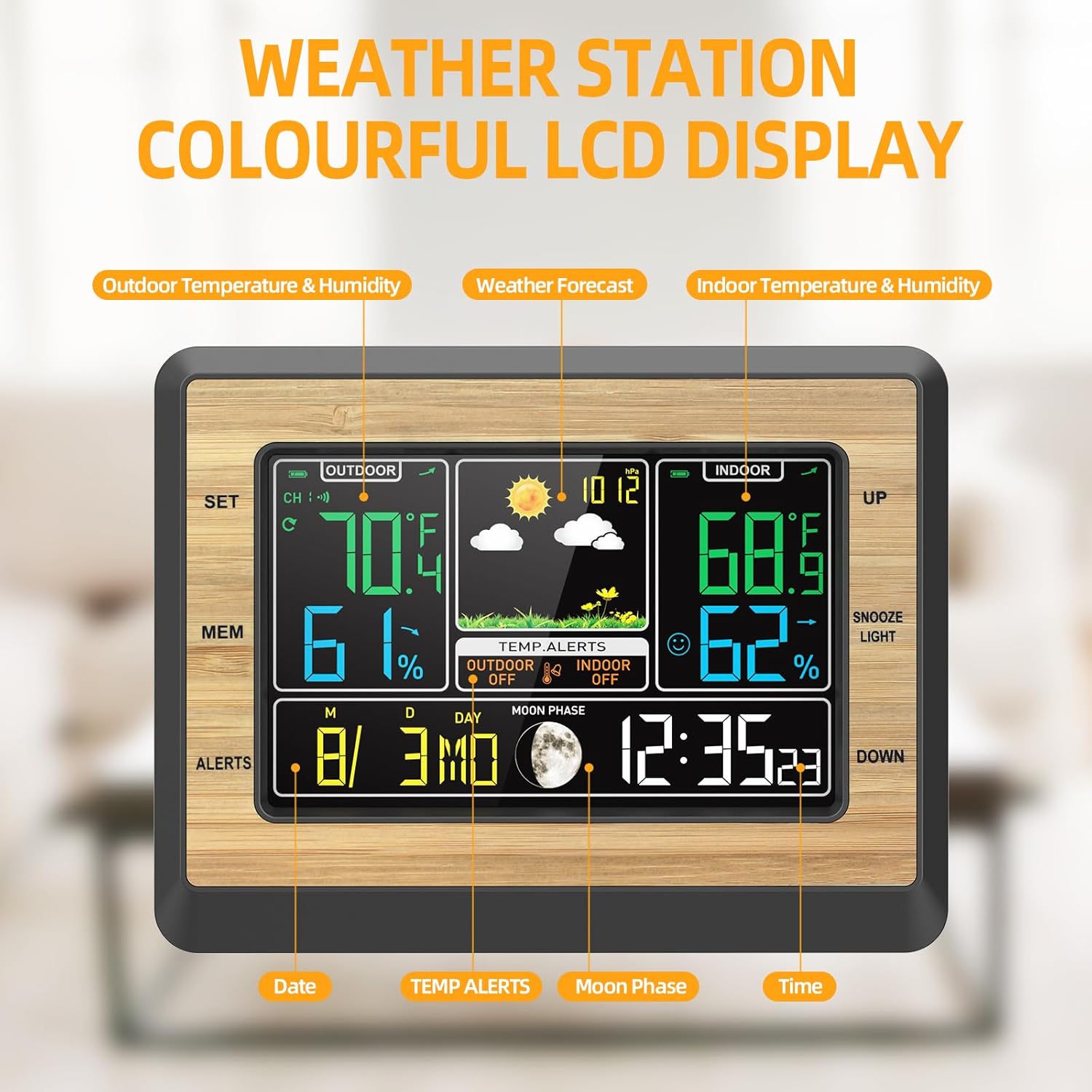
Image: Four panels illustrating the different backlight brightness levels (high, medium, low, off) of the weather station display.
3. Fungsi Penggera dan Tunda
- Tetapan Penggera: Tekan ke [MOD] button repeatedly until the alarm time is displayed. Hold [SET] to adjust the alarm time using [ATAS BAWAH]. Tekan [SET] untuk mengesahkan.
- Mengaktifkan/Menyahaktifkan Penggera: In alarm display mode, press [KE ATAS] untuk menghidupkan atau mematikan penggera.
- Tunda: Apabila penggera berbunyi, tekan [TENGOK/CAHAYA] button to activate snooze. The alarm will sound again after 5-60 minutes (adjustable in settings).
4. Temperature/Humidity Alerts
You can set upper and lower limits for indoor temperature alerts.
- Tekan ke [PERHATIAN] butang ke view current alert settings.
- tahan [PERHATIAN] to enter alert setting mode. Use [ATAS BAWAH] to adjust the desired high/low temperature limits.
- Tekan [PERHATIAN] untuk mengesahkan dan beralih ke tetapan seterusnya.
- When the temperature exceeds the set limits, an alarm will sound.
5. Max/Min Temperature and Humidity Memory
- Tekan ke [MEM] button to display the maximum recorded indoor/outdoor temperature and humidity.
- Tekan [MEM] again to display the minimum recorded values.
- tahan [MEM] to clear the recorded maximum/minimum values.
6. Ramalan Cuaca
The weather station provides a 6-level weather forecast based on barometric pressure changes. This is an approximation and should not replace professional weather services.

Image: Collage of six different weather scenes (desert, clouds, rain, snow) illustrating the 6-mode weather forecast feature of the station.
Penyelenggaraan
1. Penggantian Bateri
- When the low battery indicator appears on the display for either the main unit or the outdoor sensor, replace the batteries promptly.
- For the main unit, use 3 AAA batteries. For the outdoor sensor, use 2 AAA batteries.
- Pastikan kekutuban yang betul semasa memasang bateri baharu.
2. Pembersihan
- Lap unit utama dan sensor dengan lembut, damp kain.
- Do not use abrasive cleaners or solvents, as these may damage the display or casing.
3. Penjagaan Am
- Avoid exposing the main unit to direct sunlight, extreme temperatures, or high humidity.
- Ensure the outdoor sensor is placed in a location that minimizes direct exposure to harsh weather conditions, despite its waterproof rating.
Menyelesaikan masalah
- No outdoor temperature/humidity reading:
- Check if the outdoor sensor batteries are installed correctly and are not depleted.
- Ensure the sensor is within the transmission range (up to 60m / 100ft) and there are no major obstructions (thick walls, metal objects) between the sensor and the main unit.
- Try re-pairing the sensor by removing batteries from both units, then reinserting them into the sensor first, then the main unit.
- Bacaan suhu/kelembapan yang tidak tepat:
- Ensure the sensor is not in direct sunlight or near heat sources/vents, which can affect readings.
- Allow both units to stabilize for at least 30 minutes after setup for accurate readings.
- Paparan malap atau kosong:
- If using battery power, the backlight only stays on for 10 seconds after a button press.
- If using DC power, check the power cable connection. Press the [TENGOK/CAHAYA] butang untuk melaraskan kecerahan.
- Replace batteries if the low battery indicator is on.
- Penggera tidak berbunyi:
- Ensure the alarm function is activated (alarm icon visible on display).
- Check the alarm time settings.
Spesifikasi
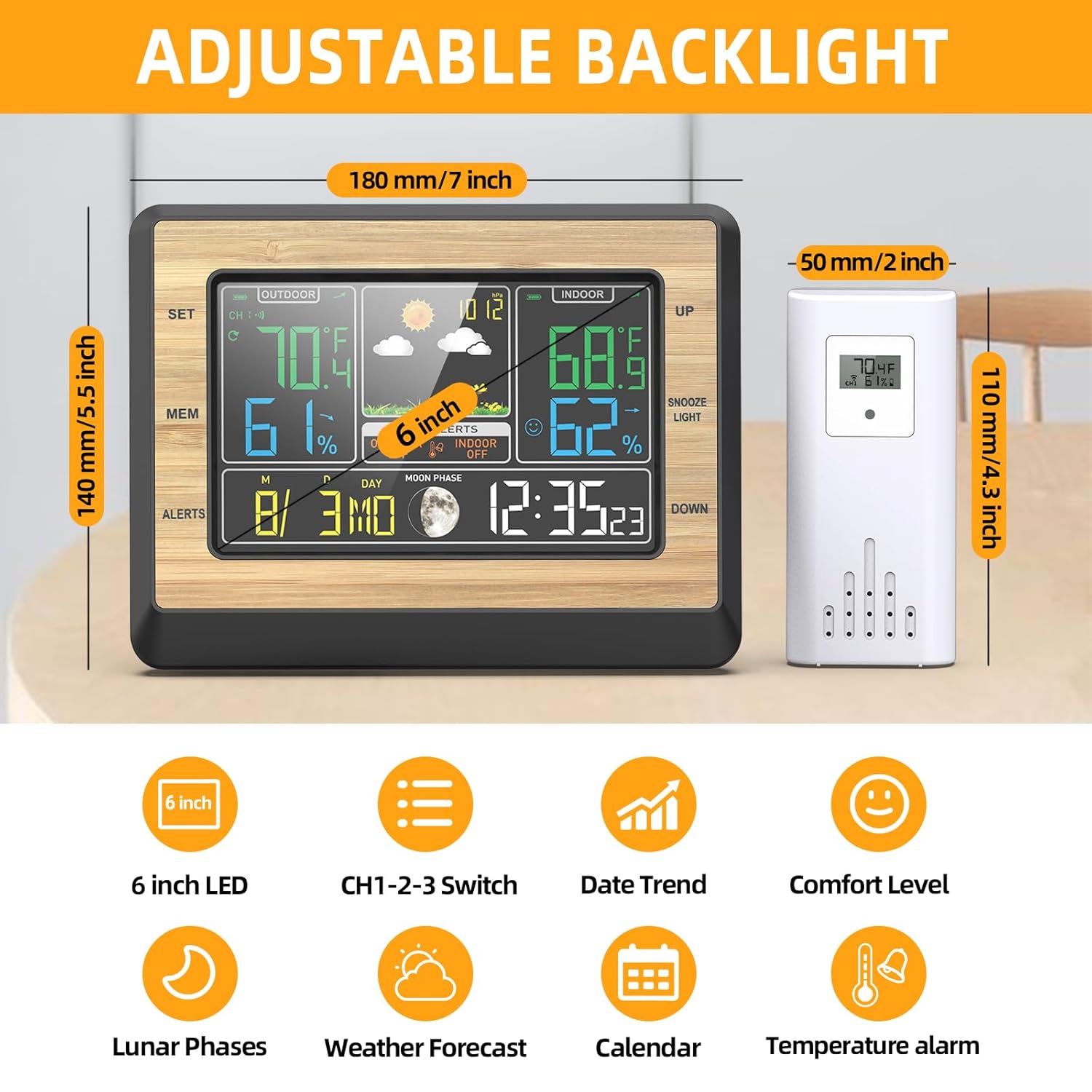
Image: Diagram showing the dimensions of the main unit (180mm/7 inch width, 140mm/5.5 inch height) and the outdoor sensor (50mm/2 inch width, 110mm/4.3 inch height), along with icons representing key features.
| Ciri | Perincian |
|---|---|
| Model | EN8829-B |
| Jenis Paparan | LCD Warna 6-inci |
| Julat Suhu Dalaman | -20°C ~ +70°C (-4°F ~ 158°F) |
| Julat Suhu Luar | -40°C ~ +70°C (-40°F ~ 158°F) |
| Resolusi Suhu | 0.1 ° C / ° F |
| Julat Kelembapan | 20%RH ~ 95%RH |
| Julat Tekanan Barometrik | 850hPa/mb (25.1 inHg) -- 1100hPa/mb (32.48 inHg) |
| Kekerapan Wayarles | 433.92 MHz |
| Jarak Penghantaran Tanpa Wayar | Sehingga 60m / 100 kaki (udara terbuka) |
| Kuasa Unit Utama | USB DC 5V or 3 x AAA batteries (not included) |
| Kuasa Sensor Luar | 2 x bateri AAA (tidak termasuk) |
| Dimensi Produk (Unit Utama) | 19 x 6 x 15 cm (L x W x T) |
| Berat Produk | 445 Gram |
| bahan | Akrilonitril Butadiena Stirena (ABS) |
Waranti dan Sokongan
Warranty information for the OBEST EN8829-B Wireless Weather Station is not explicitly provided in the product details. For specific warranty terms or technical support, please contact the retailer or manufacturer directly.