
GENBOLT GB216K
GENBOLT Solar Security Camera User Manual
Model: GB216K | Brand: GENBOLT
1. Pengenalan
The GENBOLT Solar Security Camera is a 100% wire-free outdoor surveillance solution designed for easy installation and reliable performance. Featuring a 4W solar charging panel and a 7800mAh rechargeable battery, it ensures continuous operation without the need for external power wires or Ethernet cables. This camera offers 1080P color night vision, enhanced PIR human detection with floodlight alarm, and PTZ (Pan-Tilt-Zoom) capabilities for comprehensive area coverage. Its IP66 waterproof rating ensures durability in various weather conditions.

Figure 1: GENBOLT Solar Security Camera with included solar panel.
2. Apa yang ada di dalam Kotak
Sila sahkan bahawa semua komponen ada semasa membuka bungkusan:
- Badan Kamera
- Panel Suria
- Manual Pengguna
- kurungan
- Skru

Figure 2: Included components and camera dimensions.
3. Persediaan
3.1 Pemasangan Fizikal
The GENBOLT Solar Security Camera is designed for flexible, 100% wire-free installation. Choose a location with ample sunlight for the solar panel and a clear view for the camera. The included 10FT extension cord allows for split installation of the solar panel and camera.
- Pilih Lokasi: Identify a suitable outdoor location for the camera and solar panel. Ensure the solar panel receives direct sunlight for most of the day.
- Pendakap Gunung: Use the provided screws and bracket to securely mount the camera to a wall or other stable surface.
- Pasang Panel Suria: Attach the solar panel to the camera or mount it separately using its own bracket and screws. Connect the solar panel to the camera's Type-C charging port.
- Hidupkan kuasa: Pastikan kamera dihidupkan.
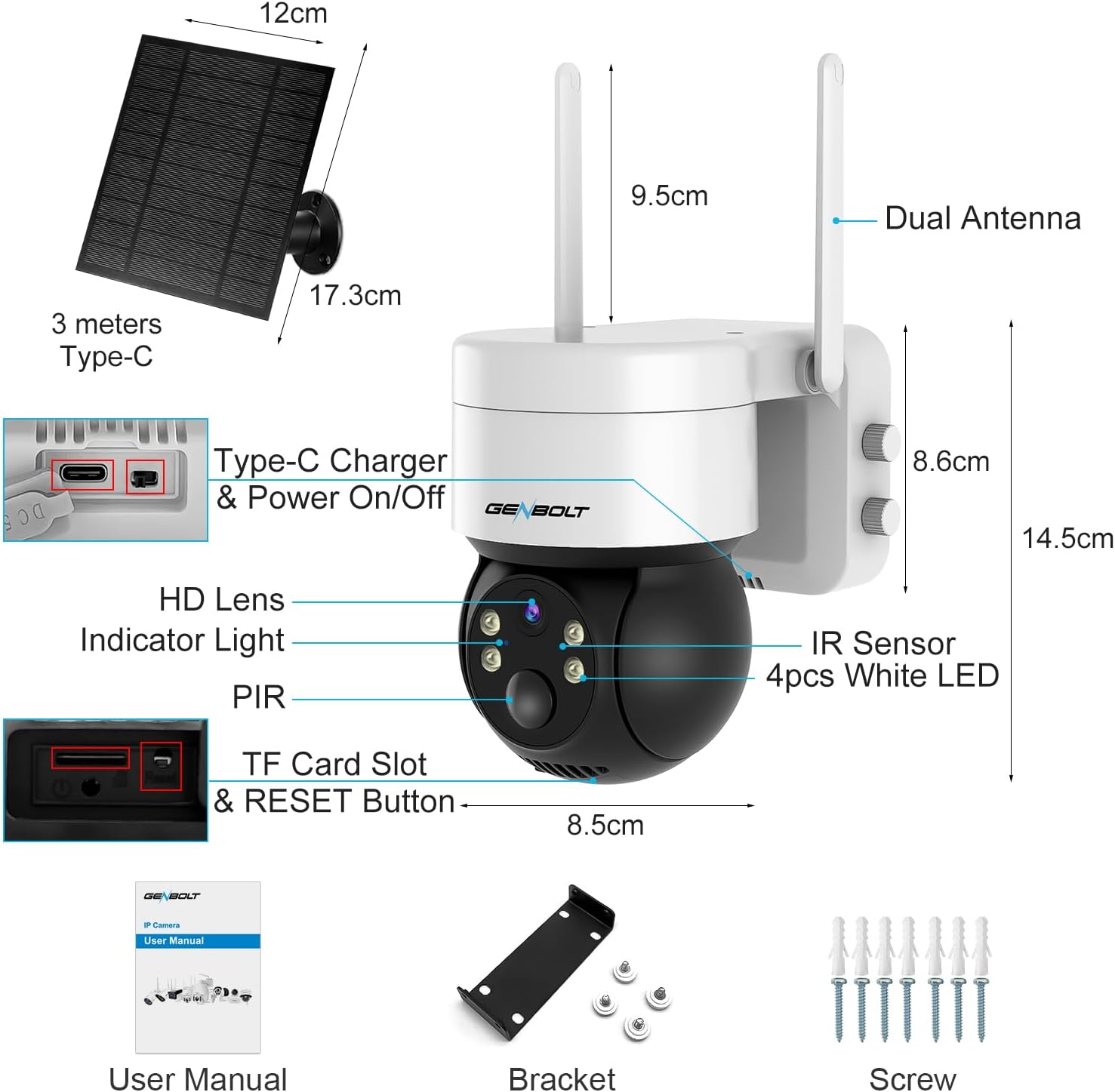
Figure 3: Flexible split installation using the 10FT extension cord.

Figure 4: The 4W solar charging panel keeps the 7800mAh battery charged.
Video 1: Selesaiview of the Solar Security Camera and its easy installation process.
3.2 Persediaan Apl
To access and control your camera, download the official GENBOLT app on your smartphone or tablet.
- Muat turun Aplikasi: Cari untuk "GENBOLT" in your device's app store (iOS or Android) and download the official application.
- Buat Akaun: Buka aplikasi dan ikut arahan pada skrin untuk membuat akaun pengguna baharu.
- Tambah Peranti: Tap the "+" icon or "Add Device" option within the app. Select your camera model and follow the prompts to connect it to your home WiFi network. This typically involves scanning a QR code displayed on the camera or entering network details.
- Persediaan Lengkap: Once connected, you can name your camera and begin customizing settings.
4. Mengendalikan Kamera
4.1 Langsung View dan Kawalan PTZ
Access the live video feed from your camera through the GENBOLT app. Use the on-screen controls to pan the camera 355° horizontally and tilt it 90° vertically, allowing you to monitor a wide area.
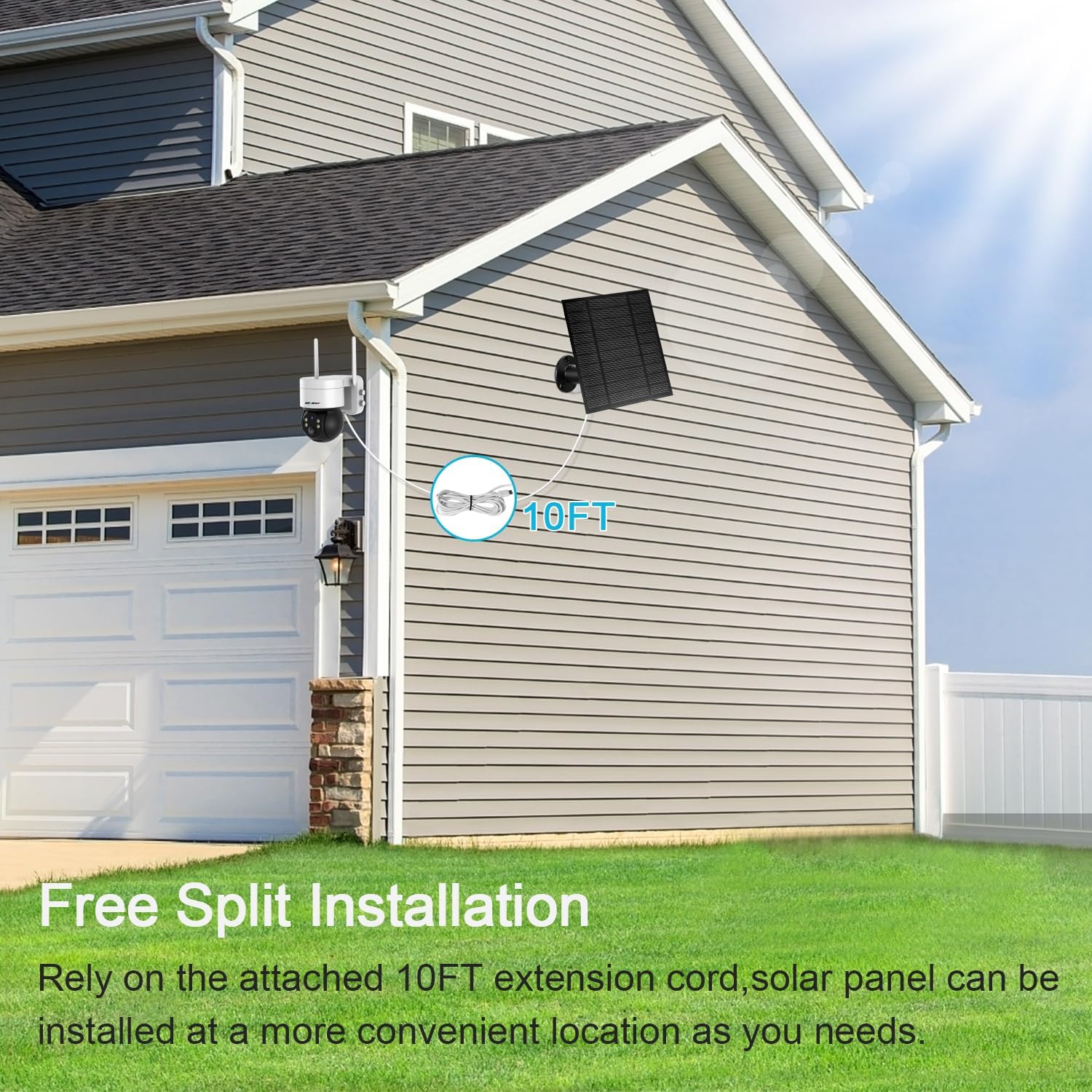
Figure 5: Pan and Tilt functionality for wide area surveillance.
4.2 Pengesanan Gerakan dan Makluman
The camera features an enhanced PIR sensor that detects human motion, minimizing false alarms. When motion is detected, you will receive real-time smartphone alerts. The integrated floodlight can also be configured to activate upon detection, deterring intruders.
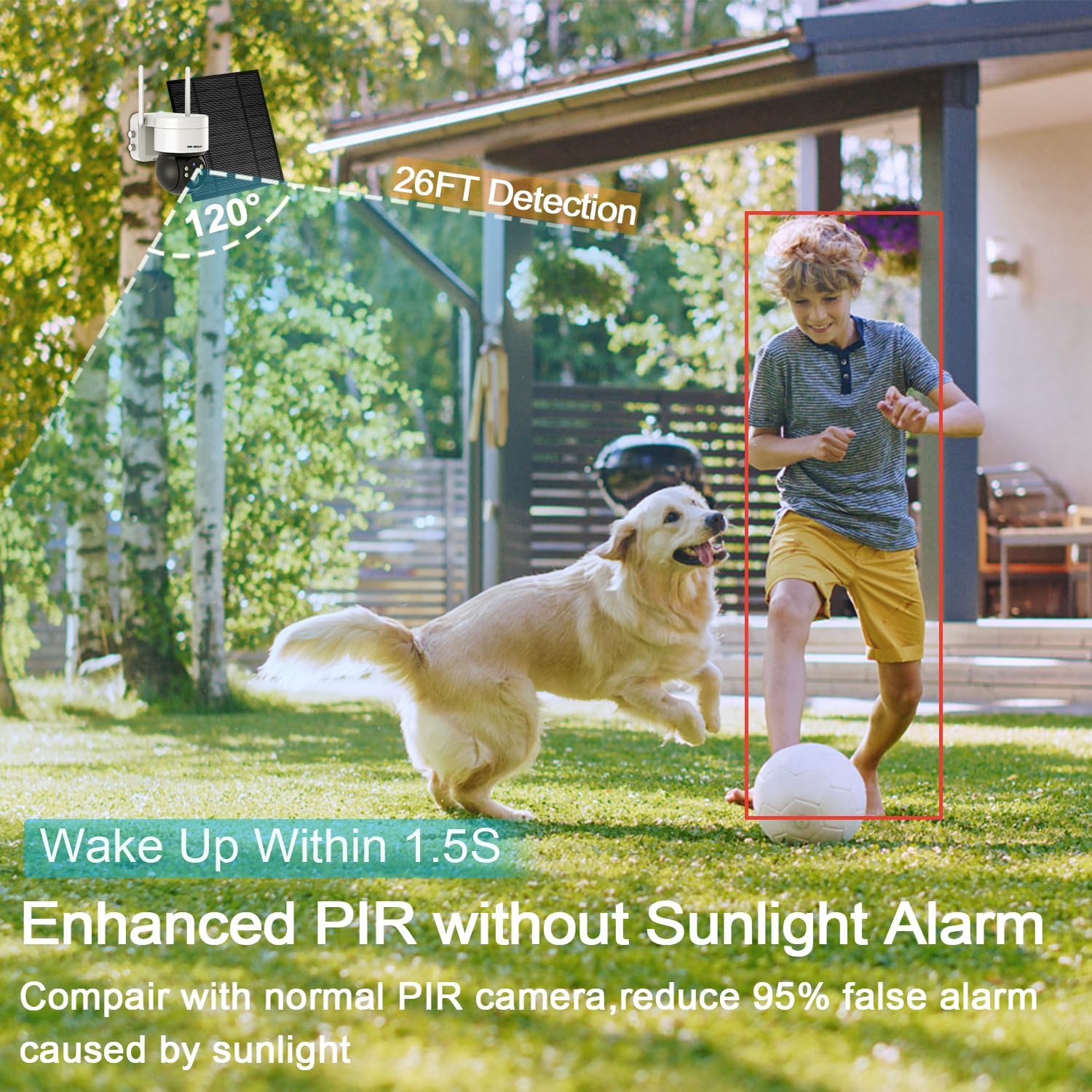
Figure 6: PIR Human Detection provides real-time smartphone alerts.
Figure 7: Active lighting defense with automatic floodlight activation upon alarm.
4.3 Audio Dua Hala
Communicate with visitors or deter unwanted guests using the camera's built-in microphone and speaker. This two-way audio function allows for real-time conversation through the app.

Figure 8: Two-way audio allows for real-time communication.
4.4 Penglihatan Malam
The camera provides 1080P color night vision, ensuring clear and detailed images even in low-light conditions. The bright floodlight enhances visibility and color accuracy at night.
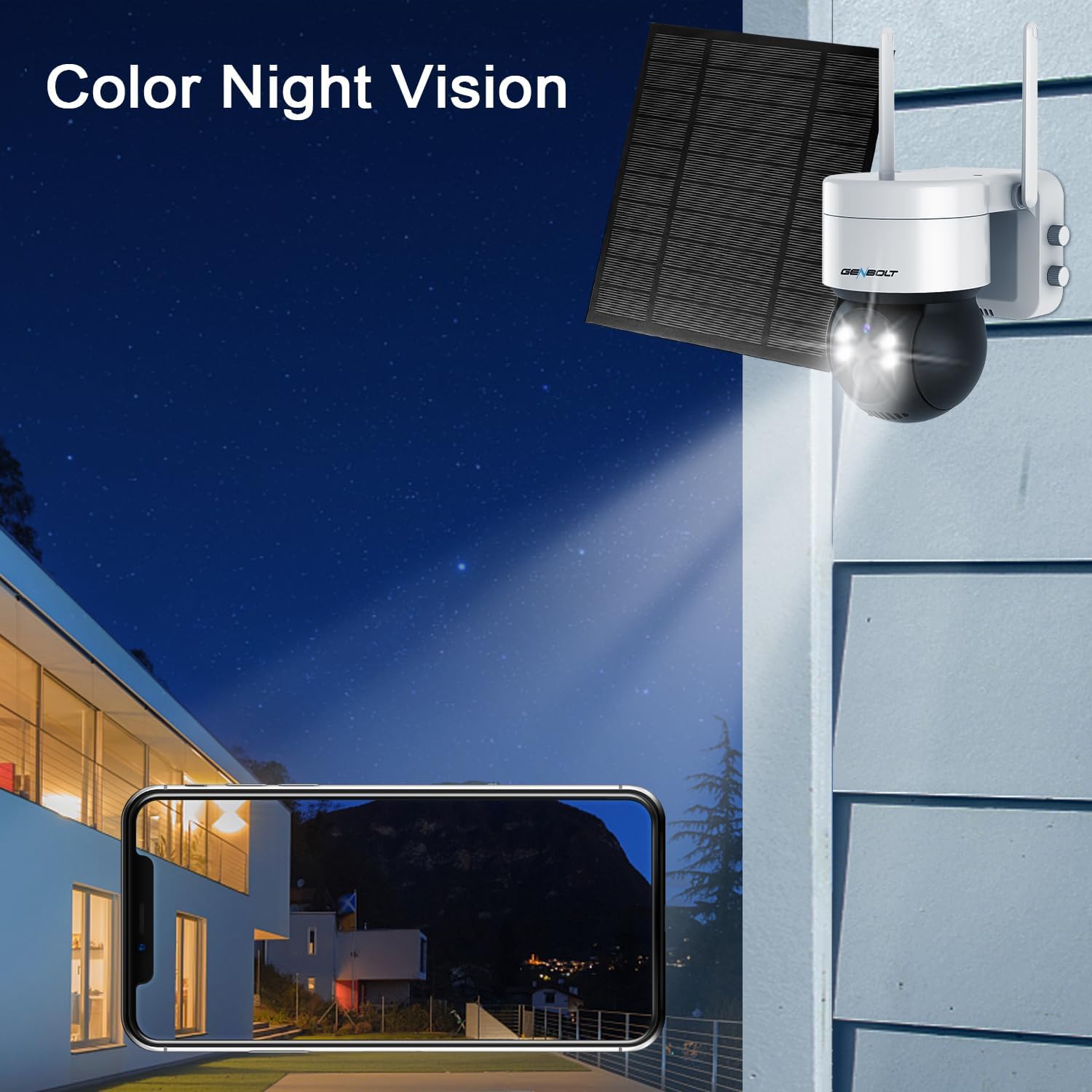
Figure 9: 1080P Color Night Vision for clear nighttime surveillance.
4.5 Rakaman dan Main semula
The camera supports local storage via a Micro SD card (up to 128GB, not included) for continuous recording or motion-triggered events. Recorded footage can be easily accessed and played back through the GENBOLT app.
5. Penyelenggaraan
5.1 Pengurusan Bateri
The camera's 7800mAh battery is primarily charged by the 4W solar panel. Ensure the solar panel is clean and free from obstructions (like dirt, leaves, or snow) to maximize charging efficiency. In periods of prolonged low sunlight, the battery may require manual charging via the Type-C port.
5.2 Pembersihan
Bersihkan kanta kamera dan panel solar dengan kerap dengan lembut, damp cloth to ensure optimal image quality and charging performance. Avoid using harsh chemicals or abrasive materials that could damage the surfaces.
Figure 10: Keep the solar panel clean for efficient charging.
6. Penyelesaian masalah
If you encounter issues with your GENBOLT Solar Security Camera, refer to the table below for common problems and their solutions.
| Masalah | Kemungkinan Punca | Penyelesaian |
|---|---|---|
| Kamera Luar Talian | Weak Wi-Fi signal, low battery, app issue. | Check Wi-Fi signal strength at camera location. Ensure solar panel is clean and receiving sunlight, or manually charge the battery. Restart the camera and/or the app. |
| Tiada Amaran Pergerakan | PIR sensitivity too low, detection zone not set, app notifications disabled. | Adjust PIR sensitivity in app settings. Verify detection zones are correctly configured. Enable notifications for the GENBOLT app in your phone's settings. |
| Penglihatan Malam yang lemah | Dirty lens, insufficient ambient light, floodlight setting. | Clean the camera lens. Ensure the floodlight is enabled for color night vision if desired. |
| Audio Dua Hala Tidak Berfungsi | Microphone/speaker muted in app, network latency. | Check audio settings in the app to ensure microphone and speaker are enabled. Verify stable network connection. |
7. Spesifikasi
| Ciri | Perincian |
|---|---|
| Model | GB216K |
| Penggunaan Dalaman/Luar | Dalaman, Luaran |
| Sumber Kuasa | Berkuasa Suria |
| Kapasiti Bateri | 7800 mAh |
| Panel Suria Wattage | 4W |
| Protokol Ketersambungan | Wi-Fi |
| Resolusi Tangkapan Video | 1080P (1296p effective) |
| Sudut Pan | 355 Darjah |
| Sudut Kecondongan | 90 Darjah |
| Viewsudut | 120 Darjah |
| Julat Penglihatan Malam | 10 Meter |
| Tahap Ketahanan Air | IP66 Kalis Air |
| Penyimpanan | Micro SD (sehingga 128GB) |
| Dimensi (L x W x H) | 3.54 x 5.12 x 5.12 inci |
| Berat Barang | 2.22 paun |
8. Waranti dan Sokongan
GENBOLT is committed to providing excellent customer service and product support.
- Pertukaran 30 Hari: Enjoy a 30-day exchange policy for your product.
- Waranti 1 Tahun: The GENBOLT Solar Security Camera comes with a 1-year limited warranty from the date of purchase.
- Sokongan Teknikal Percuma: Lifetime free technical support is guaranteed.
For technical assistance or warranty inquiries, please contact us:
- e-mel: us@genbolt.com
- Phone (Local Support): +1 (778)807-9710 (Monday - Friday, 5:30 AM to 10:30 AM PST)
Ask a question about this manual
Ask about setup, troubleshooting, compatibility, parts, safety, or missing instructions. Manuals+ will review the question and use this page’s manual context to help answer it.