pengenalan
Thank you for choosing the Bumpboxx Remixx Retro Bluetooth Boombox. This portable cassette-style speaker combines vintage aesthetics with modern audio technology, offering high-fidelity sound, wireless connectivity, and a range of features for an enhanced listening experience. This manual provides essential information for setting up, operating, maintaining, and troubleshooting your device.
Kandungan Pakej
Sila pastikan semua item ada dalam pakej anda:
- Bumpboxx Remixx Bluetooth Boombox
- Mikrofon Tanpa Wayar
- Carrying Shoulder Strap
- Penyesuai Kuasa (untuk pengecasan)
- Kabel Aux 3.5mm
- Alat Kawalan Jauh
Produk Selesaiview
Familiarize yourself with the main components and controls of your Bumpboxx Remixx.
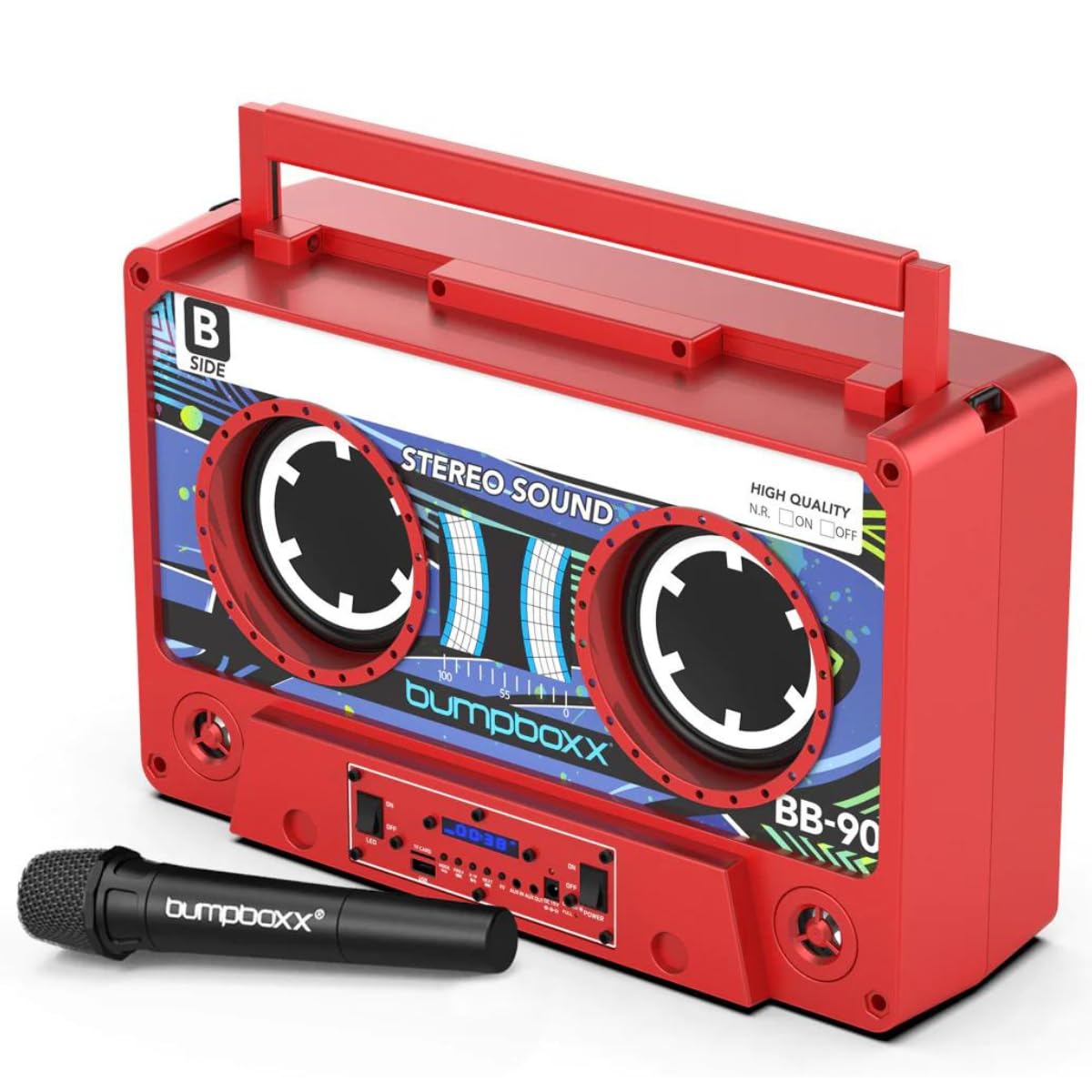
Rajah 1: Depan view of the Bumpboxx Remixx Boombox.

Figure 2: Side control panel with various ports and switches.
Kawalan dan Pelabuhan:
- Tombol Kelantangan: Melaraskan tahap output bunyi keseluruhan.
- Tombol Bes: Adjusts the low-frequency sound levels.
- Tombol Treble: Adjusts the high-frequency sound levels.
- Suis kuasa: Menghidupkan/Mematikan peranti.
- Suis LED: Menghidupkan/Mematikan lampu LED.
- Port USB: Untuk memainkan MP3 files from a USB drive or charging external devices.
- Slot Kad TF: Untuk memainkan MP3 files daripada kad TF (MicroSD).
- Butang Mod: Switches between input modes (Bluetooth, USB, TF Card, Aux In).
- Butang Sebelumnya/Seterusnya: Navigates tracks during playback.
- Butang Main/Jeda: Mengawal main balik media.
- Butang EQ: Cycles through 5 preset equalizer settings.
- Aux In (3.5mm): Sambungkan peranti audio luaran.
- Aux Out (3.5mm): Connect to other audio systems.
- Input DC 15V: Power adapter connection for charging.
- Charge/Full LED Indicators: Menunjukkan status pengecasan bateri.
Persediaan
1. Mengecas Bateri:
- Connect the provided power adapter to the DC 15V input port on the side of the boombox.
- Pasangkan penyesuai ke soket dinding standard.
- The 'Charge' indicator LED will illuminate during charging. Once fully charged, the 'Full' indicator LED will light up.
- Cas penuh memberikan masa bermain selama kira-kira 12 jam.
2. Menghidupkan/Mematikan:
- To power on the boombox, slide the kuasa switch to the 'ON' position.
- Untuk mematikan kuasa, luncurkan kuasa switch to the 'OFF' position.
Arahan Operasi
1. Berpasangan Bluetooth:
- Power on the Bumpboxx Remixx. The device will automatically enter Bluetooth pairing mode, indicated by a flashing Bluetooth icon on the display.
- Pada peranti mudah alih anda (telefon pintar, tablet, dll.), dayakan Bluetooth dan cari peranti yang tersedia.
- Select "Bumpboxx Remixx" from the list of devices.
- Once connected, the Bluetooth icon will stop flashing, and a confirmation tone may sound.
- You can now play audio from your device through the boombox.
2. Auxiliary Input (AUX In):
- Connect one end of the 3.5mm Aux cable to the Aux In port on the boombox.
- Connect the other end to the headphone jack or audio output of your external audio device.
- Tekan ke Mod button on the boombox until "AUX" is displayed.
- Kawal main balik dan kelantangan daripada peranti luaran anda.
3. Main Semula Kad USB/TF:
- Insert a USB drive into the USB port or a TF (MicroSD) card into the TF Card slot.
- The boombox will automatically switch to USB or TF Card mode and begin playing compatible MP3 files. Jika tidak, tekan Mod butang untuk memilih input yang betul.
- Gunakan Sebelumnya/Seterusnya dan Main/Jeda butang untuk mengawal main balik.
4. Wireless Microphone Usage:
- Ensure the wireless microphone is powered on and within range of the boombox.
- The microphone will automatically connect to the boombox.
- Adjust the microphone volume using the dedicated control on the microphone or the boombox (if available).
5. Tetapan EQ:
- Tekan ke EQ button to cycle through the 5 preset equalizer settings (e.g., Pop, Rock, Jazz, Classic, Flat).
- Select the setting that best suits your audio preference.
6. TWS (Stereo Wayarles Sejati) Berpasangan:
The Bumpboxx Remixx supports TWS pairing, allowing two Remixx units to connect wirelessly for a stereo sound experience.
- Ensure both Bumpboxx Remixx units are powered on and in Bluetooth mode, but not connected to any other device.
- On one unit (this will be the primary unit), press and hold the Mod butang selama beberapa saat sehingga anda mendengar nada berpasangan.
- The two units will automatically connect to each other. A confirmation tone will sound once connected.
- Now, connect your mobile device to the primary Bumpboxx Remixx via Bluetooth as described in step 1.
- Audio will now play in stereo across both units.
Video 1: Demonstrating the Bumpboxx Remixx in action, showcasing reka bentuk dan ciri-cirinya.
Video 2: A closer look at the Bumpboxx Remixx speaker, highlighting its audio capabilities.
Penyelenggaraan
1. Pembersihan:
- Wipe the exterior of the boombox with a soft, dry cloth.
- Jangan gunakan pembersih, lilin atau pelarut yang melelas kerana ia boleh merosakkan kemasan.
- Pastikan port bebas daripada habuk dan serpihan.
2. Storan:
- Simpan boombox di tempat yang sejuk dan kering, jauh daripada cahaya matahari langsung dan suhu yang melampau.
- Jika menyimpan untuk tempoh yang lama, pastikan bateri dicas separa (sekitar 50%) untuk memanjangkan jangka hayatnya.
Menyelesaikan masalah
Tiada Kuasa:
- Ensure the power adapter is securely connected to both the boombox and a working power outlet.
- Check if the battery is charged. If not, charge the device for several hours.
- Verify the Power switch is in the 'ON' position.
Tiada Bunyi:
- Increase the volume on both the boombox and your connected audio device.
- Ensure the correct input mode (Bluetooth, AUX, USB, TF Card) is selected.
- Jika menggunakan Bluetooth, pastikan peranti dipasangkan dan disambungkan dengan betul.
- If using AUX, check the cable connection and ensure it is fully inserted.
Bluetooth Tidak Bersambung:
- Ensure the boombox is in Bluetooth pairing mode (flashing Bluetooth icon).
- Make sure your mobile device's Bluetooth is enabled and searching for devices.
- Move your mobile device closer to the boombox.
- Try forgetting the device from your mobile device's Bluetooth settings and re-pairing.
- Ensure no other devices are currently connected to the boombox.
Spesifikasi
- Nama Model: Remixx
- Jenama: Bumpboxx
- Jenis pembesar suara: Terbina Dalam
- Teknologi Ketersambungan: Bluetooth
- Mod Output Audio: Stereo
- Sumber Kuasa: Dikuasakan Bateri (termasuk 1 bateri Lithium Ion)
- Hayat Bateri: Sehingga 12 jam (boleh dicas semula)
- Dimensi Produk: 17.5" (Length) x 6.25" (Width) x 11.5" (Height)
- Berat Barang: 12.5 paun
- Ciri Khas: Wireless Microphone, 5 EQ Settings, TWS Wireless Pairing, USB/TF MP3 Player, 3.5mm Line In/Line Out
- warna: Electric Red
- Bahan: plastik
- Kaedah Kawalan: Sentuh, Alat Kawalan Jauh
Waranti dan Sokongan
The Bumpboxx Remixx Retro Bluetooth Boombox comes with a Waranti pengilang selama 1 tahun menutup kecacatan pada bahan dan mutu kerja.
For warranty claims, technical support, or any questions regarding your product, please contact Bumpboxx customer service through their official webtapak atau peruncit tempat produk itu dibeli. Sila simpan bukti pembelian anda untuk pengesahan waranti.