
pengenalan
This manual provides essential information for the proper use and maintenance of your realme 11 5G smartphone. Please read this guide thoroughly before using your device to ensure optimal performance and longevity. Keep this manual for future reference.
Kandungan Pakej
Sahkan bahawa pakej anda mengandungi item berikut:
- Telefon Pintar realme 11 5G
- Pengecas
- USB Type-C Cable (typically included with charger)
- SIM Ejector Tool (typically included)
- Panduan Permulaan Pantas (biasanya disertakan)
- Safety Information and Warranty Card (typically included)
If any items are missing or damaged, please contact your retailer or realme customer support.
Reka Letak Peranti
Familiarize yourself with the physical components of your realme 11 5G.
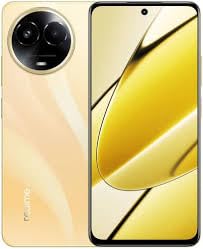
Imej: Selesaiview of the realme 11 5G smartphone. This image displays the general form factor of the device, highlighting its sleek design. Note that this is a general representation; specific button and port placements are detailed below.
- Kamera Depan: Terletak di tengah atas paparan.
- Alat dengar: Positioned above the front camera.
- Butang Kelantangan: Typically on the left side of the device.
- Butang Kuasa: Typically on the right side, often integrated with the fingerprint sensor.
- Dulang Kad SIM/microSD: Located on the side, accessible with the SIM ejector tool.
- Port USB Jenis-C: Di bahagian bawah untuk pengecasan dan pemindahan data.
- Penceramah: Terletak di bahagian bawah.
- Modul Kamera Utama: On the rear, housing the 108MP primary and 2MP secondary cameras.
Persediaan
1. Insert SIM and microSD Card
- Cari dulang kad SIM di sisi peranti anda.
- Masukkan alat ejektor SIM ke dalam lubang kecil di sebelah dulang dan tolak perlahan-lahan sehingga dulang terkeluar.
- Letakkan kad Nano-SIM dan/atau kad microSD anda ke dalam slot yang ditetapkan pada dulang. Pastikan sesentuh emas menghadap ke bawah.
- Masukkan semula dulang dengan berhati-hati ke dalam telefon.
2. Kuasa Awal Hidup
- Tekan dan tahan butang Kuasa sehingga logo realme muncul.
- Ikut arahan pada skrin untuk melengkapkan persediaan awal, termasuk pemilihan bahasa, sambungan Wi-Fi, persediaan akaun Google dan tetapan keselamatan.
3. Mengecas Bateri
- Connect the USB Type-C cable to the phone's charging port and the other end to the provided charger.
- Palamkan pengecas ke salur keluar kuasa.
- Penunjuk pengecasan akan muncul pada skrin.
Arahan Operasi
Power On/Off/Restart
- Hidupkan kuasa: Press and hold the Power button until the device vibrates and the realme logo appears.
- Matikan: Tekan dan tahan butang Kuasa selama beberapa saat, kemudian ketik "Matikan" pada skrin.
- Mulakan semula: Tekan dan tahan butang Kuasa selama beberapa saat, kemudian ketik "Mulakan Semula" pada skrin.
Pengecaman Cap Jari
- To set up fingerprint unlock, go to Settings > Password & Security > Fingerprint.
- Ikut arahan pada skrin untuk mendaftar cap jari anda.
- To unlock, place your registered finger on the fingerprint sensor (integrated with the Power button or in-display).
Penggunaan Kamera
- Buka apl Kamera daripada skrin utama atau laci apl anda.
- Pilih mod yang anda inginkan (Foto, Video, Potret, Malam, dll.).
- Ketik butang pengatup untuk menangkap foto atau mula/hentikan rakaman video.
- Use pinch-to-zoom gestures to adjust zoom levels.
- Tap the switch icon to toggle between front and rear cameras.
Ketersambungan
- Wi-Fi: Pergi ke Tetapan > Wi-Fi, turn on Wi-Fi, and select your network. Enter the password if required.
- Bluetooth: Pergi ke Tetapan > Bluetooth, turn on Bluetooth, and pair with available devices.
- NFC: For contactless payments and data transfer, enable NFC in Settings > Connection & Sharing > NFC.
- Data Mudah Alih (5G/4G/3G): Pastikan kad SIM anda aktif dan data mudah alih diaktifkan dalam Settings > Mobile Network.
Penyelenggaraan
Kemas Kini Perisian
- Semak kemas kini perisian secara kerap untuk memastikan peranti anda mempunyai ciri terkini dan tampung keselamatan. Pergi ke Tetapan > Perihal peranti > Terkini.
- Connect to a stable Wi-Fi network and ensure sufficient battery charge before performing updates.
Membersihkan Peranti Anda
- Gunakan kain lembut dan tidak berbulu untuk membersihkan skrin dan badan telefon.
- Elakkan penggunaan bahan kimia yang keras, bahan kasar atau semburan aerosol.
- Untuk calitan degil, sedikit dampen kain dengan air.
Penjagaan Bateri
- Elakkan daripada mendedahkan peranti kepada suhu yang melampau.
- Gunakan hanya pengecas dan kabel asal yang disediakan bersama peranti anda.
- Jangan nyahcas bateri sepenuhnya dengan kerap; cas separa biasanya lebih baik untuk bateri litium-ion.
Menyelesaikan masalah
| Masalah | Penyelesaian |
|---|---|
| Peranti tidak dihidupkan. | Ensure the battery is charged. Connect the charger and wait a few minutes before attempting to power on again. If unresponsive, try a forced restart (usually by holding Power and Volume Down buttons simultaneously for 10-15 seconds). |
| Aplikasi ranap atau beku. | Close the problematic app and reopen it. Clear the app's cache (Tetapan > Apl > [Nama Apl] > Storan > Kosongkan cache). If the issue persists, restart the device. |
| Poor network signal or no connectivity. | Check if Airplane Mode is off. Ensure your SIM card is properly inserted. Try restarting the device. If the issue persists, contact your network provider. |
| Sensor cap jari tidak berfungsi. | Ensure your finger and the sensor are clean and dry. Re-register your fingerprint in settings. If the issue continues, try restarting the device. |
For further assistance, refer to the official realme support webtapak atau hubungi perkhidmatan pelanggan.
Spesifikasi
| Ciri | Perincian |
|---|---|
| Model | realme 11 5G |
| Pemproses | Octa-core MediaTek Dimensity 6100+ |
| RAM | 8GB |
| Storan Dalaman | 128GB (expandable via microSD with dedicated slot) |
| Paparan | 6.72-inch FHD+ (2400x1080) Touchscreen, 120 Hz Refresh Rate |
| Kamera Belakang | 108-megapixel (f/1.75) primary + 2-megapixel (f/2.4) depth sensor |
| Kamera Depan | 16-megapixel (f/2.45) |
| Sistem Operasi | Android 13 with Realme UI 4.0 |
| Bateri | 5000 mAh Litium-Ion |
| Sokongan SIM | Dual Nano-SIM |
| Ketersambungan | Wi-Fi, GPS, Bluetooth v5.20, NFC, USB Type-C, 3G, 4G, 5G |
| Penderia | Accelerometer, Ambient Light, Compass/Magnetometer, Gyroscope, Proximity, In-display Fingerprint |
| Dimensions (HxWxT) | 165.70 x 76.00 x 8.05 mm |
| Berat badan | 190 gram |
| Tahan Air | Tahan Air |
Maklumat Keselamatan
Please observe the following safety guidelines to prevent damage to your device or injury to yourself:
- Jangan buka, baiki atau ubah suai peranti.
- Gunakan hanya pengecas dan aksesori yang diluluskan oleh realme.
- Elakkan mendedahkan peranti kepada suhu ekstrem, cahaya matahari langsung atau api.
- Jangan letakkan peranti berhampiran medan magnet yang kuat.
- Jauhkan peranti dan aksesorinya daripada kanak-kanak.
- Lupuskan peranti dan bateri secara bertanggungjawab mengikut peraturan tempatan.
Waranti dan Sokongan
Your realme 11 5G device comes with a limited warranty. Please refer to the warranty card included in your package for detailed terms and conditions. You can also visit the official realme webtapak untuk maklumat waranti dan untuk mendaftarkan produk anda.
For technical support, troubleshooting, or service inquiries, please contact realme customer service through their official channels. You may need your device's serial number or proof of purchase.
Official realme Support: https://www.realme.com/in/support