
1. Pengenalan
Thank you for choosing the WORKPRO 1500W Rotary Hammer Drill. This heavy-duty tool is designed for demanding tasks such as drilling in concrete, wood, and steel, as well as chiseling applications. This manual provides essential information for the safe and efficient operation, maintenance, and troubleshooting of your rotary hammer drill. Please read it thoroughly before first use and keep it for future reference.

Image 1.1: WORKPRO 1500W Rotary Hammer Drill and included accessories.
2. Arahan Keselamatan Am
Sentiasa patuhi langkah berjaga-jaga keselamatan asas untuk mengurangkan risiko kebakaran, kejutan elektrik dan kecederaan diri. Kegagalan mematuhi arahan ini boleh mengakibatkan kecederaan serius.
- Keselamatan Kawasan Kerja: Pastikan kawasan kerja bersih dan terang. Kawasan bersepah atau gelap mengundang kemalangan. Jangan kendalikan alatan kuasa dalam atmosfera yang mudah meletup, seperti di hadapan cecair mudah terbakar, gas atau habuk.
- Keselamatan Elektrik: Palam alat kuasa mesti sepadan dengan alur keluar. Jangan sekali-kali mengubah suai palam dalam apa jua cara. Elakkan sentuhan badan dengan permukaan yang dibumikan atau dibumikan. Jangan dedahkan alatan kuasa kepada hujan atau keadaan basah.
- Keselamatan Diri: Always wear eye protection. Use hearing protection when operating the tool for extended periods. Wear a dust mask if drilling in dusty conditions. Dress properly; avoid loose clothing or jewelry.
- Penggunaan dan Penjagaan Alat: Jangan paksa alat kuasa. Gunakan alat kuasa yang betul untuk aplikasi anda. Putuskan sambungan palam daripada sumber kuasa sebelum membuat sebarang pelarasan, menukar aksesori atau menyimpan alatan kuasa.
- Penyelenggaraan: Mengekalkan alat kuasa. Periksa ketidaksejajaran atau pengikatan bahagian yang bergerak, kerosakan bahagian, dan keadaan lain yang mungkin mempengaruhi operasi alat kuasa.
3. Product Components and Included Items
Familiarize yourself with the parts of your WORKPRO Rotary Hammer Drill and the accessories provided.

Image 3.1: Key components of the rotary hammer drill, including SDS-PLUS Chuck, Four Functions Switch, Grease Pot, Shock Absorber, On/Off Switch, Cushioned Handle, Variable Speed Control, 360° Rotatable Handle, and Heat Outlet.
Aksesori yang disertakan:

Image 3.2: The complete set of accessories includes a carrying case, rotary hammer drill, SDS-plus point flat bit (250mm), SDS-plus point chisel bit (250mm), wrench, grease, SDS-plus drill bits (8mm, 10mm, 12mm), and a dust collector.
- 1 x Heavy-duty Rotary Hammer Drill
- 3 x SDS-plus Drill Bits (8 mm, 10 mm, 12 mm)
- 1 x Round Shank Chisel (Φ14 × 250 mm)
- 1 x Flat Chisel (Φ14 × 250 mm)
- 1 x Grease container
- 1 x Carbon Brush set
- 1 x Penutup Habuk
- 1 x Sepana
- 1 x Sarung Pembawa
4. Persediaan dan Pemasangan
4.1 Memasang Pemegang Bantu
The 360° rotatable handle provides better control and comfort. Loosen the handle clamp, letakkan pemegang pada sudut yang anda inginkan, dan ketatkan penutupnyaamp dengan selamat.
4.2 Memasukkan dan Menanggalkan Bit SDS-plus
The SDS-plus chuck allows for quick and secure bit changes.
- Memasukkan: Clean the bit shank. Pull back the chuck collar, insert the bit into the chuck until it clicks into place. Release the collar. Pull on the bit to ensure it is securely locked.
- Mengalih keluar: Pull back the chuck collar and pull the bit out.

Image 4.1: Illustration of the auto-lock SDS-plus chuck for secure bit clamping.
4.3 Attaching the Dust Collector
For cleaner operation and to protect the user, attach the dust collector to the front of the tool when drilling.

Image 4.2: The anti-dust cover protects users and the machine from dust and debris.
5. Arahan Operasi
The WORKPRO Rotary Hammer Drill features four operating modes and variable speed control for versatile applications.
5.1 Pemilihan Mod
Use the four-function switch located on the side of the tool to select the desired operating mode:
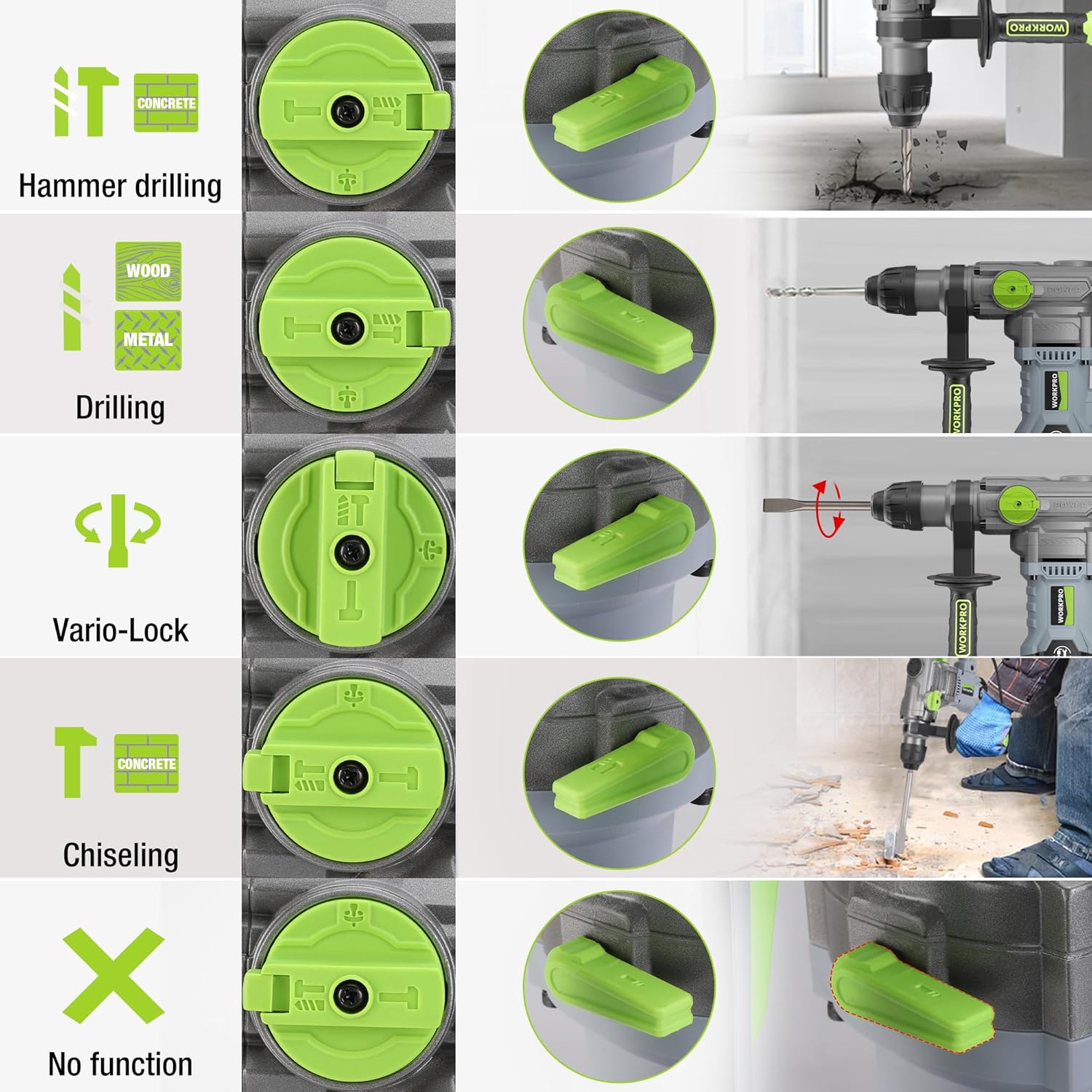
Image 5.1: The four-function switch allows selection between Hammer Drilling, Drilling, Vario-Lock (Chisel Adjust), and Chiseling modes.
- Penggerudian Tukul: For drilling in concrete and masonry with impact.
- Penggerudian: Untuk penggerudian pada kayu, logam dan plastik tanpa hentaman.
- Chiseling (Hammer Only): Untuk kerja memahat ringan dalam konkrit dan batu.
- Vario-Lock (Chisel Adjust): Allows you to rotate and lock the chisel in various positions to optimize the working angle.

Image 5.2: Visual representation of the hammer drilling, drilling, hammer, and chisel adjust modes.
5.2 Kawalan Kelajuan Boleh Ubah
The variable speed control allows you to adjust the rotation speed (0-930 RPM) and impact frequency (0-4300 BPM) to match the material and application.
- Rotate the speed adjustment dial to increase or decrease the speed.
- Start with a lower speed for precise drilling and increase as needed.
5.3 Drilling Capacities
The tool offers excellent drilling performance across various materials:
- konkrit: Sehingga 32 mm
- kayu: Sehingga 42 mm
- Keluli: Sehingga 13 mm
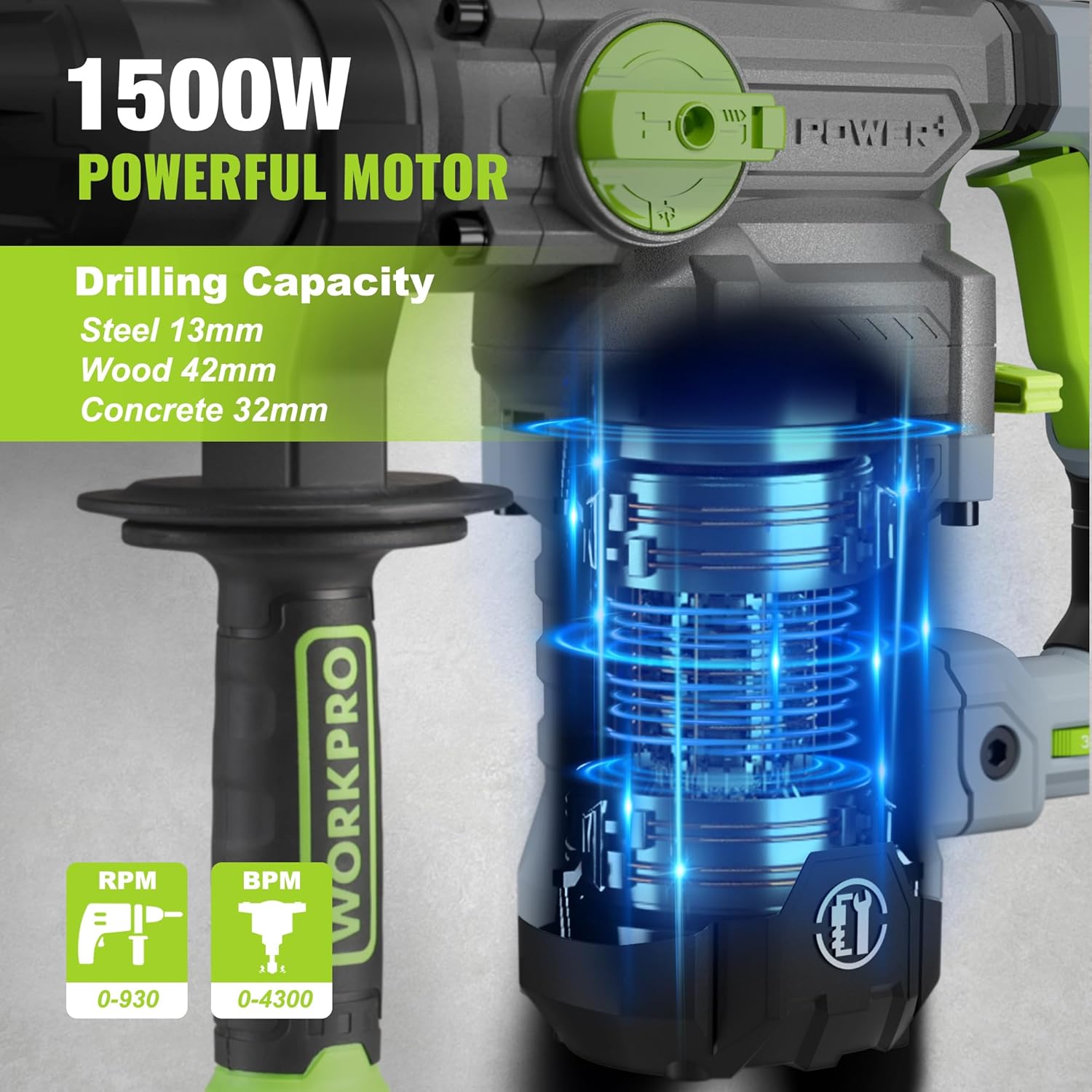
Image 5.3: The 1500W motor provides sufficient power for drilling in steel, wood, and concrete.
5.4 Permohonan Cthamples

Image 5.4: The tool is suitable for various tasks including chiseling concrete, removing tiles, concrete drilling, and floor breaking.
6. Penyelenggaraan
Penyelenggaraan tetap memastikan jangka hayat dan prestasi optimum alat anda.
6.1 Pembersihan
- Sentiasa putuskan sambungan alat daripada bekalan kuasa sebelum membersihkannya.
- Clean the ventilation slots regularly to prevent overheating.
- Lap perumah alat dengan lembut, damp kain. Jangan gunakan bahan kimia yang keras atau pembersih yang kasar.
- The tool features a dust-proof design and anti-dust bottom structure to extend its service life.
6.2 Penambahan gris
To maintain optimal performance and durability, replenish the grease every 30-40 hours of cumulative use.
- Use the provided wrench to open the grease pot.
- Apply the advanced lubricant (grease) as instructed.
- Securely close the grease pot after replenishment.
Image 6.1: Instructions for grease replenishment using the provided spanner and grease.
6.3 Penggantian Berus Karbon
Carbon brushes are wear parts and should be checked periodically. Replace them when they are worn down to their limit to ensure consistent motor performance.
7. Penyelesaian masalah
Bahagian ini menangani isu biasa yang mungkin anda hadapi. Untuk masalah yang tidak disenaraikan di sini, hubungi sokongan pelanggan.
| Masalah | Kemungkinan Punca | Penyelesaian |
|---|---|---|
| Alat tidak bermula | Tiada bekalan kuasa; Suis rosak; Berus karbon usang | Periksa sambungan kuasa; Uji suis; Gantikan berus karbon |
| Mengurangkan prestasi penggerudian | Dull drill bit; Incorrect mode selected; Insufficient grease | Replace or sharpen drill bit; Select correct mode; Replenish grease |
| Getaran / bunyi yang berlebihan | Loose components; Damaged bit; Internal issue | Check all connections; Replace bit; Contact service center |
| Terlalu panas | Slot pengudaraan tersumbat; Penggunaan berat yang berpanjangan | Clean ventilation slots; Allow tool to cool down |
8. Spesifikasi Teknikal
| Ciri | Spesifikasi |
|---|---|
| Nombor Model | W125244A |
| Input Voltage | 230-240 V |
| Kekerapan | 50 Hz |
| Kuasa Input Dinilai | 1500 W |
| Kelajuan tanpa beban | 0-930 rpm ±10% |
| Kekerapan Kesan | 0-4300 bpm ±10% |
| Single Impact Force | 5.5 J |
| Kapasiti Penggerudian (Konkrit) | 32 mm |
| Kapasiti Penggerudian (Kayu) | 42 mm |
| Kapasiti Penggerudian (Keluli) | 13 mm |
| Jenis Chuck | SDS-plus |
| Dimensi Produk (L x W x H) | 38.6 x 10.4 x 26.4 cm |
| Berat badan | 8.34 kg |
| Sumber Kuasa | Elektrik Bertali |
| Bilangan Gear | 6 (Variable Speed) |
9. Maklumat Waranti dan Sokongan
For warranty details, product support, or service inquiries, please refer to the warranty card included with your purchase or contact WORKPRO customer service directly. Keep your proof of purchase for any warranty claims.