
pengenalan
Thank you for choosing the Vivitar Singimals Kids Karaoke Speaker. This manual provides essential information for the safe and effective use of your new karaoke speaker. Please read it thoroughly before operation and retain it for future reference.
Apa yang ada di dalam Kotak:
- Singimals Kids Karaoke Speaker (Asher The Fox)
- Mikrofon Berwayar
- Kabel Pengecasan
- Manual Pengguna
Produk Selesaiview
The Vivitar Singimals Kids Karaoke Speaker is designed for interactive fun, featuring a 5W speaker, Bluetooth v5.1 connectivity, and multicolor LED lighting. It offers up to 12 hours of playtime on a single charge.
Ciri-ciri Utama:
- Pembesar Suara 5W: Delivers clear and crisp audio for an engaging karaoke experience.
- Bluetooth v5.1: Ensures stable and efficient wireless connection to compatible devices.
- Masa Main 12 Jam: Enjoy extended entertainment with the built-in rechargeable battery.
- Pencahayaan LED pelbagai warna: Dynamic lights that pulse and dance to the music, enhancing the performance atmosphere.
- Reka Bentuk Mudah Alih: Compact and lightweight for easy transport and use anywhere.
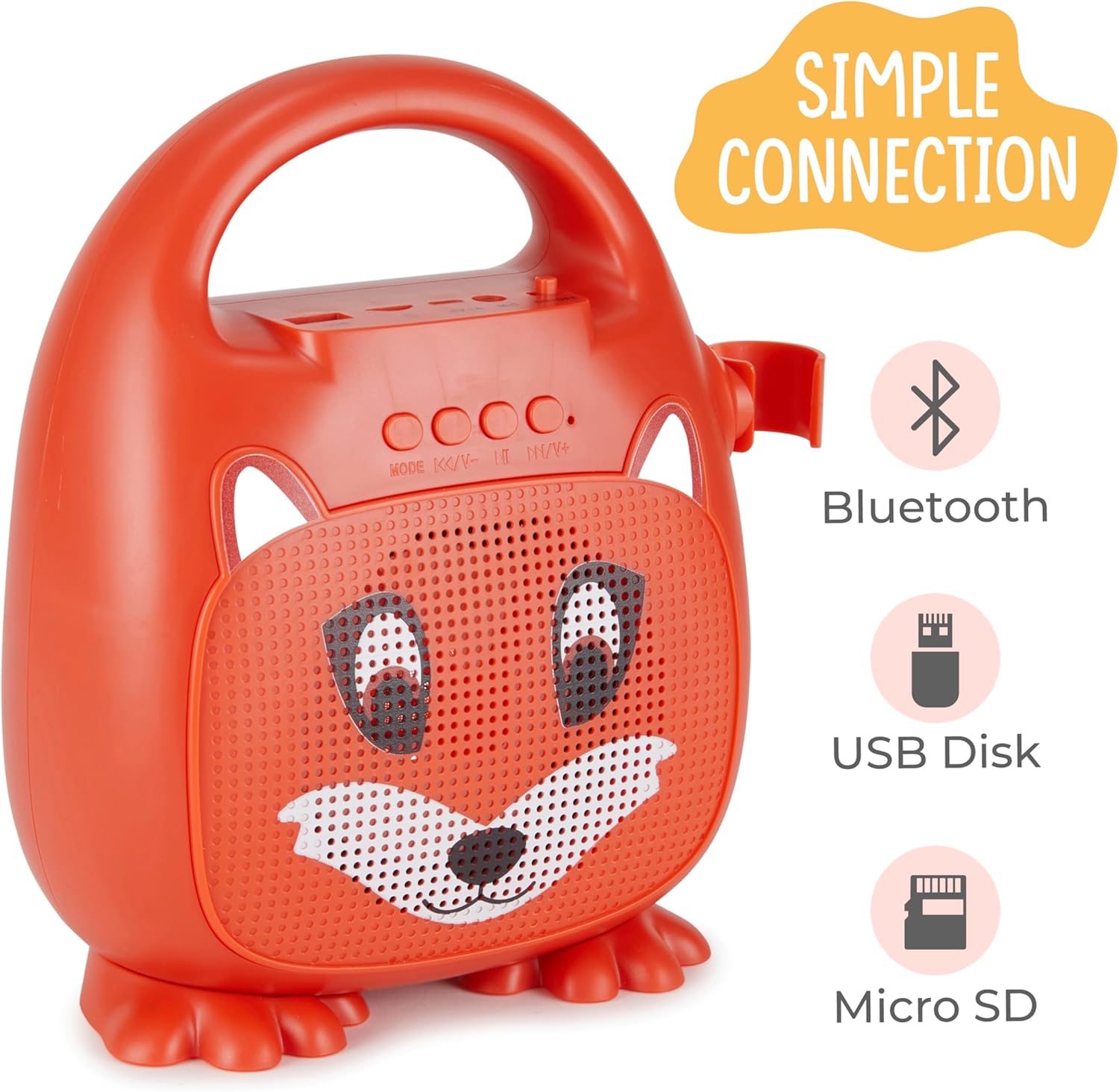
Rajah 1: Depan view of the Singimals Kids Karaoke Speaker (Asher The Fox).
Persediaan
1. Mengecas Speaker:
Before first use, fully charge the speaker. Connect the provided charging cable to the speaker's charging port (usually labeled "5V 1A" or similar) and the other end to a USB power adapter (not included) or a computer's USB port. The charging indicator light will show the charging status.
2. Menyambung Mikrofon:
Insert the microphone's plug into the MIC input port on the speaker. Ensure the microphone's ON/OFF switch is in the 'ON' position when in use.

Figure 2: Wired Microphone with ON/OFF switch.
3. Menghidupkan/Mematikan:
Locate the ON/OFF switch on the speaker. Slide it to the 'ON' position to power on the device. Slide it to 'OFF' to power down.
4. Berpasangan Bluetooth:
- Power on the karaoke speaker. It will automatically enter Bluetooth pairing mode, indicated by a flashing LED light.
- Pada telefon pintar anda atau peranti berdaya Bluetooth lain, pergi ke tetapan Bluetooth.
- Cari untuk available devices and select "Singimals" (or similar name) from the list.
- Once connected, the LED indicator on the speaker will stop flashing and remain solid, and you may hear an audible confirmation.
5. USB Disk and Micro SD Card Playback:
Insert a USB flash drive or a Micro SD card (with pre-loaded audio files) into the respective ports on the speaker. The speaker will automatically detect the media and begin playback. Use the 'MODE' button to switch between input sources (Bluetooth, USB, Micro SD).

Figure 3: Control panel and input ports.
Arahan Operasi
Butang Kawalan:
| Butang | Fungsi |
|---|---|
| MODE | Switches between input modes (Bluetooth, USB, Micro SD). |
| Trek / Kelantangan Sebelumnya | Tekan sebentar untuk trek sebelumnya. Tekan lama untuk mengurangkan kelantangan. |
| Main / Jeda | Plays or pauses the current audio track. |
| Trek / Kelantangan Seterusnya | Tekan sebentar untuk trek seterusnya. Tekan lama untuk meningkatkan kelantangan. |
Pencahayaan LED:
The speaker features multicolor LED lights that illuminate the speaker grille. These lights automatically pulse and change colors with the music. There is no separate control for the LED lighting; it operates automatically when the speaker is on.
Penyelenggaraan
- Pembersihan: Wipe the speaker and microphone with a soft, dry cloth. Do not use abrasive cleaners or solvents.
- Storan: Simpan peranti di tempat yang sejuk dan kering jauh dari cahaya matahari langsung dan suhu yang melampau.
- Penjagaan Bateri: To prolong battery life, charge the speaker regularly, even if not in frequent use. Avoid fully discharging the battery for extended periods.
- Pendedahan Air: This device is not waterproof. Keep it away from water and moisture.
Menyelesaikan masalah
| Masalah | Penyelesaian |
|---|---|
| Speaker tidak dihidupkan. | Ensure the ON/OFF switch is in the 'ON' position. Charge the speaker if the battery is depleted. |
| Tiada bunyi dari mikrofon. | Check if the microphone is securely plugged into the MIC port. Ensure the microphone's ON/OFF switch is in the 'ON' position. |
| Tidak boleh berpasangan melalui Bluetooth. | Ensure the speaker is in Bluetooth mode (flashing LED). Turn off and on Bluetooth on your device. Move your device closer to the speaker. |
| Kualiti bunyi yang buruk. | Ensure the audio source is of good quality. Adjust the volume on both the speaker and the connected device. Check for obstructions around the speaker grille. |
Spesifikasi
| Ciri | Perincian |
|---|---|
| Jenama | Vivitar |
| Nombor Model | SNG200-FOX |
| Teknologi Ketersambungan | Bluetooth |
| Versi Bluetooth | v5.1 |
| Output Wattage | 5 Watt |
| Sumber Kuasa | Dikuasakan Bateri |
| Dimensi Item (L x W x H) | 4.72 x 8.7 x 9.25 inci |
| Berat Barang | 0.94 Kilogram |
| bahan | plastik |
| Input Audio | Microphone, USB, Micro SD |
Maklumat Keselamatan
- Jangan dedahkan peranti kepada suhu yang melampau, cahaya matahari langsung atau kelembapan yang tinggi.
- Jauhkan peranti daripada air dan cecair lain.
- Jangan cuba membuka atau mengubah suai peranti. Ini akan membatalkan jaminan dan boleh menyebabkan kerosakan.
- Gunakan hanya kabel pengecasan yang disediakan.
- Supervise young children during use to ensure safe operation.
- Elakkan mendengar berpanjangan pada kelantangan tinggi untuk mengelakkan kerosakan pendengaran.
Waranti dan Sokongan
For warranty information and customer support, please refer to the warranty card included with your product or visit the official Vivitar webtapak. Simpan resit pembelian anda sebagai bukti pembelian.
Pengeluar: Sakar International, Inc.