
YABER L1w
Manual Pengguna Projektor Android YABER L1
Model: L1w
pengenalan
About Your YABER L1 Projector
The YABER Android Projector L1 is a compact smart entertainment projector designed for easy access to your favorite movies, TV shows, and games through its built-in Android OS. This manual provides essential information for setting up, operating, and maintaining your projector.

Image: The YABER Android Projector L1, showcasinreka bentuk padat dan kanta hadapannya.

Image: The YABER L1 Projector projecting a vibrant Android TV interface, highlighting its smart capabilities.

Image: The YABER L1 Projector being easily placed into a bag alongside a laptop, illustrating its portability and compact size for travel or storage.
Produk Selesaiview
Kandungan Pakej
- YABER Android Projector L1
- Alat Kawalan Jauh
- Penyesuai Kuasa
- Kabel HDMI
- Manual Pengguna
Komponen Projektor
Familiarize yourself with the key components of your YABER L1 projector:

Image: A detailed breakdown of the YABER L1 Projector's key components, including the projection lens, the top control panel with buttons, and the chamfered edge design.
- Kanta: The projection lens, responsible for displaying the image.
- Panel Kawalan: Buttons on the top of the projector for basic navigation and control.
- Chamfer: The distinct design element on the projector's casing.
- Pelabuhan: Various input/output ports (HDMI, USB, Audio Out) located on the rear or side.
- Gril Pengudaraan: Located on the sides and rear to ensure proper airflow and prevent overheating.
Panduan Persediaan
Penempatan
Place the projector on a stable, flat surface. Ensure there is adequate space around the projector for ventilation. The distance from the screen or wall will determine the image size.
Sambungan Kuasa
- Sambungkan penyesuai kuasa ke port input kuasa projektor.
- Palamkan penyesuai kuasa ke salur keluar dinding.
- Tekan butang kuasa pada projektor atau alat kawalan jauh untuk menghidupkannya.
Persediaan Awal dan Sambungan Rangkaian
Upon first power-on, the projector will guide you through the initial Android OS setup, including language selection and Wi-Fi network connection. A stable Wi-Fi connection is essential for accessing online content and apps.
Fokus dan Pembetulan Keystone
The YABER L1 features automatic focus. If the image appears blurry, the projector will automatically adjust. Manual adjustments can also be made via the settings menu. Keystone correction helps to square the image if the projector is not perfectly perpendicular to the screen.
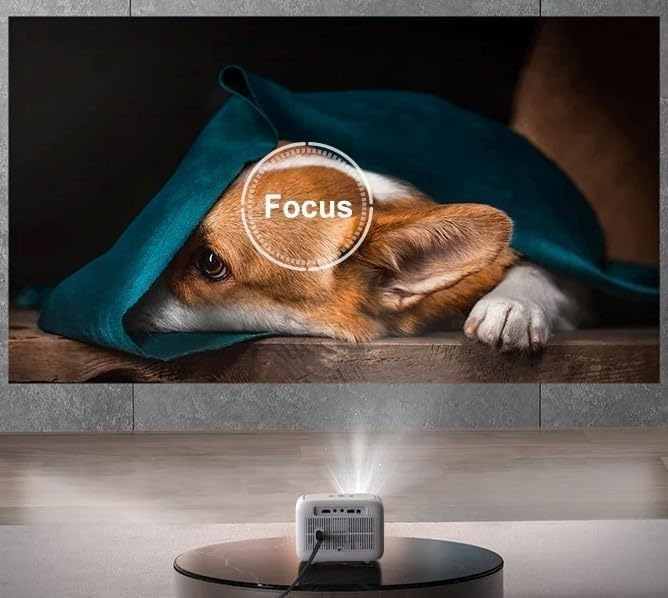
Image: The YABER L1 Projector actively performing an automatic focus adjustment, indicated by a circular 'Focus' overlay on the projected image of a dog, ensuring a clear picture.

Image: A visual guide illustrating the optimal projection distances for the YABER L1 Projector, showing how different distances (5.9ft, 9.8ft, 11.3ft) correspond to various screen sizes (60", 100", 120").
Arahan Operasi
Navigating the Android OS
Use the provided remote control to navigate the Android TV interface. The remote allows you to select apps, adjust settings, and control media playback. Basic navigation buttons are also available on the projector itself.
Connecting External Devices (HDMI, USB)
- HDMI: Connect gaming consoles, Blu-ray players, or laptops using an HDMI cable. Select the corresponding HDMI input from the projector's source menu.
- USB: Insert USB drives to play media files (photos, videos, music) directly from the drive. Use the file manager app within the Android OS to browse content.
Screen Mirroring / Casting
The YABER L1 supports screen mirroring from compatible smartphones and tablets. Ensure both your device and the projector are connected to the same Wi-Fi network. Refer to your device's casting instructions or the projector's mirroring app for detailed steps.

Image: A person holding a smartphone, demonstrating the screen mirroring capability of the YABER L1 Projector as content from the phone is displayed on the large projected screen.
Sambungan Audio Bluetooth
Connect external Bluetooth speakers or soundbars for enhanced audio experience. Navigate to the Bluetooth settings in the Android OS, enable Bluetooth, and pair with your desired audio device.

Image: The YABER L1 Projector wirelessly connected to a soundbar via Bluetooth, illustrating its ability to output audio to external speakers for an immersive sound experience.
Penyelenggaraan
Membersihkan Lensa
Gently wipe the projector lens with a soft, lint-free cloth specifically designed for optical surfaces. Do not use abrasive cleaners or excessive force, as this can scratch the lens.
Memastikan Pengudaraan yang Betul
Keep the projector's ventilation grilles clear of obstructions to ensure proper airflow. Blocked vents can lead to overheating and affect performance and lifespan. Do not place the projector on soft surfaces like blankets that can block vents.
Penyimpanan
When not in use for extended periods, store the projector in a cool, dry place, away from direct sunlight and excessive dust. Consider using the original packaging or a protective case.
Menyelesaikan masalah
This section addresses common issues you might encounter with your YABER L1 Projector.
- Tiada Kuasa:
Ensure the power adapter is securely connected to both the projector and a working power outlet. Try a different outlet. - Tiada gambar:
Check if the projector is powered on. Verify the input source is correctly selected (e.g., HDMI1, USB). Ensure the lens cap is removed. - Imej Kabur:
Allow the auto-focus to adjust. If still blurry, check for smudges on the lens and clean it gently. Ensure the projection surface is flat. - Tiada Bunyi:
Check the volume level on the projector and any connected external audio devices. If using an external device (e.g., HDMI source), ensure its audio output is enabled. If using Bluetooth, ensure it's correctly paired. - Isu Sambungan Wi-Fi:
Ensure the projector is within range of your Wi-Fi router. Restart both the projector and your router. Re-enter the Wi-Fi password to ensure it's correct.
Spesifikasi
| Ciri | Perincian |
|---|---|
| Dimensi Pakej | 8.82 x 7.76 x 6.34 inci |
| Berat Barang | 3.3 paun |
| Pengeluar | Yaber |
| ASIN | B0CG9RY23Q |
| Nombor model item | L1w |
| Tarikh Mula-mula Tersedia | 27 Ogos 2023 |
Waranti dan Sokongan
For warranty information and technical support, please refer to the warranty card included with your product or visit the official YABER website. You may also contact YABER customer service directly for assistance with product issues or inquiries.
Ask a question about this manual
Ask about setup, troubleshooting, compatibility, parts, safety, or missing instructions. Manuals+ will review the question and use this page’s manual context to help answer it.