
pengenalan
This user manual provides comprehensive instructions for the Quican Smartwatch IDW208 Plus. It covers setup, operation, fitness tracking, health monitoring, and troubleshooting. Please read this manual thoroughly to ensure proper use and to maximize your experience with the device.
Kandungan Pakej
Upon opening your Quican Smartwatch package, please verify that all the following items are included:
- Quican Smartwatch IDW208 Plus x 1
- Kabel Pengecasan x 1
- Manual Pengguna x 1

Image: The Quican Smartwatch IDW208 Plus, its charging cable, and the user manual, as typically found in the product packaging.
Panduan Persediaan
1. Mengecas Jam Pintar
Before initial use, fully charge your smartwatch. Connect the magnetic charging cable to the charging contacts on the back of the watch and plug the USB end into a power adapter (not included) or a computer's USB port. A full charge takes approximately 2.5 hours.

Image: The smartwatch connected to its magnetic charging cable, illustrating the charging process.
2. Downloading the "Veryfit" App
The Quican Smartwatch requires the "Veryfit" app for full functionality and data synchronization. Download the app from your smartphone's app store (App Store for iOS or Google Play Store for Android).
- Open your smartphone's app store.
- Cari untuk "Veryfit".
- Muat turun dan pasang apl.
3. Berpasangan dengan Telefon Pintar Anda
Follow these steps to pair your smartwatch with the "Veryfit" app via Bluetooth:
- Pastikan jam tangan pintar anda dicas dan dihidupkan.
- Dayakan Bluetooth pada telefon pintar anda.
- Open the "Veryfit" app on your smartphone.
- In the app, navigate to the "Device" section and select "Add Device".
- The app will search for nearby devices. Select "IDW208 Plus" from the list. You may need to scan a QR code displayed on the smartwatch screen to initiate pairing.
- Sahkan permintaan berpasangan pada telefon pintar anda dan jam tangan pintar.

Image: Visual guide for downloading the "Veryfit" app and connecting the smartwatch via Bluetooth, showing phone screens and watch display during the pairing process.
4. Konfigurasi Apl Permulaan
After successful pairing, the "Veryfit" app will guide you through initial settings, such as personal profile (age, height, weight), notification preferences, and health monitoring settings. Ensure you grant necessary permissions for the app to function correctly.
Mengendalikan Smartwatch
Navigasi Asas
The Quican Smartwatch features a 1.8-inch HD touchscreen and a side button for navigation:
- Skrin sentuh: Leret ke atas, bawah, kiri atau kanan untuk menavigasi menu dan skrin. Ketik untuk memilih pilihan.
- Butang Sisi: Tekan untuk kembali ke skrin utama atau mengaktifkan peranti. Tekan lama untuk pilihan kuasa.

Image: The smartwatch display, highlighting its 1.8-inch size and showing typical information like time, steps, and heart rate. Also includes wrist size compatibility.
Ciri-ciri Komunikasi
- Membuat/Menjawab Panggilan: Once paired, you can make and answer Bluetooth calls directly from your smartwatch. Access the call interface from the main menu.
- Pemberitahuan: Receive SMS, social media (e.g., Instagram, Facebook), and other app notifications directly on your watch. (Note: Messaging or text responses are not supported directly from the watch).

Image: Smartwatch screens showing an incoming call from "Selena" and a Facebook message notification, demonstrating its communication features.
Ciri Pintar
- Integrasi Alexa: Built-in Alexa allows you to use voice commands for weather forecasts, setting alarms, controlling smart home devices, and more. Simply activate Alexa on your watch and speak your command.
- Kawalan Muzik: Control music playback on your smartphone (play, pause, skip tracks) directly from your smartwatch.
- Jauh Kamera: Use your smartwatch as a remote shutter for your smartphone's camera.
- Cari Telefon: If your phone is within Bluetooth range, use this feature to make your phone ring, helping you locate it.
- Watch Faces Customization: Choose from over 110 customizable watch faces via the "Veryfit" app, or set your favorite photo as the watch face.

Image: A user interacting with the smartwatch, demonstrating the Alexa voice assistant feature by asking about the weather.

Image: Two smartwatch screens illustrating the camera remote function and music playback controls.
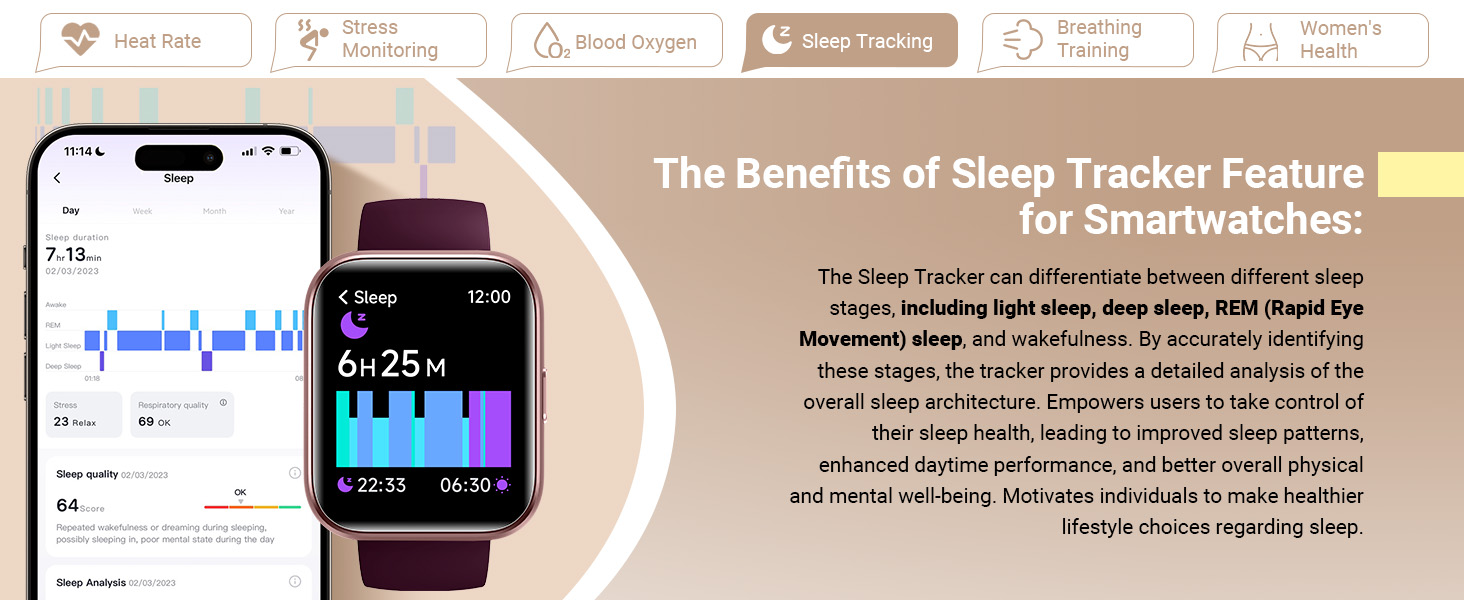
Image: A collage of smartwatch screens showing various smart features: weather forecast, alarm clock, drinking reminder, and the 'Find Your Phone' function.
Penjejakan Kecergasan
The Quican Smartwatch is equipped with advanced sensors to track your physical activity and support your fitness goals.
- 120 Mod Sukan: The watch supports over 120 sports modes, including running, walking, hiking, yoga, and more. Select your activity to accurately monitor exercise time, steps, distance, and calories burned.
- Penjejakan Aktiviti: Automatically tracks daily steps, distance covered, and calories burned, providing a comprehensive overview of your activity levels.
- IP68 Kalis Air: The smartwatch is IP68 rated, meaning it is resistant to dust and can withstand immersion in water up to 1.5 meters for 30 minutes. It is suitable for daily use, including hand washing and rain exposure, but not recommended for swimming or diving.

Image: A man running, with an overlay of the smartwatch displaying activity tracking metrics like calories, distance, and laps, alongside icons representing various sports modes.

Image: The smartwatch shown in different outdoor scenarios (running, cycling, hiking), emphasizing its IP68 waterproof and dust-resistant capabilities.
Pemantauan Kesihatan
The Quican Smartwatch provides comprehensive health monitoring features to help you stay informed about your well-being.
- Pemantau Kadar Jantung: Continuously monitors your heart rate throughout the day. This data helps you understand your cardiovascular health and optimize exercise intensity.
- Pemantauan Tekanan: Tracks your stress levels, providing insights into your body's response to different stressors.
- Pemantau Oksigen Darah (SpO2): Mengukur tahap tepu oksigen dalam darah anda, satu petunjuk penting kesihatan pernafasan.
- Penjejakan Tidur: Analyzes your sleep patterns, including light sleep, deep sleep, and REM sleep, to help you improve sleep quality.
- Latihan Pernafasan: Guided breathing exercises to help manage stress and promote relaxation.
- Penjejakan Kitaran Haid Wanita: Allows women to record and track their menstrual periods, predict future cycles, and manage their health accordingly.

Image: The smartwatch showing real-time heart rate data, accompanied by text explaining the benefits of 24/7 heart rate monitoring for health and exercise optimization.

Image: The smartwatch displaying stress level data, with text detailing how stress monitoring can improve resilience and coping mechanisms.

Image: The smartwatch displaying blood oxygen saturation (SpO2) levels, with accompanying text explaining the importance of these measurements.

Image: The smartwatch displaying sleep tracking data, with text describing how it helps identify sleep stages and improve overall well-being.

Image: The smartwatch showing a breathing exercise interface, with text explaining how breathing training activates relaxation and manages stress.

Image: The smartwatch displaying a menstrual cycle tracking calendar, with text explaining how it helps women record and predict their cycles.
Hayat Bateri & Pengecasan
The Quican Smartwatch IDW208 Plus is designed for extended use:
- Hayat Bateri: Up to 7 days of typical usage, and up to 30 days in standby mode.
- Masa Pengecasan: Kira-kira 2.5 jam untuk cas penuh.

Image: A diagram of the smartwatch emphasizing its 7-day battery life, 2.5D glass technology, advanced optical sensors, and replaceable silicone strap.
Spesifikasi
| Ciri | Perincian |
|---|---|
| Nombor Model | IDW208 Plus |
| Saiz Paparan | 1.8 Inci |
| Ketersambungan | Bluetooth 5.3 |
| Kapasiti Bateri | Polimer Litium 300 mAh |
| Hayat Bateri | Up to 7 days (typical usage), 30 days (standby) |
| Masa Mengecas | lebih kurang 2.5 jam |
| Tahan Air | IP68 |
| Keserasian | iOS 9.0+ / Android 6.0+ |
| Berat Barang | 1.38 auns (39 gram) |
| Dimensi | 10.7 x 3.5 x 0.7 inci |
| Ciri Khas | Built-in Alexa, Bluetooth Call Make/Answer, Heart Rate/SpO2/Sleep/Stress Monitor, 120 Sports Modes, Customizable Dials, Music/Camera Control |
Menyelesaikan masalah
Jika anda menghadapi sebarang masalah dengan Jam Tangan Pintar Quican anda, sila rujuk penyelesaian biasa berikut:
- Tonton tidak dihidupkan: Pastikan jam tangan dicas sepenuhnya. Sambungkannya ke kabel pengecas dan sumber kuasa selama sekurang-kurangnya 30 minit.
- Tidak dapat dipasangkan dengan telefon:
- Pastikan Bluetooth didayakan pada telefon anda dan jam tangan berada dalam julat.
- Mulakan semula kedua-dua telefon anda dan jam tangan pintar.
- Ensure the "Veryfit" app is updated to the latest version.
- Lupakan peranti dalam tetapan Bluetooth telefon anda dan cuba pasangkan semula melalui aplikasi.
- Pemberitahuan tidak muncul:
- Check notification permissions for the "Veryfit" app in your phone's settings.
- Pastikan jam tangan disambungkan melalui Bluetooth.
- Verify that notification alerts are enabled within the "Veryfit" app for specific applications.
- Data kesihatan tidak tepat:
- Pastikan jam tangan dipakai dengan kemas di pergelangan tangan anda, kira-kira satu jari lebar di atas tulang pergelangan tangan.
- Bersihkan penderia di belakang jam tangan.
- Note that health data is for reference only and should not be used for medical diagnosis.
- Hayat bateri pendek:
- Kurangkan kecerahan skrin.
- Limit continuous heart rate monitoring or frequent use of power-intensive features.
- Pastikan jam tangan dicas sepenuhnya setiap kali.
Waranti dan Sokongan
Quican provides a 5-year warranty for your smartwatch. If you experience any issues or require assistance, please contact Quican customer support. Refer to the contact information provided on the product packaging or the official Quican webtapak untuk saluran sokongan yang paling terkini.
For additional resources, you may also refer to the official user guide PDF available online: Quican Smartwatch User Guide (PDF)