
1. Pengenalan
Thank you for choosing the ARPHA Keyless Entry Door Lock D180. This electronic keypad deadbolt offers enhanced security and convenience for your home or office. Designed for easy installation and user-friendly operation, it provides multiple access methods and robust features to protect your property. Please read this manual carefully before installation and use to ensure proper function and longevity of your lock.

Imej 1.1: Depan view of the ARPHA D180 Keyless Entry Door Lock, showcasing its sleek black finish and illuminated keypad.
2. Ciri-ciri Produk
- Kemasukan tanpa kunci: Allows access using a keypad with support for up to 50 unique codes (3 administrator, 47 user passwords).
- Pemasangan Mudah: Designed for quick and straightforward installation with included mounting hardware.
- Pembinaan Tahan Lama: Features a robust zinc body for long-lasting performance and a modern aesthetic.
- Sentuh Pengaktifan: Simple touch operation for locking or unlocking the deadbolt.
- Fungsi Auto-Kunci: Automatically locks the door after a set period (customizable between 10 and 30 seconds) for added security.
- Anti-Peeking Password: Allows users to input random digits before or after the actual code to prevent unauthorized observation of the password.
- Hayat Bateri yang Panjang: Provides up to 180 days of battery life with 4 AA batteries (not included). Includes a low battery alert.
- Bekalan Kuasa Kecemasan: Equipped with a USB-C port for emergency power in case of battery depletion.
- Pad Kekunci Berlampu Belakang: Digital high-definition display under the backlit keyboard to improve visibility and prevent pressing errors in low light conditions.
- Constant Open Mode: Allows the door to remain unlocked for continuous access, useful for high-traffic periods.
- Mod Bes: Operates quietly, providing peace of mind, especially during nighttime use.

Image 2.1: Illustration showing the capability of the ARPHA D180 to store up to 50 unique passwords, including administrator and user codes for various individuals like family, delivery personnel, roommates, pet sitters, relatives, and plumbers.

Image 2.2: Depiction of the Auto Lock feature, which can be customized to automatically lock the door between 10 and 30 seconds after closing, enhancing security.
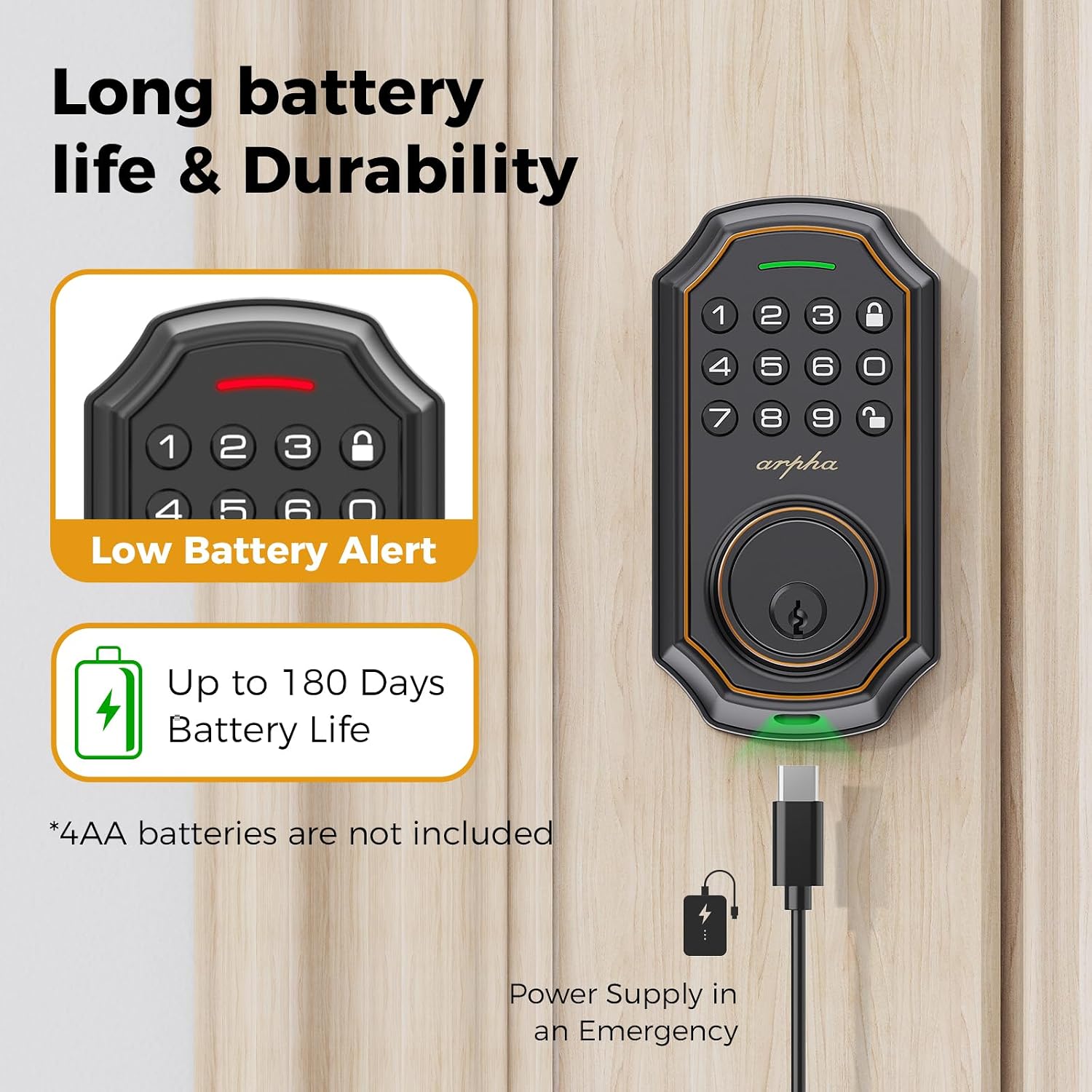
Image 2.3: Visual representation of the lock's long battery life (up to 180 days) and the low battery alert. It also shows the USB-C port for emergency power supply.

Image 2.4: Illustrates the Bass Mode feature, designed to provide quiet operation for a peaceful environment, especially during sleep.

Image 2.5: Close-up of the ARPHA D180's backlit keypad, highlighting its digital high-definition display for clear visibility and reduced errors.

Image 2.6: Demonstrates the Constant Open Mode, allowing the door to remain unlocked for convenient passage when people frequently enter and exit.
3. Pemasangan (Persediaan)
The ARPHA D180 lock is designed for easy installation. Before beginning, ensure your door's dimensions are compatible with the lock's specifications. Detailed step-by-step instructions and mounting hardware are included in the product packaging. Always refer to the physical installation guide for precise instructions.
3.1 Semakan Keserasian
Verify your door's dimensions against the following specifications:
- Set belakang: 2-3/8" (60mm) atau 2-3/4" (70mm)
- Diameter Lubang Bor: 2-1/8" (54mm)
- Ketebalan pintu: 1.4" - 2.7" (35-55mm)

Image 3.1: Diagram illustrating the required door dimensions and lock component measurements for compatibility verification before installation.
3.2 General Installation Steps (Refer to included manual for details)
- Prepare the door and door frame according to the template.
- Install the latch into the door edge.
- Pasang pemasangan papan kekunci luaran.
- Pasang plat pelekap dalaman.
- Sambungkan kabel dan pasang pemasangan dalaman.
- Pasang plat strike pada bingkai pintu.
- Uji fungsi kunci.
4. Arahan Operasi
4.1 Membuka Kunci Pintu
- Menggunakan Kod: Enter your valid user code (or administrator code) on the keypad, then press the 'Lock' button (or equivalent confirmation button). The deadbolt will retract.
- Anti-Peeking Password: To enhance security, you can enter any random digits before or after your actual code. For example, if your code is 123456, you can enter 987123456012. The lock will still recognize the correct sequence within the input.
4.2 Mengunci Pintu
- Penguncian Satu Sentuhan: Simply press the 'Lock' button (or equivalent dedicated lock button) on the keypad. The deadbolt will extend.
- Kunci Auto: If enabled, the lock will automatically extend the deadbolt after a preset time (10-30 seconds) once the door is closed.
4.3 Constant Open Mode
To activate Constant Open Mode, refer to your detailed programming instructions in the included manual. When active, the lock will remain in an unlocked state, allowing free passage without requiring a code or manual unlock. This mode is ideal for periods of high traffic or when the door needs to remain open for extended durations.
5. Kod Pengaturcaraan
The ARPHA D180 supports up to 50 unique codes: 3 administrator codes and 47 user codes. Administrator codes have full control over lock settings, including adding/deleting user codes and configuring features like auto-lock. User codes are for daily access only.
For detailed instructions on how to add, delete, or modify administrator and user codes, please refer to the comprehensive programming guide provided with your lock. This typically involves entering a master programming code followed by specific sequences for each operation.
6. Penyelenggaraan
6.1 Penggantian Bateri
The lock requires 4 AA batteries (not included). When the battery level is low, the lock will provide a low battery alert (e.g., a specific light indicator or sound). To replace batteries:
- Locate the battery compartment on the interior assembly of the lock.
- Tanggalkan penutup.
- Replace all four AA batteries with new, high-quality alkaline batteries, ensuring correct polarity.
- Gantikan penutup petak bateri.
6.2 Kuasa Kecemasan
In the event that the batteries completely drain and you cannot operate the lock, connect a standard USB-C cable to the emergency power port on the exterior keypad. This will provide temporary power to enter your code and unlock the door. Replace the internal batteries immediately after gaining access.
6.3 Pembersihan
Bersihkan permukaan luar kunci dengan kain lembutamp cloth. Avoid using abrasive cleaners, solvents, or harsh chemicals, as these can damage the finish and electronic components.
7. Penyelesaian masalah
If you encounter issues with your ARPHA D180 lock, please refer to the following common troubleshooting steps:
- Kunci tidak bertindak balas kepada pad kekunci: Check battery levels. Replace batteries if low. Ensure the cable connection between the exterior and interior assemblies is secure.
- Kod tidak berfungsi: Double-check that you are entering the correct code. Ensure the lock is not in Constant Open Mode if you expect it to be locked. Try re-entering the code slowly and deliberately.
- Kunci automatik tidak berfungsi: Verify that the auto-lock feature is enabled in your settings. Check if the door is fully closed and aligned with the strike plate.
- Lock mechanism feels stiff: Ensure all screws are tightened correctly but not overtightened. Check for any obstructions in the door frame or latch bolt path.
- Low battery alert persists after replacement: Pastikan bateri baharu dipasang dengan betul dan berkualiti baik.
For more complex issues or if the problem persists, please contact ARPHA customer support.
8. Spesifikasi
| Spesifikasi | Perincian |
|---|---|
| Jenama | ARPHA |
| Nombor Model | D180 |
| Jenis Kunci | Papan Kekunci Deadbolt |
| Ciri Khas | Keyless, Weather Resistant |
| bahan | Zink |
| warna | Hitam |
| Gaya | moden |
| Dimensi Item (L x W x H) | 5.27 x 2.75 x 0.39 inci |
| Dimensi Produk | 5.27 x 2.75 x 0.39 inci |
| Berat Barang | 2.31 paun |
| Bilangan Kepingan | 2 |
| Jenis Pengawal | Hand Control, Mechanical knob, Push Button |
| Kaedah Kawalan | Sentuh |
| Protokol Ketersambungan | Wi-Fi |
| Bateri Termasuk? | No (Requires 4 AA batteries) |
| Tarikh Mula-mula Tersedia | 28 Ogos 2023 |
9. Waranti dan Sokongan
For information regarding the product warranty, please refer to the warranty card included in your product packaging or visit the official ARPHA webtapak. Simpan bukti pembelian anda untuk tuntutan waranti.
If you require technical assistance, have questions about installation, or need support with product features, please contact ARPHA customer service. Contact details are typically found on the product packaging or the official brand webtapak.