
Produk Selesaiview
The ApisQueen U1 Underwater Thruster is a brushless propulsion unit designed for various underwater applications, including ROVs and RC bait boats. This manual provides essential information for the safe and efficient use of your thruster.
Nota Penting: This thruster is designed for use in freshwater environments only. It is not suitable for saltwater applications.
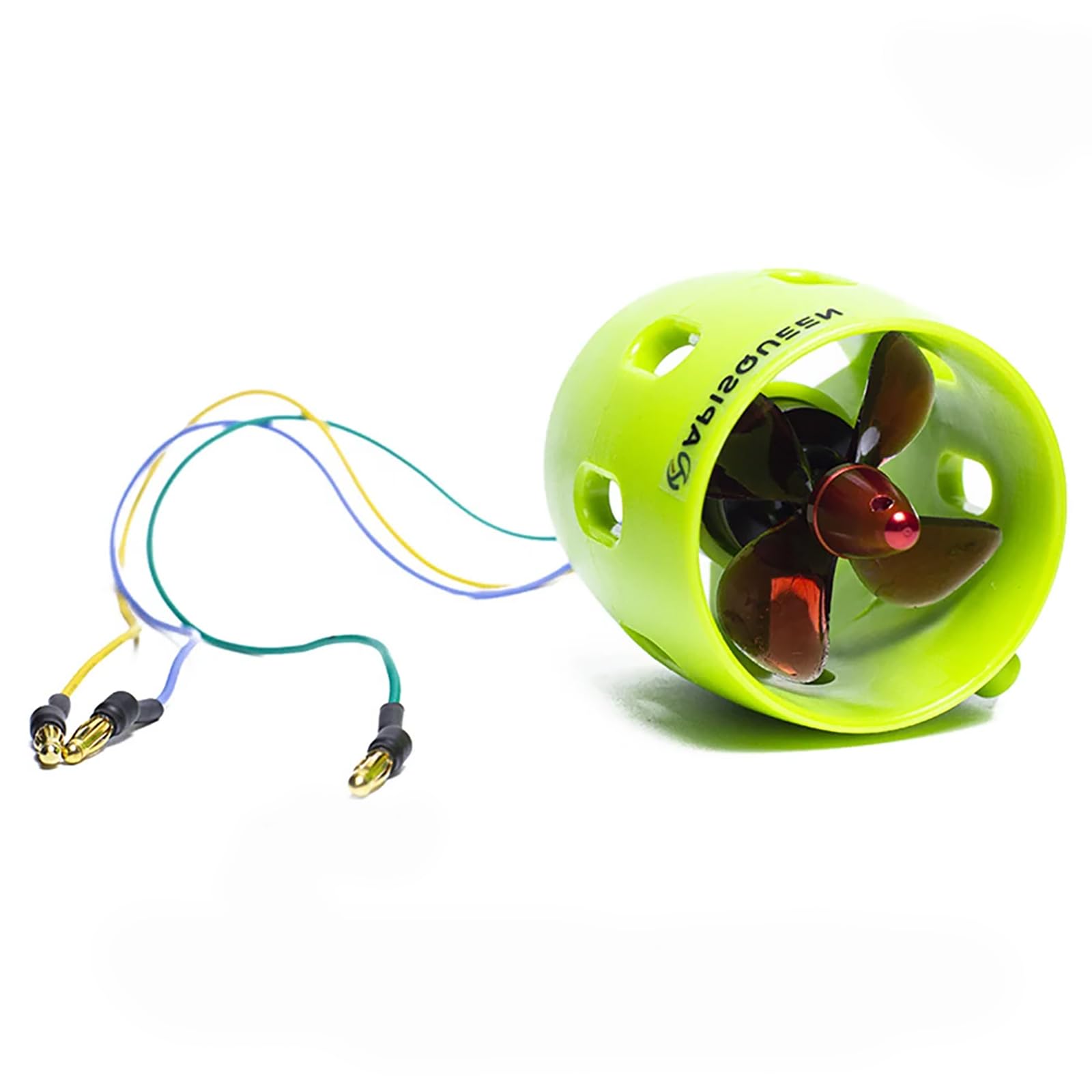
Depan view of the ApisQueen U1 Underwater Thruster.
Spesifikasi
| Ciri | Perincian |
|---|---|
| Jenama | ApisQueen |
| Nama Model | U1 CW |
| Voltage | 12V~16V (Recommended 16V for efficiency) |
| Kuasa kuda | 0.39 Kilowatt (390W) |
| Maks. kuasa | 390W |
| Maks. Teras | 2KG (4.41LB) |
| Berat Barang | 0.5 paun |
| Panjang Kabel | 330mm |
| Jenis Motor | Tanpa berus |
| UPC | 714684195722 |
| Nombor Bahagian | U01 CW |

Dimensions of the ApisQueen U1 Underwater Thruster.
Persediaan dan Sambungan
Proper connection of the thruster to an Electronic Speed Controller (ESC) and control system is crucial for safe operation.
Wired Control Method
This method involves connecting the thruster to an ESC, which is then controlled by a PWM signal generator or a similar wired controller.

Wiring diagram for the wired control method.
- Connect the thruster to the ESC.
- Connect the ESC to a PWM signal generator (e.g., a servo consistency master).
- Ensure the indicator light on the PWM signal generator is at the top.
- Initially, turn the knob to the middle position (1.5ms) where the thruster/motor is not working.
- Turning the knob clockwise (1.5ms to 2ms) gradually increases forward rotation speed, with maximum speed at 2ms.
- Turning the knob counter-clockwise (1.5ms to 1ms) gradually increases reverse speed, with maximum speed at 1ms.
- Nota: If the water outlet direction is incorrect, change any two of the three wires connecting the ESC to the motor/thruster.
- If your ESC does not have a BEC (Battery Eliminator Circuit) 5V output and cannot power the receiver (if the signal line set has only 2 lines), you will need to provide additional power to the remote control receiver.
Wireless Control Method
This method utilizes a remote control and receiver for wireless operation of the thruster.

Wiring diagram for the wireless control method.
- Connect the thruster to the ESC.
- Connect the ESC to a receiver. The receiver is an accessory of the remote control; ensure you have a remote control with a compatible receiver.
- The small white, red, and black wires are connected to the "S+", "-" ports of the throttle channel respectively.
- Push the throttle handle of the remote control to control the speed.
- When the ESC is in bidirectional mode, the thruster/motor will not operate at 1.5ms (middle throttle position).
- Moving the throttle forward from the middle position (1.5ms to 2ms) increases forward rotation speed.
- Moving the throttle backward from the middle position (1.5ms to 1ms) increases reverse speed.
- Nota: If the water outlet direction is incorrect, change any two of the three wires connecting the ESC to the motor/thruster.
- If your ESC does not have a BEC 5V output and cannot power the receiver, you will need to provide additional power to the remote control receiver.
Arahan Operasi
The ApisQueen U1 Thruster operates efficiently within a voltage range of 12V to 16V. For optimal performance, a 16V (4S LiPo) power source is recommended.

Performance data for the ApisQueen U1 Underwater Thruster at various voltages.
| ke hadapan | Pembalikan | ||||||
|---|---|---|---|---|---|---|---|
| Voltage (V) | Pendikit | Semasa (A) | Thrust (Kg) | Voltage (V) | Pendikit | Semasa (A) | Thrust (Kg) |
| 10 | 100% | 4 | 0.90 | 10 | 100% | 4 | 0.70 |
| 12 | 100% | 5 | 1.20 | 12 | 100% | 5 | 0.80 |
| 14 | 100% | 8.0 | 1.50 | 14 | 100% | 8 | 0.90 |
| 16 | 100% | 9 | 1.70 | 16 | 100% | 8 | 1.20 |
The table above illustrates the thrust generated by the U1 thruster at different voltages for both forward and reverse operations. Always operate within the specified voltage julat untuk mengelakkan kerosakan.
Video demonstrating the operation of the ApisQueen U01 Underwater Thruster, showing forward and backward movement.
Penyelenggaraan
Regular maintenance ensures the longevity and optimal performance of your ApisQueen U1 Underwater Thruster.
- After each use in freshwater, rinse the thruster thoroughly with clean, fresh water to remove any debris or sediment.
- Inspect the propeller for any signs of damage, such as cracks or bends. Replace damaged propellers immediately.
- Check all wiring and connections for wear, corrosion, or loose contacts. Ensure all connections are secure before operation.
- Store the thruster in a clean, dry place away from direct sunlight and extreme temperatures.
Menyelesaikan masalah
This section addresses common issues you might encounter with your thruster.
- Incorrect Water Outlet Direction: If the thruster operates in the opposite direction to what is intended, power off the system and swap any two of the three wires connecting the ESC to the motor/thruster. This will reverse the motor's rotation.
- Penerima Tidak Dihidupkan: If your Electronic Speed Controller (ESC) lacks a built-in 5V Battery Eliminator Circuit (BEC) output, or if its signal line only has two wires (indicating no BEC), the receiver will not receive power from the ESC. In this case, you must provide an independent 5V power supply to the remote control receiver.
- No Thruster Response:
- Ensure all power connections are secure and the battery is adequately charged.
- Verify that the ESC is correctly connected to the thruster and the control signal source (PWM generator or receiver).
- Check the throttle position on your controller. In bidirectional ESC mode, the thruster will not operate at the middle (1.5ms) throttle position.
- Inspect for any obstructions around the propeller that might prevent rotation.
Maklumat Waranti
Specific warranty details for the ApisQueen U1 Underwater Thruster are not provided within this manual. For information regarding warranty coverage, terms, and conditions, please refer to the product packaging, the official ApisQueen weblaman web, atau hubungi peruncit tempat produk tersebut dibeli.
Sokongan
If you require further assistance or have questions not covered in this manual, please visit the official ApisQueen website for support resources, FAQs, and contact information. You may also reach out to the customer service department of your retailer.