
Vorago BSP-500-V2
Vorago BSP-500-V2 Bluetooth Speaker User Manual
Model: BSP-500-V2
Jenama: Vorago
1. Produk Lebihview
The Vorago BSP-500-V2 is a portable Bluetooth speaker designed for robust performance and durability. It features IPX5 water resistance, making it suitable for various environments, including outdoor adventures and parties. This manual provides detailed instructions for setting up, operating, and maintaining your speaker.
Ciri-ciri Utama:
- Kesambungan Stereo Wayarles Sejati (TWS): Connect two BSP-500-V2 speakers for an immersive stereo sound experience.
- Jangka Hayat Bateri: Enjoy up to 7 hours of music playback at 70% volume, thanks to its 2000 mAh battery.
- Pengecasan USB Jenis-C: Convenient and modern USB-C port for charging.
- Ketersambungan Serbaguna: Supports Bluetooth for wireless streaming and a 3.5mm auxiliary input for wired connections.
- Rintangan Air IPX5: Protected against low-pressure water jets from any direction.
Kandungan Pakej:
- Pembesar Suara Bluetooth Vorago BSP-500-V2
- Kabel Pengecasan USB Jenis-C
- Kabel Audio 3.5mm
- Manual Pengguna (dokumen ini)
Rajah Produk:

Rajah 1.1: Depan view of the Vorago BSP-500-V2 Bluetooth speaker, showcasing its mesh grille and central Vorago logo.

Rajah 1.2: Bersudut view of the speaker, highlighting its robust, rectangular design and integrated carrying strap.

Rajah 1.3: Atas view showing the control panel with power, volume down, play/pause, and volume up buttons.
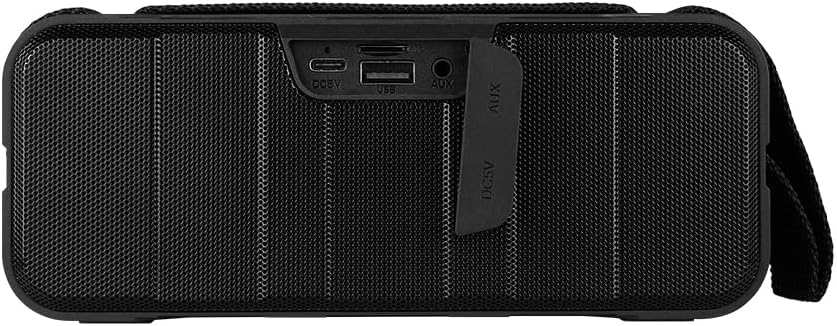
Rajah 1.4: Belakang view of the speaker, showing the protective flap covering the input ports.

Figure 1.5: Close-up of the input ports, including DC 5V (USB-C), USB-A, and AUX (3.5mm) inputs, protected by a rubber cover.
2. Maklumat Keselamatan
- Jangan dedahkan pembesar suara kepada suhu yang melampau (panas atau sejuk).
- Elakkan daripada menjatuhkan atau menundukkan pembesar suara kepada impak yang kuat.
- Keep the speaker away from direct sunlight and heat sources.
- Do not disassemble, repair, or modify the speaker yourself. This will void the warranty.
- Ensure the port cover is securely closed when using the speaker near water to maintain IPX5 water resistance.
- Do not immerse the speaker in water. IPX5 rating protects against splashes and light rain, not submersion.
- Gunakan hanya kabel pengecasan yang disediakan atau kabel USB Type-C yang diperakui untuk mengecas.
- Bersihkan pembesar suara dengan kain lembut dan kering. Jangan gunakan pembersih atau pelarut yang melelas.
3. Persediaan
3.1 Mengecas Speaker
- Open the protective rubber cover on the rear of the speaker to access the charging port.
- Connect the USB Type-C end of the charging cable to the speaker's DC 5V port.
- Sambungkan hujung kabel USB yang satu lagi ke penyesuai kuasa USB (tidak disertakan) atau port USB komputer.
- Lampu penunjuk pengecasan akan menyala semasa pengecasan dan padam apabila dicas sepenuhnya.
- Once charging is complete, securely close the protective rubber cover to maintain water resistance.
3.2 Menghidupkan/Mematikan
- Untuk Menghidupkan: Tekan dan tahan butang Butang kuasa on the top panel for approximately 3 seconds until you hear an audible prompt.
- Untuk Mematikan: Tekan dan tahan butang Butang kuasa for approximately 3 seconds until you hear an audible prompt.
3.3 Berpasangan Bluetooth
- Ensure the speaker is powered on. It will automatically enter Bluetooth pairing mode, indicated by a flashing LED light.
- Pada peranti anda (telefon pintar, tablet, komputer riba), dayakan Bluetooth dan cari peranti yang tersedia.
- Select "BSP-500-V2" from the list of found devices.
- Once successfully paired, the speaker will emit an audible confirmation, and the LED light will stop flashing and remain solid.
- Pembesar suara akan menyambung semula secara automatik ke peranti pasangan terakhir apabila dihidupkan, jika peranti berada dalam julat dan Bluetooth didayakan.
3.4 Penggandingan Stereo Tanpa Wayar Sebenar (TWS)
TWS allows you to connect two BSP-500-V2 speakers together for a true stereo sound experience.
- Ensure both BSP-500-V2 speakers are powered on and not connected to any other Bluetooth device.
- Pada salah satu pembesar suara (ini akan menjadi pembesar suara utama), tekan dua kali butang Butang Main/Jeda. The speaker will enter TWS pairing mode.
- The two speakers will automatically search for and connect to each other. You will hear an audible confirmation once they are successfully paired.
- Once TWS is established, connect your device to the primary speaker via Bluetooth as described in Section 3.3.
- To disconnect TWS, double-press the Butang Main/Jeda pada kedua-dua pembesar suara.
3.5 Sambungan Auxiliary (AUX).
For devices without Bluetooth, you can use the 3.5mm audio cable.
- Open the protective rubber cover on the rear of the speaker.
- Connect one end of the 3.5mm audio cable to the speaker's AUX port.
- Sambungkan hujung kabel yang satu lagi ke bicu output audio peranti anda.
- Pembesar suara secara automatik akan bertukar kepada mod AUX.
- Once disconnected, securely close the protective rubber cover.
4. Arahan Operasi
4.1 Fungsi Butang:
| Butang | Fungsi (Short Press) | Fungsi (Tekan Lama) |
|---|---|---|
| Butang kuasa | T/A | Hidupkan/Mati Kuasa |
| Butang Kurangkan Kelantangan | Kurangkan Kelantangan | Trek Sebelumnya |
| Butang Main/Jeda | Main/Jeda Muzik, Jawab/Tamatkan Panggilan | Reject Call, Double-press for TWS Pairing |
| Butang Naik Kelantangan | Tingkatkan Kelantangan | Trek Seterusnya |
5. Penyelenggaraan
- Pembersihan: Use a soft, dry, lint-free cloth to clean the speaker's surface. For stubborn dirt, slightly dampen kain dengan air. Jangan gunakan bahan kimia yang keras, pelarut pembersih atau detergen yang kuat.
- Penjagaan Tahan Air: Always ensure the rubber port cover on the back of the speaker is fully and securely sealed when using the speaker outdoors or near water. This maintains its IPX5 water resistance. After exposure to water, wipe the speaker dry before opening the port cover for charging or auxiliary connections.
- Storan: When not in use for extended periods, store the speaker in a cool, dry place, away from direct sunlight and extreme temperatures. It is recommended to charge the speaker fully before storing and to recharge it every few months to maintain battery health.
- Penjagaan Bateri: To prolong battery life, avoid fully discharging the battery frequently. Charge the speaker when the low battery indicator is active.
6. Penyelesaian masalah
| Masalah | Kemungkinan Punca | Penyelesaian |
|---|---|---|
| Speaker tidak dihidupkan. | Bateri lemah. | Charge the speaker fully using the provided USB Type-C cable. |
| Tidak boleh berpasangan melalui Bluetooth. | Speaker is not in pairing mode; Device's Bluetooth is off; Speaker is already connected to another device; Device is too far from speaker. | Ensure speaker is powered on and flashing (pairing mode). Turn on Bluetooth on your device. Disconnect from other devices. Move device closer to speaker (within 10 meters). |
| Tiada bunyi atau kelantangan rendah. | Volume too low on speaker or device; Incorrect input mode; Speaker not connected. | Increase volume on both speaker and connected device. Ensure correct mode (Bluetooth or AUX) is active. Verify successful Bluetooth pairing or AUX cable connection. |
| Penyelewengan bunyi. | Volume too high; Device too far from speaker; Interference. | Reduce volume on speaker and/or device. Move device closer to speaker. Avoid obstacles between speaker and device. |
| Gandingan TWS gagal. | Speakers are already paired to a device; Speakers are too far apart. | Ensure both speakers are disconnected from any Bluetooth devices. Place speakers close to each other during TWS pairing. |
7. Spesifikasi
| Ciri | Perincian |
|---|---|
| Nama Model | BSP-500-V2 |
| Jenis Pembesar Suara | Multimedia |
| Ciri Khas | Bluetooth |
| Penggunaan yang Disyorkan | Untuk pemain muzik |
| Peranti Serasi | Komputer Riba, Pemain MP3, Telefon Pintar, Tablet |
| Jenis Pengawal | Butang |
| Konfigurasi Saluran Bunyi Sekeliling | 5.0 |
| Hayat Bateri | 7 Jam |
| Komponen Termasuk | Penceramah |
| Dimensi Produk | 5D x 15W x 18H sentimeter |
| Berat Produk | 1 Kilogram |
| Kalis air | Ya (IPX5) |
| Kapasiti Bateri | 2000 mAh |
| AmpJenis yang lebih hidup | Aktif |
| Sumber Kuasa | Bateri |
| Respons Kekerapan | 180 Hz |
| Teknologi Ketersambungan | Bluetooth |
| Mod Keluaran Audio | Stereo |
| Jenis Pemasangan | Pemasangan Atas Meja |
8. Waranti dan Sokongan
The Vorago BSP-500-V2 Bluetooth Speaker comes with a limited warranty. Please refer to the warranty card included with your product for specific terms and conditions, or visit the official Vorago webtapak untuk maklumat lanjut.
For technical support, troubleshooting assistance, or warranty claims, please contact Vorago customer service through their official channels. You can find more information and contact details on the Vorago Brand Store on Amazon atau pegawai mereka webtapak.
Sila simpan bukti pembelian anda untuk tujuan waranti.
Ask a question about this manual
Ask about setup, troubleshooting, compatibility, parts, safety, or missing instructions. Manuals+ will review the question and use this page’s manual context to help answer it.