
Tenveo TEVO-VHD20UA
Tenveo VHD20UA PTZ Conference Camera User Manual
Model: TEVO-VHD20UA
1. Pengenalan
This manual provides detailed instructions for the installation, operation, and maintenance of your Tenveo VHD20UA PTZ Conference Camera. Please read this manual thoroughly before using the product to ensure proper setup and optimal performance. Keep this manual for future reference.
2. Produk Lebihview
The Tenveo VHD20UA is a high-definition PTZ (Pan-Tilt-Zoom) camera designed for professional video conferencing, live streaming, and tele-medicine applications. It features a 20x optical zoom, 1080p Full HD resolution at 60 frames per second, and multiple connectivity options including HDMI and USB 3.0.
Ciri-ciri Utama
- Full HD 1080p 60fps: Delivers crisp, clear video quality for professional presentations and meetings.
- 20x Optical Zoom & 8x Digital Zoom: Allows for detailed close-ups of participants or objects without loss of clarity.
- AI Auto-Tracking: Intelligent framing and presenter tracking capabilities ensure subjects remain in focus and within the frame automatically.
- Bidang Luas View: A 62° wide field of view captures more of the meeting space.
- Kesambungan Berbilang: Supports HDMI, USB 3.0, RS-232, and RS-485 for versatile integration with various systems.
- Alat Kawalan Jauh Inframerah: Easy control over pan, tilt, zoom, and preset settings.
- 255 Pratetap: Store and recall up to 255 camera positions for quick scene changes.
- Keserasian Universal: Works seamlessly with popular video conferencing platforms like Zoom, Webex, Google Meet, Microsoft Teams, and more.

Rajah 2.1: Berakhirview of Tenveo VHD20UA PTZ Camera key features, including 20x optical zoom, 8x digital zoom, AI auto-tracking, CMOS sensor, 1080p 60fps video, easy preset settings, USB3.0, HDMI, RS232/485 connectivity, and a 62° wide field of view.
3. Persediaan
3.1 Membongkar dan Pemeriksaan
Carefully remove all components from the packaging. Verify that all items listed in the packing list are present and undamaged. If any items are missing or damaged, contact Tenveo support immediately.
3.2 Pemasangan Fizikal
The Tenveo VHD20UA camera offers flexible installation options to suit various environments. Choose the method that best fits your setup requirements.
- Peletakan Desktop: Place the camera on a stable, flat surface. Ensure it is positioned to capture the desired area.
- Pemasangan Tripod: The camera includes a standard tripod mount for use with compatible tripods.
- Pemasangan Dinding: Use the provided wall mount bracket (if included) and appropriate hardware to secure the camera to a wall. Ensure the wall can support the camera's weight.
- Pemasangan siling: For inverted installation, use a compatible ceiling mount bracket. Remember to adjust the image flip setting in the camera menu if mounted upside down.
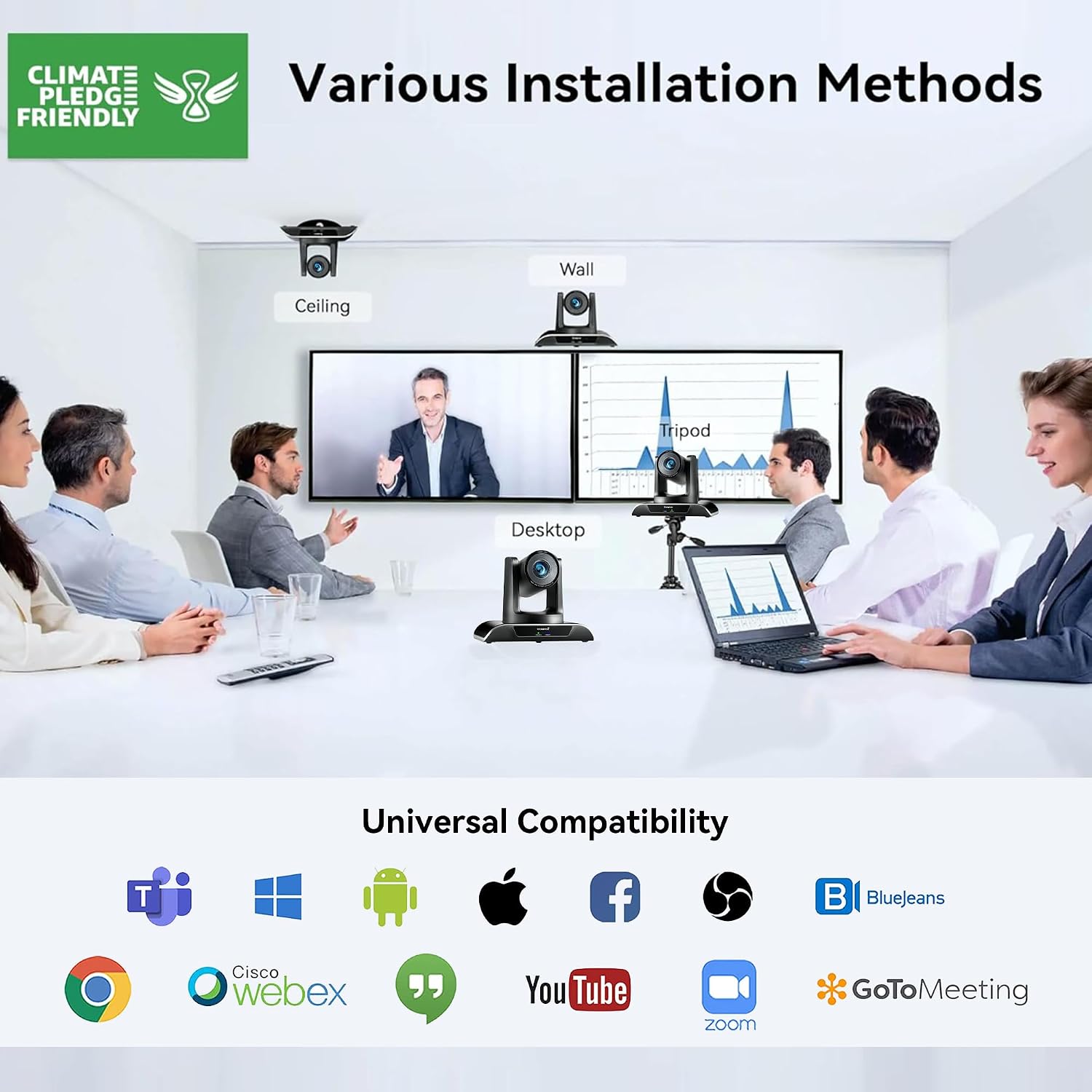
Rajah 3.1: Various installation methods for the Tenveo VHD20UA PTZ Camera, including ceiling, wall, desktop, and tripod mounting options, demonstrating its adaptability to different environments.
3.3 Menyambungkan Kamera
The VHD20UA camera supports multiple connection types for video output and control. Refer to the diagram below for connection points.
- Bekalan Kuasa: Connect the included power adapter to the DC 12V input port on the camera and then to a power outlet.
- Sambungan USB 3.0: For direct connection to a computer for video and audio, use a USB 3.0 cable to connect the camera's USB port to your computer's USB 3.0 port. This provides 1080p 60fps video output.
- Sambungan HDMI: Connect an HDMI cable from the camera's HDMI output port to an HDMI input on a display, video switcher, or capture card.
- RS-232/RS-485 Control: For external control systems (e.g., joystick controllers, automation systems), connect the appropriate control cable to the RS-232 or RS-485 ports.
- Sambungan RJ45 (LAN): Connect an Ethernet cable for IP streaming and control (if supported by your specific model and firmware).

Rajah 3.2: Terperinci view of the Tenveo VHD20UA PTZ Camera's rear panel, illustrating various connection options including power supply, RS232/485, IR, USB 3.0, HDMI, and RJ45 ports, along with examples of connected devices like a PC, smart TV, video switcher, and serial joystick.
4. Arahan Operasi
4.1 Basic Camera Control (Remote Control)
Use the included infrared remote control to operate the camera's basic functions.
- Hidupkan/Mati Kuasa: Tekan butang kuasa untuk menghidupkan atau mematikan kamera.
- Kuali/Condongkan: Use the directional arrows to move the camera horizontally (pan) and vertically (tilt). The camera supports 350° pan and 180° tilt.
- Zum: Use the '+' and '-' buttons to zoom in (telephoto) or zoom out (wide-angle). The camera features 20x optical zoom and 8x digital zoom.
- Fokus: Adjust focus manually using the dedicated focus buttons, or enable auto-focus.

Rajah 4.1: The Tenveo VHD20UA PTZ Camera demonstrating its pan (350°) and tilt (180°) capabilities, along with 20x optical zoom, 8x digital zoom, and a 62° wide angle field of view in a conference room setting.
4.2 Tetapan Pratetap
The camera allows you to save and recall up to 255 preset positions, with quick access to 10 presets via the IR remote.
- Menetapkan Pratetap:
- Position the camera to the desired pan, tilt, and zoom level.
- Tekan ke SET butang pada alat kawalan jauh.
- Press a number button (0-9) to assign the current position to that preset number.
- Mengimbas semula Pratetap:
- Press the desired number button (0-9) on the remote. The camera will move to the saved position.

Rajah 4.2: Illustration of the Tenveo VHD20UA PTZ Camera's quick preset settings feature, allowing users to save and recall up to 10 camera positions using the IR remote control, demonstrating pan (350°) and tilt (180°) capabilities.
4.3 AI Auto-Tracking and Framing
The VHD20UA camera features advanced AI capabilities for automatic subject tracking and framing.
- Pembingkaian Auto: The camera intelligently adjusts its pan, tilt, and zoom to frame all participants within the view.
- Penjejakan Penyampai: The camera can automatically follow a designated presenter as they move within the defined area, keeping them centered in the frame.
Refer to the camera's on-screen display (OSD) menu or advanced control software for specific settings and activation of AI features.

Rajah 4.3: Demonstration of the Tenveo VHD20UA PTZ Camera's AI Auto Tracking feature, showcasing both Auto Framing to include all participants and Presenter Tracking to follow a single speaker.
5. Penyelenggaraan
Regular maintenance ensures the longevity and optimal performance of your Tenveo VHD20UA camera.
- Membersihkan Lensa: Use a soft, dry microfiber cloth to gently wipe the camera lens. Avoid using harsh chemicals or abrasive materials that could scratch the lens.
- Membersihkan Badan Kamera: Lap bahagian luar kamera dengan kain lembutamp cloth. Do not use liquid cleaners directly on the camera.
- Kemas kini Firmware: Periodically check the Tenveo weblaman web untuk kemas kini perisian tegar. Mengemas kini perisian tegar kamera anda boleh meningkatkan prestasi dan menambah ciri baharu.
- Storan: When not in use for extended periods, store the camera in a clean, dry environment, away from direct sunlight and extreme temperatures.
6. Penyelesaian masalah
If you encounter issues with your Tenveo VHD20UA camera, refer to the following common problems and solutions.
| Masalah | Kemungkinan Punca | Penyelesaian |
|---|---|---|
| Tiada output video |
|
|
| Alat kawalan jauh tidak berfungsi |
|
|
| Camera movement is jerky or unresponsive |
|
|
| Kualiti imej yang lemah |
|
|
7. Spesifikasi
Below are the technical specifications for the Tenveo VHD20UA PTZ Conference Camera.
| Ciri | Perincian |
|---|---|
| Nombor Model | TEVO-VHD20UA |
| Resolusi Video | 1080p Full HD (1920x1080) at 60fps |
| Effective Resolution | 2.07 Megapiksel |
| Zum Optik | 20x |
| Zum Digital | 8x |
| Sudut Pan | 350° |
| Sudut Kecondongan | 180° |
| Bidang View (FOV) | 62° |
| Panjang Fokus Maks | 60.0 mm |
| Panjang Fokus Min | 10.0 mm |
| Apertur Maks | f/1.8 |
| Min Aperture | f/3.9 |
| Jenis Fokus | Auto Focus, Manual Focus |
| Output Video | HDMI, USB 3.0 |
| Antara Muka Kawalan | RS-232, RS-485, Infrared Remote |
| Format Tangkapan Video | MP4 |
| Penstabilan Imej | ya |
| Berat badan | 1.37 Kilogram |
| Bekalan Kuasa | DC 12V (Adapter included) |
8. Sokongan
For technical assistance, warranty inquiries, or any questions regarding your Tenveo VHD20UA camera, please contact Tenveo customer support.
E-mel Sokongan Pelanggan: tenveo_amazon@tenveo.com
Support is available 24/7 via email.
Ask a question about this manual
Ask about setup, troubleshooting, compatibility, parts, safety, or missing instructions. Manuals+ will review the question and use this page’s manual context to help answer it.